The Definitive JSAUX ROG Ally Dock Guide: Pick the Right Stand
As Amazon Associates, we earn from qualifying purchases. This means we may receive a small commission at no extra cost to you if you click through and make a purchase.
Transforming the Asus ROG Ally into a high-performance desktop workstation requires a docking solution capable of handling intensive video output, stable peripheral connections, and demanding electrical loads. Selecting the ideal jsaux rog ally dock comes down to balancing display bandwidth against thermal handling and power distribution. Because the handheld draws substantial wattage while driving modern games, pairing it with an inadequate hub often results in sluggish charging rates, restricted operating profiles, or display bottlenecks that limit visual smoothness.
This comprehensive jsaux rog ally dock comparison evaluates exactly four docking stations manufactured by JSAUX to establish which model best aligns with your desktop or mobile setup. These units differ significantly in their physical engineering and performance envelopes, ranging from modular stands with high-speed USB 3.2 data channels and active cooling docks equipped with Variable Refresh Rate support to ultra-portable wall-plug docks and all-in-one charging bundles. Understanding how each dock allocates bandwidth and manages power pass-through ensures your gaming handheld operates reliably at peak performance.
Which JSAUX Docking Stations Should You Buy

Best for: Competitive handheld gamers seeking active cooling
Pros
- HDMI 2.1 with VRR and ALLM
- Magnetic RGB cooling fan
- Chassis RGB lighting modes
- Full 30W Turbo Mode support
Cons
- Requires separate 100W charger
- Larger desktop footprint
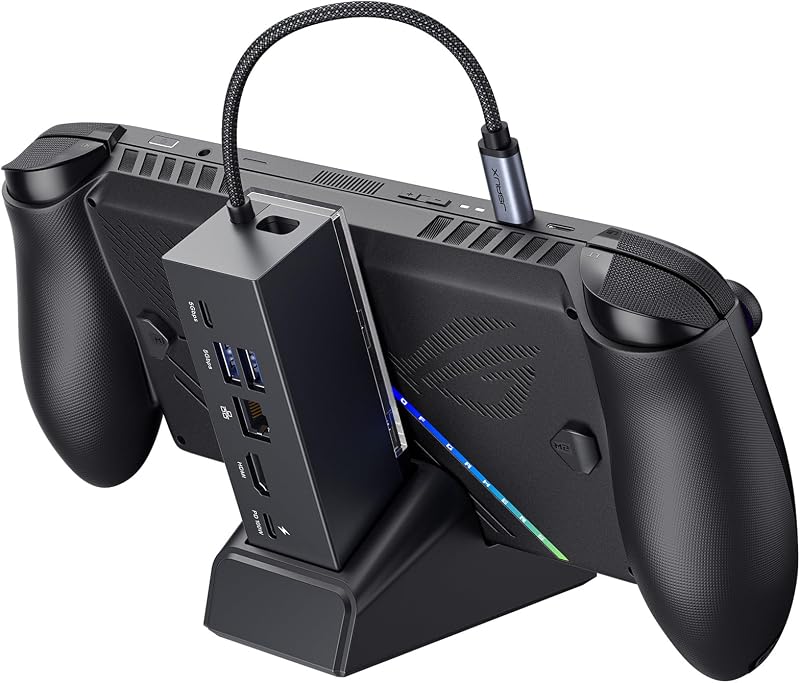
Best for: Modular desktop setups needing fast USB
Pros
- 4K@120Hz HDMI output
- Detachable modular base
- USB 3.2 Gen 1 data ports
- Gigabit Ethernet connection
Cons
- No VRR or ALLM support
- Wall charger not included
- For desktop gamers wanting modular flexibility, high-speed data ports, and customizable aesthetics: JSAUX Docking Station for ROG Xbox.
- For competitive players demanding HDMI 2.1 variable refresh rates alongside active magnetic thermal cooling: JSAUX Docking Station for ROG Ally.
- For frequent travelers needing an ultra-compact charger and display adapter in a single wall plug: JSAUX 65W Switch Dock with 4K@120Hz.
- For complete desktop setups requiring an included 100W power brick and international travel adapters: JSAUX 6-in-1 Dock & 100W Charger.
JSAUX Docking Station for ROG Xbox

Jsaux
8.0/10 Our score
- Color
- Black
- Dimensions
- 3.35 x 1.93 x 4.92 inches
Listed by the seller on the product page.
The JSAUX Docking Station for ROG Xbox, cataloged under model number jsaux hb0609, delivers a versatile six-port layout structured around modular utility and fast data transmission. Designed to accommodate modern handhelds including the ROG Ally, ROG Ally X, and ROG Xbox Ally variants, this dock provides a dedicated HDMI port capable of driving external displays at 4K at 120Hz or 1080p at 240Hz. Data management is handled through a balanced array featuring one USB-C 3.2 Gen 1 port, two USB-A 3.2 Gen 1 ports, and a Gigabit Ethernet jack for stable wired network connectivity.
A distinctive attribute of this jsaux 6-in-1 dock is its modular physical construction. The cradle base detaches cleanly from the main body, allowing the unit to function either as an all-in-one desktop stand or as a standalone cradle for varied desk arrangements. The housing includes an extra silicone pad to protect device finishes and enhance stability, along with a front-facing DIY customization slot sized at 3.00 inches by 1.13 inches by 0.01 inches. Gamers can slip personalized nameplates or custom cards behind the removable transparent cover to match their gaming workspace aesthetic.
Power management on the HB0609 supports up to 100W Power Delivery input, ensuring sufficient energy to charge connected consoles during intensive play. Users should note that the internal hub circuitry consumes a portion of the incoming power supply. Consequently, connecting an original 65W adapter may trigger a system warning regarding slow charging, though gameplay remains unaffected. Gamers seeking advanced display sync should also note that the HB0609 does not support Variable Refresh Rate (VRR) or Auto Low Latency Mode (ALLM), making it best suited for players prioritizing modular placement and 5Gbps USB transfers over monitor sync protocols.
- High-bandwidth video output delivering 4K at 120Hz or 1080p at 240Hz
- Dual USB-A 3.2 Gen 1 and single USB-C 3.2 Gen 1 data interfaces
- Detachable modular base with a DIY transparent customization card slot
- Gigabit Ethernet interface providing low-latency wired network connectivity
JSAUX Docking Station for ROG Ally

Jsaux
8.2/10 Our score
- Color
- Black-RGB Fan Cooling
- Size
- 138*145*143mm
- Dimensions
- 5.71 x 5.63 x 5.43 Inches
Listed by the seller on the product page.
The JSAUX Docking Station for ROG Ally, designated as the jsaux hb0705, is engineered specifically for performance enthusiasts requiring top-tier display synchronization and thermal dissipation. Standing out as a prime candidate for the best jsaux dock for rog ally, this 7-in-1 hub incorporates an HDMI 2.1 port that unlocks full 4K at 120Hz and 1080p at 240Hz output with comprehensive Variable Refresh Rate (VRR), Auto Low Latency Mode (ALLM), High Dynamic Range (HDR), and Quick Frame Transport (QFT) protocol support. Connecting this dock to an asus rog 32 4k oled gaming display eliminates screen tearing and minimizes input lag during competitive gameplay.
Thermal stability is a central focus of the HB0705 engineering. The unit includes a custom-engineered magnetic RGB cooling fan that attaches directly behind the dock cradle, positioning its airflow precisely over the air intake vents of the ROG Ally and ROG Ally X. This active cooling helps regulate surface temperatures during sustained processor loads. The physical dock also integrates dynamic RGB accent illumination featuring five selectable patterns—Monochromatic, Breathing, Chasing, Gradient, and Stacking—while the fan module features an independent 7-color gradient cycle. A front customization card slot matching the 3.00-inch by 1.13-inch footprint is also present.
On the electrical front, this jsaux docking station for rog ally supports full 30W Turbo Mode on compatible ROG Ally models when paired with an external 100W Power Delivery wall charger. The listing specifies that the 100W charger is not included in the package and must be supplied separately to enable the full 30W operating profile, as a standard 65W power supply lacks the overhead to run the hub, magnetic fan, RGB lighting, and Turbo Mode simultaneously. For connectivity, the dock provides two USB-A 3.0 ports, a USB-C 3.0 data port, an RGB-powering USB-C port, and a Gigabit Ethernet jack.
- HDMI 2.1 visual engine delivering 4K at 120Hz with VRR, ALLM, HDR, and QFT
- Detachable magnetic cooling fan custom-aligned with ROG Ally air intake vents
- Integrated base RGB lighting system with five distinct display modes
- Full 30W Turbo Mode capability when connected to a 100W power source
JSAUX 65W Switch Dock with 4K@120Hz

Jsaux
8.6/10 Our score
- Color
- Black
- Size
- 65W
Listed by the seller on the product page.
Best for: Frequent travelers needing ultra-compact video out
Pros
- All-in-one wall plug form factor
- 4K@120Hz external display support
- Integrated 65W fast charger
Cons
- USB 2.0 peripheral speed only
- Standard Ally capped at 25W Turbo
The JSAUX 65W Switch Dock with 4K@120Hz, cataloged under model number HC6502, redefines convenience by condensing a display dock and an AC adapter into a single wall plug. Eliminating the need for separate charging bricks and desktop cradles, this jsaux 65w dock integrates an internal 65W Power Delivery power supply, an HDMI output port, and a USB-A 2.0 connection directly into its compact chassis. It provides an exceptionally clean footprint for mobile professionals and traveling gamers who want to output their handheld display onto hotel televisions or conference room screens without packing cumbersome hardware.
Despite its pocketable form factor, the HC6502 maintains robust visual output, supporting external resolutions up to 4K at 120Hz on compatible devices. The unit is broadly compatible across multiple handheld platforms, laptops, and tablets. The integrated USB-A 2.0 port supplies up to 480 Mbps data transfer speeds alongside 5V/0.6A power delivery, making it ideal for pairing wireless keyboard dongles, game controllers, or external flash drives. When managing multi-device mobile offices alongside machines like an rog strix laptop, packing an all-in-one charging hub drastically minimizes cable clutter.
Power delivery behavior on this compact adapter requires specific operational sequences to maximize performance. According to the manufacturer guidelines, users should plug the bottom USB-C cable into the handheld first before connecting USB drives or HDMI display lines. Power output profiles are specifically calibrated per platform: the dock drives the standard ROG Ally at up to 25W Turbo Mode, while delivering up to 30W Turbo Mode for the ROG Ally X. The ROG Xbox Ally reaches up to 20W, and the ROG Xbox Ally X achieves up to 30W. Because the unit acts as a direct power plug rather than a desktop stand, users position the handheld flat on a surface or in an independent stand.
- All-in-one travel wall adapter combining 65W fast charging and video out
- High-refresh display capability supporting 4K at 120Hz video transfer
- Calibrated power profiles supporting 25W Turbo on Ally and 30W on Ally X
- USB-A 2.0 peripheral port for controllers, input devices, and flash storage
JSAUX 6-in-1 Dock & 100W Charger

Jsaux
8.4/10 Our score
- Color
- 6-IN-1 with 100W Charger
- Dimensions
- 1 x 1 x 1 Inches
Listed by the seller on the product page.
Best for: Turnkey buyers wanting included 100W power
Pros
- Includes dedicated 100W charger
- UK and EU plug adapters included
- Three USB 3.0 ports
- HDMI 2.1 4K@120Hz output
Cons
- Incompatible with ROG Xbox Ally
- Fixed non-modular cradle stand
The JSAUX 6-in-1 Dock & 100W Charger, designated under model number HB0603, resolves the power delivery dilemma by including an authentic 100W high-output charging brick directly in the retail box. When evaluating which jsaux rog ally dock to buy, users often overlook the necessity of acquiring an upgraded AC adapter to prevent slow charging warnings. This package delivers an out-of-the-box solution, supplying the 6-in-1 cradle dock, a dedicated 100W USB-C charger, a heavy-duty USB-C to USB-C cable, and interchangeable European and UK wall plug adapters for global usability.
The physical docking station features an upgraded HDMI 2.1 video port supporting 4K at 120Hz display output, delivering fluid frame delivery that doubles the refresh rate of older 60Hz units. For local peripheral management, the front chassis incorporates three high-speed USB-A 3.0 data ports, enabling concurrent connection of gaming mice, mechanical keyboards, and external storage drives without throughput degradation. A Gigabit Ethernet port ensures a rock-solid wired connection, eliminating packet loss during heavy downloads or online multiplayer sessions.
With its supplied 100W power supply, this dock provides full-speed pass-through power, guaranteeing that the standard ROG Ally and ROG Ally X execute their 30W Turbo Mode profiles without draining the internal battery during extended play. The listing notes broad compatibility across handheld hardware, including the Steam Deck LCD and OLED models, Legion Go, Legion Go S, and MSI Claw. Similar to standalone setups reviewed in a jsaux steam deck dock overview, this bundle guarantees stable electrical delivery. Buyers should note the listing explicitly states this model is not designed for the ROG Xbox Ally or Xbox Ally X.
- Complete hardware bundle including a 100W power brick and international adapters
- Upgraded HDMI 2.1 port delivering 4K at 120Hz high-refresh visual clarity
- Three USB-A 3.0 data ports for simultaneous peripheral connections
- Gigabit Ethernet networking for high-speed, low-latency online gaming
What Sets These Models Apart
| Model | Video Output | Power Architecture | Port Configuration | Distinctive Feature |
|---|---|---|---|---|
| JSAUX Docking Station for ROG Xbox | HDMI 4K@120Hz, 1080p@240Hz (No VRR/ALLM) | 100W PD Input (Requires external charger) | 1x USB-C 3.2 Gen 1, 2x USB-A 3.2 Gen 1, Gigabit LAN | Detachable modular base with DIY customization card slot |
| JSAUX Docking Station for ROG Ally | HDMI 2.1 4K@120Hz with VRR, ALLM, HDR, QFT | 100W PD Input (Enables 30W Turbo Mode) | 1x USB-C 3.0, 2x USB-A 3.0, 1x RGB USB-C, Gigabit LAN | Magnetic intake cooling fan and 5-mode chassis RGB lighting |
| JSAUX 65W Switch Dock with 4K@120Hz | HDMI 4K@120Hz (Switch limited to 4K@60Hz) | Integrated 65W PD Adapter (Up to 30W Turbo on Ally X) | 1x USB-A 2.0 (480 Mbps), 1x Host USB-C | All-in-one wall charger form factor eliminating desktop dock bulk |
| JSAUX 6-in-1 Dock & 100W Charger | HDMI 2.1 4K@120Hz | Included 100W PD Charger & Cable (Full 30W Turbo Mode) | 3x USB-A 3.0, Gigabit LAN | Turnkey package with 100W wall adapter, UK, and EU plug adapters |
Buying Tips for JSAUX Docking Stations
Understanding power distribution architecture is essential when configuring an ROG Ally docking station. The handheld console requires 65W of net power delivery to activate its maximum 30W Turbo operating mode. However, multi-port docking hubs consume between 10W and 15W of electrical overhead to operate internal display controllers, Ethernet chips, and connected USB peripherals. Plugging the original factory 65W ROG Ally charger into a dock reduces the net wattage reaching the console to roughly 50W to 55W, which triggers a low-power charging notification. To ensure uncompromised 30W Turbo Mode operation, pairing your docking station with a dedicated 100W Power Delivery adapter is strongly advised.
Display interface capabilities vary across docking stations and directly dictate external monitor performance. While standard 4K at 120Hz HDMI connections provide fluid high-refresh gameplay, competitive gaming benefits substantially from Variable Refresh Rate (VRR) and Auto Low Latency Mode (ALLM). Protocols like VRR dynamically synchronize the refresh cycle of your monitor with the real-time frame output of the console, eliminating visual stutter and screen tearing. If you intend to play fast-paced titles on a VRR-capable gaming monitor, select a dock explicitly supporting HDMI 2.1 VRR protocols, such as the HB0705.
Finally, evaluate your operating environment to determine whether physical modularity, thermal cooling, or travel portability takes priority. Heavy desktop users playing graphically intensive titles at maximum wattage benefit noticeably from active cooling docks that direct fresh air into the handheld intake vents. Conversely, business professionals who travel frequently often find traditional desktop cradles too bulky for laptop sleeves. For travel-heavy use cases, integrated wall-plug charging docks combine video conversion and AC charging into a pocketable unit, trading away multi-drive USB arrays and wired Ethernet in exchange for unmatched mobility.
FAQ
Can a JSAUX dock activate 30W Turbo Mode on the ROG Ally?
Yes, JSAUX docking stations support the full 30W Turbo Mode on the ROG Ally and ROG Ally X, provided adequate wattage is supplied to the dock. Because the docking station hardware consumes approximately 10W to 15W to power internal circuits and connected accessories, a 100W Power Delivery charger must be connected to the dock’s power input to sustain the full 30W profile. The HB0603 bundle includes this 100W charger in the box, whereas standalone docks require you to connect a separate 100W adapter.
Why does my ROG Ally show a slow charging warning with a 65W adapter?
When you plug the console’s original 65W power adapter into a multi-port dock, a portion of that electrical input is consumed directly by the docking station to drive its HDMI processors, USB ports, and Ethernet controllers. As a result, the net power passed through to the handheld drops below 65W. The ROG Ally detects this reduced wattage and displays a message stating there is not enough power to charge efficiently. While gameplay continues normally, battery recharging slows down unless an upgraded 100W power supply is used.
Which JSAUX dock supports Variable Refresh Rate and ALLM?
The JSAUX Docking Station for ROG Ally (model HB0705) explicitly supports Variable Refresh Rate (VRR), Auto Low Latency Mode (ALLM), Quick Frame Transport (QFT), and HDR over its HDMI 2.1 connection. Other models, such as the HB0609, deliver high-refresh 4K at 120Hz or 1080p at 240Hz visuals but do not support VRR or ALLM protocols. If synchronized refresh rates on compatible gaming monitors are essential for your setup, the HB0705 is the designated choice.
Does the JSAUX 65W travel dock require a separate dock cradle?
No, the JSAUX 65W Switch Dock with 4K@120Hz (model HC6502) is an integrated wall charger that consolidates power conversion, HDMI video output, and USB connectivity inside the plug itself. It does not feature a physical cradle to hold the console upright. Users connect the included USB-C cable directly from the wall adapter into the handheld, allowing the console to rest on a flat desk, an existing kickstand, or a portable travel stand.
Can JSAUX docking stations support multiple gaming handhelds?
Most JSAUX docking stations feature broad hardware compatibility across Windows and Linux handheld gaming devices, including the ROG Ally, ROG Ally X, Steam Deck, and Lenovo Legion Go. However, specific hardware limitations apply to individual models. For example, the HB0603 listing explicitly notes it is not compatible with the ROG Xbox Ally or Xbox Ally X, while the HB0609 and HC6502 provide explicit operational support across those models. Always verify console dimensions and connector orientations prior to selection.