Docking Stations Buying Guide (2026): What Matters and 8 Picks
As Amazon Associates, we earn from qualifying purchases. This means we may receive a small commission at no extra cost to you if you click through and make a purchase.
As an Amazon Associate we earn from qualifying purchases. Links on this page are affiliate links.
Choosing the right docking station buying guide requires understanding how ports, bandwidth, and power delivery affect your daily workflow. You need to match the interface speed to your computer’s capabilities. A mismatch can limit your display resolution or charging speed. This guide walks you through the key specifications that matter most. You will learn how to evaluate port density, network speeds, and maximum wattage output. These factors determine whether a dock supports your current monitors and devices.
We selected 8 recommended products based strictly on their published specifications. Each entry highlights its primary strengths, such as dual 8K support or high-power charging. You can compare features like Thunderbolt 5 bandwidth or 2.5G Ethernet connectivity. The list includes options for various operating systems and laptop models. Use this information to decide which dock fits your specific setup. Focus on the technical details that align with your hardware requirements. This approach ensures you pick a reliable solution for your workspace.
Key Specs for Docking Stations

Host Interface Speed
The connection between your computer and the dock dictates maximum bandwidth. Thunderbolt 5 offers 120Gbps, while Thunderbolt 4 provides 40Gbps. USB-C docks typically offer lower speeds. Higher bandwidth supports more displays and faster data transfer. If you use a Thunderbolt 5 host, a Thunderbolt 5 dock like the Anker Prime 14-in-1 Thunderbolt 5 Dock unlocks full potential. Older docks may bottleneck newer computers. Match the dock interface to your host port for optimal performance. Lower speed interfaces are often sufficient for basic office tasks but limit high-end setups.
Look for
- Check host port compatibility
- Verify bandwidth requirements
- Match dock to computer
Display Resolution Support
Resolution determines screen clarity. Most docks support 4K UHD, but high-end models handle 8K. The CalDigit TS5 and Anker Prime Thunderbolt 5 Dock support 8K for future-proofing. Dual display support is common, but triple display setups require specific models like the Plugable 13-in-1 Triple 4K USB-C Dock. Check if the dock can drive your desired resolution at a comfortable refresh rate. Lower resolutions may appear blurry on large monitors. Ensure the dock’s output matches your monitor’s native resolution for sharp images.
Look for
- Confirm max resolution
- Check dual display capability
- Match monitor specs
Power Delivery Wattage
Power Delivery (PD) charges your laptop through the dock. Higher wattage supports more power-hungry devices. The Anker Prime Thunderbolt 5 Dock delivers 140W, suitable for large laptops. The CalDigit TS5 also offers 140W. Most standard docks provide 60W to 100W. If your laptop requires more power than the dock supplies, you must use the original charger. Check your laptop’s power requirements before buying. Insufficient wattage may cause slow charging or battery drain during heavy use.
Look for
- Check laptop power needs
- Verify dock wattage
- Ensure sufficient charging
Ethernet Port Speed
Built-in Ethernet provides stable wired networking. Speeds vary from 1Gbps to 2.5Gbps. The Microsoft Surface Thunderbolt 4 Dock and CalDigit TS4 offer 2.5G Ethernet for faster file transfers. Standard 1Gbps ports are sufficient for most internet use. Wired connections reduce latency and interference compared to Wi-Fi. If you transfer large files or use a stable connection for video calls, prioritize higher speed ports. Check if the dock includes an Ethernet port, as some lack it entirely.
Look for
- Check Ethernet speed
- Verify port presence
- Assess network needs
Port Variety and Count
The number and type of ports determine connectivity options. High-density docks like the CalDigit TS5 offer numerous USB-A, USB-C, and HDMI ports. The ANYHDD ThinkPad Dock includes cables for convenience. Consider what peripherals you use daily. Missing USB-A ports may require adapters. Extra ports reduce cable clutter on your desk. Check if the dock supports all your devices, including webcams, microphones, and storage drives. More ports generally mean greater flexibility for your setup.
Look for
- Count required ports
- Check USB type
- Verify peripheral support
Operating System Compatibility
Not all docks work equally well with every operating system. Some docks are optimized for Mac, while others support Windows and ChromeOS. The Plugable 16-in-1 Thunderbolt 4 Dock supports macOS and Windows. The Anker Prime 14-in-1 Dual Display Dock suits Windows or ChromeOS but may fall short for macOS users. Check the manufacturer’s compatibility list. Driver support varies by OS. Incompatibility can lead to display issues or charging failures. Ensure the dock supports your specific OS version.
Look for
- Check OS support
- Verify driver availability
- Confirm compatibility list
Types of Docking Stations

Thunderbolt 5 Docks
Thunderbolt 5 docks offer the highest bandwidth, supporting up to 120Gbps. This speed enables dual 8K displays and rapid data transfer. The Anker Prime 14-in-1 Thunderbolt 5 Dock exemplifies this tier with 140W power delivery. You get maximum performance for high-end workstations. The trade-off is cost and compatibility. You need a host with a Thunderbolt 5 port to utilize these speeds. These units are ideal for professionals who need the fastest possible throughput and highest resolution support without compromise.
Thunderbolt 4 Docks
Thunderbolt 4 remains a robust standard with 40Gbps bandwidth. It supports dual 4K or single 8K displays reliably. The CalDigit TS4 and Microsoft Surface Dock fall into this category. They provide extensive port density and stable connections. You benefit from broad compatibility with both Windows and Mac systems. The main limitation is lower bandwidth compared to Thunderbolt 5. This is sufficient for most dual-monitor setups. You choose this type when you need reliable, high-speed connectivity without the premium price of the latest generation.
USB-C Docks
USB-C docks offer versatile connectivity without requiring Thunderbolt certification. They often support triple displays, as seen in the Plugable 13-in-1 model. These units provide good charging speeds, typically around 100W. You get a balance of port variety and affordability. The trade-off is lower data transfer speeds compared to Thunderbolt options. They are ideal for users who need multiple screens and peripherals but do not require extreme bandwidth. This type suits general office work and media consumption where maximum speed is not critical.
Common Mistakes When Buying

Ignoring bandwidth limits for displays
Assuming a single USB-C cable handles everything. You must verify the dock supports your monitor’s resolution and refresh rate. Check the bandwidth limits. A mismatch can force your display to drop to a lower resolution or reduce the refresh rate significantly.
Choosing a dock with low wattage
Overlooking the power delivery rating for your laptop. If the dock provides less wattage than your computer needs, your battery may drain while plugged in. Ensure the dock delivers enough power to charge your device and run peripherals simultaneously.
Skipping compatibility checks with your PC
Not checking compatibility with your specific computer model. Some docks require specific drivers or firmware updates to function correctly. Verify that your operating system supports the dock’s features. This prevents unexpected connectivity issues or missing ports after purchase.
Assuming all USB-C ports are equal
Forgetting that not all USB-C ports are equal. Your computer’s port must support DisplayPort Alt Mode and data transfer. Check your laptop’s specifications carefully. Using a port that only handles charging will prevent your monitor from displaying any image at all.
| # | Product | Best for | Price |
|---|---|---|---|
| 1 | Anker Prime 14-in-1 Dual Display Dock | High-power charging and dual 4K setups | |
| 2 | Anker Prime 14-in-1 Thunderbolt 5 Dock | High-speed data transfer and 8K dual displays | |
| 3 | CalDigit TS5 15-Port Thunderbolt 5 Dock | Thunderbolt 5 hosts needing high power and bandwidth | |
| 4 | Microsoft Surface Thunderbolt 4 Dock | Users needing dual 4K displays and 2.5G Ethernet | |
| 5 | Plugable 13-in-1 Triple 4K USB-C Dock | Triple 4K monitor setups and laptop charging | |
| 6 | CalDigit TS4 Thunderbolt 4 Dock | Users needing high port density and 2.5GbE | |
| 7 | Plugable 16-in-1 Thunderbolt 4 Dock | Dual 4K monitor setups with 100W charging | |
| 8 | ANYHDD ThinkPad Dual 4K USB-C Dock | dual 4K monitor setups with included cables |

Anker Prime 14-in-1 Dual Display Dock
Best for: High-power charging and dual 4K setups
- Display Support
- Dual
- Max Resolution
- 4K
- Host Interface
- USB-C
- Power Delivery
- 100W
- Data Transfer Speed
- 10Gbps
- Video Ports
- HDMI
This Anker Prime docking station offers 14-in-1 connectivity with dual HDMI ports for dual 4K displays. It delivers up to 160W of total power output, charging multiple devices simultaneously. The dock supports 10Gbps data transfer and includes Ethernet and audio ports. It fits users needing robust charging and dual-screen setups on Windows or ChromeOS laptops.
- 160W max power output for fast charging
- Dual HDMI ports support dual 4K displays
- 14-in-1 connectivity with versatile ports
- 10Gbps data transfer speeds on select ports
- Lower maximum power output than 240W competitors
- Does not support macOS dual monitor mirroring
- Heavier at 2.82 pounds than some rivals
- You need high-wattage charging for multiple devices
- You require dual 4K display support
- You use Windows or ChromeOS laptops
- You need Thunderbolt 5 connectivity
- You require macOS dual display mirroring
- You prefer a lighter, more compact dock
Verdict: Anker Prime 14-in-1 USB-C Dock suits users who prioritize high power output and dual 4K displays on Windows or ChromeOS systems. It delivers strong charging capabilities but falls short for Thunderbolt 5 or macOS users.

Anker Prime 14-in-1 Thunderbolt 5 Dock
Best for: High-speed data transfer and 8K dual displays
- Display Support
- Dual
- Max Resolution
- 8K@60Hz
- Host Interface
- Thunderbolt 5
- Power Delivery
- 140W
- Data Transfer Speed
- 120Gbps
- Video Ports
- HDMI 2.1, DisplayPort 2.1, TB5
This Anker Prime docking station uses Thunderbolt 5 for up to 120Gbps data transfer. It supports dual 8K@60Hz displays and delivers 140W of power delivery. The unit includes an active cooling fan to manage heat during heavy loads. Its compact gray chassis measures 4.6 by 4.6 by 3 inches. This dock suits users needing high-speed file transfers and multi-monitor setups for compatible Windows laptops.
- Thunderbolt 5 interface supports 120Gbps data transfer speeds
- 140W power delivery charges high-power laptops efficiently
- Active cooling fan prevents overheating under full load
- Supports dual 8K@60Hz displays on Thunderbolt 5 laptops
- Includes SD and TF card readers for quick access
- 140W power delivery is lower than the 240W PSU on the CalDigit TS5
- Thunderbolt 5 upstream port is newer than the Thunderbolt 4 ports on most other listed docks
- 2.37-pound weight is heavier than the 1.9-pound Plugable 13-in-1 USB-C dock
- You need the fastest possible data transfer speeds for large files
- You require dual 8K displays for a Windows laptop with Thunderbolt 5
- You want active cooling to maintain performance during intensive tasks
- You already own a Thunderbolt 4 dock that meets your needs
- You need more than 140W of charging power for your laptop
- You prefer a lighter dock for frequent portability
Verdict: Anker Prime TB5 14-in-1 Dock delivers top-tier 120Gbps speeds and 8K display support. It fits professionals who prioritize raw data throughput and high-resolution dual monitors on compatible hardware.

CalDigit TS5 15-Port Thunderbolt 5 Dock
Best for: Thunderbolt 5 hosts needing high power and bandwidth
- Display Support
- Dual
- Max Resolution
- 8K 60Hz
- Host Interface
- Thunderbolt 5
- Power Delivery
- 140W
- Data Transfer Speed
- 120Gb/s
- Video Ports
- DisplayPort 2.1, Thunderbolt 5
The CalDigit TS5 is a high-performance docking station built for Thunderbolt 5 hosts. It features a 140W host charging port and a 240W power supply to support power-hungry laptops. The dock offers flexible display configurations, including dual 8K or triple 4K setups on compatible Windows systems. It includes a 2.5GbE port for faster network speeds and multiple USB and SD card readers. This unit is designed for users needing maximum bandwidth and power delivery.
- 140W dedicated host charging for high-power laptops
- 240W power supply for sustained performance
- Supports dual 8K or triple 4K displays on Windows
- 2.5GbE Ethernet port for faster file transfers
- SD and microSD UHS-II card readers
- Requires Thunderbolt 5 or USB4 v2 host for full 80Gb/s performance
- Smaller port count with 15 total ports compared to other docks
- Limited to dual display support on macOS systems
- You need 140W charging for a high-end laptop
- You require 2.5GbE network speeds for large file transfers
- You want to connect triple 4K monitors on Windows
- You use a Thunderbolt 3 or Thunderbolt 4 host
- You need more than 15 ports for connectivity
- You require triple display support on a Mac
Verdict: The CalDigit TS5 Thunderbolt 5 Dock delivers top-tier power and bandwidth for users with Thunderbolt 5 hosts. It is ideal for professionals who need 140W charging and high-speed network connectivity.

Microsoft Surface Thunderbolt 4 Dock
Best for: Users needing dual 4K displays and 2.5G Ethernet
- Display Support
- Up to 2
- Max Resolution
- 4K
- Host Interface
- Thunderbolt 4
- Ethernet Speed
- 2.5G
- Dimensions
- 11 × 4.4 × 3.2 inches
- Weight
- 14.4 ounces
This Microsoft docking station uses Thunderbolt 4 for high-speed data transfer and charging. It supports dual 4K monitors and includes three USB-C and three USB-A ports. The unit weighs 14.4 ounces and measures 11 inches in length. You will appreciate the tactile port indicators for easy connection. It is built with recycled ocean-bound plastic and offers a 2.5G Ethernet port for stable networking.
- Thunderbolt 4 connectivity for fast data transfer
- Supports dual 4K displays
- Includes 2.5G Ethernet port
- Tactile port indicators for easy identification
- Lower port count than the 14-in-1 and 18-port competitors
- Heavier build at 14.4 ounces compared to lighter alternatives
- Limited to dual monitor output instead of triple support
- You need reliable dual 4K monitor support
- You require a 2.5G Ethernet connection
- You value tactile port indicators
- You need triple monitor support
- You want more than six USB ports
- You prefer a lighter dock under 14 ounces
Verdict: Microsoft Surface Thunderbolt 4 Dock fits users who need dual 4K support and a 2.5G Ethernet port. It suits those who prioritize tactile port identification over maximum port density.

Plugable 13-in-1 Triple 4K USB-C Dock
Best for: Triple 4K monitor setups and laptop charging
- Display Support
- Triple
- Max Resolution
- 4K@60Hz
- Host Interface
- USB-C
- Power Delivery
- 100W
- Data Transfer Speed
- 10Gbps
- Video Ports
- 3x HDMI, 3x DisplayPort
The Plugable UD-ULTC4K connects up to three 4K 60Hz displays through a single USB-C link. It delivers 100W of power delivery to your laptop while providing a separate 20W port for accessories. This dock supports Windows, macOS, and ChromeOS, making it suitable for complex multi-monitor setups. You get extensive connectivity via HDMI and DisplayPort outputs without needing extra adapters for your screens.
- Supports up to three 4K 60Hz monitors simultaneously
- Provides 100W Power Delivery for laptop charging
- Includes dedicated 20W USB-C port for accessories
- Offers multiple display outputs including HDMI and DisplayPort
- Supports only three displays, fewer than the four or more on other list options
- Requires DisplayLink drivers on macOS for external display support
- Does not support HDCP for protected streaming content
- You need three 4K monitors for data analysis or coding
- You want a single cable to charge your laptop and connect peripherals
- You use Windows or ChromeOS for straightforward setup
- You require Thunderbolt 5 speeds for maximum data transfer
- You need to play protected 4K streaming content on external screens
- You prefer a plug-and-play macOS experience without driver installation
Verdict: Plugable 13-in-1 USB-C Triple 4K Dock is a solid choice for users who need three high-resolution screens and reliable laptop charging through one connection. It fits professionals who prioritize screen real estate over the highest possible data bandwidth.
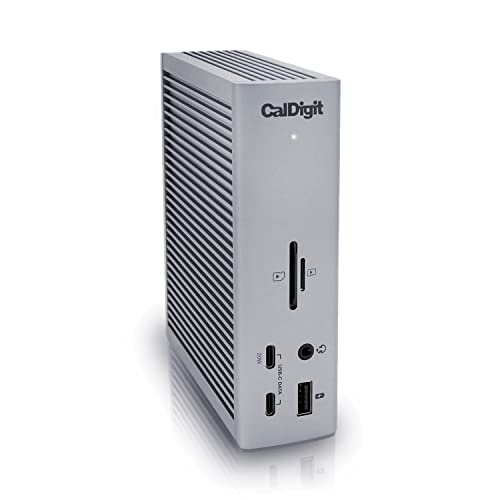
CalDigit TS4 Thunderbolt 4 Dock
Best for: Users needing high port density and 2.5GbE
- Display Support
- Dual
- Max Resolution
- 8K@30Hz, 6K@60Hz
- Host Interface
- Thunderbolt 4
- Power Delivery
- 98W
- Data Transfer Speed
- 40Gb/s
- Video Ports
- DisplayPort 1.4, Thunderbolt 4
The CalDigit TS4 is a compact Thunderbolt 4 docking station featuring 18 ports and 98W power delivery. It supports a single 8K display on Windows or dual 6K displays on M1–M4 Pro Macs. The unit includes a 2.5GbE port and multiple USB and SD card readers. It suits users needing extensive connectivity and high-speed data transfer for demanding workflows.
- 18 ports including 3x Thunderbolt 4 and 3x USB-A
- 98W power delivery for laptop charging
- Supports single 8K or dual 4K/6K displays
- 2.5GbE Ethernet port for faster networking
- Compact size with 1.41 pound weight
- 98W power delivery is lower than the 100W or 140W found on competing docks
- Single display limit on non-Pro Macs restricts multi-monitor setups
- Requires Thunderbolt 4 or USB4 host for maximum performance
- You need a high port count for multiple peripherals
- You use a Windows PC with a 8K monitor
- You require 2.5GbE Ethernet connectivity
- You need more than 98W of charging power
- You rely on non-Pro Macs for dual displays
- You prefer a dock with higher wattage than 98W
Verdict: CalDigit TS4 Thunderbolt 4 Dock offers extensive connectivity and 98W charging for users who prioritize port density and 2.5GbE speeds over higher wattage or universal dual-monitor support on all Macs.

Plugable 16-in-1 Thunderbolt 4 Dock
Best for: Dual 4K monitor setups with 100W charging
- Display Support
- Dual
- Max Resolution
- 4K@60Hz
- Host Interface
- Thunderbolt 4
- Power Delivery
- 100W
- Data Transfer Speed
- 40Gbps
- Video Ports
- 2x HDMI, 2x DisplayPort
The Plugable TBT4-UDZ is a 16-in-1 Thunderbolt 4 docking station designed for dual 4K 60Hz monitors. It delivers 100W of power delivery for your laptop and includes a 2.5Gbps Ethernet port. The unit supports both macOS and Windows systems via USB4 or Thunderbolt 4. Its silver chassis measures 11.6 by 5.8 by 4.1 inches and weighs 1.42 pounds. This dock suits users needing a reliable dual-display setup with ample peripheral connectivity.
- Supports dual 4K 60Hz displays
- Provides 100W power delivery
- Includes 2.5Gbps Ethernet port
- Features SD and microSD card readers
- Compatible with macOS and Windows
- Weighs 1.42 pounds, which is heavier than some competitors
- Offers 100W charging, less than the 140W or 240W options available elsewhere
- Supports only dual monitors, while other picks handle triple displays
- You need dual 4K 60Hz monitors for your workflow
- You use a Mac or Windows laptop with Thunderbolt 4 or USB4
- You require a 2.5Gbps Ethernet connection for faster networking
- You need to drive three monitors simultaneously
- You require more than 100W of charging power for your laptop
- You prefer a lighter dock under 1 pound
Verdict: The Plugable TBT4-UDZ Thunderbolt 4 Dock fits users who need a sturdy dual-monitor setup with 100W charging and 2.5Gbps networking. It is a solid choice for Mac and Windows users who prioritize display count and connectivity over maximum charging speed.

ANYHDD ThinkPad Dual 4K USB-C Dock
Best for: dual 4K monitor setups with included cables
- Display Support
- Dual
- Max Resolution
- 4K
- Host Interface
- USB-C
- Video Ports
- HDMI, DisplayPort
- Weight
- 1 pounds
The ANYHDD 40AY0090US is a Thunderbolt 4 workstation dock designed for dual monitor setups. It supports 4K UHD resolution across HDMI and DisplayPort outputs. The unit includes a 90W AC adapter for power delivery to your laptop. It measures 8 x 3 inches and weighs 1 pound. This dock suits users needing reliable dual displays with included cables for immediate setup.
- Supports 4K UHD resolution on external displays
- Includes 90W AC adapter for power delivery
- Comes with 4K HDMI and DisplayPort cables
- Compact 8 x 3 inch footprint
- 90W power delivery is lower than the 100W or 140W options on other picks
- Single USB-C port limits peripheral connectivity compared to 13+ port models
- 1 pound weight is heavier than some lighter alternatives
- You need a dedicated Thunderbolt 4 dock for dual 4K monitors
- You want included HDMI and DisplayPort cables for easy setup
- You use a Lenovo ThinkPad or compatible USB-C device
- You require more than 100W charging for high-power laptops
- You need extensive peripheral ports like Ethernet or SD card readers
- You are looking for a Thunderbolt 5 dock for future-proofing
Verdict: The ANYHDD 40AY0090US Lenovo Dock fits users who prioritize dual 4K display support and included cables over high wattage charging or extensive port selection.
Specifications side by side

| Spec | Anker Prime 14-in-1 Dual Display Dock | Anker Prime 14-in-1 Thunderbolt 5 Dock | CalDigit TS5 15-Port Thunderbolt 5 Dock | Microsoft Surface Thunderbolt 4 Dock | Plugable 13-in-1 Triple 4K USB-C Dock | CalDigit TS4 Thunderbolt 4 Dock | Plugable 16-in-1 Thunderbolt 4 Dock | ANYHDD ThinkPad Dual 4K USB-C Dock |
|---|---|---|---|---|---|---|---|---|
| Display Support | Dual | Dual | Dual | Up to 2 | Triple | Dual | Dual | Dual |
| Max Resolution | 4K | 8K@60Hz | 8K 60Hz | 4K | 4K@60Hz | 8K@30Hz, 6K@60Hz | 4K@60Hz | 4K |
| Host Interface | USB-C | Thunderbolt 5 | Thunderbolt 5 | Thunderbolt 4 | USB-C | Thunderbolt 4 | Thunderbolt 4 | USB-C |
| Power Delivery | 100W | 140W | 140W | – | 100W | 98W | 100W | – |
| Data Transfer Speed | 10Gbps | 120Gbps | 120Gb/s | – | 10Gbps | 40Gb/s | 40Gbps | – |
| Video Ports | HDMI | HDMI 2.1, DisplayPort 2.1, TB5 | DisplayPort 2.1, Thunderbolt 5 | – | 3x HDMI, 3x DisplayPort | DisplayPort 1.4, Thunderbolt 4 | 2x HDMI, 2x DisplayPort | HDMI, DisplayPort |
| Total Ports | 14 | 14 | 15 | – | 13 | 18 | 16 | – |
| Ethernet Speed | – | 2.5Gbps | 2.5GbE | 2.5G | – | 2.5GbE | 2.5Gbps | – |
| Resolution | 4K UHD | 8K UHD | – | – | 4K UHD | 8K UHD | 4K UHD | 4K UHD |
| Refresh Rate | – | – | – | – | – | 60Hz | – | – |
| Ports | HDMI, Ethernet | Ethernet, Thunderbolt 4 | Ethernet, Thunderbolt 4 | Thunderbolt 4 | HDMI, DisplayPort, USB-C, Thunderbolt 4 | USB-C, Ethernet, Thunderbolt 4, USB-A | HDMI, DisplayPort, Ethernet, Thunderbolt 4 | HDMI, DisplayPort, USB-C |
| Features | Audio Support | Power Delivery, SD Card Reader, Cooling Fan | Power Delivery, Audio Support, SD Card Reader | – | Power Delivery | Power Delivery | Power Delivery, SD Card Reader | – |
| Use | – | – | – | – | Mac | Mac | Mac | – |
| Operating System | – | – | – | – | ChromeOS | Windows | macOS | – |
| Number of Computers | – | 4 Computers | – | – | – | – | – | – |
| Dimensions | 5.51 × 3.82 × 1.85 inches | 3 × 4.6 × 4.6 inches | 4.5 × 2.75 × 1.12 inches | 11 × 4.4 × 3.2 inches | 4.72 × 2.64 × 6.89 inches | 4.46 × 1.65 × 5.55 inches | 11.9 × 6 × 4.3 inches | – |
| Weight | 2.82 pounds | 2.37 pounds | 8.9 ounces | 14.4 ounces | 1.07 pounds | 1.41 pounds | 1.42 pounds | 1 pounds |
| Color | Grey | Gray | Space Gray | Black | – | Space Gray | Silver | Black |
| Model | A83B6 | A83B5 | TBT5-TS5-US-AMZ | T8H-00001 | UD-ULTC4K | TS4-US 500971 | TBT4-UDZ | DOCK-40AY0090US-New |
| Size | – | 4.60" x 4.60" x 3" | 4.25 | Pack of 1 | – | compact | 11.6" × 5.8" × 4.1" | 8 x 3 inch |
Frequently asked questions
Can a docking station support dual 4K monitors?
Yes, many docking stations support dual 4K displays. The Anker Prime 14-in-1 Dual Display Dock is designed for this specific use case. It delivers strong charging capabilities alongside dual 4K output. You should verify your computer’s host interface supports the required bandwidth for two high-resolution screens simultaneously.
Which docking station is best for Thunderbolt 5 hosts?
The CalDigit TS5 15-Port Thunderbolt 5 Dock is ideal for these systems. It delivers top-tier power and bandwidth for users with compatible hosts. It provides 140W charging and high-speed network connectivity. This dock is built for professionals who need maximum data throughput and display performance.
Do docking stations work with Mac computers?
Many docking stations are compatible with Mac operating systems. The Plugable 16-in-1 Thunderbolt 4 Dock supports macOS and Windows users. It offers a sturdy dual-monitor setup with 100W charging. You can use these docks to expand your Mac’s connectivity while maintaining reliable power delivery to your device.
What is the highest resolution supported by docking stations?
The highest resolution supported is 8K UHD. The Anker Prime 14-in-1 Thunderbolt 5 Dock offers 8K display support. The CalDigit TS4 Thunderbolt 4 Dock also supports 8K UHD at a 60Hz refresh rate. These models fit professionals who prioritize high-resolution dual monitors on compatible hardware.
Can a docking station charge my laptop?
Yes, most modern docking stations include power delivery features. The Anker Prime 14-in-1 Thunderbolt 5 Dock provides 140W PD. The CalDigit TS5 also offers 140W charging. The Plugable 13-in-1 Triple 4K USB-C Dock provides 100W PD. This allows you to power your laptop through a single connection.
Does the Microsoft Surface Dock have Ethernet?
The Microsoft Surface Thunderbolt 4 Dock includes a 2.5G Ethernet port. It fits users who need dual 4K support and reliable wired networking. This dock suits those who prioritize tactile port identification over maximum port density. It is a solid choice for professional environments requiring stable internet connections.
Are there docking stations for triple monitor setups?
Yes, some docks support three high-resolution screens. The Plugable 13-in-1 Triple 4K USB-C Dock is designed for this purpose. It is a solid choice for users who need three high-resolution screens and reliable laptop charging. It fits professionals who prioritize screen real estate over the highest possible data bandwidth.
What is the weight of a typical docking station?
Docking stations vary in weight based on their build and features. The CalDigit TS5 is lightweight at 8.9 ounces. The Microsoft Surface Dock weighs 14.4 ounces. Heavier models like the Anker Prime 14-in-1 Dual Display Dock weigh 2.82 pounds. You should consider weight if you plan to move the dock frequently.
See also