Dell UltraSharp 27-Inch 1440p Monitor Alternatives: 6 Similar Picks Compared
As Amazon Associates, we earn from qualifying purchases. This means we may receive a small commission at no extra cost to you if you click through and make a purchase.
As an Amazon Associate we earn from qualifying purchases. Links on this page are affiliate links.
The Dell UltraSharp 27-Inch 1440p Monitor is a solid choice for office productivity and ergonomic setups. If you are looking for dell ultrasharp 27 inch 1440p monitor alternatives, this guide compares 6 similar picks. The original model offers a height-adjustable stand and a USB hub. It also provides a 350-nit brightness level and a 5 ms response time. These specs make it reliable for daily work tasks. However, you might want a different resolution or a larger screen size. Some users prefer 4K clarity for content creation, while others need a smaller footprint for tight desks. Others may prioritize built-in webcams or wired Ethernet connections. We selected these alternatives because their specifications overlap with the original Dell model. Each option shares key features like adjustable stands or USB-C connectivity. This ensures you find a monitor that fits your specific workflow needs without compromising on essential ergonomics or connectivity options.
How each alternative compares
BenQ 27-Inch 1080p USB-C IPS Monitor
The BenQ GW2786TC offers a height-adjustable stand and USB hub similar to the Dell, but it uses a 1080p resolution instead of 1440p. This lower pixel density makes text less sharp on a 27-inch screen. It includes a 100Hz refresh rate, which is higher than the Dell’s standard 60Hz. The panel is IPS for good viewing angles. You get USB-C connectivity for data and video. This monitor is lighter at 9.1 pounds compared to the Dell’s 14.5 pounds. It is a practical choice if you prioritize ergonomic adjustability and clean cable management over high resolution. It suits office workers who need basic productivity features without the cost of higher pixel counts.
ASUS ProArt 27-Inch 4K USB-C Monitor
The ASUS ProArt PA279CV steps up to 4K resolution, providing significantly more screen real estate and sharpness than the Dell’s 1440p display. It retains the height-adjustable stand and USB hub found on the Dell. This model adds Power Delivery via USB-C, allowing you to charge your laptop through the monitor. The panel is IPS for consistent colors. It is heavier at 19 pounds and slightly wider than the Dell. This monitor is ideal for content creators who need color accuracy and higher pixel density. It fits users who want a single-cable solution for both data and power. If you need more workspace or precise color reproduction, this 4K option is a strong upgrade over the 1440p Dell.
BenQ 27-Inch 4K Mac USB-C Monitor
The BenQ MA270U is a 4K monitor designed for macOS users. It offers 4K clarity, which is sharper than the Dell’s 1440p resolution. It includes a height-adjustable stand and USB hub for connectivity. This model provides 90W Power Delivery via USB-C, which is higher than many standard office monitors. The color is silver, matching a Mac aesthetic. It lacks HDMI and DisplayPort inputs, relying on USB-C for video. It is lighter than the Dell at roughly similar dimensions but with a different profile. This pick is best for MacBook users who want 4K clarity and high-power charging. It suits those who value color accuracy and a clean desk setup over higher refresh rates or larger screen sizes.
ASUS 27-Inch QHD Conferencing Monitor
The ASUS BE27ACSBK matches the Dell’s 1440p resolution and IPS panel type. It includes a height-adjustable stand and USB hub. This model adds a built-in webcam and speakers, which the Dell does not list. It supports USB-C for single-cable connectivity. The monitor is heavier at 23.6 pounds compared to the Dell’s 14.5 pounds. It is wider and deeper. This monitor is best for professionals who prioritize video conferencing features. It fits users who want a complete package with integrated audio and video without buying separate peripherals. If you need a clean desk setup with built-in conferencing tools, this 1440p option is a practical alternative to the Dell.
ASUS 32-Inch 4K IPS Ergonomic Monitor
The ASUS VA32UQSB increases the screen size to 32 inches and ups the resolution to 4K. It offers a height-adjustable stand and USB hub like the Dell. The panel is IPS for good color and viewing angles. It includes built-in speakers. This monitor is significantly larger and heavier at 20.6 pounds. It lacks USB-C connectivity, relying on HDMI and DisplayPort. It is best for users who need a large workspace. It suits professionals who prioritize screen real estate and color accuracy over portability and modern single-cable connectivity. If you want more desk space and higher pixel density without needing USB-C, this 32-inch 4K monitor is a solid choice.
ASUS 24-Inch 1200p USB-C Docking Monitor
The ASUS BE248CFN is a smaller 24-inch monitor with 1200p resolution. It offers a height-adjustable stand and USB hub. It includes a 100Hz refresh rate and IPS panel. This model features a built-in Ethernet port, which the Dell does not have. It supports USB-C for docking. It has built-in speakers. The monitor is lighter at 12.8 pounds. It is best for users who need a wired Ethernet connection and a smaller footprint. It fits well if you require a compact, single-cable docking monitor for a laptop. If you prioritize network connectivity and space savings over higher resolution, this 24-inch option is a practical alternative.
| # | Product | Best for | Price |
|---|---|---|---|
| 1 | Dell UltraSharp 27-Inch 1440p Monitor Best overall | Office productivity and ergonomic setups | |
| 2 | BenQ 27-Inch 1080p USB-C IPS Monitor Best budget | Office workers needing ergonomic adjustability and USB-C | |
| 3 | ASUS ProArt 27-Inch 4K USB-C Monitor Also great | color-accurate 4K content creation | |
| 4 | BenQ 27-Inch 4K Mac USB-C Monitor Best premium | MacBook users seeking 4K clarity and 90W charging | |
| 5 | ASUS 27-Inch QHD Conferencing Monitor Best 1440p qhd | video conferencing and single-cable connectivity | |
| 6 | ASUS 32-Inch 4K IPS Ergonomic Monitor Best 32 inch | Users needing a large 32-inch 4K workspace | |
| 7 | ASUS 24-Inch 1200p USB-C Docking Monitor Best ethernet | Users needing wired Ethernet on a smaller screen |

Dell UltraSharp 27-Inch 1440p Monitor
Best for: Office productivity and ergonomic setups
- Screen Size
- 27"
- Resolution
- WQHD
- Panel Type
- LED
- Response Time
- 5 ms
- Aspect Ratio
- 16:9
- Ports
- USB Type-C
The Dell UltraSharp U2724D is a 27-inch WQHD monitor designed for productivity. It features a height-adjustable stand and a built-in USB hub. The display offers 350 nits of brightness and a 5 ms response time. At 14.5 pounds, it provides a stable base for your workspace. This monitor suits users who need reliable performance and ergonomic adjustments for daily tasks.
- 27-inch WQHD resolution for clear visuals
- Height-adjustable stand for ergonomic positioning
- Built-in USB hub for device connectivity
- 350 nits brightness for decent visibility
- 5 ms response time for smooth motion
- 14.5 pounds weight is heavier than lighter alternatives
- 350 nits brightness is lower than high-end panels
- WQHD resolution is lower than 4K options on the list
- You need a height-adjustable stand for comfort
- You want a USB hub for connectivity
- You prefer a 27-inch WQHD display
- You require 4K UHD resolution
- You need high brightness for bright rooms
- You want a lightweight portable monitor
Verdict: Dell UltraSharp U2724D 27-Inch WQHD Monitor offers a solid balance of ergonomics and connectivity for office work. It fits users who prioritize adjustable stands and USB hubs over maximum resolution or brightness.

BenQ 27-Inch 1080p USB-C IPS Monitor
Best for: Office workers needing ergonomic adjustability and USB-C
- Screen Size
- 27 Inch
- Resolution
- 1080p
- Refresh Rate
- 100Hz
- Panel Type
- IPS
- Ports
- USB-C
- Features
- Height-Adjustable Stand, USB Hub
The BenQ GW2786TC is a 27-inch IPS monitor with 1080p FHD resolution and a 100Hz refresh rate. It includes a USB-C port with 65W charging and a height-adjustable stand. This model suits office workers who need ergonomic flexibility and noise-cancellation for calls. It is a budget-friendly option for those prioritizing connectivity and comfort over high pixel density.
- 100Hz refresh rate for smoother motion
- USB-C with 65W quick charging
- Height-adjustable stand with tilt, pivot, and swivel
- Built-in noise-cancellation microphone
- 1080p resolution is lower than the 1440p or 4K panels on this list
- 27-inch size with 1080p results in lower pixel density
- 9.1 pounds weight is heavier than many slim office monitors
- You need a height-adjustable stand for ergonomic comfort
- You require USB-C connectivity for charging and video
- You work in an office setting with frequent calls
- You need 1440p or 4K resolution for sharp text
- You prefer a lighter, more compact monitor design
- You are looking for a 24-inch display size
Verdict: BenQ GW2786TC 27-Inch 1080p Monitor is a practical choice for office users who value ergonomic adjustability and USB-C convenience over high resolution. It fits buyers who prioritize call clarity and cable management in a business environment.

ASUS ProArt 27-Inch 4K USB-C Monitor
Best for: color-accurate 4K content creation
- Screen Size
- 27 inches
- Panel Type
- IPS
- Response Time
- 5.0 milliseconds
- Ports
- USB-C, DisplayPort, HDMI, USB 3.1
- Resolution
- 4K UHD
- Features
- Height-Adjustable Stand, USB Hub, Power Delivery
This 27-inch monitor delivers 4K UHD resolution on an IPS panel with a 5.0 millisecond response time. It features Calman Verified accuracy with Delta E < 2 and includes a USB-C port supporting 65W Power Delivery. The design includes a height-adjustable stand and a built-in USB hub. It suits professionals needing precise color reproduction for content creation.
- 4K UHD resolution for sharp detail
- Delta E < 2 color accuracy
- USB-C with 65W Power Delivery
- Height-adjustable stand included
- Built-in USB hub connectivity
- 5.0 millisecond response time is slower than gaming monitors
- 19-pound weight is heavier than many 27-inch competitors
- Limited to 65W power delivery output
- You need accurate color for professional design work
- You want a single cable for video and power
- You prefer a height-adjustable stand
- You require a high refresh rate for fast gaming
- You need more than 65W of power delivery
- You prefer a lighter, more portable display
Verdict: ASUS ProArt 27-Inch 4K USB-C Monitor is a solid choice for creators who prioritize color accuracy and connectivity. It fits users who need a sturdy, adjustable stand and reliable 4K output for daily professional tasks.

BenQ 27-Inch 4K Mac USB-C Monitor
Best for: MacBook users seeking 4K clarity and 90W charging
- Screen Size
- 27”
- Resolution
- 3840×2160
- Ports
- HDMI, USB-C
- Features
- Height-Adjustable Stand, USB Hub, Power Delivery
- Use
- Mac
- Operating System
- macOS
This 27-inch 4K monitor is tuned for Apple displays. It uses a single USB-C cable to connect and charge your MacBook with 90W power delivery. You can adjust the stand for height, tilt, swivel, and pivot. The screen covers a wide P3 color gamut. Dual USB-C ports also charge smaller devices like an iPad. This setup simplifies your desk by reducing cable clutter.
- 4K UHD resolution for sharp detail
- 90W USB-C power delivery for laptops
- Height-adjustable stand with pivot support
- Calibrated for Mac color matching
- Lower resolution than the 4K UHD ASUS ProArt PA279CV
- Smaller 27-inch screen compared to the 32-inch ASUS VA32UQSB
- Fewer ports than the Dell UltraSharp U2724D
- You use a MacBook Pro or Air
- You want a single-cable connection
- You need height adjustment
- You prefer a 1440p resolution
- You need a 24-inch screen
- You require a webcam
Verdict: BenQ MA270U 27-inch 4K Mac Monitor suits MacBook users who want a clean desk with 4K clarity and 90W charging. It fits those who value color accuracy and ergonomic adjustments over higher refresh rates or larger screens.

ASUS 27-Inch QHD Conferencing Monitor
Best for: video conferencing and single-cable connectivity
- Screen Size
- 27-inch
- Resolution
- 2560×1440
- Panel Type
- IPS
- Ports
- HDMI, DisplayPort, USB-C
- Features
- Built-in Speakers, Height-Adjustable Stand, USB Hub, Webcam
- Dimensions
- 28.1 × 8.98 × 19.8 inches
This 27-inch WQHD IPS monitor delivers sharp 1440p resolution with wide viewing angles. It includes a built-in Full HD webcam, microphone array, and stereo speakers. USB-C connectivity supports video, data, and power delivery through a single cable. The frameless design maximizes screen space. It suits users who want an all-in-one setup for video calls and multitasking without extra peripherals.
- 27-inch WQHD (2560×1440) IPS panel for clear visuals
- Built-in Full HD webcam and microphone array
- USB-C port supports video, data, and power delivery
- Integrated stereo speakers for audio output
- Frameless bezel design for immersive viewing
- 23.6-pound weight is heavier than many 27-inch competitors
- Standard 1440p resolution is lower than the 4K options on this list
- You want a single cable for video, data, and power via USB-C
- You need a built-in webcam and speakers for video conferencing
- You prefer a frameless design for multi-monitor setups
- You require 4K UHD resolution for detailed professional work
- You need a lighter monitor for frequent desk adjustments
- You prefer a 24-inch or 32-inch screen size instead
Verdict: ASUS BE27ACSBK 27-Inch 1440p Monitor offers a complete package with its integrated webcam and USB-C connectivity. It is best for professionals who prioritize video conferencing features and clean desk setups over higher pixel density.
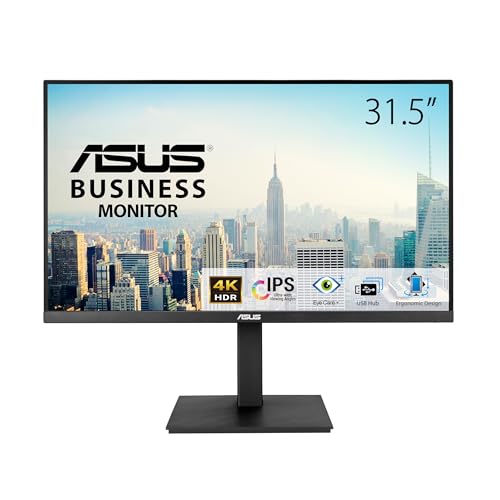
ASUS 32-Inch 4K IPS Ergonomic Monitor
Best for: Users needing a large 32-inch 4K workspace
- Screen Size
- 31.5"
- Resolution
- 3840 x 2160
- Panel Type
- IPS
- Ports
- HDMI, DisplayPort, USB
- Features
- Built-in Speakers, Height-Adjustable Stand, USB Hub
- Size
- 32 Inch
This 32-inch monitor offers 4K UHD resolution on an IPS panel with a 178-degree viewing angle. It includes dual HDMI and DisplayPort inputs alongside a USB hub. The stand supports height, tilt, swivel, and pivot adjustments. Built-in speakers and TÜV Rheinland-certified eye care features are included. It is a solid choice for those needing a larger screen with high pixel density.
- 32-inch 4K UHD (3840 x 2160) resolution
- IPS panel with 178-degree wide viewing angles
- Ergonomic stand with height, tilt, swivel, and pivot adjustments
- Built-in USB hub and speakers
- TÜV Rheinland-certified Flicker-free and Low Blue Light technologies
- 20.6 pounds weight is heavier than the 27-inch competitors
- Only includes dual HDMI and DisplayPort, lacking USB-C connectivity
- 23.4 inches height is the maximum in its variation set
- You need a larger 32-inch screen for detailed work
- You want a 4K IPS panel with wide viewing angles
- You require an ergonomic stand with full height and pivot adjustments
- You prefer a lighter monitor under 15 pounds
- You need USB-C connectivity for your laptop
- You want a 27-inch display instead of 32-inch
Verdict: ASUS VA32UQSB 32-inch 4K IPS Monitor fits users who prioritize screen real estate and color accuracy over portability and modern connectivity. It serves professionals needing a large, adjustable workspace.

ASUS 24-Inch 1200p USB-C Docking Monitor
Best for: Users needing wired Ethernet on a smaller screen
- Screen Size
- 24.1"
- Resolution
- 1920×1200
- Refresh Rate
- 100Hz
- Panel Type
- IPS
- Aspect Ratio
- 16:10
- Variable Refresh Rate
- Adaptive-Sync
This 24-inch WUXGA monitor uses an IPS panel with a 100Hz refresh rate. It includes an RJ45 Ethernet port for stable wired networking, which sets it apart from other options in this guide. The USB-C port delivers 96W power delivery, allowing you to charge a laptop through a single cable. It also features height-adjustable ergonomics and built-in speakers for a complete desktop setup.
- RJ45 Ethernet port for wired network connection
- USB-C with 96W power delivery
- 100Hz refresh rate with Adaptive-Sync
- Height-adjustable stand with pivot
- Smaller 24-inch screen size compared to 27-inch and 32-inch competitors
- Lower 1920×1200 resolution than the 1440p and 4K options on this list
- You need a wired Ethernet connection for stable internet
- You want a compact 24-inch display for tight spaces
- You prefer a single-cable USB-C docking solution
- You require a 27-inch or larger screen
- You need 4K resolution for detailed work
- You prefer wireless connectivity over wired Ethernet
Verdict: ASUS BE248CFN 24-Inch 1200p USB-C Monitor is a practical pick for users who prioritize a wired Ethernet connection and a smaller footprint. It fits well if you need a compact, single-cable docking monitor for a laptop.
Specifications side by side

| Spec | Dell UltraSharp 27-Inch 1440p Monitor | BenQ 27-Inch 1080p USB-C IPS Monitor | ASUS ProArt 27-Inch 4K USB-C Monitor | BenQ 27-Inch 4K Mac USB-C Monitor | ASUS 27-Inch QHD Conferencing Monitor | ASUS 32-Inch 4K IPS Ergonomic Monitor | ASUS 24-Inch 1200p USB-C Docking Monitor |
|---|---|---|---|---|---|---|---|
| Screen Size | 27" | 27 Inch | 27 inches | 27” | 27-inch | 31.5" | 24.1" |
| Resolution | WQHD | 1080p | – | 3840×2160 | 2560×1440 | 3840 x 2160 | 1920×1200 |
| Refresh Rate | – | 100Hz | – | – | – | – | 100Hz |
| Panel Type | LED | IPS | IPS | – | IPS | IPS | IPS |
| Response Time | 5 ms | – | 5.0 milliseconds | – | – | – | – |
| Aspect Ratio | 16:9 | – | – | – | – | – | 16:10 |
| Variable Refresh Rate | – | – | – | – | – | – | Adaptive-Sync |
| Ports | USB Type-C | USB-C | USB-C, DisplayPort, HDMI, USB 3.1 | HDMI, USB-C | HDMI, DisplayPort, USB-C | HDMI, DisplayPort, USB | HDMI, USB-C, DisplayPort, RJ45 |
| Features | Height-Adjustable Stand, USB Hub | Height-Adjustable Stand, USB Hub | Height-Adjustable Stand, USB Hub, Power Delivery | Height-Adjustable Stand, USB Hub, Power Delivery | Built-in Speakers, Height-Adjustable Stand, USB Hub, Webcam | Built-in Speakers, Height-Adjustable Stand, USB Hub | Built-in Speakers, Height-Adjustable Stand, USB Hub |
| Use | – | Business & Office, Office | – | Mac | – | – | – |
| Size | 13.9" x 24.1" x 2" | 27 Inch | 27 Inch | – | 27 Inch | 32 Inch | 24 Inch |
| Operating System | – | – | – | macOS | – | – | – |
| Dimensions | 2 × 24.1 × 13.9 inches | 9 × 24 × 18 inches | 20.6 × 24.2 × 8.97 inches | 24 × 22 × 8.6 inches | 28.1 × 8.98 × 19.8 inches | 10.4 × 28.1 × 23.4 inches | 8.3 × 20.9 × 18.6 inches |
| Weight | 14.5 pounds | 9.1 pounds | 19 pounds | – | 23.6 pounds | 20.6 pounds | 12.8 pounds |
| Color | Platinum Silver, Silver | White | BLACK | Sliver | BLACK | BLACK | BLACK |
| Model | 210-BKSF | GW2786TC | PA279CV | MA270U | BE27ACSBK | VA32UQSB | BE248CFN |
Frequently asked questions
Which 27-inch monitor offers the best overall balance for office work?
The Dell UltraSharp 27-Inch 1440p Monitor is the top pick for office productivity and ergonomic setups. It provides a solid balance of adjustability and connectivity. The model includes a height-adjustable stand and a USB hub. This makes it ideal for users who prioritize an adjustable workspace over maximum resolution or brightness.
Is there a budget-friendly 27-inch option with USB-C connectivity?
The BenQ 27-Inch 1080p USB-C IPS Monitor is the best budget choice. It is practical for office users needing ergonomic adjustability and USB-C convenience. While it uses 1080p resolution instead of 1440p, it fits buyers who prioritize call clarity and cable management in a business environment over high pixel density.
What is the best 27-inch monitor for color-accurate content creation?
The ASUS ProArt 27-Inch 4K USB-C Monitor is a solid choice for creators prioritizing color accuracy. It offers 4K UHD resolution and an IPS panel. The unit features a sturdy, adjustable stand and reliable 4K output for daily professional tasks. It also includes power delivery and a USB hub for connectivity.
Which monitor is best suited for MacBook users seeking 4K clarity?
The BenQ 27-Inch 4K Mac USB-C Monitor is the best premium pick for MacBook users. It provides 4K clarity and 90W charging via USB-C. This monitor suits those who value color accuracy and ergonomic adjustments. It is designed specifically for macOS and helps maintain a clean desk setup with single-cable connectivity.
Is there a 1440p monitor with a built-in webcam for conferencing?
The ASUS 27-Inch QHD Conferencing Monitor is the best 1440p option for video calls. It features an integrated webcam and USB-C connectivity for a complete package. This model is best for professionals who prioritize video conferencing features and clean desk setups. It offers a height-adjustable stand and built-in speakers for daily use.
Can I get a larger 32-inch 4K monitor with similar features?
The ASUS 32-Inch 4K IPS Ergonomic Monitor is the best 32-inch choice. It fits users who prioritize screen real estate and color accuracy. The unit includes a height-adjustable stand, USB hub, and built-in speakers. It serves professionals needing a large, adjustable workspace, though it lacks modern connectivity options like USB-C.
Is there a smaller monitor with wired Ethernet connectivity?
The ASUS 24-Inch 1200p USB-C Docking Monitor is the best pick for wired Ethernet. It offers a practical solution for users needing a wired connection on a smaller screen. The model includes HDMI, DisplayPort, and USB-C ports. It fits well if you need a compact, single-cable docking monitor for your laptop.
See also