Looking Beyond the Dell Pro P 27 USB-C Hub Webcam Monitor? 6 Alternatives Worth a Look
As Amazon Associates, we earn from qualifying purchases. This means we may receive a small commission at no extra cost to you if you click through and make a purchase.
As an Amazon Associate we earn from qualifying purchases. Links on this page are affiliate links.
The Dell Pro P 27 USB C Hub Webcam Monitor is a focused business display for users who prioritize integrated webcam quality and connectivity over high refresh rates or vibrant color gamuts. If you are looking for dell pro p 27 USB c hub webcam monitor alternatives, you may want a different spec, size, feature, or brand. This guide presents 6 options that share key capabilities with the original model.
We selected these alternatives because their specifications overlap with the Dell monitor in areas like resolution, connectivity, or intended use. Some choices offer higher refresh rates for gaming, while others provide portability for travelers. You might prefer a larger ultrawide screen for multitasking or a compact second display for mobile setups. Each option here is chosen for its distinct technical advantages, allowing you to find a monitor that better fits your specific workflow and desk space.
How these alternatives compare
HP 527pm 27-Inch QHD USB-C Monitor
The HP 527pm matches the Dell’s 27-inch QHD size and 100Hz refresh rate, making it a direct functional competitor for office work. It adds built-in speakers and an Ethernet port, which the Dell lacks. You get similar webcam integration for video calls, but the HP is heavier at 17.4 pounds. Choose this if you need more connectivity options without sacrificing screen real estate. It is a practical swap for those who want a complete all-in-one unit for daily tasks.
Cocopar 17.3-Inch 4K Portable Monitor
This Cocopar monitor shifts focus from a stationary desk setup to travel. It offers 4K resolution on a 17.3-inch panel, providing sharper detail than the Dell’s QHD display. However, it lacks a webcam and relies on external power. It is significantly lighter and thinner, weighing just a fraction of the Dell’s 15.3 pounds. Pick this if you need a portable second screen for work on the go. You trade integrated connectivity and larger size for extreme portability and higher pixel density.
KTC 27-Inch Dual-Mode Mini LED Monitor
The KTC M27P6 targets users who need high performance rather than webcam features. It delivers 4K resolution on a 27-inch IPS panel with adaptive sync for smoother gaming. It lacks a built-in camera, requiring you to use a separate one. The stand is height-adjustable, offering better ergonomics than the Dell’s fixed design. Choose this if you prioritize visual clarity and gaming fluidity over video conferencing tools. It is a versatile display for mixed use that does not include webcam hardware.
CRUA 49" DQHD 120Hz Curved Monitor
The CRUA monitor offers a massive 49-inch ultrawide format with a 120Hz refresh rate. It provides a 32:9 aspect ratio, replacing dual monitors instead of matching the Dell’s single 27-inch screen. It includes built-in speakers and a curved design for immersion. You lose the compact footprint and integrated webcam, gaining instead a vast workspace for multitasking or gaming. Pick this if you have ample desk space and want an immersive experience that goes far beyond standard business monitor dimensions.
KOORUI 27-Inch 4K Dual-Mode Mini-LED Monitor
The KOORUI S2741LM focuses on high-fidelity visuals with a 4K Mini-LED panel and 160Hz refresh rate. It excludes a webcam, directing you toward creative or gaming workflows. The 27-inch size matches the Dell, but the image quality is sharper and the motion smoother. It is ideal if you need color accuracy and speed for professional work or gaming. You sacrifice video conferencing convenience for superior display performance and modern panel technology in a similar form factor.
InnoView 18.5" 2K 100Hz Dual Portable Monitor
The InnoView INVPM809 provides a dual-screen experience in a portable package. It features two 18.5-inch 2K panels with a 100Hz refresh rate, offering more total screen real estate than the Dell. It lacks a webcam and is designed for mobile productivity. Weighing only 5.15 pounds, it is much lighter than the Dell. Choose this if you need expanded workspace while traveling. It is a unique solution for users who prioritize extra display area and portability over a single large screen with integrated cameras.
| # | Product | Best for | Price |
|---|---|---|---|
| 1 | Dell P2726DEV 27-inch USB-C Monitor Best overall | business video conferencing and office productivity | |
| 2 | HP 527pm 27-Inch QHD USB-C Monitor Best budget | Video conferencing and office work | |
| 3 | Cocopar 17.3-Inch 4K Portable Monitor Best 60hz | Travelers needing a lightweight 4K second screen | |
| 4 | KTC 27-Inch Dual-Mode Mini LED Monitor Best ips | High refresh rate 4K gaming and productivity | |
| 5 | CRUA 49" DQHD 120Hz Curved Monitor Best 120hz | immersive ultrawide gaming and multitasking | |
| 6 | KOORUI 27-Inch 4K Dual-Mode Mini-LED Monitor Also great | High-fidelity gaming and color-accurate creative work | |
| 7 | InnoView 18.5" 2K 100Hz Dual Portable Monitor Best windows | mobile dual-screen productivity setups |

Dell P2726DEV 27-inch USB-C Monitor
Best for: business video conferencing and office productivity
- Screen Size
- 27"
- Resolution
- 2560 x 1440
- Refresh Rate
- 100 Hz
- Panel Type
- IPS
- Response Time
- 5 ms (GtG)
- Aspect Ratio
- 16:9
The Dell Pro P 27 is a 27-inch QHD monitor with a 100 Hz refresh rate and IPS panel. It includes a built-in 5MP Sony Starvis webcam and a USB-C hub. The 350-nit brightness and 1500:1 contrast ratio suit office work. You get a GbE port for wired networking. This setup is ideal for professionals who want a clean desk with integrated conferencing tools.
- 27-inch QHD (2560 x 1440) IPS display
- Built-in 5MP Sony Starvis QHD webcam
- USB-C hub with RJ45 GbE port
- 100 Hz refresh rate at 5 ms response time
- 100 Hz refresh rate is lower than the 120 Hz or 160 Hz options available elsewhere
- 350 nits of brightness is modest compared to higher-end panels
- 1500:1 static contrast ratio is standard for IPS rather than high-contrast
- You need a built-in high-resolution webcam for video calls
- You want a single cable solution for power and data via USB-C
- You require a wired GbE network connection for stable internet
- You need a high refresh rate above 100 Hz for fast-paced gaming
- You require a curved screen for immersive viewing
- You prefer a portable or travel-friendly display
Verdict: Dell Pro P 27 USB-C Monitor is a focused business display for users who prioritize integrated webcam quality and connectivity over high refresh rates or vibrant color gamuts.

HP 527pm 27-Inch QHD USB-C Monitor
Best for: Video conferencing and office work
- Screen Size
- 27"
- Resolution
- 2560 x 1440
- Refresh Rate
- 100Hz
- Panel Type
- IPS
- Ports
- USB-C, RJ-45, HDMI, DisplayPort
- Features
- Built-in Speakers, USB Hub, Webcam
The HP 527pm is a 27-inch QHD (2560×1440) USB-C conferencing monitor with a 100Hz refresh rate. It includes a 5MP pop-up webcam, AI noise-reduction mics, and 4x3W speakers. The stand offers full ergonomic adjustment. It comes with a portable dock for data sync. This setup suits users who need integrated video tools and clear audio for meetings.
- 27-inch QHD IPS panel with 100Hz refresh rate
- 5MP pop-up webcam with AI noise-reduction mics
- 4x3W down-firing speakers for clear audio
- Full ergonomic stand with height, tilt, swivel, and pivot
- Includes Dockztorm portable data hub
- 100Hz refresh rate is lower than the 160Hz or 320Hz options on this list
- 27-inch screen is smaller than the 49-inch ultrawide and 17.3-inch portable options
- 17.4 pounds weight is heavier than the portable monitors
- You need a dedicated conferencing monitor with a built-in high-resolution webcam
- You want a standard 27-inch display with full ergonomic adjustability
- You require integrated speakers and mics for video calls
- You are looking for a high-refresh-rate gaming monitor above 100Hz
- You need a portable monitor that weighs under 10 pounds
- You prefer an ultrawide or curved display for multitasking
Verdict: HP 527pm 27" QHD USB-C Monitor fits office workers who prioritize video conferencing quality and ergonomic flexibility over high refresh rates or portability.

Cocopar 17.3-Inch 4K Portable Monitor
Best for: Travelers needing a lightweight 4K second screen
- Screen Size
- 17.3 Inch
- Resolution
- 3840×2160
- Refresh Rate
- 60Hz
- Ports
- USB-C, HDMI
- Features
- Built-in Speakers
- Use
- Mac, Travel
This 17.3-inch portable display offers 4K UHD resolution at 60Hz with 150% sRGB color coverage. It weighs 1.7 lbs and includes built-in stereo speakers. You can connect via USB-C or HDMI for a second screen. The aluminum build includes a kickstand. It suits travelers needing a lightweight, high-resolution extension for laptops or consoles.
- 4K UHD 3840×2160 resolution
- 150% sRGB wide color gamut
- 1.7 lbs ultra-lightweight aluminum body
- Built-in stereo speakers
- Single USB-C cable connectivity
- 60Hz refresh rate limits motion smoothness
- 17.3-inch size is smaller than 27-inch desktop options
- Requires external power for peak 600-nit brightness
- You need a lightweight second screen for travel
- You require accurate color reproduction for photo editing
- You want a portable display with built-in audio
- You need a high-refresh-rate display for gaming
- You require a large 27-inch desktop monitor
- You want a monitor without external power needs
Verdict: Cocopar 17.3 Inch 4K Portable Monitor delivers sharp visuals in a travel-friendly package. It fits mobile professionals who prioritize color accuracy and portability over large screen real estate.
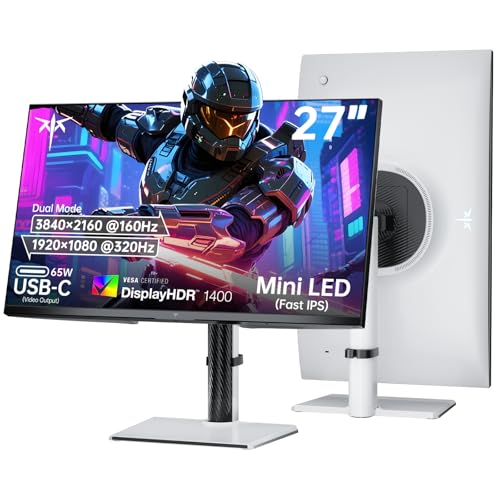
KTC 27-Inch Dual-Mode Mini LED Monitor
Best for: High refresh rate 4K gaming and productivity
- Screen Size
- 27 Inch
- Resolution
- 4K UHD / 1080P FHD
- Refresh Rate
- 160Hz / 320Hz
- Panel Type
- Fast IPS
- Variable Refresh Rate
- Adaptive-Sync, Freesync, G-sync
- Ports
- 65W Type-C, DP 1.4, 2 x HDMI 2.1
This KTC 27-inch monitor uses a Fast IPS panel with Mini LED backlighting and 1152 dimming zones. You can switch between 4K UHD at 160Hz or 1080p at 320Hz. It supports VESA Display HDR 1400 and includes a 65W USB-C port. The stand allows height, tilt, swivel, and pivot adjustments. This setup suits gamers who need high refresh rates or professionals requiring sharp 4K visuals.
- Dual Mode: 4K UHD at 160Hz or 1080p at 320Hz
- Mini LED panel with 1152 independent dimming zones
- VESA Display HDR 1400 certification
- 65W USB-C port for power and data
- Height-adjustable stand with tilt, swivel, and pivot
- 27-inch screen is smaller than the 49-inch CRUA ultrawide on this list
- 15-pound weight is heavier than the 17.3-inch cocopar portable monitor
- 1152 dimming zones is fewer than the 1500R curvature focus of the CRUA
- You want 4K resolution with high refresh rates
- You need a 65W USB-C port for laptop charging
- You require a height-adjustable stand for ergonomic viewing
- You prefer a portable monitor under 10 pounds
- You need an ultrawide display for multitasking
- You want a larger 32-inch or bigger screen
Verdict: KTC 27" Mini LED Dual Mode Monitor offers versatile performance for gamers and professionals. It fits users who need high refresh rates or sharp 4K visuals in a compact 27-inch form factor.

CRUA 49" DQHD 120Hz Curved Monitor
Best for: immersive ultrawide gaming and multitasking
- Screen Size
- 49"
- Resolution
- 5120×1440
- Refresh Rate
- 120Hz
- Aspect Ratio
- 32:9
- Ports
- HDMI 2.0, DP 1.4, Type-C 65W, USB 2.0
- Features
- Built-in Speakers, Curved Screen
This CRUA ultrawide monitor gives you a 49-inch 5120×1440 display with a 1500R curve. It runs at 120Hz with 120% sRGB coverage. The 32:9 aspect ratio acts like two screens side by side. It includes USB-C with 65W power delivery and built-in speakers. You get height and swivel adjustments for your desk. It suits those who want a massive, immersive view for gaming or multitasking.
- 49-inch 5120×1440 DQHD resolution
- 120Hz refresh rate for smooth motion
- 120% sRGB color coverage
- USB-C port with 65W power delivery
- 1500R curved screen design
- 25-pound weight requires sturdy desk support
- 320 nits brightness is lower than typical office monitors
- 47-inch width needs significant desk space
- You want a single screen that replaces two monitors
- You play racing or flight simulation games
- You need USB-C connectivity for your laptop
- You have a small desk with limited width
- You need a standard 16:9 aspect ratio
- You require high brightness for bright rooms
Verdict: CRUA 49" DQHD 120Hz Curved Monitor fits users who want a massive, immersive ultrawide display for gaming or heavy multitasking. It is ideal if you have the desk space and want a single screen to replace dual setups.

KOORUI 27-Inch 4K Dual-Mode Mini-LED Monitor
Best for: High-fidelity gaming and color-accurate creative work
- Screen Size
- 27"
- Resolution
- 3840×2160
- Refresh Rate
- 160Hz, 320Hz
- Panel Type
- QD-Mini LED
- Response Time
- 1ms
- Variable Refresh Rate
- Adaptive Sync Premium
This KOORUI monitor uses a 27-inch 4K panel with Mini-LED backlighting and 1152 local dimming zones. It supports 160Hz refresh rates at 4K or 320Hz at 1080p. The display covers 99% of the Adobe RGB color space and reaches VESA DisplayHDR 1400 brightness. A 90W USB-C port handles video, data, and charging. It includes an ergonomic stand with height and swivel adjustments for flexible positioning.
- 1152-zone Mini-LED for high contrast and HDR1400 support
- Dual-mode switching between 4K 160Hz and 1080p 320Hz
- 99% Adobe RGB color accuracy for professional work
- 90W USB-C port for single-cable laptop charging
- 15-pound weight makes it heavier than standard 27-inch office monitors
- 27-inch size is smaller than the 49-inch ultrawide option on this list
- 1080p mode reduces resolution to 1920×1080 for higher refresh rates
- You need high color accuracy for photo or video editing
- You want a single cable for video and laptop charging
- You play competitive shooters at 1080p for maximum frame rates
- You require a built-in webcam for video calls
- You need a 49-inch ultrawide display for multitasking
- You prefer a lightweight monitor for frequent travel
Verdict: KOORUI 27" Mini-LED 4K 160Hz suits users who prioritize color accuracy and high refresh rates over webcam integration. It delivers professional-grade visuals and fast gaming performance in a single package.

InnoView 18.5" 2K 100Hz Dual Portable Monitor
Best for: mobile dual-screen productivity setups
- Screen Size
- 18.5"
- Resolution
- 2560 x 1440
- Refresh Rate
- 100Hz
- Panel Type
- IPS
- Ports
- DP, USB-C, HDMI
- Use
- Mac
This InnoView unit offers a dual-screen setup with two 18.5-inch panels. It delivers 2K resolution at 100Hz with 100% sRGB color accuracy. The foldable design allows for stackable or side-by-side use. It supports Windows and Mac via HDMI, DisplayPort, or USB-C. You get a 178-degree viewing angle and flexible stands. This configuration expands your workspace for multitasking on the go.
- Dual 18.5-inch panels for expanded workspace
- 2K resolution with 100Hz refresh rate
- 100% sRGB color gamut for accurate visuals
- Foldable and stackable design for portability
- Smaller 18.5-inch screen size compared to 27-inch or 49-inch alternatives
- Heavier at 5.15 pounds for a portable display
- Lower 100Hz refresh rate compared to 160Hz or 320Hz gaming monitors
- You need a dual-screen setup for multitasking
- You prioritize color accuracy for design work
- You want a foldable monitor for travel
- You require a single large screen over 27 inches
- You need high refresh rates for competitive gaming
- You prefer a lighter display under 5 pounds
Verdict: InnoView 18.5" Dual Portable Monitor provides a unique dual-screen experience for mobile productivity. It suits users who need extra screen real estate in a compact, foldable form factor.
Specifications side by side

| Spec | Dell P2726DEV 27-inch USB-C Monitor | HP 527pm 27-Inch QHD USB-C Monitor | Cocopar 17.3-Inch 4K Portable Monitor | KTC 27-Inch Dual-Mode Mini LED Monitor | CRUA 49" DQHD 120Hz Curved Monitor | KOORUI 27-Inch 4K Dual-Mode Mini-LED Monitor | InnoView 18.5" 2K 100Hz Dual Portable Monitor |
|---|---|---|---|---|---|---|---|
| Screen Size | 27" | 27" | 17.3 Inch | 27 Inch | 49" | 27" | 18.5" |
| Resolution | 2560 x 1440 | 2560 x 1440 | 3840×2160 | 4K UHD / 1080P FHD | 5120×1440 | 3840×2160 | 2560 x 1440 |
| Refresh Rate | 100 Hz | 100Hz | 60Hz | 160Hz / 320Hz | 120Hz | 160Hz, 320Hz | 100Hz |
| Panel Type | IPS | IPS | – | Fast IPS | – | QD-Mini LED | IPS |
| Response Time | 5 ms (GtG) | – | – | – | – | 1ms | – |
| Aspect Ratio | 16:9 | – | – | – | 32:9 | – | – |
| Variable Refresh Rate | – | – | – | Adaptive-Sync, Freesync, G-sync | – | Adaptive Sync Premium | – |
| Ports | HDMI, DisplayPort, USB-C, 1 x RJ45 GbE | USB-C, RJ-45, HDMI, DisplayPort | USB-C, HDMI | 65W Type-C, DP 1.4, 2 x HDMI 2.1 | HDMI 2.0, DP 1.4, Type-C 65W, USB 2.0 | HDMI 2.1, DP 1.4, USB-A, USB-B, USB-C | DP, USB-C, HDMI |
| Features | Webcam | Built-in Speakers, USB Hub, Webcam | Built-in Speakers | Height-Adjustable Stand | Built-in Speakers, Curved Screen | – | – |
| Use | – | – | Mac, Travel | Gaming | Gaming | Gaming | Mac |
| Size | – | Single monitor | 17.3 Inch | 27 Inch | – | 27"/Mini-LED/UHD/160Hz | 18.5 inch 2K 100Hz |
| Operating System | – | – | macOS | – | – | – | Windows |
| Dimensions | 7.28 × 24.1 × 16.3 inches | 8.15 × 24.2 × 21.4 inches | 0.5 × 15.4 × 9.5 inches | 8.32 × 24.3 × 21.5 inches | 6 × 47 × 14 inches | 21 × 11 × 14 inches | 0.96 × 16.7 × 10.2 inches |
| Weight | 15.3 pounds | 17.4 pounds | – | 15 pounds | 25 pounds | 15 pounds | 5.15 pounds |
| Color | black | Black/Silver | black | White 4K | Black | Black | black |
| Model | P2726DEV | HP 527pm | Y173ULH | M27P6 | CR490ZC | S2741LM | INVPM809 |
Frequently asked questions
Which Dell alternative has the best webcam for business calls?
The Dell P2726DEV remains the top choice for integrated webcam quality. It is designed specifically for business video conferencing and office productivity. The monitor includes a built-in webcam and USB-C connectivity. This setup allows you to connect your computer and peripherals with a single cable. It prioritizes clear video communication over high refresh rates or vibrant color gamuts.
What is the most budget-friendly option with a webcam?
The HP 527pm is the best budget alternative for video conferencing. It features a 27-inch QHD display and a 100Hz refresh rate. This monitor includes a built-in webcam, speakers, and an Ethernet port. These features provide ergonomic flexibility and connectivity for office work. It fits users who need reliable video call capabilities without paying for high-end gaming specs.
Can I use a portable monitor for travel instead of a webcam setup?
The Cocopar 17.3-inch 4K Portable Monitor is ideal for travelers. It delivers sharp 4K visuals in a lightweight package that weighs very little. You can connect it via HDMI or USB-C to your laptop. While it lacks a built-in webcam, its portability allows you to use your laptop’s camera in a better lighting environment. It suits mobile professionals who prioritize color accuracy and screen size.
Which monitor offers the highest refresh rate for gaming?
The KOORUI 27-inch Mini-LED 4K 160Hz offers a 160Hz refresh rate. This high speed suits users who prioritize gaming performance and color accuracy. It features a 4K UHD resolution and Mini-LED technology for professional-grade visuals. The monitor connects via HDMI, DisplayPort, and USB-C. It delivers fast gaming performance without the need for an integrated webcam.
Is there an ultrawide option for multitasking and gaming?
The CRUA 49-inch DQHD 120Hz Curved Monitor provides an immersive experience. It features a 32:9 aspect ratio that replaces dual screen setups. The 120Hz refresh rate supports immersive ultrawide gaming and heavy multitasking. It includes built-in speakers and connects via HDMI, DisplayPort, and USB-C. You need ample desk space for this 25-pound display, but it offers massive screen real estate.
Which monitor is best for mobile dual-screen productivity?
The InnoView 18.5-inch Dual Portable Monitor provides a unique dual-screen experience. It features two 2K displays with a 100Hz refresh rate. This setup is ideal for mobile productivity and Windows users. You can fold it for easy transport and connect it via HDMI, DisplayPort, or USB-C. It offers extra screen real estate in a compact form factor for users on the go.
Does the KTC monitor support adaptive sync for smooth gaming?
Yes, the KTC 27-inch Dual-Mode Mini LED Monitor supports Adaptive-Sync. It features an IPS panel and 4K UHD resolution. This combination offers versatile performance for both gaming and productivity. The monitor includes a height-adjustable stand and connects via HDMI, DisplayPort, and USB-C. It fits users who need high refresh rates and sharp visuals in a compact 27-inch form factor.
Which alternative is best for color-accurate creative work?
The KOORUI 27-inch Mini-LED 4K 160Hz is best for color-accurate creative work. It delivers professional-grade visuals with high fidelity. The Mini-LED technology enhances contrast and color performance. You get a 160Hz refresh rate for smooth gaming alongside your creative tasks. The monitor connects via HDMI, DisplayPort, and USB-C, making it a versatile tool for professionals who prioritize visual quality.
See also