Looking Beyond the Dell Alienware 27-Inch 280Hz Gaming Monitor? 6 Alternatives Worth a Look
As Amazon Associates, we earn from qualifying purchases. This means we may receive a small commission at no extra cost to you if you click through and make a purchase.
As an Amazon Associate we earn from qualifying purchases. Links on this page are affiliate links.
The Dell Alienware 27" 280Hz QHD monitor delivers high-speed gaming with a 1ms response and universal sync compatibility. If you are searching for dell alienware 27 inch 280hz gaming monitor alternatives, you may want a different screen size or feature set. This model excels in competitive play due to its Fast IPS panel and robust ergonomic stand. However, its 27-inch form factor and specific connectivity options might not suit every desk setup.
We selected 6 alternatives that share core specifications like QHD resolution and variable refresh rate support. These options cover a range of refresh rates from 180Hz to 300Hz and include 32-inch variants for those needing more screen real estate. Some picks prioritize USB-C connectivity or specific HDR standards. Each option matches the original in key performance metrics while offering distinct advantages for different gaming priorities.
Comparing Alternative Monitor Options
Samsung 32-Inch Odyssey G5 180Hz Gaming Monitor
The Samsung 32-Inch Odyssey G5 trades the Alienware’s 280Hz speed for a larger 32-inch canvas. You gain significant screen real estate with QHD resolution, which improves immersion in open-world games. The 180Hz refresh rate is lower than the Alienware’s, so fast-paced competitive shooters may feel slightly less fluid. However, you still get FreeSync and G-SYNC compatibility for tear-free play. This model suits players who prioritize a spacious display and ergonomic stand adjustability over maximum frame rates. It is a practical choice if you prefer a bigger view without sacrificing too much speed.
ASUS TUF 27-Inch 260Hz QHD Gaming Monitor
The ASUS TUF 27-Inch monitor keeps the 27-inch form factor but offers 260Hz instead of 280Hz. You lose a small amount of peak refresh rate, but you retain the QHD clarity and Fast IPS panel quality. It includes ELMB Sync technology, which reduces motion blur by strobing the backlight. The ergonomic stand allows height, tilt, swivel, and pivot adjustments, similar to the Alienware. This option fits competitive gamers who want a familiar 27-inch size with reliable variable refresh rate support. It is a balanced alternative if you do not need the absolute highest refresh rate available.
ASUS ROG Strix XG27ACMEG-G 27" 260Hz
The ASUS ROG Strix XG27ACMEG-G provides 260Hz refresh rate on a 27-inch QHD panel, slightly below the Alienware’s 280Hz. Its key advantage is the inclusion of USB-C connectivity, which the Alienware lacks. You get G-SYNC compatibility for smooth gameplay, though it does not list FreeSync support in the same way. The monitor features a height-adjustable stand for ergonomic positioning. This model is ideal for users who need a single cable for video and data transfer. It offers a balanced mix of speed and modern connectivity for gamers who value versatility over maximum refresh rates.
LG 27-Inch 240Hz QHD Gaming Monitor
The LG 27-Inch 240Hz QHD Monitor offers a lower 240Hz refresh rate compared to the Alienware’s 280Hz. You sacrifice a bit of peak speed but gain a focus on color fidelity and smooth motion. It supports both FreeSync and G-SYNC for universal sync compatibility. The QHD resolution ensures sharp image quality for both gaming and media. This monitor is a solid middle ground for players who want high clarity without chasing the highest possible frame rates. It fits users who prioritize balanced performance and accurate colors over the absolute fastest refresh rates available in the 27-inch category.
LG 27-Inch UltraGear 300Hz QHD Monitor
The LG 27-Inch UltraGear 300Hz QHD Monitor exceeds the Alienware’s 280Hz refresh rate with 300Hz performance. You gain a slight edge in speed for competitive FPS games. It maintains QHD resolution and supports both FreeSync and G-SYNC for tear-free playback. The panel type is IPS, ensuring good color accuracy. This model is designed for players who prioritize frame rate above all else. It is the ideal choice for competitive gamers who want the fastest possible response on a 27-inch screen. You trade the Alienware’s specific ergonomic features for a marginally higher refresh rate.
LG UltraGear 32-Inch QHD 200Hz IPS Monitor
The LG UltraGear 32-Inch QHD 200Hz Monitor offers a larger 32-inch screen with QHD resolution, similar to the Samsung alternative. You lose significant refresh rate compared to the Alienware’s 280Hz, settling for 200Hz. However, you gain a spacious canvas for immersive gaming. It supports both FreeSync and G-SYNC for smooth variable refresh rate performance. The IPS panel provides solid color reproduction. This monitor suits players who value a larger display and reliable sync technology over high-speed competitive performance. It is a practical choice for those who prefer a bigger view with balanced features.
| # | Product | Best for | Price |
|---|---|---|---|
| 1 | Dell Alienware 27-Inch 280Hz Gaming Monitor Best overall | Competitive gamers wanting sync compatibility | |
| 2 | Samsung 32-Inch Odyssey G5 180Hz Gaming Monitor Best budget | Gamers wanting a larger 32-inch screen | |
| 3 | ASUS TUF 27-Inch 260Hz QHD Gaming Monitor Also great | Competitive gamers wanting 27-inch Fast IPS speed | |
| 4 | ASUS ROG Strix XG27ACMEG-G 27" 260Hz Best premium | Gamers needing G-SYNC and USB-C on a 27-inch screen | |
| 5 | LG 27-Inch 240Hz QHD Gaming Monitor Best 240hz | balanced QHD gaming with accurate colors | |
| 6 | LG 27-Inch UltraGear 300Hz QHD Monitor Also great | competitive FPS players wanting 300Hz speed | |
| 7 | LG UltraGear 32-Inch QHD 200Hz IPS Monitor Also great | Players wanting a larger 32-inch QHD screen |

Dell Alienware 27-Inch 280Hz Gaming Monitor
Best for: Competitive gamers wanting sync compatibility
- Screen Size
- 27"
- Resolution
- QHD
- Refresh Rate
- 280Hz
- Panel Type
- Fast IPS
- Response Time
- 1ms
- Variable Refresh Rate
- FreeSync Premium Pro, G-Sync Compatible
The Dell Alienware 27-inch monitor delivers a 1440p QHD resolution with a 280Hz refresh rate on a Fast IPS panel. It supports both FreeSync Premium Pro and G-Sync for tear-free gameplay. The display offers VESA DisplayHDR 600 and covers 95% of the DCI-P3 color gamut. An ergonomic stand allows full height, tilt, swivel, and pivot adjustments. This setup suits competitive gamers who want high speed and color accuracy.
- 280Hz refresh rate for smooth motion
- 1ms response time eliminates blur
- VESA DisplayHDR 600 for vivid contrast
- 95% DCI-P3 color gamut coverage
- Full ergonomic stand adjustments
- 27-inch screen is smaller than the 32-inch alternatives on this list
- 19.6-pound weight is heavier than the 27-inch LG and ASUS options
- 280Hz refresh rate is lower than the 300Hz LG 27G64NA-B
- You need a monitor compatible with both NVIDIA and AMD graphics cards
- You want high color accuracy for cinematic gaming
- You prefer a compact 27-inch desk footprint
- You require a refresh rate higher than 280Hz
- You need a larger 32-inch display for immersion
- You are looking for the lightest possible monitor
Verdict: Dell Alienware 27" 280Hz QHD provides a balanced mix of speed and color fidelity for competitive gamers. It fits users who value universal sync compatibility and a sturdy ergonomic stand over raw maximum refresh rates.

Samsung 32-Inch Odyssey G5 180Hz Gaming Monitor
Best for: Gamers wanting a larger 32-inch screen
- Screen Size
- 32"
- Resolution
- 2560 x 1440
- Refresh Rate
- 180Hz
- Panel Type
- Fast IPS
- Response Time
- 1ms (GtG)
- Variable Refresh Rate
- G-Sync Compatible, AMD FreeSync
This Samsung monitor offers a 32-inch QHD display with an 180Hz refresh rate and 1ms response time. The Fast IPS panel provides wide 178-degree viewing angles and consistent color accuracy. It supports G-Sync compatibility and HDR10 for smoother, more detailed visuals. The height-adjustable stand adds ergonomic flexibility. It suits gamers who prefer a larger screen size without sacrificing speed.
- 32-inch QHD resolution for detailed images
- 180Hz refresh rate and 1ms GtG response time
- Fast IPS panel with 178-degree viewing angles
- Height-adjustable ergonomic stand
- 180Hz refresh rate is lower than the 280Hz and 300Hz options on this list
- 32-inch size is larger than the 27-inch standard found in most competitors
- You want a larger 32-inch screen for immersive gaming
- You need a height-adjustable stand for better ergonomics
- You prioritize wide viewing angles with an IPS panel
- You require a refresh rate higher than 180Hz
- You prefer a compact 27-inch desk footprint
- You need native G-Sync hardware rather than compatibility
Verdict: Samsung 32" Odyssey G5 QHD Gaming Monitor is a solid choice for players who value screen real estate and ergonomic adjustability over the highest possible refresh rates found in smaller 27-inch models.

ASUS TUF 27-Inch 260Hz QHD Gaming Monitor
Best for: Competitive gamers wanting 27-inch Fast IPS speed
- Screen Size
- 27”
- Resolution
- 2560 x 1440
- Refresh Rate
- 260Hz
- Panel Type
- Fast IPS
- Response Time
- 1ms
- Variable Refresh Rate
- FreeSync Premium, G-Sync Compatible
This 27-inch Fast IPS monitor delivers QHD resolution with a 260Hz refresh rate. It supports FreeSync Premium and G-SYNC compatibility for tear-free visuals. The display includes ELMB Sync to reduce motion blur and offers DisplayHDR 400 for better contrast. It comes with a stand that adjusts for height, tilt, swivel, and pivot. This model suits gamers who want high speed and sharp images without a premium price tag.
- 260Hz overclocked refresh rate for smooth gameplay
- Fast IPS panel for quick response times
- ELMB Sync reduces ghosting and tearing
- Height, tilt, swivel, and pivot stand adjustments
- 260Hz refresh rate is lower than the 300Hz LG option
- DisplayHDR 400 rating is basic compared to higher tiers
- 27-inch size is smaller than the 32-inch Samsung and LG models
- You want a high refresh rate for competitive gaming
- You prefer a 27-inch screen for desk space
- You need VESA AdaptiveSync for compatible graphics cards
- You require a 32-inch display for larger immersion
- You need the highest possible 300Hz refresh rate
- You want advanced HDR performance beyond DisplayHDR 400
Verdict: ASUS TUF VG27AQML1A 260Hz QHD offers a balanced mix of speed and image quality for gamers who prioritize a 27-inch Fast IPS display. It fits users who value ELMB Sync and ergonomic stand adjustments over maximum refresh rates or larger screen sizes.
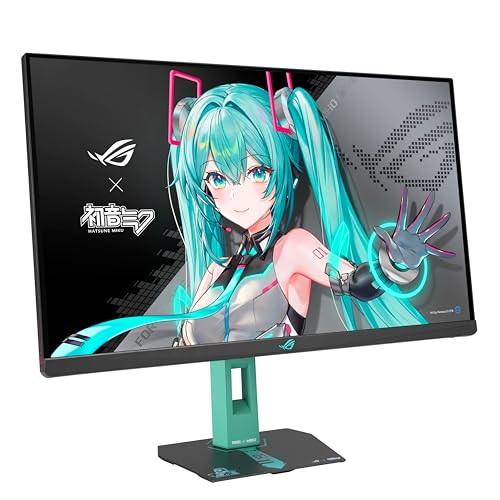
ASUS ROG Strix XG27ACMEG-G 27" 260Hz
Best for: Gamers needing G-SYNC and USB-C on a 27-inch screen
- Screen Size
- 27-inch
- Resolution
- 2560 x 1440
- Refresh Rate
- 260Hz
- Panel Type
- Fast IPS
- Response Time
- 0.3ms
- Variable Refresh Rate
- G-SYNC Compatible
This 27-inch gaming monitor delivers QHD resolution with a 260Hz refresh rate and 0.3ms response time. It uses Fast IPS technology for sharp visuals and includes ELMB Sync to reduce motion blur. The display supports G-SYNC for tear-free gameplay and offers USB-C connectivity. It features a height-adjustable stand and a distinctive Hatsune Miku design. This unit suits gamers who want high speed and specific aesthetic styling.
- 260Hz overclocked refresh rate for high frame rates
- 0.3ms response time with Fast IPS panel
- G-SYNC variable refresh rate support
- USB-C port with DP Alt mode
- Height-adjustable stand included
- 260Hz refresh rate is lower than the 300Hz LG 27G64NA-B
- 27-inch screen is smaller than the 32-inch Samsung and LG 32G620B-B options
- 12.8-pound weight is heavier than standard 27-inch panels
- You want a high-refresh QHD display with G-SYNC compatibility
- You prefer a 27-inch screen size for your desk setup
- You need USB-C connectivity for simplified cable management
- You require the highest possible refresh rate available in this guide
- You prefer a larger 32-inch display for immersive viewing
- You are looking for a standard black design without special edition themes
Verdict: ASUS ROG Strix XG27ACMEG-G 27" 260Hz offers a balanced mix of speed and connectivity for competitive gamers who value G-SYNC and USB-C support over maximum refresh rates or larger screen sizes.

LG 27-Inch 240Hz QHD Gaming Monitor
Best for: balanced QHD gaming with accurate colors
- Screen Size
- 27"
- Resolution
- 2560 x 1440
- Refresh Rate
- 240Hz
- Panel Type
- IPS
- Response Time
- 1ms (GtG)
- Variable Refresh Rate
- G-SYNC Compatible, AMD FreeSync Premium
The LG 27GR83Q-B is a 27-inch IPS gaming monitor with QHD resolution and a 240Hz refresh rate. It supports both HDMI 2.1 and DisplayPort 1.4 for high frame rates. The panel offers 1ms response time and covers 95% of the DCI-P3 color gamut. It includes VESA DisplayHDR 400 certification. This display is designed for gamers who want smooth motion and accurate colors without the premium price of higher refresh rates.
- 240Hz refresh rate via HDMI 2.1 or DisplayPort 1.4
- IPS panel with 95% DCI-P3 color gamut coverage
- 1ms gray-to-gray response time
- Compatible with NVIDIA G-SYNC and AMD FreeSync Premium
- 240Hz refresh rate is lower than the 280Hz and 300Hz options on this list
- 27-inch screen size is smaller than the 32-inch alternatives available
- DisplayHDR 400 rating is less robust than HDR400 implementations with higher peak brightness
- You want a balance of high refresh rate and color accuracy
- You prefer a 27-inch QHD screen for desktop gaming
- You use both NVIDIA and AMD graphics cards
- You need the highest possible refresh rate like 280Hz or 300Hz
- You prefer a larger 32-inch display for immersive gaming
- You require advanced HDR performance beyond DisplayHDR 400
Verdict: LG 27GR83Q-B 27-inch 240Hz QHD Monitor offers a solid middle ground for gamers who value color fidelity and smooth motion. It fits players who want QHD clarity without chasing the absolute highest refresh rates.

LG 27-Inch UltraGear 300Hz QHD Monitor
Best for: competitive FPS players wanting 300Hz speed
- Screen Size
- 27"
- Resolution
- 2560 x 1440
- Refresh Rate
- 300Hz
- Panel Type
- IPS
- Response Time
- 1ms GtG
- Variable Refresh Rate
- G-Sync Compatible, FreeSync Premium
This LG 27-inch QHD IPS monitor offers a 300Hz refresh rate and 1ms response time for smooth, responsive gaming. It includes VESA DisplayHDR 400 for better contrast and supports both NVIDIA G-SYNC Compatible and AMD FreeSync Premium. The display covers 93% of the sRGB color gamut. It is a strong alternative to the Dell Alienware, providing higher speed and similar resolution for competitive players.
- 300Hz refresh rate for ultra-smooth motion
- 1ms (GtG) response time reduces blur
- 93% sRGB color coverage for vivid visuals
- VESA DisplayHDR 400 certification for improved contrast
- Dual compatibility with G-SYNC and FreeSync Premium
- 27-inch screen size is smaller than the 32-inch Samsung and LG 32G620B options
- 10.1-pound weight is heavier than the 27-inch ASUS and Dell Alienware models
- HDR400 brightness is lower than typical high-end HDR standards
- You want a 27-inch QHD display with the highest possible refresh rate
- You play fast-paced shooters and need 300Hz speed
- You use both NVIDIA and AMD graphics cards
- You prefer a larger 32-inch screen for more immersive viewing
- You need a lighter monitor for easy desk mobility
- You require advanced HDR performance beyond DisplayHDR 400
Verdict: LG 27G64NA-B 27-inch 300Hz QHD Monitor delivers top-tier speed for competitive gamers who prioritize frame rate over screen size. It is the ideal choice for players seeking a 27-inch QHD panel with 300Hz performance.

LG UltraGear 32-Inch QHD 200Hz IPS Monitor
Best for: Players wanting a larger 32-inch QHD screen
- Screen Size
- 32-inch
- Resolution
- 2560 x 1440
- Refresh Rate
- 200Hz
- Panel Type
- IPS
- Response Time
- 1ms GtG
- Variable Refresh Rate
- NVIDIA G-SYNC, AMD FreeSync Premium
The LG 32G620B-B offers a 32-inch QHD IPS panel with a 200Hz refresh rate and 1ms response time. It supports NVIDIA G-SYNC Compatible and AMD FreeSync Premium for tear-free visuals. HDR10 and up to 99% sRGB coverage enhance color and contrast. This monitor provides a larger screen real estate than the 27-inch alternatives, making it suitable for players who prefer an expansive view for tracking movement and managing HUD elements.
- 32-inch QHD (2560×1440) IPS display for sharp detail
- 200Hz refresh rate with 1ms GtG response time
- NVIDIA G-SYNC Compatible and AMD FreeSync Premium support
- HDR10 with up to 99% sRGB color coverage
- 200Hz refresh rate is lower than the 280Hz, 260Hz, and 300Hz options on this list
- 15.9-pound weight and larger footprint make it bulkier than 27-inch models
- 99% sRGB coverage is less expansive than typical DCI-P3 standards found in higher-end panels
- You want a larger 32-inch screen for better situational awareness
- You prioritize a balance of high refresh rate and color accuracy
- You need G-SYNC compatibility for smooth gameplay
- You require the absolute highest refresh rate available, such as 280Hz or 300Hz
- You have limited desk space and need a compact 27-inch form factor
- You prefer OLED or mini-LED technology for deeper black levels
Verdict: LG 32-inch 200Hz QHD Gaming Monitor fits players who value a larger 32-inch canvas and solid color reproduction over the maximum possible refresh rate. It is a practical choice for those who want a spacious QHD display with reliable variable refresh rate support.
Specifications side by side

| Spec | Dell Alienware 27-Inch 280Hz Gaming Monitor | Samsung 32-Inch Odyssey G5 180Hz Gaming Monitor | ASUS TUF 27-Inch 260Hz QHD Gaming Monitor | ASUS ROG Strix XG27ACMEG-G 27" 260Hz | LG 27-Inch 240Hz QHD Gaming Monitor | LG 27-Inch UltraGear 300Hz QHD Monitor | LG UltraGear 32-Inch QHD 200Hz IPS Monitor |
|---|---|---|---|---|---|---|---|
| Screen Size | 27" | 32" | 27” | 27-inch | 27" | 27" | 32-inch |
| Resolution | QHD | 2560 x 1440 | 2560 x 1440 | 2560 x 1440 | 2560 x 1440 | 2560 x 1440 | 2560 x 1440 |
| Refresh Rate | 280Hz | 180Hz | 260Hz | 260Hz | 240Hz | 300Hz | 200Hz |
| Panel Type | Fast IPS | Fast IPS | Fast IPS | Fast IPS | IPS | IPS | IPS |
| Response Time | 1ms | 1ms (GtG) | 1ms | 0.3ms | 1ms (GtG) | 1ms GtG | 1ms GtG |
| Variable Refresh Rate | FreeSync Premium Pro, G-Sync Compatible | G-Sync Compatible, AMD FreeSync | FreeSync Premium, G-Sync Compatible | G-SYNC Compatible | G-SYNC Compatible, AMD FreeSync Premium | G-Sync Compatible, FreeSync Premium | NVIDIA G-SYNC, AMD FreeSync Premium |
| Ports | – | – | – | USB Type-C | HDMI 2.1, DisplayPort 1.4 | HDMI 2.1, DisplayPort | HDMI, DisplayPort |
| Features | – | HDR, Height-Adjustable Stand | – | Height-Adjustable Stand | HDR | HDR | HDR |
| Use | Gaming | Gaming | Gaming | Gaming | Gaming | Gaming | Gaming |
| Size | – | 32 Inch | – | – | 240Hz-HDMI/DP | – | – |
| Dimensions | 10.6 × 23.9 × 20.3 inches | 9.9 × 28.1 × 24.6 inches | 24.2 × 8.4 × 21 inches | 24.2 × 7.4 × 19.8 inches | 10 × 24.2 × 22.7 inches | 8.4 × 24.1 × 20.6 inches | 8.7 × 28.1 × 24 inches |
| Weight | 19.6 pounds | 0.38 ounces | 14.1 pounds | 12.8 pounds | 13.7 pounds | 10.1 pounds | 15.9 pounds |
| Color | QHD-280Hz | Black | BLACK | BLACK | Black | Black | Black |
| Model | AW2723DF | S32FG502EN | VG27AQML1A | XG27ACMEG-G | 27GR83Q-B.AUS | 27G64NA-B.AUSQ | 32G620B-B.AUSQ |
Frequently asked questions
Is there a 32-inch alternative to the Dell Alienware 27-inch monitor?
Yes, the Samsung 32-Inch Odyssey G5 and LG UltraGear 32-Inch QHD 200Hz IPS Monitor are larger options. The Samsung model offers a 32-inch IPS panel with 180Hz refresh and height-adjustable stands. The LG variant provides a 32-inch QHD display with 200Hz speed. Both prioritize screen real estate over the maximum refresh rates found in 27-inch models.
Which monitor offers the highest refresh rate among these alternatives?
The LG 27-Inch UltraGear 300Hz QHD Monitor provides the highest speed at 300Hz. It is designed for competitive FPS players who prioritize frame rate. The Dell Alienware 27-Inch 280Hz Gaming Monitor follows closely with 280Hz. Other options like the ASUS TUF 27-Inch 260Hz and LG 27-Inch 240Hz QHD offer slightly lower but still high refresh rates.
Do these monitors support both FreeSync and G-SYNC?
Most listed monitors support both FreeSync and G-SYNC for universal sync compatibility. The Dell Alienware, Samsung Odyssey G5, ASUS TUF, LG 27-Inch 240Hz, LG 27-Inch UltraGear 300Hz, and LG UltraGear 32-Inch QHD 200Hz all include both technologies. The ASUS ROG Strix XG27ACMEG-G focuses on G-SYNC support. This ensures smooth gameplay across different graphics card brands.
Which alternative is best for users wanting USB-C connectivity?
The ASUS ROG Strix XG27ACMEG-G is the best choice for USB-C connectivity. It is a 27-inch 260Hz QHD monitor that includes USB-C support. This allows for video, data, and power delivery through a single cable. Other monitors in this list, such as the Dell Alienware and Samsung Odyssey G5, do not list USB-C ports in their specifications.
Is there a lightweight option compared to the Dell Alienware?
The ASUS ROG Strix XG27ACMEG-G is the lightest option at 12.8 pounds. The LG 27-Inch UltraGear 300Hz QHD Monitor is also lighter at 10.1 pounds. The Dell Alienware 27-Inch 280Hz Gaming Monitor weighs 19.6 pounds. The Samsung 32-Inch Odyssey G5 lists a weight of 0.38 ounces, which appears to be a data error, but its dimensions suggest a heavier build.
Which monitors feature HDR support?
Several monitors in this list include HDR features. The Samsung 32-Inch Odyssey G5, LG 27-Inch 240Hz QHD, LG 27-Inch UltraGear 300Hz, and LG UltraGear 32-Inch QHD 200Hz all list HDR as a feature. The Dell Alienware 27-Inch 280Hz and ASUS TUF 27-Inch 260Hz do not explicitly list HDR in their attributes. HDR support enhances contrast and color depth in supported content.
See also