ViewSonic Monitors: 15 Picks Ranked by Specs
As Amazon Associates, we earn from qualifying purchases. This means we may receive a small commission at no extra cost to you if you click through and make a purchase.
As an Amazon Associate we earn from qualifying purchases. Links on this page are affiliate links.
You can find the best ViewSonic monitors for your specific needs by looking at their published specifications. This guide covers 15 models, ranging from large curved gaming displays to compact portable screens. We ranked them strictly by the specs listed on their product pages.
Our top pick is the ViewSonic 27-Inch 4K UHD IPS Monitor. It leads because it offers solid 4K clarity and standard connectivity for desktop productivity. Each selection here targets a distinct use case, from touch-enabled commercial displays to high-refresh-rate gaming setups. You will find clear distinctions in panel type, resolution, and port options across this range.
| # | Product | Best for | Price |
|---|---|---|---|
| 1 | ViewSonic 27-Inch 4K UHD IPS Monitor Best overall | Desktop productivity and media viewing | |
| 2 | ViewSonic 15.6-Inch 1080p Touchscreen Portable Monitor Also great | portable touch displays for laptops | |
| 3 | ViewSonic 27-Inch 4K USB-C Monitor Also great | Home office setups with 4K needs | |
| 4 | ViewSonic 15.6-Inch 4K OLED Portable Monitor Best premium | Mobile professionals needing 4K OLED quality | |
| 5 | ViewSonic 16-Inch 1600p Portable Monitor Also great | Travelers needing a USB-C portable second screen | |
| 6 | ViewSonic 32-Inch 1440p Curved Gaming Monitor Best budget | desktop gaming with high refresh rates | |
| 7 | ViewSonic 27-Inch 1080p Conferencing Monitor Best webcam | home office video conferencing | |
| 8 | ViewSonic 32-Inch 4K UHD IPS Monitor Best 32 inch | 4K media and single-cable office setups | |
| 9 | ViewSonic 34-Inch 180Hz Curved Gaming Monitor Best va | immersive ultrawide gaming and multitasking | |
| 10 | ViewSonic 24-Inch 120Hz Dual Monitor Pack Also great | dual-screen office productivity setups | |
| 11 | ViewSonic TD2760 27 Inch Touchscreen Also great | Point-of-sale and conference touch applications | |
| 12 | ViewSonic TD2211 22 Inch Touch Monitor Also great | commercial touch applications | |
| 13 | ViewSonic 27-Inch 4K ColorPro Monitor Best photo & video editing | Professional photo and video editing | |
| 14 | ViewSonic TD2223 22-Inch Touch Monitor Also great | Retail POS and kiosk touch applications | |
| 15 | ViewSonic 27-Inch 5K IPS Monitor Best thunderbolt 4 | Mac creatives needing 5K color accuracy |
ViewSonic Monitors Ranked by Specs

The ViewSonic lineup at a glance shows distinct categories based on resolution and panel type. The ViewSonic 27-Inch 4K UHD IPS Monitor leads with standard 4K clarity, while the 27-Inch 5K IPS Monitor targets Mac creatives needing Thunderbolt 4 connectivity. Portable options like the 15.6-Inch 1080p Touchscreen Monitor offer compact, touch-enabled displays for travelers.
Gamers can choose from the 32-Inch 1440p Curved Gaming Monitor or the 34-Inch 180Hz Curved Gaming Monitor for high refresh rates and FreeSync support. Office users may prefer the 27-Inch 1080p Conferencing Monitor for its integrated webcam. Each model serves a specific use case defined by its ports, features, and screen size.

ViewSonic 27-Inch 4K UHD IPS Monitor
Best for: Desktop productivity and media viewing
- Screen Size
- 27 Inch
- Resolution
- 3840 x 2160
- Panel Type
- IPS
- Ports
- Dual HDMI, DisplayPort
- Features
- HDR
- Use
- Business & Office, Mac, Office, Home Office
This 27-inch ViewSonic monitor delivers 4K UHD resolution on an IPS panel with 400-nit brightness. It supports HDR10 for better contrast and includes Eye Care technology with an anti-glare screen. You get dual HDMI and DisplayPort inputs for flexible connectivity. It is designed for home office, business, and Mac users who need sharp visuals for productivity and media.
- 4K UHD resolution (3840 x 2160) on an IPS panel
- HDR10 support for improved contrast and detail
- Dual HDMI and DisplayPort connectivity options
- Eye Care technology and anti-glare screen
- Lower 400-nit brightness compared to HDR-capable competitors
- Heavier 12.1-pound build compared to portable options
- Lacks USB-C connectivity found on other models
- You need sharp 4K visuals for office work or media
- You prefer IPS panels for consistent color viewing angles
- You want a standard HDMI/DisplayPort setup without USB-C
- You require USB-C connectivity for single-cable docking
- You need a portable monitor under 10 pounds
- You want a higher refresh rate for gaming
Verdict: ViewSonic 27 Inch 4K IPS Monitor offers solid 4K clarity and eye comfort for desktop setups. It fits users who prioritize image quality and standard ports over portability or USB-C convenience.

ViewSonic 15.6-Inch 1080p Touchscreen Portable Monitor
Best for: portable touch displays for laptops
- Screen Size
- 15.6 Inch
- Resolution
- 1920 x 1080
- Ports
- USB-C, Mini HDMI
- Features
- Built-in Speakers, Touchscreen
- Use
- Mac, Travel
- Operating System
- macOS
This 15.6-inch portable display offers 1080p resolution with 10-point multi-touch support. It connects via USB-C and Mini HDMI, delivering up to 60W of power to your laptop. The unit includes built-in dual speakers and a protective cover. Its compact 2.2-pound weight makes it suitable for travel. You will find this screen useful for presentations, remote work, or extending your workspace while on the go.
- 10-point multi-touchscreen for direct interaction
- 60W USB-C power delivery for connected devices
- Built-in dual speakers for audio output
- Compact 2.2-pound portable design
- 1080p resolution is lower than the 4K and 5K options on this list
- 15.6-inch size is smaller than the standard 24-inch and 27-inch desktop monitors
- 15.6-inch diagonal is narrower than the 32-inch and 34-inch ultrawide alternatives
- You need a lightweight screen for travel
- You want touch input for presentations
- You require a secondary display for a laptop
- You need 4K or higher resolution
- You want a large desktop-sized screen
- You do not need touch functionality
Verdict: ViewSonic TD1655 15.6 Inch Touch Monitor is a compact, touch-enabled display for travelers. It fits users who prioritize portability and interactive controls over high resolution or large screen real estate.

ViewSonic 27-Inch 4K USB-C Monitor
Best for: Home office setups with 4K needs
- Screen Size
- 27 Inch
- Resolution
- 3840 x 2160
- Panel Type
- IPS
- Ports
- USB-C, HDMI, DisplayPort
- Features
- HDR, Built-in Speakers, Power Delivery
- Use
- Business & Office, Mac, Office, Home Office
This 27-inch ViewSonic monitor delivers 4K UHD resolution on an IPS panel, offering four times the detail of standard HD. It features HDR10 support for richer contrast and color in media. A single USB-C cable provides video, data, and 65W power delivery to your laptop. Integrated eye-care technologies like Flicker-Free and Blue Light Filter help reduce fatigue during long sessions. It includes built-in speakers and versatile inputs for home office use.
- 27-inch 4K UHD (3840 x 2160) IPS display
- 65W USB-C power delivery and connectivity
- HDR10 support for enhanced contrast and color
- Built-in Flicker-Free and Blue Light Filter technology
- Includes HDMI, DisplayPort, and USB-C inputs
- Heavier build at 8.6 pounds compared to portable options
- Standard 60Hz refresh rate suitable for office work
- 27-inch size is less compact for travel
- You need a single-cable USB-C solution for your laptop
- You require 4K resolution for detailed office tasks
- You want HDR10 support for media consumption
- You need a portable monitor for travel
- You require a high refresh rate for gaming
- You prefer a smaller 22-inch or 24-inch display
Verdict: ViewSonic 27-Inch 4K USB-C Monitor is a solid choice for home office users who value high resolution and convenient USB-C charging. It fits buyers who prioritize screen clarity and cable management over portability.

ViewSonic 15.6-Inch 4K OLED Portable Monitor
Best for: Mobile professionals needing 4K OLED quality
- Screen Size
- 15.6 Inch
- Resolution
- 3840 x 2160
- Panel Type
- OLED
- Response Time
- 0.05ms
- Ports
- Mini-HDMI, dual USB-C
- Features
- Built-in Speakers, Power Delivery
This 15.6-inch portable monitor uses an OLED panel to deliver 4K UHD resolution and HDR500 support. It connects via USB-C with 60W power delivery and includes a Mini-HDMI port. Weighing 1.5 pounds and measuring 0.6 inches thick, it is designed for mobile workspaces. The included kickstand allows for portrait or landscape orientation. It suits professionals who need high-contrast visuals in a compact form factor.
- 4K UHD OLED panel for high contrast
- 60W USB-C power delivery
- 1.5 pounds weight for portability
- Integrated kickstand for flexible viewing
- 15.6-inch screen is smaller than most list options
- 1440p refresh rate is lower than gaming-focused competitors
- Only 60W power delivery limits high-power laptop charging
- You need a high-resolution OLED display for color-critical mobile work
- You prioritize ultra-portability and a slim 0.6-inch profile
- You want a single-cable USB-C connection for productivity
- You require a large 27-inch or larger screen for desktop use
- You need a high refresh rate for competitive gaming
- You prefer a standard HDMI port over Mini-HDMI
Verdict: ViewSonic 16-Inch 4K OLED Portable Monitor is ideal for creatives who prioritize screen quality and portability over size and speed. It fits users who travel frequently and need a compact, high-resolution secondary display.

ViewSonic 16-Inch 1600p Portable Monitor
Best for: Travelers needing a USB-C portable second screen
- Screen Size
- 16"
- Aspect Ratio
- 16:10
- Ports
- Dual USB-C
- Resolution
- 1440p QHD
- Features
- Built-in Speakers
- Use
- Mac, Travel
The ViewSonic VG1656 is a 16-inch portable display with a 1600p resolution. It uses dual USB-C ports for video, data, and up to 65W power delivery. The unit weighs 2.3 pounds and includes a protective smart cover with an integrated stand. Dual speakers and Eye Care features are built in. It suits users needing a compact second screen for travel or remote work setups.
- 1600p WQXGA resolution for sharp detail
- 65W USB-C power delivery for laptops
- Dual USB-C ports for streamlined connectivity
- Integrated smart cover and built-in stand
- Dual built-in speakers for audio
- Smaller 16-inch screen compared to standard 27-inch desktop monitors
- Lower 1600p resolution than 4K UHD options on this list
- Heavier 2.3-pound build for a portable display
- You need a compact second screen for travel
- You want USB-C power delivery for your laptop
- You require a display with built-in speakers
- You prefer a larger 27-inch or 32-inch screen
- You need 4K UHD resolution for color work
- You want a monitor with a built-in webcam
Verdict: ViewSonic VG1656 16-inch Portable Monitor fits travelers who need a lightweight, USB-C powered secondary display. It is ideal for professionals who value portability and integrated audio over maximum screen real estate.

ViewSonic 32-Inch 1440p Curved Gaming Monitor
Best for: desktop gaming with high refresh rates
- Screen Size
- 32 Inch
- Resolution
- 2560 x 1440
- Refresh Rate
- 180Hz
- Response Time
- 1ms
- Variable Refresh Rate
- AMD FreeSync
- Ports
- HDMI 1.4, DisplayPort
This ViewSonic VX3228C-2K is a 32-inch curved gaming monitor with a 1440p resolution and 180Hz refresh rate. The 1000R curve and AMD FreeSync support reduce eye strain and screen tearing. It includes HDR10 for better contrast. The 1ms response time helps with fast motion. This display suits gamers who want immersion and speed on a larger screen.
- 180Hz refresh rate for smooth motion
- 1440p QHD resolution for clear detail
- 1000R curved screen for immersion
- AMD FreeSync prevents screen tearing
- 1440p resolution is lower than the 4K and 5K options on this list
- HDMI 1.4 ports limit bandwidth compared to newer standards
- 11.8 pounds weight is heavier than the portable 16-inch models
- You want a large 32-inch screen for desktop gaming
- You prioritize high refresh rates and curved immersion
- You use AMD graphics cards for FreeSync benefits
- You need 4K or 5K resolution for professional work
- You want a portable monitor for travel
- You require modern HDMI 2.1 connectivity
Verdict: ViewSonic 32 Inch 1440p Curved Gaming Monitor delivers solid 1440p performance with a fast 180Hz refresh rate. It fits desktop gamers who value immersion and speed over maximum pixel density.
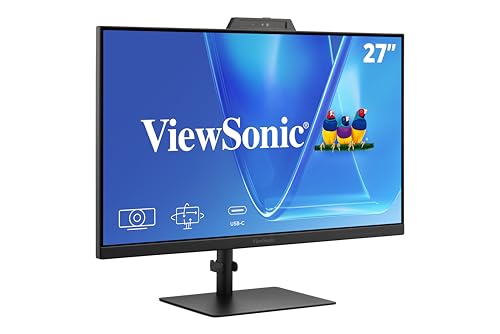
ViewSonic 27-Inch 1080p Conferencing Monitor
Best for: home office video conferencing
- Screen Size
- 27-Inch
- Resolution
- 1080p
- Refresh Rate
- 120Hz
- Ports
- USB-C, HDMI, DisplayPort
- Features
- Built-in Speakers, Webcam
- Use
- Business & Office, Mac, Office, Home Office
This 27-inch ViewSonic monitor pairs 1080p resolution with a 120Hz refresh rate and includes a built-in 5MP IR webcam. You get integrated speakers, a microphone, and USB-C connectivity in one unit. It supports Windows Hello for secure sign-in. This setup suits remote workers who want to reduce desk clutter by combining display and conferencing hardware into a single device.
- Built-in 5MP IR webcam for video calls
- 120Hz refresh rate for smooth motion
- Integrated speakers and microphone
- Windows Hello facial recognition support
- USB-C connectivity for streamlined setup
- 1080p resolution is lower than the 4K and 5K options on this list
- 27-inch size is smaller than the 32-inch and 34-inch ultrawide models listed
- 11.7-pound weight is heavier than the portable 15.6-inch and 16-inch monitors
- You need a single display for video conferencing and daily work
- You want to minimize cables with USB-C connectivity
- You use Windows Hello for quick, secure sign-in
- You require 4K or higher resolution for detailed design work
- You prefer a lightweight, portable monitor for travel
- You need an ultrawide screen for multitasking across multiple windows
Verdict: ViewSonic VG2741V 27-inch Webcam Monitor fits professionals who prioritize integrated conferencing hardware over maximum screen resolution or portability.

ViewSonic 32-Inch 4K UHD IPS Monitor
Best for: 4K media and single-cable office setups
- Screen Size
- 32 Inch
- Resolution
- 3840 x 2160
- Panel Type
- IPS
- Ports
- USB-C, HDMI, DisplayPort
- Features
- HDR
- Use
- Business & Office, Mac, Office, Home Office
This 32-inch ViewSonic monitor delivers 4K UHD resolution on an IPS panel, offering sharp detail and wide viewing angles. It includes HDR10 support for improved contrast and color vibrancy in media content. A 65W USB-C port simplifies connections by handling video, data, and device charging through a single cable. Integrated eye-care features like Flicker-Free technology and a Blue Light Filter help reduce fatigue during long sessions.
- 32-inch 4K UHD (3840 x 2160) IPS display
- 65W USB-C connectivity for video, data, and charging
- HDR10 support for enhanced contrast and color
- Built-in Flicker-Free and Blue Light Filter technologies
- Heavier build at 17.2 pounds compared to portable options
- Standard 60Hz refresh rate limits high-speed gaming performance
- Fixed 16:9 aspect ratio restricts ultrawide multitasking
- You need a large 32-inch screen for detailed work
- You want a single-cable USB-C setup for your laptop
- You prioritize color accuracy and wide viewing angles
- You require a portable monitor under 10 pounds
- You need a refresh rate above 60Hz for gaming
- You prefer an ultrawide 21:9 or 32:9 display
Verdict: ViewSonic 32 Inch 4K IPS Monitor suits professionals and media consumers who value high resolution and clean desk setups. It fits users who need a stable, large display with reliable USB-C connectivity rather than portability or high refresh rates.

ViewSonic 34-Inch 180Hz Curved Gaming Monitor
Best for: immersive ultrawide gaming and multitasking
- Screen Size
- 34 Inch
- Resolution
- 3440 x 1440
- Refresh Rate
- 180Hz
- Response Time
- 1ms
- Aspect Ratio
- 21:9
- Variable Refresh Rate
- FreeSync Premium
This ViewSonic monitor features a 34-inch 1440p QHD VA panel with a 21:9 aspect ratio and a 1500R curve. It delivers a 180Hz refresh rate and 1ms response time for smooth gaming. The stand allows height adjustments for better ergonomics. It supports HDR10 and FreeSync Premium to reduce screen tearing. This setup suits players who want an immersive, wide-field experience for fast-paced titles.
- 180Hz refresh rate for smooth motion
- 3440 x 1440 QHD resolution
- 1500R curved ultrawide design
- Height-adjustable stand for ergonomics
- 12.5 pounds weight is heavier than many portable or smaller desktop monitors
- 1440p resolution is lower than the 4K or 5K options in this guide
- Only HDMI and DisplayPort connections available
- You play fast-paced games like shooters or racing titles
- You want a wide 21:9 screen for multitasking or streaming
- You need a height-adjustable stand for comfort
- You require 4K or 5K resolution for detailed work
- You need USB-C connectivity for your laptop
- You prefer a flat screen over a curved one
Verdict: ViewSonic 34 Inch Ultrawide Curved Monitor is a solid choice for gamers who prioritize speed and immersion. It fits those who want a large, curved display with high refresh rates for competitive play.

ViewSonic 24-Inch 120Hz Dual Monitor Pack
Best for: dual-screen office productivity setups
- Screen Size
- 24"
- Resolution
- 1080p
- Refresh Rate
- 120Hz
- Panel Type
- IPS
- Ports
- HDMI, DisplayPort, VGA
- Use
- Business & Office, Mac, Office, Home Office
This dual-pack includes two 24-inch ViewSonic monitors with 1080p IPS panels and 120Hz refresh rates. The head-only design supports VESA mounting for flexible setups. You get HDMI, DisplayPort, and VGA inputs for broad compatibility. It suits office workers needing extra screen space for spreadsheets or research. The frameless bezels help create a cleaner side-by-side workspace.
- Includes two 24-inch 1080p IPS displays
- 120Hz refresh rate for smooth scrolling
- VESA mountable head-only design
- HDMI, DisplayPort, and VGA connectivity
- 1080p resolution is lower than the 4K and 5K options on this list
- No built-in stand included in the package
- 11.9 pounds total weight for the pair
- You need a dual-screen setup for productivity
- You prefer VESA mounting over traditional stands
- You work with spreadsheets and documents
- You require 4K or higher resolution
- You want monitors with included stands
- You need USB-C connectivity
Verdict: ViewSonic VA2456A Dual 24-Inch 1080p is a practical dual-monitor solution for office environments. It fits users who prioritize screen real estate and mounting flexibility over high resolution.

ViewSonic TD2760 27 Inch Touchscreen
Best for: Point-of-sale and conference touch applications
- Screen Size
- 27 Inch
- Resolution
- 1920 x 1080
- Refresh Rate
- 60Hz
- Ports
- USB, HDMI, DisplayPort, RS232, VGA
- Features
- USB Hub, Touchscreen
- Use
- Point of Sale
The ViewSonic TD2760 is a 27-inch 1080p touch screen monitor designed for interactive environments. It features 10-point multi-touch technology and a 60Hz refresh rate. The display includes an ergonomic dual-hinge stand and supports RS232 connectivity for professional setups. This unit suits users needing robust input control for point-of-sale or conference applications.
- 27-inch 1080p resolution display
- 10-point multi-touch capability
- RS232 serial port support
- Ergonomic dual-hinge stand design
- 1080p resolution is lower than the 4K and 1440p options on this list
- 60Hz refresh rate is slower than the 120Hz and 180Hz gaming models here
- 17.4-pound weight is heavier than the portable 16-inch and 15.6-inch picks
- You need 10-point touch input for point-of-sale systems
- You require RS232 connectivity for industrial or commercial control
- You want a 27-inch display with an adjustable ergonomic stand
- You need 4K or 1440p resolution for detailed graphic work
- You require a high refresh rate for fast-paced gaming
- You want a lightweight portable monitor for travel
Verdict: ViewSonic TD2760 27-Inch Touch Monitor is a specialized display for commercial and interactive use. It fits users who need precise touch control and serial connectivity for point-of-sale or conference setups.

ViewSonic TD2211 22 Inch Touch Monitor
Best for: commercial touch applications
- Screen Size
- 22 Inch
- Resolution
- 1920 x 1080
- Refresh Rate
- 75Hz
- Ports
- HDMI, VGA, DVI-D, USB
- Features
- Touchscreen
- Use
- Business & Office, Office, Point of Sale
The ViewSonic TD2211 is a 22-inch 1080p monitor designed for commercial and industrial use. It features single-point resistive touch technology and a 75Hz refresh rate. The display offers a 20M:1 dynamic contrast ratio for clear images. You will appreciate the flexible connectivity with HDMI, VGA, and USB ports. This model suits environments requiring durable touch input for POS systems or kiosks.
- 22-inch 1080p FHD resolution
- Single-point resistive touch screen
- 75Hz refresh rate
- Multiple connectivity options including HDMI and VGA
- Lower 1080p resolution compared to 4K or 2K models on this list
- Single-point touch limits multi-touch gesture support
- 9.6-pound weight is heavier than portable alternatives
- You need a durable touch interface for industrial or commercial applications
- You require a 22-inch display for point-of-sale systems
- You want a monitor with single-point resistive touch reliability
- You require multi-touch gestures for interactive presentations
- You need a high-resolution 4K or 5K display for design work
- You prefer a lightweight portable monitor for travel
Verdict: ViewSonic TD2211 22-Inch Touch Monitor is a specialized tool for commercial settings. It fits businesses needing reliable single-point touch input for kiosks or POS systems rather than general desktop use.

ViewSonic 27-Inch 4K ColorPro Monitor
Best for: Professional photo and video editing
- Screen Size
- 27 Inch
- Resolution
- 3840 x 2160
- Panel Type
- IPS
- Ports
- USB-C, HDMI, DisplayPort
- Features
- USB Hub
- Use
- Photo & Video Editing
This 27-inch ViewSonic VP2756-4K monitor is built for professional photo and video editing. It features a 4K UHD IPS panel with 100% sRGB coverage and Pantone validation. Factory calibration ensures Delta E<2 accuracy for precise color reproduction. You get 60W USB-C charging and versatile connectivity via HDMI and DisplayPort. The ergonomic stand allows height, tilt, swivel, and rotation adjustments. This display suits creators who need reliable color fidelity and a clean, single-cable desk setup.
- 4K UHD resolution for high-detail editing workflows
- 100% sRGB and Rec.709 color coverage
- Pantone Validated for professional color fidelity
- Delta E<2 factory calibration accuracy
- 60W USB-C charging and data connectivity
- 60Hz refresh rate limits motion smoothness
- 15.1-pound weight adds desk bulk
- 27-inch size is smaller than 32-inch options
- You require Pantone validated color accuracy
- You want a single-cable USB-C setup
- You need full ergonomic stand adjustments
- You need a high refresh rate for gaming
- You prefer a larger 32-inch screen
- You want an OLED display panel
Verdict: ViewSonic 27-Inch 4K ColorPro Monitor delivers essential color science for editors who prioritize accuracy over speed. It fits professionals who value Pantone validation and a sturdy, adjustable stand.

ViewSonic TD2223 22-Inch Touch Monitor
Best for: Retail POS and kiosk touch applications
- Screen Size
- 22 Inch
- Resolution
- 1920x1080p
- Refresh Rate
- 75Hz
- Ports
- HDMI, VGA, DVI, USB Hub
- Features
- USB Hub, Touchscreen
- Use
- Point of Sale
This 22-inch 1080p monitor features 10-point infrared touch technology and a 75Hz refresh rate. It includes a 7H scratch-resistant surface and flicker-free display for reduced eye strain. The unit weighs 9.9 pounds and connects via HDMI and VGA. It suits retail, POS, and kiosk applications where durable, multi-touch interaction is required.
- 10-point infrared multi-touch capability
- 7H scratch-resistant screen surface
- 75Hz refresh rate
- Flicker-free technology with blue light filter
- 1080p resolution is lower than the 4K and 5K displays on this list
- 9.9-pound weight is heavier than the portable monitors included here
- HDMI and VGA ports only, lacking modern USB-C connectivity
- You need a durable touchscreen for retail or kiosk use
- You require 10-point multi-touch input
- You want a flicker-free display for extended viewing
- You need 4K or higher resolution
- You require USB-C connectivity
- You want a lightweight portable monitor
Verdict: ViewSonic TD2223 22-Inch Touch Monitor is a sturdy option for retail or kiosk setups needing 10-point touch. It fits environments where durability and multi-touch input matter more than high resolution or portability.

ViewSonic 27-Inch 5K IPS Monitor
Best for: Mac creatives needing 5K color accuracy
- Screen Size
- 27 Inch
- Resolution
- 5120 x 2880
- Panel Type
- IPS
- Ports
- Thunderbolt 4, USB-C, HDMI, DisplayPort
- Features
- HDR, Height-Adjustable Stand, Power Delivery
- Use
- Mac
This 27-inch IPS display delivers 5K resolution for Mac users who need precise color. It features 100% sRGB and 99% DCI-P3 coverage, validated by Pantone. Thunderbolt 4 connectivity provides 40 Gbps data transfer and 100W power delivery. You can daisy chain up to two 5K monitors for a multi-display setup. The stand offers height, tilt, swivel, and rotate adjustments. This monitor suits creative professionals requiring high pixel density and color accuracy.
- 5K resolution (5120 x 2880) for sharp detail
- 100W Thunderbolt 4 power delivery for single-cable charging
- Pantone Validated with 99% DCI-P3 color coverage
- Daisy chain support for up to two 5K monitors
- Heavier at 14 pounds compared to portable options
- 27-inch size limits desk space for smaller setups
- Fixed 60Hz refresh rate in specifications
- You use a Mac and need 5K clarity
- You require Pantone validated color accuracy
- You want to daisy chain multiple high-res displays
- You need a portable or lightweight monitor
- You require a high refresh rate for gaming
- You prefer a smaller 24-inch 4K display
Verdict: ViewSonic 27-Inch 5K Thunderbolt 4 Monitor is a specialized tool for Mac creatives who prioritize color fidelity and resolution over portability. It fits users building a stationary, high-end multi-monitor workstation.
Specifications side by side

| Spec | ViewSonic 27-Inch 4K UHD IPS Monitor | ViewSonic 15.6-Inch 1080p Touchscreen Portable Monitor | ViewSonic 27-Inch 4K USB-C Monitor | ViewSonic 15.6-Inch 4K OLED Portable Monitor | ViewSonic 16-Inch 1600p Portable Monitor | ViewSonic 32-Inch 1440p Curved Gaming Monitor | ViewSonic 27-Inch 1080p Conferencing Monitor | ViewSonic 32-Inch 4K UHD IPS Monitor | ViewSonic 34-Inch 180Hz Curved Gaming Monitor | ViewSonic 24-Inch 120Hz Dual Monitor Pack | ViewSonic TD2760 27 Inch Touchscreen | ViewSonic TD2211 22 Inch Touch Monitor | ViewSonic 27-Inch 4K ColorPro Monitor | ViewSonic TD2223 22-Inch Touch Monitor | ViewSonic 27-Inch 5K IPS Monitor |
|---|---|---|---|---|---|---|---|---|---|---|---|---|---|---|---|
| Screen Size | 27 Inch | 15.6 Inch | 27 Inch | 15.6 Inch | 16" | 32 Inch | 27-Inch | 32 Inch | 34 Inch | 24" | 27 Inch | 22 Inch | 27 Inch | 22 Inch | 27 Inch |
| Resolution | 3840 x 2160 | 1920 x 1080 | 3840 x 2160 | 3840 x 2160 | – | 2560 x 1440 | 1080p | 3840 x 2160 | 3440 x 1440 | 1080p | 1920 x 1080 | 1920 x 1080 | 3840 x 2160 | 1920x1080p | 5120 x 2880 |
| Refresh Rate | – | – | – | – | – | 180Hz | 120Hz | – | 180Hz | 120Hz | 60Hz | 75Hz | – | 75Hz | – |
| Panel Type | IPS | – | IPS | OLED | – | – | – | IPS | – | IPS | – | – | IPS | – | IPS |
| Response Time | – | – | – | 0.05ms | – | 1ms | – | – | 1ms | – | – | – | – | – | – |
| Aspect Ratio | – | – | – | – | 16:10 | – | – | – | 21:9 | – | – | – | – | – | – |
| Variable Refresh Rate | – | – | – | – | – | AMD FreeSync | – | – | FreeSync Premium | – | – | – | – | – | – |
| Ports | Dual HDMI, DisplayPort | USB-C, Mini HDMI | USB-C, HDMI, DisplayPort | Mini-HDMI, dual USB-C | Dual USB-C | HDMI 1.4, DisplayPort | USB-C, HDMI, DisplayPort | USB-C, HDMI, DisplayPort | HDMI, DisplayPort | HDMI, DisplayPort, VGA | USB, HDMI, DisplayPort, RS232, VGA | HDMI, VGA, DVI-D, USB | USB-C, HDMI, DisplayPort | HDMI, VGA, DVI, USB Hub | Thunderbolt 4, USB-C, HDMI, DisplayPort |
| Features | HDR | Built-in Speakers, Touchscreen | HDR, Built-in Speakers, Power Delivery | Built-in Speakers, Power Delivery | Built-in Speakers | HDR, Curved Screen | Built-in Speakers, Webcam | HDR | HDR, Curved Screen, Height-Adjustable Stand | – | USB Hub, Touchscreen | Touchscreen | USB Hub | USB Hub, Touchscreen | HDR, Height-Adjustable Stand, Power Delivery |
| Use | Business & Office, Mac, Office, Home Office | Mac, Travel | Business & Office, Mac, Office, Home Office | Mac | Mac, Travel | Gaming | Business & Office, Mac, Office, Home Office | Business & Office, Mac, Office, Home Office | Gaming | Business & Office, Mac, Office, Home Office | Point of Sale | Business & Office, Office, Point of Sale | Photo & Video Editing | Point of Sale | Mac |
| Size | 27 Inch | 8.8" x 14" x 0.6" | 27 Inch | 15.6-Inch OLED | 9.3" x 14.1" x 0.4" | 16.6" x 27.7" x 4.1" | 27 Inch | 32 Inch | 34 Inch | – | 27 Inch | 12.1" x 20.4" x 2.2" | 27 Inch | 12.5" x 20.5" x 2.4" | 27-Inch 5K |
| Operating System | macOS | macOS | macOS | macOS | macOS | – | Windows | macOS | – | macOS | – | – | – | – | macOS |
| Power Delivery | – | – | – | – | – | – | – | – | – | – | – | – | – | – | 100W PD |
| Dimensions | 2.1 × 24.2 × 14.5 inches | 8.8 × 0.6 × 14 inches | 8.2 × 24.2 × 17.2 inches | 0.6 × 13.9 × 8.78 inches | 0.38 × 14 × 9.25 inches | 10.4 × 27.7 × 20 inches | 8.11 × 24.1 × 21.7 inches | 9.2 × 28.1 × 19.6 inches | 11.4 × 31.8 × 20.9 inches | 2 × 21.2 × 12.4 inches | 9.4 × 17.5 × 26 inches | 9.4 × 20.4 × 14.8 inches | 24.1 × 8.5 × 21.3 inches | 20.5 × 4 × 13.1 inches | 8.26 × 24.1 × 21.4 inches |
| Weight | 12.1 pounds | 2.2 pounds | 8.6 pounds | 1.5 pounds | 2.3 pounds | 11.8 pounds | 11.7 pounds | 17.2 pounds | 12.5 pounds | 11.9 pounds | 17.4 pounds | 9.6 pounds | 15.1 pounds | 9.9 pounds | 14 pounds |
| Color | Black | blue | Black | Black | Black | Black | Black | Black | Black | Black | Black | Black | Black | Black | Black |
| Model | VA2756-4K-MHD | TD1655 | VS19281 | VX1655-4K-OLED | VG1656-2K | VX3228C-2K | VS20457 | VX3267U-4K | VX3418C-2K | VA2456A-MHD_H2 | TD2760 | TD2211 | VP2756-4K | VS18311 | VP2788-5K |
Who ViewSonic Monitors Suit Best

ViewSonic covers a wide range of sizes, from compact 15.6-inch portable screens to large 34-inch ultrawide displays. You can choose between standard flat panels, curved gaming monitors, and specialized touchscreens for commercial use. The brand offers options for various lighting needs, including HDR support and OLED technology for deep blacks. However, the current lineup lacks dedicated 4K gaming monitors with high refresh rates and does not include monitors with built-in KVM switching. If you need a stationary 5K display for Mac or a rugged kiosk screen, ViewSonic has a specific fit for you.
If you prefer a 21:9 aspect ratio for multitasking, evaluate the best ViewSonic ultrawide monitors.
How to choose the right ViewSonic monitor
Match resolution to screen size
Resolution determines pixel density and sharpness. For a 27-inch display, 4K UHD offers high clarity for text and media, as seen in the ViewSonic 27-Inch 4K UHD IPS Monitor. If you prefer a larger canvas, consider the 32-inch 4K model for more workspace without sacrificing detail. For portable screens, 1080p is standard, but the 15.6-inch 4K OLED option provides exceptional sharpness in a compact form. Choose 4K for stationary desks and 1080p or 1440p for travel to balance weight and clarity.
Select panel type for color needs
Panel technology affects viewing angles and color accuracy. IPS panels, found in the ViewSonic 27-Inch 4K UHD IPS Monitor, provide wide viewing angles and consistent colors, making them ideal for office work and general media. VA panels, like those in the 34-inch curved gaming monitor, offer deeper blacks and higher contrast, which benefits immersive gaming. OLED technology, used in the 15.6-inch 4K OLED portable monitor, delivers perfect blacks and vibrant hues. Match the panel to your primary activity, whether it is color-critical editing or fast-paced gaming.
Check refresh rate for motion
Refresh rate measures how many times the screen updates per second. Standard office monitors typically run at 60Hz to 120Hz, such as the ViewSonic 27-Inch 1080p Conferencing Monitor. For gaming, higher rates like 180Hz, found in the 32-inch 1440p Curved Gaming Monitor, reduce motion blur and stuttering. This makes fast-moving scenes smoother. If you are a casual gamer or primarily use your screen for spreadsheets, a standard refresh rate is sufficient. Reserve high refresh rates for competitive gaming or fast-paced action titles.
Use ports for connectivity
Ports determine how you connect devices. HDMI and DisplayPort are standard for video input. USB-C offers video, data, and charging in one cable. The ViewSonic 27-Inch 4K USB-C Monitor supports Power Delivery, allowing you to charge a laptop while displaying video. The 27-Inch 5K Thunderbolt 4 Monitor provides even faster data transfer. If you have a modern laptop, prioritize USB-C or Thunderbolt 4 for a cleaner desk. Traditional HDMI and DisplayPort connections remain reliable for desktop PCs and consoles.
Consider aspect ratio for multitasking
Aspect ratio defines the shape of the screen. Standard monitors use a 16:9 ratio, suitable for media and general use. Ultrawide monitors, like the 34-inch 180Hz Curved Gaming Monitor, feature a 21:9 aspect ratio. This wider format provides more horizontal space, which is excellent for multitasking, coding, or immersive gaming. It mimics the experience of using two side-by-side displays. Choose a standard aspect ratio for media consumption and a 21:9 ultrawide if you need extra horizontal workspace for productivity or simulation games.
Frequently asked questions
Which ViewSonic monitor is best for general desktop productivity?
The ViewSonic 27-Inch 4K UHD IPS Monitor is the top pick for desktop setups. It features a 4K UHD resolution and IPS panel for clear image quality. The display includes HDMI and DisplayPort connections along with HDR support. This model fits users who prioritize standard connectivity and visual clarity over portability or USB-C convenience.
What is the best ViewSonic monitor for Mac users needing high resolution?
The ViewSonic 27-Inch 5K IPS Monitor is designed for Mac creatives requiring high color fidelity. It offers a 5K resolution and includes Thunderbolt 4 connectivity. The monitor provides 100W power delivery and features an IPS panel. This setup is ideal for stationary workstations where maximum pixel density and accurate color reproduction are essential.
Which ViewSonic portable monitor has the highest resolution?
The ViewSonic 15.6-Inch 4K OLED Portable Monitor offers the highest resolution among portable options. It features a 4K UHD OLED panel for deep contrast and sharp details. The device weighs only 1.5 pounds and includes USB-C and HDMI ports with power delivery. It is ideal for travelers who need a compact, high-quality secondary display.
Does ViewSonic make a monitor with a built-in webcam?
Yes, the ViewSonic VG2741V 27-inch Webcam Monitor includes an integrated camera. It provides 1080p FHD resolution and a 120Hz refresh rate. The display features HDMI, DisplayPort, and USB-C ports with built-in speakers. This model suits professionals who prioritize integrated conferencing hardware for home office video calls rather than maximum screen resolution.
Which ViewSonic monitor is best for immersive gaming?
The ViewSonic 34-Inch Ultrawide Curved Monitor is designed for immersive gaming experiences. It features a 1440p QHD VA panel with a 180Hz refresh rate and FreeSync technology. The 21:9 aspect ratio and curved screen enhance visual engagement. This model is ideal for competitive play and multitasking, offering speed and a wide field of view.
Are there ViewSonic monitors suitable for commercial touch applications?
Yes, ViewSonic offers several touch monitors for commercial use. The TD2760 provides 1080p FHD resolution with a touchscreen and USB hub for point-of-sale or conference setups. The TD2211 and TD2223 models also feature 1080p FHD displays with touchscreen capabilities. These are built for environments requiring reliable touch input, such as retail kiosks.
Which ViewSonic monitor is best for photo and video editing?
The ViewSonic 27-Inch 4K ColorPro Monitor is tailored for professional editors. It delivers 4K UHD resolution and includes USB-C connectivity with a USB hub. The monitor is designed for color accuracy, featuring Pantone validation. It fits professionals who value precise color science and a sturdy, adjustable stand for their creative workflow.
What is the best ViewSonic monitor for a clean desk setup?
The ViewSonic 32-Inch 4K UHD IPS Monitor is ideal for clean desk setups. It offers 4K UHD resolution and includes USB-C connectivity alongside HDMI and DisplayPort. The IPS panel ensures consistent viewing angles, and the display supports HDR. This model suits users who need a large, stable display with reliable single-cable connectivity for office or media use.
See also