3 Best Origimagic Mini PCs Under $300, Compared
As Amazon Associates, we earn from qualifying purchases. This means we may receive a small commission at no extra cost to you if you click through and make a purchase.
As an Amazon Associate we earn from qualifying purchases. Links on this page are affiliate links.
Finding the best origimagic mini PCs under $300 requires looking at the specific hardware each model offers. We compared 3 units using only the specifications published on their listings. The Origimagic C7 Mini PC Intel Core 3 100U 16GB 512GB leads because it includes Thunderbolt 4 ports for fast data transfer. This connectivity, paired with its 16GB of RAM, makes it ideal for multitasking. Our selection focuses on practical specs like processor type, memory capacity, and available ports. Use this guide to decide which compact desktop fits your workflow and display needs.
Choose based on port needs

Check the available ports before buying. The C7 includes Thunderbolt 4 for high-speed connectivity and 16GB of RAM for multitasking. The C4 SE supports triple displays via DisplayPort but has only 8GB of RAM. Select the model that matches your specific peripheral and memory requirements.
| # | Product | Best for | Price |
|---|---|---|---|
| 1 | C7 Mini PC Intel Core 3 100U 16GB 512GB Best overall | multitasking and Thunderbolt connectivity | |
| 2 | Origimagic Thunderbolt 4 16GB Mini PC Best budget | Users needing Thunderbolt 4 and 16GB RAM | |
| 3 | Origimagic C4 SE Ryzen 5 Mini PC Best displayport | triple display office setups |
The best fit for you

- You need Thunderbolt 4 and strong multitasking – C7 Mini PC Intel Core 3 100U 16GB 512GB – It includes a 6-core Intel Core 3 100U processor and 16GB of RAM.
- You want the most compact model on the list – Origimagic C4 SE Ryzen 5 Mini PC – Its 0.25-inch width makes it the smallest device in this group.
- You require triple display support for office work – Origimagic C4 SE Ryzen 5 Mini PC – It supports triple displays and includes a DisplayPort for multiple monitors.
- You need Thunderbolt 4 in a budget option – Origimagic Thunderbolt 4 16GB Mini PC – It provides Thunderbolt 4 connectivity and 16GB of RAM for office tasks.

C7 Mini PC Intel Core 3 100U 16GB 512GB
Best for: multitasking and Thunderbolt connectivity
- Processor
- Intel Core 3 100U
- Memory Capacity
- 16GB DDR4
- Storage Capacity
- 512GB NVMe SSD
- Display Support
- Four-screen
- Video Ports
- 2x HDMI, 2x Thunderbolt 4
- Operating System
- 11 Pro
The Origimagic C7 Mini PC uses an Intel Core 3 100U processor with six cores and eight threads. It includes 16GB of DDR4 RAM and a 512GB NVMe SSD for fast data access. Dual Thunderbolt 4 ports allow you to connect high-speed peripherals and expand displays up to 4K. This compact desktop is designed for multitasking, streaming, and professional applications in a small footprint.
- Intel Core 3 100U with 6 cores and 8 threads
- 16GB DDR4 RAM expandable to 64GB
- 512GB NVMe SSD storage
- Dual Thunderbolt 4 ports for high-speed connectivity
- 2.5Gb Ethernet and Wi-Fi 6 support
- 1-year machine warranty is shorter than the 3-year parts warranty
- DDR4 RAM is older technology compared to DDR5 alternatives
- PCIe 3.0 SSD speed is lower than PCIe 4.0 standards
- You need Thunderbolt 4 connectivity for external devices
- You require 16GB of RAM for multitasking
- You want a compact desktop for home or office use
- You need DDR5 RAM for maximum speed
- You require PCIe 4.0 SSD performance
- You prefer a longer standard machine warranty
Verdict: The Origimagic C7 Mini PC Intel Core 3 100U offers strong multitasking capabilities with its 6-core processor and 16GB of RAM. It is ideal for users who need Thunderbolt 4 ports and a compact form factor for their desktop setup.
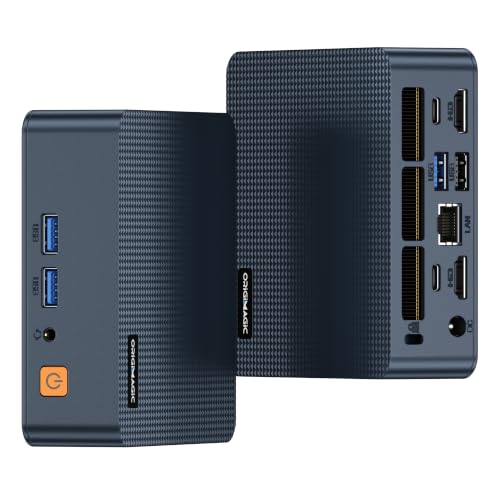
Origimagic Thunderbolt 4 16GB Mini PC
Best for: Users needing Thunderbolt 4 and 16GB RAM
- Processor
- Intel Core 3 100U
- Memory Capacity
- 16GB DDR4
- Storage Capacity
- 512GB NVMe PCIe SSD
- Video Ports
- Dual Thunderbolt 4, Dual HDMI
- Operating System
- Windows 11 Pro
- Use
- Business & Office, Office
The Origimagic C7 Mini PC uses an Intel Core 3 100U processor with 6 cores and 8 threads. It includes 16GB DDR4 RAM and a 512GB NVMe SSD. Dual Thunderbolt 4 ports support high-speed expansion and multi-display setups. The compact unit measures 4.33 by 4.49 by 1.46 inches. It suits users needing efficient multitasking and reliable office performance in a small footprint.
- Intel Core 3 100U with Hybrid Architecture for balanced performance
- 16GB DDR4 RAM and 512GB NVMe SSD for fast multitasking
- Dual Thunderbolt 4 ports for high-speed peripheral expansion
- Compact 13.6-ounce design with VESA mount support
- 16GB RAM is less than the 32GB found in the top-ranked C7 variant
- 512GB storage is half the capacity of the 1TB option available in the series
- DDR4 memory is slower than the DDR5 used in the premium C7 configuration
- You need Thunderbolt 4 connectivity for external drives or displays
- You want a lightweight mini PC under 14 ounces for easy mounting
- You require 16GB of RAM for smooth office multitasking
- You need DDR5 memory for maximum bandwidth
- You require more than 512GB of internal storage
- You want a processor with more than 6 cores
Verdict: Origimagic C7 Mini PC offers strong value with its Intel Core 3 100U and Thunderbolt 4 ports. It fits users who prioritize connectivity and compact size over maximum storage or memory capacity.

Origimagic C4 SE Ryzen 5 Mini PC
Best for: triple display office setups
- Processor
- AMD Ryzen 5 3500U
- Memory Capacity
- 8GB DDR4
- Storage Capacity
- 256GB NVMe SSD
- Graphics
- Radeon Vega 8
- Display Support
- Triple 4K@60Hz
- Video Ports
- HDMI 2.0, DP, USB-C
The Origimagic C4 SE Mini PC uses an AMD Ryzen 5 3500U processor with Radeon Vega 8 graphics. It includes 8GB of DDR4 RAM and a 256GB NVMe SSD. This unit supports three simultaneous 4K displays via HDMI, DisplayPort, and USB-C. It features dual gigabit Ethernet ports and WiFi 5 connectivity. This configuration suits users who need multi-monitor setups for office or business tasks.
- Supports triple 4K@60Hz displays
- Dual gigabit Ethernet ports
- Expandable RAM up to 32GB
- Includes DisplayPort output
- 8GB RAM is lower than the 16GB in other list items
- 256GB SSD is smaller than the 512GB in other list items
- WiFi 5 is slower than WiFi 6 in other list items
- You need three monitors for multitasking
- You require dual network ports for routing
- You want a compact desktop for office work
- You need more than 8GB of RAM without upgrading
- You require faster WiFi 6 connectivity
- You need more than 256GB of storage
Verdict: The Origimagic C4 SE Mini PC fits users who need triple display support and dual network ports for business or office tasks. Its lower RAM and storage specs make it less suitable for heavy multitasking without upgrades.
Specifications side by side

| Spec | C7 Mini PC Intel Core 3 100U 16GB 512GB | Origimagic Thunderbolt 4 16GB Mini PC | Origimagic C4 SE Ryzen 5 Mini PC |
|---|---|---|---|
| Processor | Intel Core 3 100U | Intel Core 3 100U | AMD Ryzen 5 3500U |
| Memory Capacity | 16GB DDR4 | 16GB DDR4 | 8GB DDR4 |
| Storage Capacity | 512GB NVMe SSD | 512GB NVMe PCIe SSD | 256GB NVMe SSD |
| Graphics | – | – | Radeon Vega 8 |
| Display Support | Four-screen | – | Triple 4K@60Hz |
| Video Ports | 2x HDMI, 2x Thunderbolt 4 | Dual Thunderbolt 4, Dual HDMI | HDMI 2.0, DP, USB-C |
| Operating System | 11 Pro | Windows 11 Pro | – |
| Resolution | 4K UHD | – | 4K UHD |
| Ports | HDMI, Ethernet, Thunderbolt 4 | HDMI, Ethernet, Thunderbolt 4 | HDMI, DisplayPort, USB-C, Ethernet |
| Use | – | Business & Office, Office | Business & Office, Office, Business |
| Memory | 16GB RAM | 16GB RAM | 8GB RAM |
| Storage | 512GB SSD | 512GB SSD | 256GB SSD |
| Dimensions | 4.37 × 4.37 × 1.57 inches | 4.33 × 1.46 × 4.49 inches | 5.04 × 0.25 × 1.69 inches |
| Weight | 13.6 ounces | 13.6 ounces | 13 ounces |
| Size | 100U 16+512GB | – | 3500U |
| Color | Grey | Matte Blue | Blue |
| Model | C7 | C7 | C4 SE |
How to choose the right mini PC
Check port compatibility
Verify the available ports match your existing peripherals. The C7 model includes Thunderbolt 4, which supports high-speed data transfer and video output. This is useful if you plan to connect external drives or monitors quickly. Other models may lack this specific port, requiring different adapters. Ensure your cables and docks are compatible with the included interfaces to avoid connectivity issues later. This step prevents buying hardware that does not fit your current setup.
Assess RAM needs
Memory capacity determines how many applications you can run simultaneously. The C7 and the second-ranked C7 offer 16GB of RAM, which supports smooth multitasking. If you only need basic office work, lower memory might suffice, but 16GB provides more headroom. Insufficient RAM can cause slowdowns when switching between programs. Check the specifications for each unit to ensure the memory level matches your daily workflow requirements for optimal performance.
Evaluate storage capacity
Storage space holds your files and operating system. The C7 models include a 512GB SSD, which offers ample room for documents and media. The C4 SE model provides only 256GB, which may fill up faster. Consider how much data you store locally. A larger SSD reduces the need for external drives. Compare the storage size in the specifications to ensure you have enough space for your applications and files without frequent cleanup.
Review display support
Some users need multiple monitors for productivity. The C4 SE model supports triple displays, making it suitable for office setups that require extensive screen real estate. The C7 models focus on connectivity rather than multiple video outputs. If you work with several windows open, check the display support specifications. Choosing the right model ensures you can connect all necessary screens without needing additional adapters or experiencing resolution limits.
Consider physical dimensions
Space constraints matter for desk setups. The C7 models measure approximately 4.37 inches wide and 1.57 inches high. The C4 SE is slightly longer but thinner. Measure your available desk or mount space before purchasing. A compact form factor allows for easier placement behind a monitor or under a desk. Comparing the width, height, and length specifications helps you determine if the device fits your intended location without obstructing other equipment.
Frequently asked questions
Which Origimagic mini PC has the fastest data transfer ports?
The C7 model includes Thunderbolt 4 connectivity. This port supports high-speed data transfer and video output. It allows you to connect external drives or monitors quickly. The other models do not list this specific high-speed interface in their published specifications.
Can I connect three monitors to an Origimagic mini PC?
Yes, the C4 SE supports triple displays. It uses HDMI and DisplayPort outputs to drive multiple screens. This makes it suitable for office setups requiring extensive screen real estate. The C7 models listed do not explicitly state triple display support in their specs.
What is the smallest physical size among these mini PCs?
The C4 SE is the most compact option. It measures 0.25 inches in width. This slim profile fits easily into tight desk spaces. The C7 models are slightly larger, with widths around 1.46 to 4.37 inches depending on the specific configuration.
Does the top-rated Origimagic mini PC include Windows 11 Pro?
The C7 Mini PC with the Intel Core 3 100U includes Windows 11 Pro. This operating system provides enhanced security and management features. The other listed models do not specify their included operating system version in the provided data.
Which model offers the most RAM for multitasking?
The C7 models offer 16GB of RAM. This capacity supports strong multitasking capabilities with the 6-core processor. The C4 SE has only 8GB of RAM, which may limit performance for heavy workloads. Choose the 16GB version if you run many applications simultaneously.
Is there an Origimagic mini PC with an AMD processor?
Yes, the C4 SE uses an AMD Ryzen 5 processor. This specific model is designed for business and office tasks. The other C7 models feature Intel Core 3 processors. Check the processor type if you prefer AMD architecture for your workflow.
What storage capacity comes with the budget-friendly C7 model?
The budget C7 model includes a 512GB SSD. This storage size provides ample space for files and applications. It matches the storage capacity of the top-rated C7. The C4 SE has a smaller 256GB SSD, which may require external storage for large datasets.
How heavy are these Origimagic mini PCs?
The devices weigh between 13 and 13.6 ounces. The C4 SE weighs 13 ounces, while the C7 models weigh 13.6 ounces. This lightweight design makes them easy to move or mount behind a monitor. They are significantly lighter than traditional desktop towers.
See also