Best Monitors for Office in 2026: 15 Picks Ranked by Specs
As Amazon Associates, we earn from qualifying purchases. This means we may receive a small commission at no extra cost to you if you click through and make a purchase.
As an Amazon Associate we earn from qualifying purchases. Links on this page are affiliate links.
Choosing the best monitors for office work requires matching your desk setup to specific technical needs. We compared 15 options ranked by their published specifications. The BenQ 27-Inch 1080p USB-C IPS Monitor leads because it offers a height-adjustable stand and integrated USB hub for ergonomic flexibility. These picks focus on panel types, connectivity, and physical dimensions. This guide helps you decide which display fits your workflow and space.
Choose Resolution Based on Screen Size

Your desk depth dictates the best resolution. For 27-inch screens, 1080p offers sufficient clarity for general tasks, as seen in the BenQ GW2786TC. If you sit farther away or need sharper text for spreadsheets, step up to 4K models like the ViewSonic VX2776-4K-MHDU. Higher pixel density ensures legible documents without straining your eyes during long workdays.
| # | Product | Best for | Price |
|---|---|---|---|
| 1 | BenQ 27-Inch 1080p USB-C IPS Monitor Best overall | Office workers needing built-in mic and USB-C charging | |
| 2 | KTC 32-Inch 4K UHD White VA Monitor Also great | office desks needing large 4K clarity | |
| 3 | ViewSonic 27-Inch 4K UHD IPS Monitor Also great | Sharp 4K text and clean multi-monitor setups | |
| 4 | ViewSonic 27-Inch 4K USB-C Monitor Best power delivery | Office setups needing 4K clarity and USB-C charging | |
| 5 | CUNPU 27" Touchscreen 1080p 60Hz Monitor Best business | touch-based office presentations and data entry | |
| 6 | FYHXele 32 Inch Touchscreen Monitor Best premium | Touch-enabled large screen office work | |
| 7 | Thinlerain 27-Inch 4K 160Hz Webcam Monitor Also great | Office users needing 4K clarity and a pop-up webcam | |
| 8 | Dell P2725H 27" IPS Office Monitor Best budget | Standard office tasks with eye comfort focus | |
| 9 | ViewSonic 27-Inch 1080p Conferencing Monitor Best windows | Video conferencing and Windows Hello authentication | |
| 10 | ViewSonic 32-Inch 4K UHD IPS Monitor Also great | Office workers needing large 4K screens with USB-C power delivery | |
| 11 | Acer Nitro 49" DQHD 120Hz Curved Monitor Also great | Wide single-screen office multitasking | |
| 12 | Kado 27" Curved Triple Monitor Best 75hz | multi-monitor office setups with limited desk space | |
| 13 | ViewSonic 24-Inch 120Hz Dual Monitor Pack Also great | Dual-screen office productivity with 120Hz | |
| 14 | Gawfolk 32 Inch 4K Curved Monitor Best freesync | Office workers wanting large 4K curved displays | |
| 15 | ViewSonic TD2465 24 Inch Touch Monitor Also great | Touch-enabled office tasks and Mac setups |
The best fit for you

- You need built-in mic and USB-C charging – BenQ 27-Inch 1080p USB-C IPS Monitor – It features a built-in microphone and USB-C port for charging.
- You want large 4K clarity for office desks – KTC 32-Inch 4K UHD White VA Monitor – It provides 32-inch 4K UHD resolution for sharp visuals.
- You require touch input for presentations – CUNPU 27" Touchscreen 1080p 60Hz Monitor – It includes a touchscreen for direct interaction during workflows.
- You need video conferencing hardware – ViewSonic 27-Inch 1080p Conferencing Monitor – It has a built-in webcam and supports Windows Hello.
Is the Office designation worth it?
The Office tag signals features tailored for professional environments. The BenQ GW2786TC includes a height-adjustable stand and USB hub for ergonomic flexibility. The ViewSonic VG2741V adds Windows Hello authentication for secure access. The CUNPU TUH1AW-7727Y offers direct touch input for data entry. These monitors prioritize connectivity and interaction over raw pixel density or high refresh rates, ensuring a streamlined workflow for daily business tasks.
Worth it if
- You need built-in authentication like Windows Hello
- You require touch input for presentations
- You want ergonomic stands with USB hubs
Skip it if
- You prioritize high refresh rates for gaming
- You need maximum pixel density for design
- You prefer minimal bezels for multi-monitor arrays

BenQ 27-Inch 1080p USB-C IPS Monitor
Best for: Office workers needing built-in mic and USB-C charging
- Use
- Business & Office, Office
- Screen Size
- 27 Inch
- Resolution
- 1080p
- Refresh Rate
- 100Hz
- Panel Type
- IPS
- Ports
- USB-C
This BenQ monitor offers a 27-inch IPS panel with 1080p resolution and a 100Hz refresh rate. It includes a built-in noise-cancellation microphone and 65W USB-C charging. The stand provides height adjustment for ergonomic comfort. Brightness Intelligence Tech adjusts settings automatically. It suits office users who need clear audio and flexible positioning for daily tasks.
- 100Hz refresh rate for smoother visuals
- 65W USB-C charging capability
- Built-in noise-cancellation microphone
- Height-adjustable stand with tilt and pivot
- 1080p resolution is lower than the 4K options on this list
- 9.1 pounds weight is heavier than many 27-inch competitors
- Single 27-inch size option available in this variation
- You need a microphone for video calls without extra hardware
- You prefer height-adjustable ergonomics for long work sessions
- You want 65W charging for your laptop via a single cable
- You require 4K UHD resolution for detailed graphic work
- You need a curved display for immersive viewing
- You prefer a lighter monitor under 8 pounds
Verdict: BenQ GW2786TC 27 Inch 1080p IPS Monitor fits office workers who prioritize integrated audio and ergonomic flexibility over high pixel density.

KTC 32-Inch 4K UHD White VA Monitor
Best for: office desks needing large 4K clarity
- Use
- Business & Office, Office, Home Office
- Screen Size
- 32"
- Resolution
- 3840 x 2160
- Refresh Rate
- 60Hz
- Ports
- HDMI 2.0, DP 1.4
- Panel Type
- VA
The KTC H32U6 is a 32-inch 4K UHD monitor with a VA panel. It offers 99% sRGB color coverage and HDR10 support. The stand adjusts for height, tilt, and swivel. It connects via HDMI and DisplayPort. This white monitor suits office desks that need large, clear screens for detailed work.
- 3840×2160 4K UHD resolution
- 99% sRGB wide color gamut
- Full ergonomic adjustable stand
- HDR10 technology support
- VA panel has slower response times than IPS panels
- Only includes HDMI and DisplayPort inputs
- 3000:1 contrast ratio is lower than some competitors
- You need a large 32-inch screen for office tasks
- You prefer a white monitor to match modern decor
- You want full ergonomic adjustability for neck comfort
- You require USB-C connectivity for single-cable setup
- You need IPS panel viewing angles for side viewing
- You want a curved display for immersive work
Verdict: KTC H32U6 32-inch 4K White Monitor delivers sharp 4K visuals and flexible positioning. It fits office users who prioritize screen real estate and color accuracy over high refresh rates.

ViewSonic 27-Inch 4K UHD IPS Monitor
Best for: Sharp 4K text and clean multi-monitor setups
- Use
- Business & Office, Mac, Office, Home Office
- Screen Size
- 27 Inch
- Resolution
- 3840 x 2160
- Panel Type
- IPS
- Ports
- Dual HDMI, DisplayPort
- Features
- HDR
The ViewSonic VA2756-4K-MHD is a 27-inch 4K UHD monitor designed for office use. It features an IPS panel with HDR10 support and dual HDMI plus DisplayPort connectivity. The 400-nit brightness and Eye Care technology help reduce strain during long work sessions. Its ultra-thin bezels allow for clean multi-monitor setups. This model suits users who need sharp text and reliable daily performance without extra smart features.
- 4K UHD resolution for sharp text and detail
- IPS panel with wide viewing angles
- HDR10 support for better contrast
- Dual HDMI and DisplayPort inputs
- Eye Care technology for reduced strain
- Only 400-nit brightness compared to higher-end office displays
- Fixed stand with no height adjustment listed in specs
- Heavier at 12.1 pounds than some lighter 27-inch models
- You need a dedicated second screen for productivity
- You prefer a clean look with thin bezels
- You connect via HDMI or DisplayPort
- You require built-in webcam or USB hub
- You need height-adjustable stand
- You want a curved display
Verdict: ViewSonic 27 Inch 4K Office Monitor delivers clear 4K visuals and reliable connectivity for daily tasks. It fits well as a primary or secondary screen for users who value sharp text and a slim profile over advanced ergonomic adjustments.

ViewSonic 27-Inch 4K USB-C Monitor
Best for: Office setups needing 4K clarity and USB-C charging
- Use
- Business & Office, Mac, Office, Home Office
- Screen Size
- 27 Inch
- Resolution
- 3840 x 2160
- Panel Type
- IPS
- Ports
- USB-C, HDMI, DisplayPort
- Features
- HDR, Built-in Speakers, Power Delivery
This 27-inch ViewSonic monitor delivers 4K UHD resolution on an IPS panel. It features HDR10 support for richer visuals. The USB-C port provides 65W power delivery, simplifying your desk setup. Flicker-free technology and a blue light filter help reduce eye strain during long office sessions. You get versatile connectivity with HDMI and DisplayPort inputs alongside the USB-C connection.
- 4K UHD (3840 x 2160) resolution
- 65W USB-C power delivery
- IPS panel with HDR10 support
- Flicker-free and blue light filter
- 65W power delivery is lower than the 90W+ options in this list
- Built-in speakers are basic for professional audio needs
- 27-inch size limits screen real estate compared to 32-inch competitors
- You need a single-cable solution for your laptop
- You prioritize sharp 4K text for office work
- You want eye-care features for long hours
- You require high refresh rates for gaming
- You need more than 65W of charging power
- You prefer a larger 32-inch display
Verdict: ViewSonic VX2776-4K-MHDU 27" 4K USB-C suits office workers who want a clean desk with 4K clarity and sufficient laptop charging. It is a solid choice for those who value eye comfort and standard connectivity.

CUNPU 27" Touchscreen 1080p 60Hz Monitor
Best for: touch-based office presentations and data entry
- Use
- Business & Office, Office, Business
- Screen Size
- 27"
- Resolution
- 1080P
- Refresh Rate
- 60 Hz
- Panel Type
- Nano IPS
- Ports
- HDMI, VGA, USB
This 27-inch monitor features a 1080p resolution and a 60Hz refresh rate with an IPS panel. It includes a 10-point capacitive touchscreen for direct interaction. The display covers 100% sRGB and offers 178-degree viewing angles. It is designed for office use and supports VESA mounting. You can connect it via HDMI and VGA.
- 10-point capacitive touchscreen
- 100% sRGB color coverage
- IPS panel with 178-degree viewing angles
- VESA 100×100 mm mount compatibility
- 1080p resolution is lower than the 4K options in this list
- 60Hz refresh rate is slower than the 100Hz and 120Hz models available
- You need direct touch interaction for presentations or data entry
- You want a 27-inch display with accurate color for office tasks
- You prefer an IPS panel for consistent viewing angles
- You require 4K resolution for detailed work
- You need a high refresh rate for smooth motion
- You use macOS as touch support is not available
Verdict: CUNPU 27" 1080p Touchscreen Monitor fits users who need direct touch input for office workflows. It is a practical choice for those prioritizing interaction over high resolution or speed.

FYHXele 32 Inch Touchscreen Monitor
Best for: Touch-enabled large screen office work
- Use
- Gaming, Business & Office, Office
- Screen Size
- 32"
- Refresh Rate
- 100Hz
- Panel Type
- IPS
- Ports
- USB-C, HDMI, DisplayPort
- Resolution
- 1440p QHD
This FYHXele monitor offers a 32-inch QHD display with 100Hz refresh rate and IPS panel. It features a 10-point touchscreen for direct interaction. The USB-C port provides video, data, and charging. The stand adjusts for height, swivel, tilt, and rotation. It suits office users needing touch input and color accuracy in a large format.
- 32-inch QHD resolution for sharp text
- 100Hz refresh rate for smooth motion
- 10-point touchscreen for intuitive control
- USB-C port for video and charging
- Height-adjustable stand with swivel and tilt
- 100Hz refresh rate is lower than 120Hz or 160Hz options on this list
- 32-inch size is larger than the 24-inch or 27-inch monitors here
- Touch function is incompatible with consoles like Switch or Xbox
- You need a large screen with touch capabilities
- You want USB-C connectivity for single-cable setups
- You prefer a 32-inch display for multitasking
- You require a refresh rate above 100Hz
- You prefer a 24-inch or 27-inch screen size
- You plan to use the touch feature with game consoles
Verdict: FYHXele 32 Inch Touchscreen QHD Monitor fits office users who value touch interaction and a large QHD canvas. It is less suitable if you prioritize high refresh rates or smaller footprints.

Thinlerain 27-Inch 4K 160Hz Webcam Monitor
Best for: Office users needing 4K clarity and a pop-up webcam
- Use
- Gaming, Business & Office, Office, Home Office
- Screen Size
- 27"
- Resolution
- 3840 x 2160
- Refresh Rate
- 160Hz
- Panel Type
- IPS
- Response Time
- 1ms GTG
This 27-inch IPS monitor delivers 4K UHD resolution and a 160Hz refresh rate. It includes a pop-up 3MP webcam with a physical privacy shutter and dual built-in speakers. The stand offers height, tilt, swivel, and 90-degree pivot adjustments for vertical use. It connects via HDMI, DisplayPort, and USB-C. This setup suits office users who want high clarity and integrated video conferencing tools.
- 4K UHD resolution for sharp text and images
- 160Hz refresh rate with 1ms GTG response time
- Pop-up 3MP webcam with physical privacy shutter
- Full ergonomic stand with 90-degree pivot
- Dual built-in speakers for audio output
- Webcam requires a separate USB-A to USB-B connection
- Brightness is limited to 350 nits
- 27-inch size is smaller than some 32-inch competitors
- You need a high refresh rate for smooth motion
- You want a built-in webcam with a physical shutter
- You require a monitor that pivots to vertical mode
- You need a monitor larger than 27 inches
- You cannot use a USB-A port for the webcam
- You prefer a monitor with higher than 350 nits brightness
Verdict: Thinlerain 27 Inch 4K 160Hz Monitor is a strong option for office workers who value high refresh rates and integrated video tools. It fits users who need vertical screen rotation and clear 4K visuals without external peripherals.

Dell P2725H 27" IPS Office Monitor
Best for: Standard office tasks with eye comfort focus
- Use
- Business & Office, Office
- Screen Size
- 27"
- Panel Type
- IPS
- Dimensions
- 7.5 × 24 × 21 inches
- Weight
- 4.41 pounds
The Dell P2725H is a 27-inch IPS monitor designed for business and office environments. It features an anti-glare screen with Eye Comfort Technology and low blue light settings to reduce strain during long work sessions. The unit weighs 4.41 pounds and includes a security lock slot. It suits users who prioritize eye care and basic office functionality over high refresh rates or 4K resolution.
- 27-inch IPS panel for wide viewing angles
- Anti-glare coating reduces screen reflections
- Eye Comfort Technology with low blue light
- Built-in security lock slot
- 1080p resolution is lower than the 4K and QHD options on this list
- 60Hz refresh rate is standard and slower than the 100Hz to 160Hz panels here
- No USB-C connectivity compared to several competitors
- You need a large 27-inch screen for standard office tasks
- You want an IPS panel with eye-care features
- You require a physical security lock for the monitor
- You need 4K resolution for detailed work
- You require USB-C connectivity for docking
- You want a high refresh rate for smooth motion
Verdict: Dell P2725H 27" IPS Office Monitor fits office workers who prioritize eye comfort and screen size over high resolution or modern connectivity options.
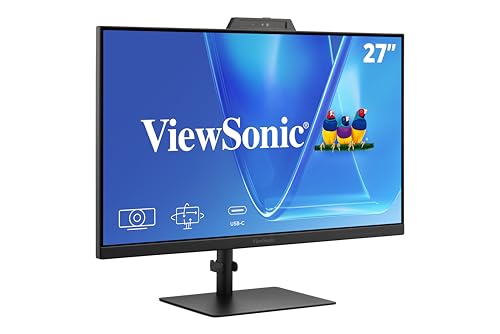
ViewSonic 27-Inch 1080p Conferencing Monitor
Best for: Video conferencing and Windows Hello authentication
- Use
- Business & Office, Mac, Office, Home Office
- Screen Size
- 27-Inch
- Resolution
- 1080p
- Refresh Rate
- 120Hz
- Ports
- USB-C, HDMI, DisplayPort
- Features
- Built-in Speakers, Webcam
The ViewSonic VG2741V is a 27-inch monitor with 1080p resolution and a 120Hz refresh rate. It includes a built-in 5MP IR webcam for Windows Hello, integrated speakers, and a microphone. USB-C, HDMI, and DisplayPort connections support laptops and desktops. This setup suits office workers who need video conferencing tools and streamlined authentication without extra accessories.
- Built-in 5MP IR webcam with Windows Hello support
- Integrated speakers and microphone for calls
- 120Hz refresh rate for smooth motion
- USB-C connectivity for streamlined setup
- 1080p resolution is lower than the 4K options on this list
- 27-inch size is smaller than the 32-inch and 49-inch alternatives
- You need a built-in webcam for video calls
- You want Windows Hello facial recognition
- You prefer a 27-inch display size
- You require 4K UHD resolution
- You need a 32-inch screen or larger
- You do not use Windows for authentication
Verdict: ViewSonic VG2741V 27-Inch Webcam Monitor fits professionals who prioritize integrated conferencing hardware and Windows Hello over high pixel density.

ViewSonic 32-Inch 4K UHD IPS Monitor
Best for: Office workers needing large 4K screens with USB-C power delivery
- Use
- Business & Office, Mac, Office, Home Office
- Screen Size
- 32 Inch
- Resolution
- 3840 x 2160
- Panel Type
- IPS
- Ports
- USB-C, HDMI, DisplayPort
- Features
- HDR
This 32-inch 4K UHD IPS monitor delivers sharp detail and wide viewing angles for office tasks. It features HDR10 support for richer visuals and a Blue Light Filter to reduce eye strain. The 65W USB-C port simplifies your workspace by providing video, data, and power in one cable. It includes HDMI and DisplayPort inputs for flexible connectivity. This model suits those who need a large, clear display with minimal cable clutter.
- 32-inch 4K UHD (3840×2160) IPS panel
- 65W USB-C single-cable connectivity
- HDR10 support for enhanced contrast
- Integrated Blue Light Filter and Flicker-Free technology
- 60Hz refresh rate is lower than the 120Hz or 144Hz options on this list
- 17.2-pound weight is heavier than the 24-inch and 27-inch models in the guide
- Built-in speakers are absent, requiring external audio solutions
- You need a large 32-inch screen for detailed office work
- You want to power your laptop and connect video through a single USB-C cable
- You prefer IPS panels for consistent color and wide viewing angles
- You require a high refresh rate above 60Hz for smooth motion
- You prefer a lighter monitor under 15 pounds for easy desk movement
- You need built-in speakers for immediate audio output
Verdict: ViewSonic 32-inch 4K USB-C Monitor offers a spacious 4K IPS display and convenient 65W USB-C charging for organized office setups. It fits professionals who prioritize screen real estate and cable reduction over high refresh rates or built-in audio.

Acer Nitro 49" DQHD 120Hz Curved Monitor
Best for: Wide single-screen office multitasking
- Use
- Business & Office, Office
- Screen Size
- 49"
- Resolution
- 5120 x 1440
- Refresh Rate
- 120Hz
- Response Time
- 3ms
- Aspect Ratio
- 32:9
This 49-inch curved monitor offers a 5120×1440 DQHD resolution and a 120Hz refresh rate. The 1000R curve provides a uniform viewing experience. It includes a height-adjustable stand for ergonomic positioning. The 32:9 aspect ratio expands your field of view. It suits users who need a wide workspace for office tasks.
- 5120×1440 DQHD resolution for sharp details
- 120Hz refresh rate for smooth motion
- 1000R curved screen for uniform viewing
- Height-adjustable stand for ergonomic comfort
- 20.5 pounds weight requires a sturdy desk
- 45.3 inches width needs ample desk space
- 120Hz refresh rate is lower than 144Hz+ options
- You need a wide, single-screen workspace
- You prefer a curved display for immersion
- You want height adjustment for comfort
- You have a small desk with limited width
- You prefer a compact 24-inch or 27-inch screen
- You need a flat screen for precise alignment
Verdict: Acer EI491CUR 49in Curved Office Monitor fits professionals who want a massive, immersive workspace without juggling multiple screens. Its wide aspect ratio and adjustable stand make it ideal for multitasking in a spacious office setup.

Kado 27" Curved Triple Monitor
Best for: multi-monitor office setups with limited desk space
- Use
- Gaming, Business & Office, Office
- Screen Size
- 27"
- Resolution
- 1920×1080
- Refresh Rate
- 75Hz
- Ports
- HDMI
- Features
- Built-in Speakers, Curved Screen
The Kado 27" monitor features a 1500R curved screen and 1080p FHD resolution. It runs at a 75Hz refresh rate with a 100% sRGB color gamut. Built-in speakers save desk space. This model suits office workers who need a seamless multi-monitor setup. The curved design reduces eye strain during long work sessions.
- 1500R curved screen reduces peripheral distortion
- 100% sRGB color gamut for accurate visuals
- Built-in speakers save desk space
- 75Hz refresh rate for smooth motion
- 1080p resolution is lower than the 4K options on this list
- 12.2 pounds weight is heavier than standard single panels
- Only HDMI ports available for connectivity
- You need a triple monitor setup for office tasks
- You prefer a curved screen to reduce eye strain
- You want built-in speakers to save desk space
- You require 4K UHD resolution for detailed work
- You need USB-C connectivity for docking
- You want a flat screen design
Verdict: Kado 27" Curved 1080p 75Hz Monitor fits office users who prioritize a seamless multi-monitor experience and built-in audio. It is a solid choice for those who value the ergonomic benefits of a 1500R curve over higher resolution.

ViewSonic 24-Inch 120Hz Dual Monitor Pack
Best for: Dual-screen office productivity with 120Hz
- Use
- Business & Office, Mac, Office, Home Office
- Screen Size
- 24"
- Resolution
- 1080p
- Refresh Rate
- 120Hz
- Panel Type
- IPS
- Ports
- HDMI, DisplayPort, VGA
This dual-pack includes two 24-inch 1080p IPS monitors with 120Hz refresh rates. Each head-only unit supports VESA mounting for flexible dual-screen setups. The frameless design aids side-by-side productivity for spreadsheets and documents. You get HDMI, DisplayPort, and VGA connectivity for home office or business use. Eye Care features help support longer work sessions.
- 120Hz refresh rate for fluid scrolling
- IPS panel for consistent viewing angles
- Frameless design for clean dual setups
- VESA mountable head-only design
- 1080p resolution is lower than the 4K options on this list
- Includes only two 24-inch screens rather than larger single displays
- Requires separate purchase of VESA mounts or stands
- You need a dual-screen setup for spreadsheets and documents
- You prefer a 120Hz refresh rate for smoother scrolling
- You want to use VESA mounts for a clean desk
- You require 4K resolution for detailed work
- You need a single large display for video editing
- You want monitors with built-in stands included
Verdict: ViewSonic 24-Inch 120Hz IPS Dual Pack fits users who need two 24-inch screens for multitasking. It suits those who prioritize a 120Hz refresh rate and plan to use VESA mounts for their office setup.

Gawfolk 32 Inch 4K Curved Monitor
Best for: Office workers wanting large 4K curved displays
- Use
- Gaming, Business & Office, Office, Home Office
- Screen Size
- 32"
- Resolution
- 3840 x 2160
- Refresh Rate
- 60Hz
- Variable Refresh Rate
- FreeSync
- Ports
- HDMI 2.0, DP 1.4, 3.5mm audio
This 32-inch monitor offers 4K UHD resolution on a VA panel with a 1500R curve. It includes FreeSync for tear-free visuals and built-in speakers. The 60Hz refresh rate suits general office tasks. You get two HDMI and two DisplayPort connections. The tilt-adjustable stand supports wall mounting. It is a solid choice for those wanting a large, sharp screen for daily work.
- 3840×2160 4K UHD resolution for sharp text
- FreeSync technology reduces screen tearing
- Built-in speakers save desk space
- 1500R curved VA panel for immersive viewing
- Two HDMI 2.0 and two DP 1.4 ports
- 60Hz refresh rate limits motion smoothness
- 11.5-pound weight adds bulk to the setup
- Tilt-only stand lacks height adjustment
- You need a large 4K screen for detailed work
- You want built-in audio for a clean desk
- You prefer a curved display for immersion
- You require high refresh rates for gaming
- You need height-adjustable ergonomics
- You prefer a flat screen design
Verdict: Gawfolk 32 Inch 4K Curved Monitor delivers sharp 4K visuals and convenient built-in speakers for office use. It fits users who prioritize screen size and resolution over high refresh rates or advanced stand adjustments.

ViewSonic TD2465 24 Inch Touch Monitor
Best for: Touch-enabled office tasks and Mac setups
- Use
- Business & Office, Mac, Office, Home Office
- Screen Size
- 24 Inch
- Resolution
- 1920x1080p
- Refresh Rate
- 60Hz
- Ports
- USB, HDMI, DisplayPort, VGA
- Panel Type
- VA
The ViewSonic TD2465 is a 24-inch 1080p monitor with a VA panel and 10-point touch capability. It includes built-in speakers and a USB hub for office convenience. The screen supports Mac connectivity via vTouch driver. It offers flexible stand options and connects via HDMI, DisplayPort, or VGA. This model suits users needing touch input in business environments.
- 10-point projected capacitive touchscreen
- Built-in speakers and USB hub
- VA panel with 1080p resolution
- MacOS vTouch driver support
- 1080p resolution is lower than 4K competitors
- 24-inch size is smaller than 27-inch options
- 11.9-pound weight is heavier than many displays
- You need 10-point touch interaction for office tasks
- You use MacOS devices and want gesture control
- You prefer a compact 24-inch screen size
- You require 4K UHD resolution for detailed work
- You need a larger 27-inch or 32-inch display
- You prefer IPS panels for wider viewing angles
Verdict: ViewSonic TD2465 24 Inch Touch Monitor is a practical pick for office workers who rely on touch input and Mac compatibility. It fits desks where a smaller footprint and built-in audio are priorities.
Specifications side by side

| Spec | BenQ 27-Inch 1080p USB-C IPS Monitor | KTC 32-Inch 4K UHD White VA Monitor | ViewSonic 27-Inch 4K UHD IPS Monitor | ViewSonic 27-Inch 4K USB-C Monitor | CUNPU 27" Touchscreen 1080p 60Hz Monitor | FYHXele 32 Inch Touchscreen Monitor | Thinlerain 27-Inch 4K 160Hz Webcam Monitor | Dell P2725H 27" IPS Office Monitor | ViewSonic 27-Inch 1080p Conferencing Monitor | ViewSonic 32-Inch 4K UHD IPS Monitor | Acer Nitro 49" DQHD 120Hz Curved Monitor | Kado 27" Curved Triple Monitor | ViewSonic 24-Inch 120Hz Dual Monitor Pack | Gawfolk 32 Inch 4K Curved Monitor | ViewSonic TD2465 24 Inch Touch Monitor |
|---|---|---|---|---|---|---|---|---|---|---|---|---|---|---|---|
| Screen Size | 27 Inch | 32" | 27 Inch | 27 Inch | 27" | 32" | 27" | 27" | 27-Inch | 32 Inch | 49" | 27" | 24" | 32" | 24 Inch |
| Resolution | 1080p | 3840 x 2160 | 3840 x 2160 | 3840 x 2160 | 1080P | – | 3840 x 2160 | – | 1080p | 3840 x 2160 | 5120 x 1440 | 1920×1080 | 1080p | 3840 x 2160 | 1920x1080p |
| Refresh Rate | 100Hz | 60Hz | – | – | 60 Hz | 100Hz | 160Hz | – | 120Hz | – | 120Hz | 75Hz | 120Hz | 60Hz | 60Hz |
| Panel Type | IPS | – | IPS | IPS | Nano IPS | IPS | IPS | IPS | – | IPS | – | – | IPS | – | – |
| Response Time | – | – | – | – | – | – | 1ms GTG | – | – | – | 3ms | – | – | – | – |
| Aspect Ratio | – | – | – | – | – | – | – | – | – | – | 32:9 | – | – | – | – |
| Variable Refresh Rate | – | – | – | – | – | – | – | – | – | – | AMD FreeSync | – | – | FreeSync | – |
| Ports | USB-C | HDMI 2.0, DP 1.4 | Dual HDMI, DisplayPort | USB-C, HDMI, DisplayPort | HDMI, VGA, USB | USB-C, HDMI, DisplayPort | 2x HDMI, DisplayPort, USB-C, USB-A | – | USB-C, HDMI, DisplayPort | USB-C, HDMI, DisplayPort | 2x HDMI 2.1, DisplayPort | HDMI | HDMI, DisplayPort, VGA | HDMI 2.0, DP 1.4, 3.5mm audio | USB, HDMI, DisplayPort, VGA |
| Features | Height-Adjustable Stand, USB Hub | HDR | HDR | HDR, Built-in Speakers, Power Delivery | Touchscreen | Height-Adjustable Stand, Touchscreen | Built-in Speakers, Webcam | – | Built-in Speakers, Webcam | HDR | Curved Screen, Height-Adjustable Stand | Built-in Speakers, Curved Screen | – | Built-in Speakers, Curved Screen | Built-in Speakers, USB Hub, Touchscreen |
| Use | Business & Office, Office | Business & Office, Office, Home Office | Business & Office, Mac, Office, Home Office | Business & Office, Mac, Office, Home Office | Business & Office, Office, Business | Gaming, Business & Office, Office | Gaming, Business & Office, Office, Home Office | Business & Office, Office | Business & Office, Mac, Office, Home Office | Business & Office, Mac, Office, Home Office | Business & Office, Office | Gaming, Business & Office, Office | Business & Office, Mac, Office, Home Office | Gaming, Business & Office, Office, Home Office | Business & Office, Mac, Office, Home Office |
| Size | 27 Inch | 31.5" | 27 Inch | 27 Inch | 27 Inch | – | 27 Inch | – | 27 Inch | 32 Inch | – | 27 | – | 32 Inch | – |
| Operating System | – | – | macOS | macOS | – | – | – | – | Windows | macOS | – | – | macOS | – | macOS |
| Dimensions | 9 × 24 × 18 inches | 9.8 × 28.2 × 21.1 inches | 2.1 × 24.2 × 14.5 inches | 8.2 × 24.2 × 17.2 inches | 7.16 × 21.3 × 16 inches | 2.69 × 28.2 × 16.7 inches | 8.67 × 24 × 21.3 inches | 7.5 × 24 × 21 inches | 8.11 × 24.1 × 21.7 inches | 9.2 × 28.1 × 19.6 inches | 22.5 × 45.3 × 15.6 inches | 2.83 × 24.5 × 14.6 inches | 2 × 21.2 × 12.4 inches | 3.89 × 27.6 × 16.3 inches | 7.8 × 21.6 × 15.8 inches |
| Weight | 9.1 pounds | – | 12.1 pounds | 8.6 pounds | 9.81 pounds | – | – | 4.41 pounds | 11.7 pounds | 17.2 pounds | 20.5 pounds | 12.2 pounds | 11.9 pounds | 11.5 pounds | 11.9 pounds |
| Color | White | White | Black | Black | Black | Black-32" | 3840 x 2160-160Hz | Black | Black | Black | Black | Black | Black | Black | Black |
| Model | GW2786TC | H32U6 | VA2756-4K-MHD | VS19281 | TUH1AW-7727Y | FYHXTGM | HD-270 | P2722H | VS20457 | VX3267U-4K | EI491CUR J0biiphx | KADO-C27-TRIPLE | VA2456A-MHD_H2 | GFTY982 | TD2465 |
If you work while traveling, compare display weight and connectivity options among the best portable monitors for office.
How We Picked Office Monitors

We selected monitors by scanning Amazon listings for the Use: Office attribute. This feature appears in the product title or key feature lists. We included only one size or variant from each product family to keep the list clean. Every detail comes directly from the published specifications on those listings. We do not handle or test the hardware ourselves.
The list is ordered by availability first, then by overall rating weighted by rating count. Final ranking considers how many of our office criteria the specs meet. We look at resolution, panel type, ports, and ergonomic features. Prices and stock levels update live on the page and are not part of this text.
How to Choose Your Office Monitor
Match Resolution to Size
Screen size and pixel density determine text clarity. A 27-inch monitor with 1080p resolution, like the BenQ GW2786TC, works well for general tasks if you sit at a standard distance. If you need sharper text for spreadsheets or sit farther away, choose 4K UHD. The ViewSonic VA2756-4K-MHD offers 4K on a 27-inch panel for crisp details. Larger screens like the KTC H32U6 benefit from 4K to maintain sharpness. Higher resolution ensures readable text and clear icons during long work sessions.
Check Connectivity Needs
USB-C ports simplify desk setups by combining video, data, and power. The ViewSonic VX2776-4K-MHDU provides USB-C with power delivery, allowing you to charge your laptop while viewing content. This reduces cable clutter significantly. Other models, such as the Dell P2725H, rely on HDMI or DisplayPort connections. If your laptop only supports USB-C, ensure the monitor has this port. Standard HDMI and DisplayPort connections remain reliable for desktop computers and older devices that do not require high-speed data transfer through the display.
Consider Built-in Audio
Integrated speakers eliminate the need for external audio devices. The BenQ GW2786TC includes a built-in microphone and speakers, which is useful for video calls without extra hardware. The ViewSonic VG2741V also features built-in speakers for basic audio needs. If you require high-quality sound, you may still need headphones or external speakers. Check the attributes list for audio features. Monitors without built-in audio often have a smaller footprint and lower weight, which can be beneficial for compact desk arrangements.
Evaluate Touchscreen Utility
Touchscreens offer direct interaction for presentations or data entry. The CUNPU TUH1AW-7727Y provides 1080p touch input, suitable for users who prefer manual navigation over a mouse. The FYHXele FYHXTGM offers a larger QHD touchscreen for more detailed work. Touch functionality adds convenience but may not be necessary for standard typing and browsing tasks. Consider your workflow. If you frequently annotate documents or navigate interfaces manually, a touchscreen is practical. Otherwise, standard IPS or VA panels provide better clarity and response times for general office use.
Assess Stand Adjustability
Ergonomic stands support long-term comfort. The BenQ GW2786TC features a height-adjustable stand, allowing you to position the screen at eye level. The FYHXele FYHXTGM also offers height adjustment along with a large QHD display. Adjustable stands help reduce neck strain by letting you tilt or raise the monitor. Fixed stands, like those on the ViewSonic VA2756-4K-MHD, limit positioning options. If you share a desk or need vertical rotation, check for ergonomic features. Proper positioning ensures you maintain good posture during extended work periods.
Review Refresh Rate Options
Refresh rate affects motion smoothness. Standard office monitors typically operate at 60Hz or 75Hz. The ViewSonic VA2456A-MHD_H2 offers 120Hz for smoother scrolling and cursor movement. Higher refresh rates like 100Hz or 160Hz, found in the Thinlerain HD-270, provide enhanced fluidity. While not critical for static documents, higher rates reduce eye fatigue during fast navigation. Compare the refresh rate in the attributes. If you multitask frequently or move windows often, a higher refresh rate improves the overall visual experience without impacting productivity.
Frequently asked questions
Which office monitor has the best ergonomic stand?
The BenQ GW2786TC includes a height-adjustable stand for flexible positioning. This feature helps you align the screen with your eye level to reduce neck strain during long workdays. It also offers a USB hub for convenient peripheral connections. These ergonomic benefits make it a strong choice for users prioritizing physical comfort and workspace organization.
Are 4K monitors good for office work?
Yes, 4K monitors provide sharp text and clear visuals for detailed tasks. Models like the ViewSonic VA2756-4K-MHD and KTC H32U6 deliver crisp 4K UHD resolution. This clarity is beneficial for reading spreadsheets or editing documents. Larger screens, such as the 32-inch ViewSonic VX3267U-4K, offer more screen real estate for multitasking while maintaining high pixel density.
Which monitor supports USB-C charging for laptops?
Several options support USB-C power delivery for a cleaner desk setup. The ViewSonic VX2776-4K-MHDU provides sufficient laptop charging alongside 4K clarity. The ViewSonic VX3267U-4K offers 65W USB-C charging for organized office setups. The BenQ GW2786TC also features a USB-C port. These ports allow you to connect your laptop with a single cable for data and power.
Do any office monitors include built-in webcams?
Yes, some models integrate webcams for video conferencing. The Thinlerain HD-270 includes a built-in webcam for clear video calls without external peripherals. The ViewSonic VG2741V adds a webcam and supports Windows Hello authentication for secure access. These features are useful for professionals who need integrated video tools and do not want to clutter their desk with separate hardware.
Which monitors have touchscreens for presentations?
Touchscreen monitors are ideal for interactive office workflows and data entry. The CUNPU TUH1AW-7727Y offers direct touch input for practical use. The FYHXele FYHXTGM provides a large QHD canvas with touch capabilities. The ViewSonic TD2465 also includes a touchscreen and USB hub. These models prioritize interaction over high resolution, making them suitable for collaborative environments.
What is the best curved monitor for multitasking?
The Acer EI491CUR is a 49-inch curved monitor designed for wide single-screen multitasking. Its massive immersive workspace allows you to manage multiple applications without juggling separate screens. The curved design and adjustable stand enhance comfort for long sessions. This option fits professionals who want a spacious setup in a single unit rather than using multiple monitors.
Which monitor is best for Mac users?
Several monitors are compatible with macOS for office use. The ViewSonic VA2756-4K-MHD and VX2776-4K-MHDU both list macOS compatibility. The ViewSonic VX3267U-4K also supports Mac setups. The ViewSonic TD2465 is another practical pick for Mac users requiring touch input. These models ensure reliable connectivity and display performance for Apple devices in a professional environment.
Do office monitors come with built-in speakers?
Many office monitors include built-in speakers to reduce cable clutter. The ViewSonic VX2776-4K-MHDU and FYHXele FYHXTGM feature integrated audio. The Kado KADO-C27-TRIPLE also includes built-in speakers for a seamless experience. The ViewSonic TD2465 offers audio alongside its touchscreen. These features are convenient for users who want sound without connecting external speakers to their workstation.
See also