Best LG 180Hz Monitors: 3 Spec-Based Picks
As Amazon Associates, we earn from qualifying purchases. This means we may receive a small commission at no extra cost to you if you click through and make a purchase.
As an Amazon Associate we earn from qualifying purchases. Links on this page are affiliate links.
Finding the best LG 180Hz monitors requires looking at specific technical details rather than marketing claims. This guide compares 3 models based strictly on the specifications published on their listings. The top pick is the LG UltraGear 32-Inch Curved 180Hz Monitor because it offers a large 32-inch curved QHD display for players wanting a large curved QHD screen. Each selection highlights a different priority, from port variety to resolution clarity. You will use this information to decide which screen size, panel type, and connectivity options fit your setup. The goal is to help you choose the right hardware for your specific gaming needs.
Match Resolution to Your Screen Size

You should choose your resolution based on the physical size of the display. The top two picks use 1440p QHD panels on 32-inch screens. This combination offers a balanced balance of detail and smoothness for most players. If you prefer sharper images in a smaller footprint, look for the 4K UHD option on a 27-inch panel. Higher pixel density requires more powerful hardware to drive the 180Hz refresh rate effectively.
| # | Product | Best for | Price |
|---|---|---|---|
| 1 | LG UltraGear 32-Inch Curved 180Hz Monitor Best overall | players wanting a large curved QHD screen | |
| 2 | LG 32-Inch UltraGear Curved QHD Gaming Monitor Best budget | Large-screen immersive gaming | |
| 3 | LG 27-Inch 4K UHD Dual-Mode Gaming Monitor Best 4k uhd | 4K gaming with high refresh rate clarity |
The best fit for you

- You want a large curved QHD screen for gaming – LG UltraGear 32-Inch Curved 180Hz Monitor – It offers a 32-inch curved QHD display with 180Hz refresh rate.
- You need a budget-friendly large curved gaming monitor – LG 32-Inch UltraGear Curved QHD Gaming Monitor – This 32-inch curved model provides 180Hz speed and height-adjustable ergonomics.
- You prefer 4K clarity in a smaller 27-inch form – LG 27-Inch 4K UHD Dual-Mode Gaming Monitor – It delivers 4K UHD resolution at 180Hz with an IPS panel.

LG UltraGear 32-Inch Curved 180Hz Monitor
Best for: players wanting a large curved QHD screen
- Refresh Rate
- 180Hz
- Screen Size
- 32"
- Resolution
- 2560×1440
- Response Time
- 1ms GtG
- Variable Refresh Rate
- AMD FreeSync
- Ports
- 2x HDMI, DisplayPort
The LG 32GS60QC is a 32-inch curved gaming monitor with a 2560 x 1440 resolution and 180Hz refresh rate. It features a 1000R curve and 1ms GtG response time. AMD FreeSync reduces tearing. The display covers 99% sRGB and supports HDR10. This model suits players who want immersive visuals and smooth motion on a larger screen.
- 180Hz refresh rate for smooth gameplay
- 1000R curved screen for immersion
- 99% sRGB color gamut coverage
- AMD FreeSync for tear-free visuals
- 32-inch size is larger than the 27-inch alternatives
- 13-pound weight is heavier than smaller models
- QHD resolution is lower than the 4K option
- You want a larger 32-inch display for gaming
- You prefer a curved screen for immersion
- You play at QHD resolution
- You need a 4K UHD resolution
- You prefer a flat screen over a curved one
- You have limited desk space for a 32-inch monitor
Verdict: LG 32GS60QC 32-inch 180Hz QHD Monitor offers a large, curved QHD display for players who prioritize screen size and immersion over higher resolution.
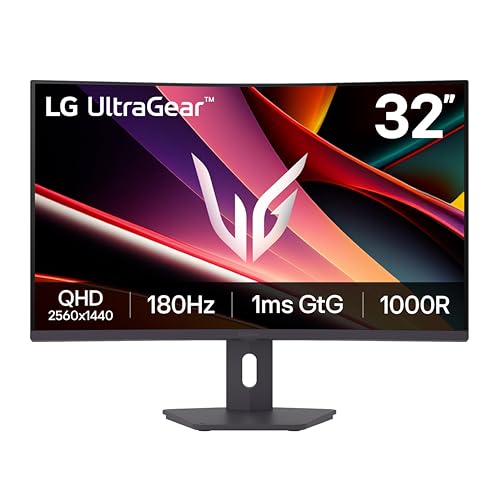
LG 32-Inch UltraGear Curved QHD Gaming Monitor
Best for: Large-screen immersive gaming
- Refresh Rate
- 180Hz
- Screen Size
- 32"
- Resolution
- 2560 x 1440
- Response Time
- 1ms
- Variable Refresh Rate
- AMD FreeSync
- Ports
- HDMI, DisplayPort
The LG 32G600A-B is a 32-inch curved gaming monitor with a 2560×1440 resolution and 180Hz refresh rate. It features a 1000R curve, 1ms response time, and AMD FreeSync. The panel covers 99% of the sRGB color gamut and supports HDR10. You get adjustable height, tilt, and swivel. This model suits players who want a large, immersive screen with smooth motion.
- 32-inch QHD (2560×1440) curved display
- 180Hz refresh rate for smooth motion
- 1ms response time (GtG)
- 99% sRGB color coverage
- Height-adjustable stand
- 14.8 pounds weight is heavier than smaller alternatives
- 1000R curvature is less aggressive than some gaming monitors
- QHD resolution is lower than 4K options in this list
- You want a large 32-inch screen for immersive gaming
- You prioritize smooth 180Hz motion over 4K resolution
- You need an adjustable stand for ergonomic setup
- You require a 4K UHD resolution for sharper detail
- You prefer a flat panel over a curved display
- You need a lighter monitor for easy desk movement
Verdict: The LG 32G600A 32-inch Curved QHD Monitor delivers a large, immersive 180Hz gaming experience with smooth motion and adjustable ergonomics. It is a solid choice for players who value screen size and fluidity over maximum pixel density.

LG 27-Inch 4K UHD Dual-Mode Gaming Monitor
Best for: 4K gaming with high refresh rate clarity
- Refresh Rate
- 180Hz
- Screen Size
- 27-inch
- Resolution
- 3840 x 2160
- Panel Type
- IPS
- Response Time
- 1ms (GtG)
- Variable Refresh Rate
- NVIDIA G-Sync, AMD FreeSync Premium
The LG 27G810A-B is a 27-inch IPS monitor offering 4K UHD resolution at 180Hz. It features Dual Mode to switch to FHD 360Hz for faster action games. The panel covers 95% DCI-P3 color and supports DisplayHDR 400. With FreeSync Premium and G-SYNC compatibility, it reduces screen tearing. This setup suits players who want high clarity and smooth motion in a compact size.
- 27-inch 4K UHD resolution for sharp detail
- 180Hz refresh rate with Dual Mode FHD 360Hz option
- 95% DCI-P3 color coverage on IPS panel
- FreeSync Premium and G-SYNC compatible for tear-free play
- 27-inch screen is smaller than the 32-inch competitors
- 16.3-pound weight is heavier than typical 27-inch monitors
- DisplayHDR 400 offers less brightness than higher-tier HDR standards
- You prefer a compact 27-inch desk setup
- You want 4K clarity with high refresh rates
- You play both story-driven and fast-paced FPS games
- You need a larger 32-inch display for immersion
- You require native 4K at 360Hz without resolution switching
- You prioritize higher peak brightness for HDR content
Verdict: LG 27-inch 4K 180Hz IPS Gaming Monitor delivers sharp visuals and flexible speed options for gamers who value resolution and smoothness in a smaller form factor. It fits players who want high detail without the bulk of a 32-inch screen. The Dual Mode feature adds versatility for different game genres.
Specifications side by side

| Spec | LG UltraGear 32-Inch Curved 180Hz Monitor | LG 32-Inch UltraGear Curved QHD Gaming Monitor | LG 27-Inch 4K UHD Dual-Mode Gaming Monitor |
|---|---|---|---|
| Screen Size | 32" | 32" | 27-inch |
| Resolution | 2560×1440 | 2560 x 1440 | 3840 x 2160 |
| Refresh Rate | 180Hz | 180Hz | Dual Mode UHD 180Hz or FHD 360Hz |
| Panel Type | – | – | IPS |
| Response Time | 1ms GtG | 1ms | 1ms (GtG) |
| Variable Refresh Rate | AMD FreeSync | AMD FreeSync | NVIDIA G-Sync, AMD FreeSync Premium |
| Ports | 2x HDMI, DisplayPort | HDMI, DisplayPort | HDMI 2.1, 4-pole headphone jack |
| Features | HDR, Curved Screen | Curved Screen, Height-Adjustable Stand | HDR |
| Use | Gaming | Gaming | Gaming |
| Size | 32 Inch | – | 27 Inch |
| Dimensions | 8.9 × 27.6 × 20 inches | 10.2 × 27.7 × 22 inches | 8.7 × 24.2 × 21 inches |
| Weight | 13 pounds | 14.8 pounds | 16.3 pounds |
| Color | Black | Black | Black |
| Model | 32GS60QC-B.AUSQ | 32G600A-B.AUSQ | 27G810A-B.AUS |
How to choose the right one
Check variable refresh rate support
Variable refresh rate technology synchronizes the monitor’s refresh rate with your graphics card’s frame output. This reduces screen tearing and stuttering during fast-paced action. You should look for FreeSync or G-SYNC compatibility. The LG 27G810A supports both FreeSync and G-SYNC, offering broader compatibility with different GPUs. The other models listed here rely solely on FreeSync. If you use an NVIDIA graphics card, dual support ensures smoother performance across various titles without manual configuration.
Decide on curved or flat
Curved screens wrap around your field of view, enhancing immersion for gaming. This design keeps edges equidistant from your eyes, reducing distortion. The top two picks feature curved panels, which is ideal for players prioritizing engagement. If you prefer a flat surface for precise alignment in competitive shooters, you might look for a non-curved option. However, the current list focuses on curved displays. Consider whether the immersive benefit outweighs the potential difficulty in aligning multiple monitors side by side.
Evaluate port availability
The number and type of video inputs determine how easily you can connect your devices. The LG 32G600A includes both HDMI and DisplayPort connections, providing flexibility for consoles and PCs. In contrast, the LG 32GS60QC lists only DisplayPort, and the 27G810A lists HDMI. You should verify which ports your current hardware uses. If your console lacks DisplayPort, ensure the monitor has HDMI. Having multiple input types allows you to switch between devices without changing cables.
Consider screen size and resolution
Screen size affects physical footprint and viewing distance. The 32-inch models offer a larger canvas for immersive gaming, while the 27-inch model provides a more compact setup. The 27-inch LG 27G810A also offers 4K UHD resolution, delivering sharper images than the 1440p QHD panels on the 32-inch models. You should match the resolution to your GPU’s capability. Higher resolutions demand more graphical power. If you prioritize sharpness over screen real estate, the smaller 4K display is a strong technical choice.
Look for ergonomic adjustments
Ergonomic stands allow you to adjust the monitor’s height, tilt, or swivel to fit your desk and posture. The LG 32G600A features a height-adjustable stand, which helps reduce neck strain during long sessions. The other models in this guide do not explicitly list height adjustment in their attributes. You should check the physical specs for stand versatility. Proper ergonomic support improves comfort and focus. If you spend many hours gaming, a flexible stand is a practical specification to prioritize over other features.
Frequently asked questions
Which LG 180Hz monitor is best for immersive gaming?
The LG UltraGear 32GS60QC is the top pick for players wanting a large curved screen. It features a 32-inch QHD display that curves around your view. This design enhances immersion for games. The panel runs at 180Hz with FreeSync support. You get smooth motion without tearing. It weighs 13 pounds and fits standard desks.
What is the best budget LG 180Hz monitor?
The LG 32G600A is the best budget option for large-screen gaming. It offers a 32-inch curved QHD display at 180Hz. This model includes a height-adjustable stand for better ergonomics. You get FreeSync support for smoother visuals. It weighs 14.8 pounds. This makes it a solid choice for those prioritizing size and fluidity over pixel density.
Does LG make a 4K 180Hz monitor?
Yes, the LG 27G810A is a 4K UHD 180Hz monitor. It uses an IPS panel for sharp visuals. This 27-inch model supports Dual Mode for flexibility. You get both FreeSync and G-SYNC compatibility. It includes HDR support for better contrast. The monitor weighs 16.3 pounds. It fits players who want high detail in a smaller form factor.
Are these LG monitors curved?
Two of the top picks are curved. The LG 32GS60QC and the LG 32G600A both feature curved screens. These 32-inch models use 1440p QHD resolution. The curve helps wrap the image around your field of view. The LG 27G810A is a flat 27-inch panel. It offers 4K clarity without the curvature.
What ports do these LG monitors have?
Connectivity varies by model. The LG 32GS60QC includes a DisplayPort. The LG 32G600A has both HDMI and DisplayPort inputs. The LG 27G810A features HDMI ports. All models support variable refresh rates. You should check your graphics card outputs to match the available ports on your chosen monitor.
How heavy are these LG 180Hz monitors?
Weight ranges from 13 to 16.3 pounds. The LG 32GS60QC weighs 13 pounds. The LG 32G600A weighs 14.8 pounds. The LG 27G810A is the heaviest at 16.3 pounds. These weights reflect the 32-inch and 27-inch screen sizes. You should ensure your desk or mount can support the specific weight of your chosen model.
Do these monitors support G-SYNC?
Only the LG 27G810A supports G-SYNC. It also includes FreeSync compatibility. The other two models, the 32GS60QC and 32G600A, support FreeSync. This technology synchronizes the refresh rate with your GPU. You get smoother gameplay with compatible graphics cards. Check your card’s supported protocols before buying.
What resolution do these 32-inch monitors use?
Both 32-inch models use 1440p QHD resolution. The LG 32GS60QC and LG 32G600A share this spec. This resolution offers a good balance of detail and performance. It runs at 180Hz for smooth motion. The 27-inch model uses 4K UHD instead. You get higher pixel density on the smaller screen.
See also