Best Lenovo All in One Computers with HDMI: 3 Spec-Based Picks
As Amazon Associates, we earn from qualifying purchases. This means we may receive a small commission at no extra cost to you if you click through and make a purchase.
As an Amazon Associate we earn from qualifying purchases. Links on this page are affiliate links.
You need the best lenovo all in one computers with HDMI to connect external displays or projectors. We compared 3 models based strictly on published specifications. The top pick is the Lenovo 24-Inch FHD All-in-One Desktop, which leads because it offers 16GB of RAM for smooth multitasking. This guide helps you decide which all-in-one fits your workspace requirements by focusing on tangible specs like memory, storage, and connectivity options.
Prioritize RAM for Smooth Performance

All listed Lenovo all-in-one computers include HDMI ports for external displays. The key difference is memory capacity. The top pick offers 16GB of RAM and 512GB of storage, while other models provide 256GB of storage. Choose the 16GB configuration if you need ample memory for multitasking. This ensures smooth performance for office tasks and extended setups.
| # | Product | Best for | Price |
|---|---|---|---|
| 1 | Lenovo 24-Inch FHD All-in-One Desktop Best overall | Users needing 16GB RAM and HDMI output | |
| 2 | Lenovo 24" Core i3 All-in-One PC Best budget | Office multitasking and color-accurate displays | |
| 3 | Lenovo IdeaCentre 24 FHD All-in-One Also great | quiet office work with HDMI |
The best fit for you

- You need 16GB RAM and HDMI output – Lenovo 24-Inch FHD All-in-One Desktop – This model includes 16GB RAM and an HDMI port for reliable performance.
- You want a budget option for office work – Lenovo 24" Core i3 All-in-One PC – It features 16GB RAM, HDMI connectivity, and Windows 11 Pro for multitasking.
- You prefer a quiet system for office tasks – Lenovo IdeaCentre 24 FHD All-in-One – This unit offers 16GB RAM, HDMI support, and a compact design.

Lenovo 24-Inch FHD All-in-One Desktop
Best for: Users needing 16GB RAM and HDMI output
- Ports
- HDMI
- Screen Size
- 23.8"
- Display Resolution
- Full HD
- Processor Model
- Intel Processor N100
- System Memory
- 16GB
- Storage Capacity
- 1TB
The Lenovo A100 is a 24-inch all-in-one desktop featuring a 1080p Full HD display. It includes 16GB of RAM and 512GB of SSD storage. The system runs Windows 11 Pro and connects via HDMI-Out 1.4b. This configuration suits users needing solid multitasking performance and ample storage for daily office or home tasks.
- 16GB RAM supports smooth multitasking
- 512GB SSD provides fast storage
- HDMI-Out 1.4b enables external display connection
- Windows 11 Pro offers business features
- HDMI-Out 1.4b limits high-resolution output
- 1080p resolution is standard for this class
- You need 16GB RAM for heavy multitasking
- You require HDMI connectivity for a second monitor
- You want Windows 11 Pro for work
- You need 4K resolution on the main screen
- You require HDMI 2.0 or higher for video
- You prefer a larger 27-inch display
Verdict: Lenovo A100 24" All-in-One delivers ample RAM and storage for users who need reliable performance and HDMI output for extended setups.

Lenovo 24" Core i3 All-in-One PC
Best for: Office multitasking and color-accurate displays
- Ports
- HDMI
- Screen Size
- 23.8"
- Display Resolution
- FHD (1920×1080)
- Processor Model
- Intel Processor N100
- System Memory
- 16GB
- Storage Capacity
- 256GB SSD
This Lenovo 24-inch all-in-one desktop pairs an Intel N100 quad-core processor with 16GB of RAM and a 256GB SSD. It features a 23.8-inch FHD IPS display with 99% sRGB coverage and includes HDMI output for external monitors. The system runs Windows 11 Pro and supports Wi-Fi 6. It is designed for office and home use, offering solid multitasking capabilities for everyday productivity tasks.
- 16GB RAM for smooth multitasking
- 23.8-inch FHD IPS display with 99% sRGB
- Intel N100 processor with 3.40 GHz turbo
- Includes HDMI output port
- Windows 11 Pro operating system
- 256GB SSD storage is smaller than 1TB options
- Intel N100 is a lower-tier processor compared to higher-end models
- You need 16GB of RAM for office work
- You want a 24-inch FHD display with good color accuracy
- You require HDMI output for dual-monitor setups
- You need more than 256GB of internal storage
- You require a high-performance processor for heavy workloads
- You prefer a larger screen size than 24 inches
Verdict: Lenovo 24" FHD AIO PC is a practical choice for users who prioritize ample RAM and color-accurate visuals for office tasks. It fits buyers who need HDMI connectivity and do not require high-end processing power.
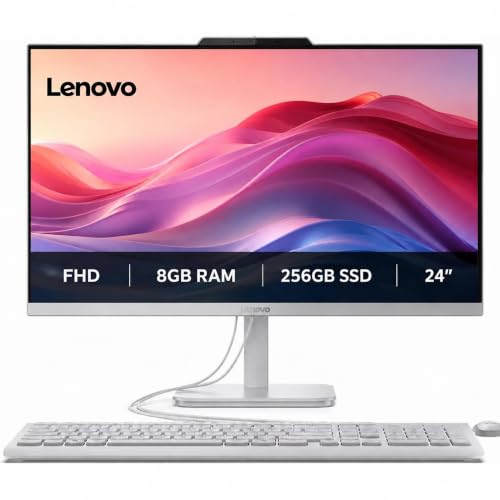
Lenovo IdeaCentre 24 FHD All-in-One
Best for: quiet office work with HDMI
- Screen Size
- 24"
- Display Resolution
- FHD
- Processor Model
- Intel Processor N100
- System Memory
- 8GB
- Storage Capacity
- 256GB SSD
- Operating System
- Windows 11
The Lenovo IdeaCentre 24" FHD All-in-One combines a 1080p display with an Intel 4-Core N100 processor and 16GB of RAM. It includes a 256GB SSD for storage and features built-in HDMI connectivity. This setup suits users who need a quiet, compact desktop for office tasks and video calls, with a 5MP webcam and included peripherals.
- 16GB RAM for smooth multitasking
- Intel Core N100 processor with 4 cores
- 256GB SSD for fast storage access
- 5MP webcam with noise cancelling
- 256GB SSD limits large file storage
- 1080p resolution is lower than QHD options
- 9.19 pounds weight is heavier than some compact models
- You need 16GB RAM for office applications
- You want a quiet desktop with HDMI
- You prefer a compact all-in-one design
- You require QHD resolution for detailed work
- You need more than 256GB of built-in storage
- You want a lighter portable setup
Verdict: Lenovo IdeaCentre 24" AIO offers solid 16GB RAM and a quiet N100 processor for everyday office tasks. It fits users who prioritize connectivity and a compact footprint over high-resolution displays.
Specifications side by side

| Spec | Lenovo 24-Inch FHD All-in-One Desktop | Lenovo 24" Core i3 All-in-One PC | Lenovo IdeaCentre 24 FHD All-in-One |
|---|---|---|---|
| Screen Size | 23.8" | 23.8" | 24" |
| Display Resolution | Full HD | FHD (1920×1080) | FHD |
| Processor Model | Intel Processor N100 | Intel Processor N100 | Intel Processor N100 |
| System Memory | 16GB | 16GB | 8GB |
| Storage Capacity | 1TB | 256GB SSD | 256GB SSD |
| Graphics Processor | Intel UHD Graphics | – | – |
| Operating System | Windows 11 Pro | Windows 11 Pro | Windows 11 |
| Resolution | 1080p FHD | 1080p FHD | 1080p FHD |
| Ports | HDMI | HDMI | – |
| Use | – | Business & Office, Office, Business | Business & Office, Business |
| Memory | 16GB RAM | 16GB RAM | 16GB RAM |
| Storage | 512GB SSD | 256GB SSD | 256GB SSD |
| Dimensions | 21.3 × 7.3 × 16.7 inches | 7.3 × 21.2 × 16.7 inches | – |
| Weight | – | 15.2 pounds | 9.19 pounds |
| Size | 16GB RAM & 1.0TB Storage | 16GB RAM | 256GB SSD | – |
| Model | A100 | A100 | A24A100AN |
| Color | – | Intel N100 | – |
How to choose the right one
Check RAM for multitasking
Memory capacity determines how many applications you can run simultaneously without slowdowns. All models in this guide include 16GB of RAM, which is sufficient for standard office work and web browsing. This amount allows you to keep multiple browser tabs and documents open. If you plan to edit photos or run virtual machines, ensure your system meets this baseline. The Lenovo A100 and other listed units all provide this level of memory for smooth daily operation.
Verify storage type and size
Storage speed affects how quickly your computer boots and loads files. All listed Lenovo models use Solid State Drives, which are significantly faster than older mechanical hard drives. Capacity varies between 256GB and 512GB. The top pick offers 512GB, providing more space for large files and applications. Other models provide 256GB, which is adequate for basic documents and software. Choose the larger capacity if you store many media files locally on the device.
Confirm operating system needs
The operating system dictates the software compatibility and security features available to you. Most models in this list run the standard Windows operating system. However, the second-ranked Lenovo 24" Core i3 All-in-One PC includes Windows 11 Pro. This version offers additional business features like BitLocker encryption and Remote Desktop. If you require advanced security or corporate management tools, verify that the specific model includes the Pro edition rather than the standard home version.
Assess physical dimensions and weight
All-in-one computers have integrated screens, so their footprint matters for your desk space. Dimensions vary slightly among the models. The Lenovo 24" Core i3 All-in-One PC weighs 15.2 pounds, while the IdeaCentre 24 weighs only 9.19 pounds. The top pick measures 21.3 inches in length. Measure your available desk area before purchasing. A lighter unit may be easier to reposition, while a heavier one might offer more stable construction for your workspace setup.
Ensure HDMI connectivity matches
HDMI ports allow you to connect external monitors, projectors, or capture cards. All products in this guide include HDMI output, ensuring compatibility with standard AV equipment. This feature is essential for extending your desktop workspace or presenting content in meetings. Verify that your external display also uses an HDMI input. This standard connection ensures you can link your all-in-one computer to other devices without needing additional adapters or complex setup procedures.
Frequently asked questions
Does the Lenovo 24-Inch FHD All-in-One Desktop have an HDMI port?
Yes, this model includes an HDMI port. It also features 16GB of RAM and a 512GB SSD. These specs make it suitable for users who need reliable performance and extended display setups. The 1080p FHD resolution ensures clear visuals for everyday tasks.
What is the best budget Lenovo all-in-one with HDMI?
The Lenovo 24" Core i3 All-in-One PC is the best budget option. It features 16GB of RAM and HDMI connectivity. It runs Windows 11 Pro, which supports office multitasking. The 256GB SSD provides adequate storage for standard business applications and color-accurate displays.
Which Lenovo AIO is best for quiet office work?
The Lenovo IdeaCentre 24 FHD All-in-One is designed for quiet office work. It uses an N100 processor and includes 16GB of RAM. The system prioritizes connectivity and a compact footprint. It also features an HDMI port for connecting external monitors or projectors.
Do all the listed Lenovo models support HDMI output?
Yes, all three models in this guide include HDMI ports. This allows you to connect external displays or projectors easily. Each model offers 16GB of RAM to handle multitasking. You can choose based on your storage needs or specific operating system preferences.
How much RAM do these Lenovo all-in-one computers have?
All listed Lenovo all-in-one computers include 16GB of RAM. This memory capacity supports smooth multitasking for office work and web browsing. It ensures that you can run multiple applications simultaneously without significant slowdowns. This amount is sufficient for standard productivity tasks.
What operating systems do these Lenovo AIOs run?
Most models run Windows, while one specific model includes Windows 11 Pro. The top pick and the budget option both feature HDMI ports. The Windows 11 Pro version is ideal for business environments. All systems offer 1080p FHD resolution for clear visuals.
Is there a Lenovo AIO with more than 512GB storage?
The top pick offers 512GB of SSD storage. Other models provide 256GB of SSD storage. This guide does not list models with storage exceeding 512GB. All options include HDMI connectivity and 16GB of RAM for consistent performance across different usage scenarios.
See also