2 Best Kvm Switches with USB Hub, Compared
As Amazon Associates, we earn from qualifying purchases. This means we may receive a small commission at no extra cost to you if you click through and make a purchase.
As an Amazon Associate we earn from qualifying purchases. Links on this page are affiliate links.
You need reliable hardware to manage multiple systems. We compared 2 best kvm switches with USB Hub to find the right fit for your desk. The StarTech 2-Port DP KVM 4K 60Hz leads because it supports 4K UHD resolution at 60Hz. These picks are based strictly on the specifications published on the listings. We focused on features like port types and display output. This guide helps you decide which unit matches your monitor and computer setup.
Choose resolution based on your needs

Most models here support 4K UHD, but the AV Access iDock B23 offers 8K UHD resolution. It also provides a higher 165Hz refresh rate compared to the 60Hz found on the StarTech unit. Pick the higher spec if you need sharper images or smoother motion for gaming. Otherwise, 4K is sufficient for standard professional work.
| # | Product | Best for | Price |
|---|---|---|---|
| 1 | StarTech 2-Port DP KVM 4K 60Hz Best overall | dual-monitor setups with two computers | |
| 2 | AV Access iDock B23 8K KVM Docking Station Best 8k uhd | multi-monitor setups with high power needs |
The best fit for you

- You want the best overall dual-monitor setup – StarTech 2-Port DP KVM 4K 60Hz – It offers 4K UHD resolution at 60Hz with DisplayPort and USB Hub features.
- You need high refresh rates for gaming – AV Access iDock B23 8K KVM Docking Station – It supports 8K UHD resolution at 165Hz refresh rate for smooth visuals.
- You require high power delivery for laptops – AV Access iDock B23 8K KVM Docking Station – It includes 100W power delivery to charge connected devices efficiently.
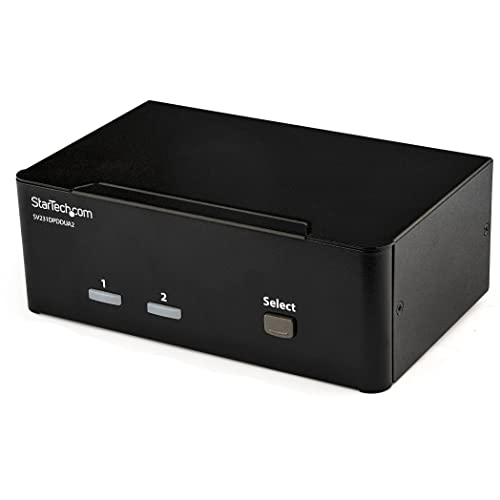
StarTech 2-Port DP KVM 4K 60Hz
Best for: dual-monitor setups with two computers
- Features
- USB Hub, Audio Support
- Computers Supported
- 2
- Monitors Supported
- 2
- Maximum Resolution
- 4K 60Hz
- Video Interface
- DisplayPort 1.2
- Dimensions
- 3.9 × 6.3 × 2.3 inches
This StarTech KVM switch connects two computers to dual 4K 60Hz displays via DisplayPort 1.2. It includes a built-in 2-port USB hub for sharing peripherals and 3.5 mm audio jacks for independent sound control. The compact unit measures 6.3 by 3.9 by 2.3 inches and weighs 1.62 pounds. It suits creative professionals needing high-resolution output and multi-computer access.
- Supports 4K UHD resolution at 60Hz on each monitor
- Includes a 2-port USB hub for peripheral sharing
- Features 3.5 mm auxiliary ports for audio
- Compact dimensions of 6.3 x 3.9 x 2.3 inches
- Supports only 2 computers, while the AV Access model handles 2 computers with 3 monitors
- Uses DisplayPort 1.2 connections, which may limit compatibility with HDMI-only setups
- Weighs 1.62 pounds, adding slight bulk to your desk setup
- You need to control two computers from one dual-monitor setup
- You require 4K 60Hz resolution for graphic design or editing
- You want to share USB peripherals and audio between systems
- You need to connect more than two computers
- You require support for three monitors per computer
- You prefer HDMI connections over DisplayPort
Verdict: StarTech 2-Port Dual-Monitor DisplayPort KVM Switch delivers reliable dual-display support for two computers. It fits creative professionals who need high-resolution output and shared peripherals.

AV Access iDock B23 8K KVM Docking Station
Best for: multi-monitor setups with high power needs
- Features
- USB Hub, Power Delivery
- Computers Supported
- 2
- Monitors Supported
- 3
- Maximum Resolution
- 8K@60Hz, 4K@165Hz
- Video Interface
- USB-C
- Power Delivery
- 100W
This KVM docking station connects two computers to three displays. It supports 8K resolution at 60Hz for the desktop and 4K at 165Hz. The USB-C port delivers 100W power delivery, allowing you to charge a laptop while using shared peripherals. It includes a 10Gbps USB hub and an Ethernet port that stays active on both systems. This setup reduces desk clutter by combining switching, docking, and data transfer in one unit.
- Supports 8K@60Hz for desktop monitors
- 100W Power Delivery over USB-C
- 10Gbps USB data transfer speeds
- Ethernet remains active on both PCs
- Built-in SDXC card reader
- MacBooks only support mirrored displays
- Limited to two connected computers
- Smaller form factor may restrict port access
- You need to drive three monitors from two PCs
- You want 100W charging for your laptop
- You require high-speed 10Gbps file transfers
- You use MacBooks and need extended multi-monitor mode
- You need to connect more than two computers
- You require 4K@165Hz on all three displays
Verdict: AV Access iDock B23 8K KVM Dock is a robust solution for users needing triple-monitor support and high-speed data sharing. It fits professionals who want a clean desk setup with powerful docking capabilities.
Specifications side by side

| Spec | StarTech 2-Port DP KVM 4K 60Hz | AV Access iDock B23 8K KVM Docking Station |
|---|---|---|
| Computers Supported | 2 | 2 |
| Monitors Supported | 2 | 3 |
| Maximum Resolution | 4K 60Hz | 8K@60Hz, 4K@165Hz |
| Video Interface | DisplayPort 1.2 | USB-C |
| Power Delivery | – | 100W |
| USB Hub Standard | – | 10Gbps USB 3.2, 5Gbps USB-A |
| Ethernet Speed | – | 1 Gbps |
| Resolution | 4K UHD | 8K UHD |
| Refresh Rate | 60Hz | 165Hz |
| Ports | DisplayPort | – |
| Features | USB Hub, Audio Support | USB Hub, Power Delivery |
| Use | – | Gaming |
| Number of Computers | – | 2 Computers |
| Dimensions | 3.9 × 6.3 × 2.3 inches | 5.61 × 0.91 × 1.03 inches |
| Weight | 1.62 pounds | – |
| Size | 2.3" x 6.3" x 3.9" | 23 |
| Color | Black | 8K 3 monitors 1 desktop & 1 laptop(iDock B23) |
| Model | SV231DPDDUA2 | iDock B23 |
How to Choose the Right KVM Switch
Match Resolution to Your Needs
You should verify the maximum output resolution before buying. Most users find 4K UHD sufficient for standard productivity tasks. However, if you work with high-detail graphics or need future-proofing, consider models supporting 8K UHD. The AV Access iDock B23 delivers 8K UHD resolution, which provides significantly more pixel density than standard 4K. This higher resolution ensures sharp text and images on compatible displays. Check your monitor specifications to ensure it can accept the signal. Choosing the correct resolution prevents blurry images and wasted potential in your setup.
Check Refresh Rate for Smoothness
The refresh rate determines how many times the screen updates per second. A higher number results in smoother motion, which is critical for gaming and fast-paced video editing. The StarTech 2-Port DP KVM supports a 60Hz refresh rate, which is standard for office work. In contrast, the AV Access iDock B23 offers 165Hz, ideal for competitive gaming. You must ensure your monitors support the target refresh rate. Mismatched rates can cause stuttering or reduced performance. Select a switch that matches your primary activity for the best visual experience.
Verify Port Compatibility
You need to confirm the physical connection type matches your devices. DisplayPort is common for high-resolution signals but requires compatible cables. The StarTech unit uses DisplayPort for its video output. You should check if your computers and monitors have the corresponding inputs. Using the wrong cable type will prevent the signal from passing through. Ensure all connected devices share the same port standard. This step avoids connectivity issues and ensures reliable signal transmission between your computers and displays.
Assess Power Delivery Requirements
If you use a laptop, check the power delivery specifications. Some KVM switches can charge your device while switching signals. The AV Access iDock B23 provides 100W Power Delivery, which is sufficient for most laptops. This feature reduces cable clutter by combining data, video, and power in one dock. You should verify that the power output matches your laptop’s charging needs. Insufficient power may cause slow charging or battery drain. Choosing a unit with adequate power delivery simplifies your desk setup significantly.
Confirm USB Hub Functionality
A built-in USB hub allows you to share peripherals across computers. You can connect keyboards, mice, and storage devices to the switch. Both listed models include USB Hub features for this purpose. You should verify the number of available ports for your peripherals. This setup lets you control multiple systems without swapping cables. Ensure the hub supports the data transfer speeds you require. Proper hub functionality enhances productivity by keeping your workspace organized and efficient.
Frequently asked questions
Can I connect two computers to a single monitor setup with a USB hub?
Yes, many KVM switches allow you to share peripherals between two systems. The StarTech 2-Port DP KVM supports two computers with a single DisplayPort connection. It includes a built-in USB hub for shared devices. This setup lets you switch between machines without unplugging keyboards or mice.
What is the highest resolution supported by these KVM switches?
The AV Access iDock B23 supports 8K UHD resolution. This is the highest output available in this comparison. The StarTech model tops out at 4K UHD. Choose the 8K option if you need maximum clarity for future displays or high-end graphics work.
Do these switches support audio output?
The StarTech 2-Port DP KVM explicitly lists audio support in its features. This allows sound to pass through from your computer to your monitors or speakers. The AV Access iDock B23 data does not specify audio capabilities. Check the manual for specific audio port details on that model.
Is power delivery included for laptops on these KVM switches?
The AV Access iDock B23 provides 100W Power Delivery. This allows you to charge a connected laptop while using the switch. The StarTech 2-Port DP KVM data does not mention power delivery features. If you need to charge devices, the AV Access unit is the better choice.
Which KVM switch is best for gaming due to refresh rate?
The AV Access iDock B23 is better for gaming. It offers a 165Hz refresh rate compared to the 60Hz on the StarTech unit. Higher refresh rates provide smoother visuals for fast-paced games. The 8K resolution also supports high-detail gaming setups.
How many monitors can these switches support simultaneously?
The AV Access iDock B23 supports triple-monitor setups. It is designed for users needing three displays for productivity. The StarTech 2-Port DP KVM is described as a dual-monitor solution. Verify the exact port count on your specific model before purchasing.
See also