Best Kvm Switches Under $300: 14 Spec-Based Picks
As Amazon Associates, we earn from qualifying purchases. This means we may receive a small commission at no extra cost to you if you click through and make a purchase.
As an Amazon Associate we earn from qualifying purchases. Links on this page are affiliate links.
You need reliable best kvm switches under $300 to manage multiple systems without clutter. We compared 14 models using only the specifications published on their listings. The StarTech 4-Port DisplayPort KVM Switch leads because it supports 4K UHD resolution and includes dedicated audio ports for clear sound separation. This guide helps you decide which KVM switch fits your port needs, resolution requirements, and computer count. You will find options for single monitors, dual displays, and long-distance server control.
Match Ports and Resolution First

Your monitor inputs dictate which switch works. The Sabrent model supports 8K and Thunderbolt 4, while the StarTech option uses DisplayPort for 4K. Check the refresh rate too. Some units cap at 60Hz, whereas others reach 165Hz. Verify your cable type matches the switch ports to avoid connection issues.
| # | Product | Best for | Price |
|---|---|---|---|
| 1 | StarTech 4-Port DisplayPort KVM Switch Best overall | Managing four computers with single monitor | |
| 2 | AV Access 4KEX100-KVM Cat6 Extender Also great | long-distance server room control | |
| 3 | StarTech 2-Port DP KVM 4K 60Hz Also great | Dual 4K@60Hz setups for creative professionals | |
| 4 | StarTech 2-Port Dual-Monitor DP KVM Best budget | Two-desktop setups with DisplayPort monitors | |
| 5 | Sabrent Thunderbolt 4 KVM Switch Best premium | Thunderbolt 4 setups needing 60W charging | |
| 6 | AV Access iDock-C20 Dual Monitor KVM Dock Best 1080p fhd | dual-laptop setups with Ethernet needs | |
| 7 | AV Access iDock M10 Dual 4K KVM Dock Best dual display | MacBook and desktop PC dual-monitor setups | |
| 8 | TESmart 2-Monitor HDMI KVM Also great | Two HDMI computers sharing two monitors | |
| 9 | AV Access iDock B23 8K KVM Docking Station Best 165hz | Windows users needing 165Hz triple-monitor switching | |
| 10 | GL.iNet Comet X 4-Port KVM with Touchscreen Best touchscreen | rack-mounted home lab KVM with touchscreen | |
| 11 | AV Access iDock B23-S2 8K KVM Dock Also great | users needing triple-monitor setups with high power delivery | |
| 12 | AV Access iDock X20 Dual USB-C KVM Also great | Two USB-C laptops with dual 4K displays | |
| 13 | TESmert Dual Monitor 4K KVM Switch Best 120hz | High refresh rate dual-monitor setups | |
| 14 | TESmert USB-C KVM Switch for 2 Laptops Also great | Two laptops with dual monitors and charging |
The best fit for you

- You manage four computers with one monitor – StarTech 4-Port DisplayPort KVM Switch – It supports four inputs with 4K UHD resolution and dedicated audio ports.
- You need remote control over long distances – AV Access 4KEX100-KVM Cat6 Extender – It extends HDMI signals up to 100 meters with RS232 support.
- You need 8K resolution and high refresh rates – Sabrent Thunderbolt 4 KVM Switch – It delivers 8K UHD at 144Hz via Thunderbolt 4.
- You want a rack-mounted unit with touchscreen – GL.iNet Comet X 4-Port KVM with Touchscreen – It includes a built-in touchscreen for local management of four ports.
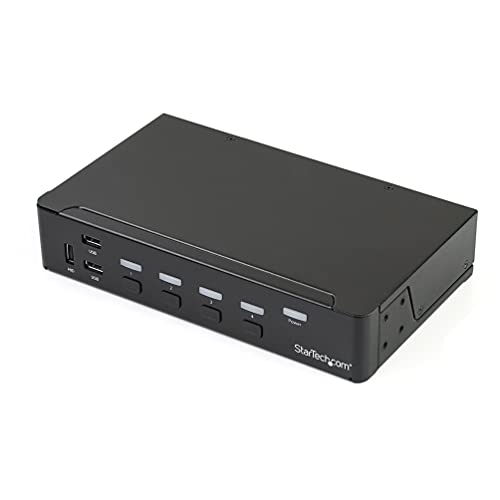
StarTech 4-Port DisplayPort KVM Switch
Best for: Managing four computers with single monitor
- Computers Supported
- 4
- Monitors Supported
- 1
- Maximum Resolution
- 4K 30Hz
- Video Interface
- DisplayPort
- USB Hub Standard
- USB 3.0
- Ports
- DisplayPort, USB 3.0
This StarTech KVM switch lets you control four DisplayPort computers with one monitor, keyboard, and mouse. It supports 4K resolution at 30Hz and includes a separate USB 3.0 hub for sharing peripherals. You also get auxiliary 3.5mm audio ports for independent analog audio sharing. It fits well if you need to manage multiple machines without cluttering your desk with extra input devices.
- Controls four computers with a single console
- Supports 4K UHD resolution at 30Hz
- Includes separate USB 3.0 hub for peripherals
- Features auxiliary 3.5mm audio ports for analog audio
- Supports only 30Hz refresh rate at 4K resolution
- Heavier build at 2.34 pounds compared to lighter docks
- Limited to single monitor setup per computer
- You need to switch between four computers
- You require separate USB peripheral sharing
- You want independent analog audio output
- You need 4K at 60Hz or higher
- You want to connect multiple monitors per computer
- You prefer a lighter, more compact device
Verdict: StarTech 4-Port DisplayPort KVM Switch is a solid choice for users managing four computers who prioritize peripheral sharing over high refresh rates. It suits those who need dedicated audio ports and do not require dual-monitor support.

AV Access 4KEX100-KVM Cat6 Extender
Best for: long-distance server room control
- Maximum Resolution
- 4K@60Hz
- Video Interface
- HDMI
- USB Hub Standard
- USB 2.0
- Ports
- HDMI, Ethernet
- Features
- Audio Support, EDID Emulation
- Dimensions
- 9.84 × 5.12 × 0.79 inches
This KVM extender transmits 4K@60Hz video and USB 2.0 data over a single Cat6 cable up to 100 meters. It includes four USB ports for peripherals and supports RS232 and audio pass-through. Independent EDID control ensures stable display output. You need this for server rooms or industrial setups where remote control is essential without moving the host PC.
- Transmits 4K@60Hz signals up to 100m over Cat6
- Includes four USB ports for peripheral connection
- Supports bi-directional RS232 and analog stereo audio
- Features independent EDID control via DIP switch
- USB 2.0 speed caps at 480Mbps
- Heavier build at 1.01 pounds
- Larger dimensions than compact desktop switches
- You need to control a PC from up to 100 meters away
- You require RS232 pass-through for automation systems
- You want independent EDID management for stable display output
- You need USB 3.0 speeds for high-bandwidth peripherals
- You require a compact desktop switch for a small workspace
- You need 8K resolution support for future-proofing
Verdict: AV Access 4K KVM Extender 100m fits IT professionals managing server rooms who need reliable remote control over long distances. It is the right choice for industrial environments where RS232 and audio integration are critical.
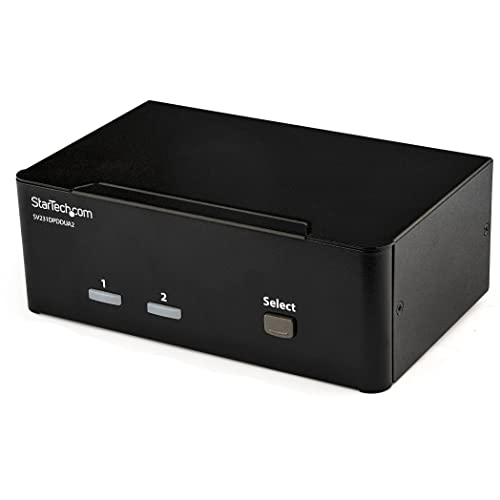
StarTech 2-Port DP KVM 4K 60Hz
Best for: Dual 4K@60Hz setups for creative professionals
- Computers Supported
- 2
- Monitors Supported
- 2
- Maximum Resolution
- 4K 60Hz
- Video Interface
- DisplayPort 1.2
- Features
- USB Hub, Audio Support
- Dimensions
- 3.9 × 6.3 × 2.3 inches
This StarTech KVM switch connects two computers to dual 4K monitors at 60Hz via DisplayPort 1.2. It includes a built-in USB hub for sharing peripherals and 3.5 mm audio ports for independent sound control. The compact, black unit weighs 1.62 pounds. It suits creative professionals needing high-resolution displays and straightforward multi-computer access without complex networking.
- Supports 4K UHD resolution at 60Hz on each DisplayPort
- Includes a 2-port USB hub for peripheral sharing
- Features 3.5 mm auxiliary ports for independent audio
- Compact dimensions of 6.3 x 3.9 x 2.3 inches
- Limited to 2 ports, fewer than many competitors offering 4 or 8 ports
- Supports only DisplayPort connections, excluding HDMI or USB-C direct monitor links
- Maxes out at 60Hz refresh rate, lower than 144Hz options available
- You need dual 4K displays for graphic design or editing tasks
- You want to share USB peripherals and audio between two computers
- You prefer a compact, dedicated hardware switch over software solutions
- You require HDMI or USB-C monitor connections
- You need to connect more than two computers
- You need high refresh rates above 60Hz for gaming
Verdict: StarTech 2-Port Dual-Monitor DisplayPort KVM delivers reliable 4K@60Hz performance for two computers. It fits users who prioritize dual-display clarity and audio separation over high refresh rates or multi-computer flexibility.

StarTech 2-Port Dual-Monitor DP KVM
Best for: Two-desktop setups with DisplayPort monitors
- Computers Supported
- 2
- Monitors Supported
- 2
- Maximum Resolution
- 4K@60Hz
- Video Interface
- DisplayPort
- Ports
- DisplayPort, USB-A
- Features
- Hotkey Switching
This StarTech KVM switch lets you control two desktops using dual 4K 60Hz DisplayPort monitors and USB-A peripherals. It features integrated 5ft host cables and remote push-button switching for easy setup. The unit is bus-powered, eliminating the need for an external power adapter. It supports Windows, macOS, Linux, and ChromeOS, making it a versatile option for mixed-OS environments.
- Supports dual 4K 60Hz DisplayPort monitors
- Integrated 5ft host cables reduce port strain
- Bus-powered design requires no external adapter
- Remote push-button switching included
- Compatible with Windows, macOS, Linux, and ChromeOS
- Limited to 2-port capacity compared to 4-port options
- Uses USB-A instead of USB-C for peripheral connections
- Max resolution is 4K 60Hz, lower than 8K or 144Hz alternatives
- You need to switch between two desktop computers
- You prefer DisplayPort monitors with USB-A peripherals
- You want a compact, bus-powered unit with integrated cables
- You require support for more than two computers
- You need USB-C connectivity for laptops
- You require 8K resolution or high refresh rates above 60Hz
Verdict: StarTech 2-Port Dual-Monitor KVM is a practical solution for users managing two desktops with DisplayPort monitors. It fits professionals who value integrated cables and bus-powered simplicity over high-resolution or multi-computer capacity.
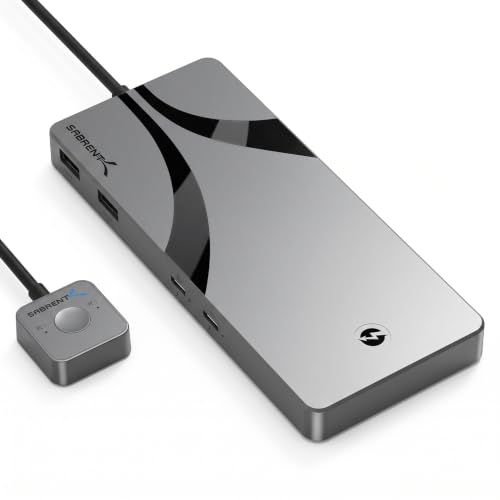
Sabrent Thunderbolt 4 KVM Switch
Best for: Thunderbolt 4 setups needing 60W charging
- Computers Supported
- 2
- Monitors Supported
- 2
- Maximum Resolution
- 8K@60Hz, 4K@144Hz
- Video Interface
- Thunderbolt 4, USB-C, DisplayPort
- Power Delivery
- 60W
- USB Hub Standard
- USB 3.2 Gen 2×1 (10Gbps)
This Sabrent Thunderbolt 4 KVM Switch lets you share two computers with high-resolution displays and USB devices. It supports up to 8K@60Hz on a single monitor or 4K@60Hz on dual monitors. The unit includes two USB-C ports with 60W Power Delivery to charge laptops. It uses an aluminum build and connects via an integrated 70cm cable. This model suits users needing fast data transfer and strong charging capability for their setup.
- Supports 8K@60Hz or 4K@60Hz dual-monitor output
- Two USB-C ports with 60W Power Delivery
- Thunderbolt 4 connectivity with 40Gbps transfer speeds
- Aluminum chassis for heat dissipation
- Lower 60W Power Delivery compared to 100W options
- Heavier 1-pound build than many compact docks
- Single 70cm integrated cable limits placement flexibility
- You need Thunderbolt 4 speeds for high-bandwidth devices
- You want 60W charging for two laptops simultaneously
- You require 8K resolution support on a single display
- You need more than 60W charging for your laptops
- You prefer a lighter, more portable form factor
- You require detachable cables for easier cable management
Verdict: Sabrent Thunderbolt 4 KVM Switch delivers high-speed connectivity and solid charging for users prioritizing Thunderbolt 4 performance and 8K display support over maximum power delivery.

AV Access iDock-C20 Dual Monitor KVM Dock
Best for: dual-laptop setups with Ethernet needs
- Computers Supported
- 2
- Monitors Supported
- 2
- Maximum Resolution
- 4K
- Video Interface
- USB-C, HDMI
- Power Delivery
- 60W
- USB Hub Standard
- USB 3.0 (5Gbps), USB 2.0
This AV Access KVM dock lets you control two laptops using one set of monitors, keyboard, and mouse. It features dual USB-C ports that support 4K video output and 60W power delivery for each connected machine. The unit includes 12-in-1 connectivity with Ethernet, USB 3.0, and SD card slots. It is designed for users who want to streamline their dual-laptop workflow without swapping cables.
- Dual USB-C ports support 20Gbps data and 60W charging per laptop
- 12-in-1 connectivity includes Ethernet, USB 3.0, and SD card slot
- Switches between computers in 2-3 seconds using EDID emulation
- Combines KVM switching with docking station functionality
- Limited to 2 computers, whereas competitors support up to 8
- Maximum resolution for 49-inch ultrawide monitors is restricted to 3840×1080
- Mac models only support mirrored displays due to macOS limitations
- You manage two laptops from a single desk setup
- You need Ethernet and SD card connectivity in your dock
- You want to charge laptops at 60W while switching
- You require support for more than two computers
- You need native 4K dual-display support on macOS
- You plan to use a 5K monitor
Verdict: AV Access iDock-C20 Dual Laptop KVM is a compact docking solution for users managing two laptops who prioritize integrated Ethernet and SD card slots over multi-computer capacity.

AV Access iDock M10 Dual 4K KVM Dock
Best for: MacBook and desktop PC dual-monitor setups
- Computers Supported
- 2
- Monitors Supported
- 2
- Maximum Resolution
- 4K@60Hz
- Video Interface
- HDMI, USB-C
- Power Delivery
- 100W
- USB Hub Standard
- 10Gbps, USB 3.2, USB 3.0
The AV Access iDock M10 is a KVM docking station for two computers, specifically one MacBook and one desktop PC. It supports dual 4K displays at 60Hz. The device includes 100W USB-C Power Delivery and Gigabit Ethernet. It uses EDID emulation to prevent screen flicker during switching. This setup replaces separate hubs and KVM switches, keeping your desk organized while sharing peripherals across both machines.
- Supports dual 4K monitors at 60Hz refresh rates
- Provides 100W USB-C Power Delivery for connected laptops
- Includes Gigabit Ethernet for continuous network connectivity
- Uses EDID emulation to maintain stable display resolution
- Integrates USB, audio, and SD card expansion ports
- Limited to two connected computers
- Designed for one MacBook and one desktop PC only
- Base M1 and M2 MacBooks support only one external display
- You need a single dual-monitor workspace for a MacBook and a desktop PC
- You require 100W power delivery to keep your laptop charged while switching
- You want to share peripherals and network access between two machines
- You need to connect two laptops simultaneously
- You require support for more than two monitors
- You need a KVM switch for more than two computers
Verdict: The AV Access iDock M10 Dual 4K KVM Dock is a practical solution for users who need to manage a MacBook and a desktop PC on two 4K screens. It fits professionals who want to consolidate their desk setup while maintaining high-resolution output and continuous network access.

TESmart 2-Monitor HDMI KVM
Best for: Two HDMI computers sharing two monitors
- Computers Supported
- 2
- Monitors Supported
- 2
- Maximum Resolution
- 4K@60Hz
- Video Interface
- HDMI
- USB Hub Standard
- USB 3.0 (5Gbps)
- EDID Emulation
- Supported
The TESmart HDMI KVM Switch handles two computers and two monitors at 4K@60Hz. It features USB 3.0 ports for fast peripheral sharing and EDID emulation to keep display settings stable. You can switch sources via buttons, hotkeys, or an IR remote. Audio passes through seamlessly, and it works with most operating systems without extra drivers. This is a solid option for dual-display setups using HDMI.
- Supports 4K UHD resolution at 60Hz refresh rate
- USB 3.0 ports provide 5Gbps data transfer speeds
- EDID emulation prevents display setting changes during switching
- Integrated audio output and microphone support
- Multiple switching methods including buttons and IR remote
- Limited to HDMI connections, excluding DisplayPort or USB-C video
- Supports only two computers, fewer than many competitors
- Requires each connected PC to have two HDMI outputs
- You need to share two monitors between two HDMI-based computers
- You want stable EDID emulation to avoid display flickering
- You prefer switching via physical buttons or a remote
- You require DisplayPort or USB-C video connections
- You need to connect more than two computers
- Your computers lack dual HDMI outputs
Verdict: The TESmart 2-Monitor HDMI KVM is a practical choice for users with two HDMI-equipped computers who need dual-monitor support. It delivers reliable 4K@60Hz performance with stable EDID handling for office or home lab setups.

AV Access iDock B23 8K KVM Docking Station
Best for: Windows users needing 165Hz triple-monitor switching
- Computers Supported
- 2
- Monitors Supported
- 3
- Maximum Resolution
- 8K@60Hz, 4K@165Hz
- Video Interface
- USB-C
- Power Delivery
- 100W
- USB Hub Standard
- 10Gbps USB 3.2, 5Gbps USB-A
The AV Access iDock B23 is a triple-monitor KVM docking station for two computers. It supports 8K@60Hz and 4K@165Hz video output. The device includes 100W Power Delivery over a single USB-C cable. It features three 10Gbps USB ports and a 1Gb Ethernet connection. This setup allows you to share displays, peripherals, and network access between a laptop and desktop.
- Supports 8K@60Hz and 4K@165Hz refresh rates
- Provides 100W Power Delivery via USB-C
- Includes three 10Gbps USB ports for fast data transfer
- Maintains 1Gb Ethernet connection on both computers during switching
- MacBooks are limited to mirrored displays only
- Desktop PC supports higher refresh rates than the connected laptop
- Requires Windows MST support for extended multi-monitor mode on laptops
- You need to drive three monitors from a single docking station
- You require high refresh rates like 165Hz for gaming or design
- You want to charge your laptop with up to 100W Power Delivery
- You use MacBooks and need independent extended displays across multiple monitors
- You only need to connect two monitors instead of three
- You require higher refresh rates on the laptop side than 165Hz
Verdict: The AV Access iDock B23 8K KVM Docking Station fits users who need a high-spec triple-monitor hub with 165Hz support and 100W charging. It is ideal for Windows users running demanding dual-computer workflows.

GL.iNet Comet X 4-Port KVM with Touchscreen
Best for: rack-mounted home lab KVM with touchscreen
- Computers Supported
- 4
- Monitors Supported
- 1
- Maximum Resolution
- 4K@30Hz
- Video Interface
- HDMI
- Features
- Touchscreen
- Dimensions
- 6.69 × 3.54 × 1.57 inches
The GL.iNet Comet X is a quad-port remote KVM designed for home labs and IT professionals. It supports four HDMI inputs and includes a 3.69-inch TFT touchscreen for local control. The device features a 4K 30Hz HDMI loop-out for direct monitor access and offers browser-based remote management over HTTPS. PoE power keeps your rack tidy, while 64 GB of onboard storage aids in system deployment.
- Quad-port connectivity for up to four host systems
- 3.69-inch TFT touchscreen for intuitive local configuration
- 4K 30Hz HDMI loop-out for simultaneous local display
- PoE powered with 5V Type-C backup redundancy
- 64 GB eMMC storage for system images and backups
- 4K resolution is limited to 30Hz, lower than the 60Hz or 144Hz found on many other switches
- 1.23-pound weight is heavier than typical compact desktop KVMs
- HDMI input limits connection to displays with HDMI ports
- You need a rack-mountable KVM with PoE power for server environments
- You want a touchscreen interface for quick local port switching
- You require browser-based remote access without installing client software
- You require 4K resolution at 60Hz or higher refresh rates
- You need DisplayPort or Thunderbolt connectivity for your hosts
- You prefer a lightweight, non-rack-mountable desktop unit
Verdict: The GL.iNet Comet X 4-Port KVM with Touchscreen fits IT pros managing home labs who value PoE integration and local touchscreen control. It is less suitable for users needing high-refresh-rate 4K displays or non-HDMI connections.

AV Access iDock B23-S2 8K KVM Dock
Best for: users needing triple-monitor setups with high power delivery
- Computers Supported
- 2
- Monitors Supported
- 3
- Maximum Resolution
- 8K@60Hz
- Video Interface
- DP 2.0, HDMI 2.1, USB-C
- Power Delivery
- 100W
- USB Hub Standard
- 10Gbps, 5Gbps
This KVM docking station connects two computers to three displays. It supports 8K resolution at 60Hz and 4K at 165Hz for the desktop. The USB-C port delivers up to 100W of power to your laptop. You get shared peripherals, gigabit Ethernet, and an SD card reader. It suits users who want a single cable for video, data, and charging.
- Supports 8K@60Hz and 4K@165Hz for high-detail work
- Delivers up to 100W USB-C power delivery to laptops
- Connects two computers to three monitors simultaneously
- Includes gigabit Ethernet and SD card reader
- MacBooks only support mirrored displays, not extended desktops
- HDMI and DisplayPort cables are not included with the unit
- Requires specific USB-C video output compatibility on laptops
- You need to drive three monitors from two computers
- You want a single USB-C cable for charging and data
- You require 8K resolution support for detailed design work
- You use MacBooks and need extended multi-monitor setups
- You prefer a simple switch without docking station features
- You want all necessary display cables included in the box
Verdict: AV Access iDock B23-S2 Triple Monitor KVM fits professionals who need to manage three displays across two systems with minimal cable clutter. It is ideal for users who value high resolution and fast laptop charging in one device.

AV Access iDock X20 Dual USB-C KVM
Best for: Two USB-C laptops with dual 4K displays
- Computers Supported
- 2
- Monitors Supported
- 2
- Maximum Resolution
- 4K@60Hz
- Video Interface
- HDMI, USB-C
- Power Delivery
- 65W
- USB Hub Standard
- USB 3.0, USB 2.0, 5Gbps
The AV Access iDock X20 is a dual USB-C KVM docking station designed for two laptops. It supports dual 4K@60Hz displays over a single USB-C cable per machine and provides 65W Power Delivery to both connected devices simultaneously. The dock includes a Gigabit Ethernet port, SD card reader, and multiple USB 3.0 and 2.0 ports. It features a unique Dual PC Mode for independent keyboard and mouse switching between two visible screens.
- 65W Power Delivery for two connected laptops
- Dual 4K@60Hz display support via USB-C
- Always-on Gigabit Ethernet for both systems
- Dual PC Mode for independent control
- Includes wired remote controller
- Supports only two computers, fewer than many list options
- Apple Silicon Macs display mirrored content on dual monitors
- Refresh rate limited to 240Hz for single display modes
- You need to manage two USB-C laptops from one desk
- You require simultaneous 65W charging for both machines
- You want independent keyboard and mouse control across dual screens
- You need to connect more than two computers
- You use Apple Silicon Macs and need independent dual displays
- You require 8K resolution support
Verdict: AV Access iDock X20 Dual USB-C KVM Dock is a practical solution for users managing two USB-C laptops who need simultaneous charging and dual 4K displays. It suits professionals who benefit from independent input switching across two monitors.

TESmert Dual Monitor 4K KVM Switch
Best for: High refresh rate dual-monitor setups
- Computers Supported
- 2
- Monitors Supported
- 2
- Maximum Resolution
- 4K@60Hz
- Video Interface
- DisplayPort, HDMI, USB-C
- Power Delivery
- 100W
- USB Hub Standard
- USB 3.0 (5 Gbps)
This TESmert KVM switch manages two computers and two monitors. It supports 4K resolution at 60Hz and handles high refresh rates up to 120Hz for smooth visuals. The unit includes USB-C ports with 100W power delivery for laptops. You get USB 3.0 data transfer and a 1000 Mbps Ethernet port. It works with Windows, Mac, and Linux systems. The switch allows you to control both machines with one keyboard and mouse.
- Supports 120Hz refresh rates for smooth gaming
- 100W USB-C power delivery for laptops
- Built-in EDID emulator to prevent window rearrangement
- Three switching methods: hotkeys, buttons, and mouse wheel
- Maximum resolution is 4K@60Hz, lower than some competitors offering 8K
- Supports only two computers, fewer than the eight-port options available
- Physical dimensions are 4.53 x 7.28 x 1.89 inches, requiring desk space
- You need high refresh rates like 120Hz for gaming
- You want to charge your laptop via the KVM dock
- You use both Windows and Mac computers
- You require 8K resolution support
- You need to connect more than two computers
- You prefer a compact single-monitor setup
Verdict: TESmert Dual Monitor 4K KVM Switch is a solid choice for users who prioritize high refresh rates and laptop charging. It fits professionals and gamers who switch between two machines regularly.

TESmert USB-C KVM Switch for 2 Laptops
Best for: Two laptops with dual monitors and charging
- Computers Supported
- 2
- Monitors Supported
- 2
- Maximum Resolution
- 4K@60Hz
- Video Interface
- HDMI, USB-C
- Power Delivery
- 65W
- USB Hub Standard
- USB 3.0 (5 Gbps)
This USB-C KVM switch connects two laptops to two monitors. It supports 4K at 60Hz and 2K at 144Hz via MST and DP Alt modes. Each laptop port delivers 65W power delivery. You get USB 3.0 for data, 1G Ethernet, and audio jacks. It includes EDID emulation to reduce screen rearranging. Switching uses hotkeys, buttons, or the mouse wheel. It fits users who want a clean desk with dual displays and fast charging.
- Supports dual 4K@60Hz or 2K@144Hz displays
- 65W power delivery for each laptop
- Built-in 1G Ethernet port
- USB 3.0 for fast data transfer
- EDID emulator minimizes window rearranging
- Supports only two computers, fewer than many competitors
- 1G Ethernet limit compared to 2.5G options
- 65W charging lower than 100W alternatives
- You need to switch between two laptops
- You want 65W charging for your devices
- You prefer a single cable for video and power
- You need to connect more than two computers
- You require 8K resolution support
- You need 2.5G Ethernet speeds
Verdict: TESmert USB-C KVM Switch for 2 Laptops is a solid choice for users who want to manage two laptops with dual monitors and fast charging. It suits those who value a tidy desk setup with MST support.
Specifications side by side

| Spec | StarTech 4-Port DisplayPort KVM Switch | AV Access 4KEX100-KVM Cat6 Extender | StarTech 2-Port DP KVM 4K 60Hz | StarTech 2-Port Dual-Monitor DP KVM | Sabrent Thunderbolt 4 KVM Switch | AV Access iDock-C20 Dual Monitor KVM Dock | AV Access iDock M10 Dual 4K KVM Dock | TESmart 2-Monitor HDMI KVM | AV Access iDock B23 8K KVM Docking Station | GL.iNet Comet X 4-Port KVM with Touchscreen | AV Access iDock B23-S2 8K KVM Dock | AV Access iDock X20 Dual USB-C KVM | TESmert Dual Monitor 4K KVM Switch | TESmert USB-C KVM Switch for 2 Laptops |
|---|---|---|---|---|---|---|---|---|---|---|---|---|---|---|
| Computers Supported | 4 | – | 2 | 2 | 2 | 2 | 2 | 2 | 2 | 4 | 2 | 2 | 2 | 2 |
| Monitors Supported | 1 | – | 2 | 2 | 2 | 2 | 2 | 2 | 3 | 1 | 3 | 2 | 2 | 2 |
| Maximum Resolution | 4K 30Hz | 4K@60Hz | 4K 60Hz | 4K@60Hz | 8K@60Hz, 4K@144Hz | 4K | 4K@60Hz | 4K@60Hz | 8K@60Hz, 4K@165Hz | 4K@30Hz | 8K@60Hz | 4K@60Hz | 4K@60Hz | 4K@60Hz |
| Video Interface | DisplayPort | HDMI | DisplayPort 1.2 | DisplayPort | Thunderbolt 4, USB-C, DisplayPort | USB-C, HDMI | HDMI, USB-C | HDMI | USB-C | HDMI | DP 2.0, HDMI 2.1, USB-C | HDMI, USB-C | DisplayPort, HDMI, USB-C | HDMI, USB-C |
| Power Delivery | – | – | – | – | 60W | 60W | 100W | – | 100W | – | 100W | 65W | 100W | 65W |
| USB Hub Standard | USB 3.0 | USB 2.0 | – | – | USB 3.2 Gen 2×1 (10Gbps) | USB 3.0 (5Gbps), USB 2.0 | 10Gbps, USB 3.2, USB 3.0 | USB 3.0 (5Gbps) | 10Gbps USB 3.2, 5Gbps USB-A | – | 10Gbps, 5Gbps | USB 3.0, USB 2.0, 5Gbps | USB 3.0 (5 Gbps) | USB 3.0 (5 Gbps) |
| Ethernet Speed | – | – | – | – | – | 1 Gbps | 1 Gbps | – | 1 Gbps | – | 1 Gbps | 1 Gbps | 1000 Mbps | 1000 Mbps |
| EDID Emulation | – | – | – | – | – | Supported | Supported | Supported | – | – | – | – | – | – |
| Resolution | 4K UHD | 4K UHD | 4K UHD | 4K UHD | 8K UHD | 1080p FHD | 4K UHD | 4K UHD | 8K UHD | 4K UHD | 8K UHD | – | 4K UHD | 4K UHD |
| Refresh Rate | – | 60Hz | 60Hz | 60Hz | 144Hz | 240Hz | 60Hz | 60Hz | 165Hz | – | 144Hz | 240Hz | 120Hz | 144Hz |
| Ports | DisplayPort, USB 3.0 | HDMI, Ethernet | DisplayPort | DisplayPort, USB-A | USB-C, Thunderbolt 4, USB-A | USB-C, Ethernet | Ethernet | HDMI, USB 3.0 | – | HDMI | HDMI, DisplayPort, USB-C, Ethernet | USB-C, Ethernet | HDMI, DisplayPort, USB-C, Ethernet, USB 3.0 | DisplayPort, USB-C, Ethernet, USB 3.0 |
| Features | Audio Support | Audio Support, EDID Emulation | USB Hub, Audio Support | Hotkey Switching | Power Delivery | Power Delivery, EDID Emulation, MST | Power Delivery, EDID Emulation | Audio Support, EDID Emulation, Hotkey Switching | USB Hub, Power Delivery | Touchscreen | – | Power Delivery, EDID Emulation | Power Delivery, Audio Support, EDID Emulation, Hotkey Switching | Power Delivery, Audio Support, EDID Emulation, Hotkey Switching, MST |
| Use | – | – | – | – | Mac | Business & Office, Office, Home Office | Mac | – | Gaming | – | – | – | – | – |
| Display Support | – | – | – | – | – | – | Dual Display | – | – | – | – | – | – | – |
| Operating System | – | – | – | Windows | macOS | – | macOS | – | – | – | – | – | – | – |
| Number of Computers | – | – | – | – | – | 2 Computers | 2 Computers | 2 Computers | 2 Computers | – | 2 Computers | 2 Computers | 2 Computers | 2 Computers |
| Dimensions | 8.7 × 5.1 × 1.7 inches | 9.84 × 5.12 × 0.79 inches | 3.9 × 6.3 × 2.3 inches | 4.9 × 3.5 × 1 inches | 6.3 × 2.76 × 0.71 inches | 6.69 × 4.33 × 1.77 inches | 8.66 × 3.94 × 0.98 inches | 11.8 × 4.33 × 1.18 inches | 5.61 × 0.91 × 1.03 inches | 6.69 × 3.54 × 1.57 inches | – | – | 7.28 × 4.53 × 1.89 inches | 7.28 × 4.53 × 1.89 inches |
| Weight | 2.34 pounds | 1.01 pounds | 1.62 pounds | 1.32 pounds | 1 pounds | 3.88 pounds | 12 ounces | – | – | 1.23 pounds | – | – | – | – |
| Size | 1.7"x5.1"x8.7" | 100 | 2.3" x 6.3" x 3.9" | [Output] 2 x DP | Thunderbolt 4 KVM | 20 | – | – | 23 | – | – | – | – | – |
| Color | Black | Black | Black | black | Black | Grey | black | Black | 8K 3 monitors 1 desktop & 1 laptop(iDock B23) | Dark Gray | – | – | – | – |
| Model | SV431DPU3A2 | 4KEX100-KVM | SV231DPDDUA2 | C2-DD46-UA2-CBL-KVM | SB-TB4K | iDock-C20-US | iDock M10 | TES-HKS0202A2U-USBK-V2 | iDock B23 | GL-RM4PE | iDock B23-S2 | iDock X20-S2 | T722-USCB | T422-CACB |
If you require wired LAN connectivity, specifications for the best network switches under 300 detail port options.
How to Choose Your KVM Switch
Check Port Compatibility
Your switch must match your monitor and computer inputs. The StarTech 4-Port DisplayPort KVM Switch uses DisplayPort for video, while the AV Access 4KEX100-KVM uses HDMI. If you use Thunderbolt 4 devices, the Sabrent Thunderbolt 4 KVM Switch is necessary. Ensure the physical connectors on the switch align with the cables on your peripherals. Mismatched ports will prevent connection regardless of other specifications. Always verify the input types before purchasing to avoid compatibility issues with your existing hardware setup.
Verify Resolution Support
Resolution determines image clarity and detail. Most listed switches support 4K UHD, which is standard for modern displays. However, the Sabrent Thunderbolt 4 KVM Switch and AV Access iDock B23 support 8K UHD for higher fidelity. The AV Access iDock-C20 is limited to 1080p FHD. If you have a high-resolution monitor, ensure the switch can output that resolution. Lower resolution support will result in a blurry or stretched image. Match the switch spec to your monitor's native resolution for the best visual experience.
Match Refresh Rates
Refresh rate affects motion smoothness, which is critical for gaming and fast-paced video. Many units cap at 60Hz, such as the StarTech 2-Port DP KVM. If you need higher speeds, the AV Access iDock B23 supports 165Hz, and the TESmert Dual Monitor supports 120Hz. The Sabrent model reaches 144Hz. Check the listed refresh rate to ensure it meets your needs. A low refresh rate on a high-speed monitor will bottleneck performance. Select a switch that matches or exceeds your monitor's maximum refresh rate.
Assess Power Delivery
Power Delivery allows the switch to charge your laptop while connected. The AV Access iDock M10 provides 100W PD, which is sufficient for most large laptops. The TESmert Dual Monitor 4K KVM Switch also offers 100W PD. The Sabrent model provides 60W, which may be slower for some devices. If you rely on the KVM for charging, verify the wattage output. Insufficient power may cause slow charging or battery drain. Choose a model with adequate PD if you plan to keep your laptop plugged in through the switch.
Confirm Number of Computers
The number of supported computers determines how many systems you can control. The StarTech 4-Port DisplayPort KVM Switch handles four computers. Most other listed models, like the TESmart 2-Monitor HDMI KVM, support two computers. The AV Access iDock B23 supports two computers with triple monitors. Ensure the switch supports the exact count of systems you own. Exceeding the limit is not possible, and using fewer inputs may waste potential. Select a model that matches your current setup and allows for minor future expansion.
Frequently asked questions
Which KVM switch supports 8K resolution?
The Sabrent Thunderbolt 4 KVM Switch and the AV Access iDock B23 both support 8K UHD resolution. The Sabrent model also offers a 144Hz refresh rate, making it suitable for high-performance setups. The AV Access iDock B23 provides 165Hz support for smoother motion. These units handle the highest available display standards among the listed options.
How do I connect two laptops with one monitor setup?
You can use the AV Access iDock-C20 or the TESmert Dual Monitor 4K KVM Switch. The iDock-C20 is designed for dual-laptop setups and includes Ethernet ports. The TESmert model supports two computers with dual monitors and offers 100W power delivery. Both allow you to share peripherals while managing distinct systems.
Does any KVM switch include a touchscreen?
Yes, the GL.iNet Comet X 4-Port KVM with Touchscreen features a built-in display for local control. It is designed for rack-mounted environments and home labs. This unit supports 4K UHD resolution and HDMI connections. It allows direct interaction without needing an external monitor for management tasks.
Can I use a KVM switch with Thunderbolt 4 devices?
The Sabrent Thunderbolt 4 KVM Switch is built for this purpose. It utilizes Thunderbolt 4 connectivity to support 8K resolution and 144Hz refresh rates. It also provides 60W power delivery for connected devices. This makes it ideal for Mac users or high-speed workstation setups requiring Thunderbolt compatibility.
Which switch is best for long-distance server control?
The AV Access 4KEX100-KVM Cat6 Extender is designed for long-distance management. It extends HDMI signals up to 100 meters. This unit supports 4K UHD resolution at 60Hz and includes RS232 and audio integration. It is suitable for industrial environments or server rooms where physical proximity is not possible.
Do these switches support audio passthrough?
Several models include dedicated audio support. The StarTech 4-Port DisplayPort KVM Switch and the StarTech 2-Port DP KVM 4K 60Hz both feature audio ports. The TESmart 2-Monitor HDMI KVM and TESmert models also support audio. This allows you to route sound from the active computer to your speakers or headphones.
See also