Best Kvm Switches for Gaming in 2026: 7 Picks Ranked by Specs
As Amazon Associates, we earn from qualifying purchases. This means we may receive a small commission at no extra cost to you if you click through and make a purchase.
As an Amazon Associate we earn from qualifying purchases. Links on this page are affiliate links.
Finding the best kvm switches for gaming requires matching high refresh rates and stable EDID management to your hardware. We compared 7 models ranked by their published specifications. The TESmart 8K HDMI DP KVM leads because it supports 144Hz refresh rates across HDMI and DisplayPort connections. This ensures smooth visuals for dual-monitor setups with two PCs. Each pick prioritizes port types, resolution limits, and switching features. Use this guide to decide which KVM handles your specific gaming and productivity needs.
Match ports to your monitor connections

Your KVM switch must support the same video ports as your monitors. Most top picks use HDMI or DisplayPort. Check the port list carefully. You need a switch with HDMI if your displays use HDMI cables. Choose DisplayPort models for DP monitors. Both options support 8K resolution and high refresh rates for smooth gaming performance.
| # | Product | Best for | Price |
|---|---|---|---|
| 1 | TESmart 8K HDMI DP KVM Best overall | Dual monitor gaming with two PCs | |
| 2 | TESmart 8K DP KVM Switch 2×2 Also great | Dual-monitor DisplayPort gaming setups | |
| 3 | AV Access iDock B10 8K KVM Dock Best budget | Dual monitor gaming and hybrid work | |
| 4 | TESmart 8K HDMI KVM Switch Best premium | 2 PC gaming setups with HDMI displays | |
| 5 | AV Access iDock B23 8K KVM Docking Station Best usb hub | Triple monitor gaming setups with laptop charging | |
| 6 | TESmart 4-PC 3-Monitor KVM Best 4 computers | 4 PC setups with 3 high refresh monitors | |
| 7 | TESmart 8K HDMI KVM Switch Also great | Dual HDMI gaming setups requiring 8K support |
The best fit for you

- You want the best overall dual monitor gaming setup – TESmart 8K HDMI DP KVM – It supports 8K resolution at 144Hz with HDMI and DisplayPort inputs.
- You need high refresh rates for dual monitor gaming – AV Access iDock B10 8K KVM Dock – This dock offers 165Hz refresh rates and 100W power delivery.
- You manage four PCs across three high refresh monitors – TESmart 4-PC 3-Monitor KVM – It connects four computers to three monitors at 144Hz refresh rates.
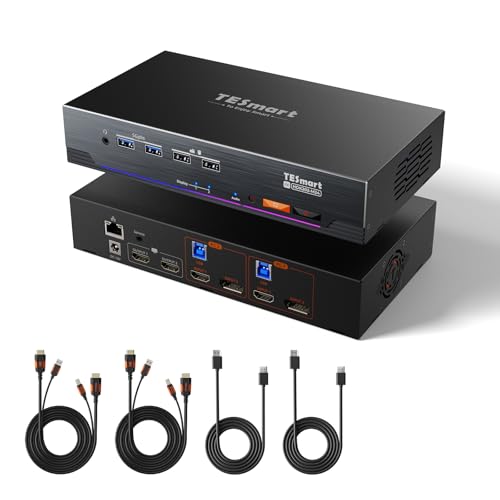
TESmart 8K HDMI DP KVM
Best for: Dual monitor gaming with two PCs
- Use
- Gaming
- Computers Supported
- 2
- Monitors Supported
- 2
- Maximum Resolution
- 8K@60Hz
- Video Interface
- HDMI 2.1, DisplayPort 1.4
- USB Hub Standard
- USB 3.0
This KVM switch supports two computers and two monitors with HDMI and DisplayPort connections. It handles 8K@60Hz and 4K@144Hz resolutions for smooth gaming. The device includes EDID emulation to maintain stable display settings. You get Gigabit Ethernet sharing and multiple switching methods. It fits users who need high refresh rates and dual-monitor setups for gaming.
- Supports 8K@60Hz and 4K@144Hz resolutions
- Includes HDMI 2.1 and DP 1.4 ports
- Features EDID emulation for stable displays
- Shares a single Gigabit Ethernet connection
- Supports VRR, ALLM, and Dynamic HDR
- Supports only two connected computers
- Includes only two HDMI output ports
- Requires separate AAA batteries for the IR remote
- You need to switch between two desktop computers
- You want to use two monitors for gaming
- You require 4K@144Hz or 8K@60Hz support
- You need to connect three or more computers
- You require three monitor outputs per computer
- You prefer a compact docking station form factor
Verdict: TESmart 8K HDMI+DP KVM Switch is a solid choice for gamers using two computers and two monitors. It delivers high refresh rates and stable EDID management for a reliable setup.

TESmart 8K DP KVM Switch 2×2
Best for: Dual-monitor DisplayPort gaming setups
- Use
- Gaming
- Computers Supported
- 2
- Monitors Supported
- 2
- Maximum Resolution
- 8K@60Hz
- Video Interface
- DisplayPort 1.4
- USB Hub Standard
- USB 3.0
This KVM switch supports two monitors and two desktops via DisplayPort 1.4. It delivers 8K@60Hz resolution with 144Hz refresh rates for gaming. EDID emulation stabilizes display settings. You get hotkey, button, and remote switching. Audio remains active during switches. It is built for dual-monitor gaming setups requiring high bandwidth and low latency.
- Supports 8K@60Hz and 4K@144Hz resolutions
- Includes EDID emulation for stable displays
- Offers four switching methods including hotkeys
- Maintains audio connection during source changes
- Supports only two monitors compared to three in other picks
- Limited to DisplayPort inputs without HDMI
- AAA batteries for remote are not included
- You need a stable dual-monitor gaming setup
- You use DisplayPort 1.4 monitors and desktops
- You want to keep audio active while switching
- You require HDMI or USB-C inputs
- You need to connect three monitors
- You prefer a remote with included batteries
Verdict: TESmart 8K DP KVM Switch suits gamers using two DisplayPort monitors. It provides high refresh rates and stable EDID emulation. It is a solid choice for dual-desktop gaming.

AV Access iDock B10 8K KVM Dock
Best for: Dual monitor gaming and hybrid work
- Use
- Gaming
- Computers Supported
- 2
- Monitors Supported
- 2
- Maximum Resolution
- 8K@60Hz
- Video Interface
- HDMI 2.1, DisplayPort 1.4a, USB-C
- Power Delivery
- 100W
This AV Access iDock B10 KVM docking station connects two computers to two monitors. It supports 8K@60Hz or 4K@165Hz video output. You get 100W power delivery over a single USB-C cable. The device includes gigabit Ethernet ports for both systems. This setup lets you share peripherals while keeping background tasks running on the inactive computer. It suits gamers and hybrid workers who need high refresh rates and fast data transfer.
- Supports dual 8K@60Hz or dual 4K@165Hz resolution
- Delivers 100W power delivery via USB-C
- Includes gigabit Ethernet for both computers
- Features 10Gbps USB data transfer speeds
- Maintains network connectivity for both systems
- Supports only two computers, while other options handle three
- Drives two monitors, whereas some competitors support three
- MacOS mirrors displays instead of extending them
- You need 4K@165Hz gaming performance
- You want to charge a laptop with 100W PD
- You require simultaneous internet access for two PCs
- You need to connect three monitors
- You need to manage more than two computers
- You require extended dual displays on macOS
Verdict: AV Access iDock B10 Dual Monitor KVM delivers high refresh rates and 100W charging for dual setups. It fits users who prioritize speed and network continuity over multi-monitor expansion.

TESmart 8K HDMI KVM Switch
Best for: 2 PC gaming setups with HDMI displays
- Use
- Gaming
- Computers Supported
- 2
- Monitors Supported
- 2
- Maximum Resolution
- 8K@60Hz, 4K@144Hz
- Video Interface
- HDMI 2.1
- USB Hub Standard
- USB 3.0
This KVM switch supports two computers and two monitors via HDMI 2.1. It delivers 8K@60Hz and 4K@144Hz with VRR and ALLM for gaming. EDID emulation ensures stable signals. You get USB 3.0 and 1G Ethernet for data and network sharing. Integrated audio allows you to listen to one PC while working on the other. It includes an IR remote and hotkeys for switching.
- HDMI 2.1 supports 8K@60Hz and 4K@144Hz
- EDID emulation for stable display signals
- VRR, ALLM, and HDR10+ for gaming
- Integrated microphone and L/R audio output
- 1G Ethernet for shared network access
- Supports only two computers
- HDMI only, no DisplayPort or USB-C video
- Limited to two monitor outputs
- You need 8K@60Hz or 4K@144Hz gaming performance
- You want to share a 1G network connection
- You prefer HDMI connections for both PCs
- You require DisplayPort video outputs
- You need to connect more than two computers
- You want to control more than two monitors
Verdict: TESmart 8K@60Hz HDMI KVM 2×2 fits users who need high-refresh HDMI gaming with two PCs. It suits those who value shared Ethernet and stable EDID signals over multi-port flexibility.

AV Access iDock B23 8K KVM Docking Station
Best for: Triple monitor gaming setups with laptop charging
- Use
- Gaming
- Computers Supported
- 2
- Monitors Supported
- 3
- Maximum Resolution
- 8K@60Hz, 4K@165Hz
- Video Interface
- USB-C
- Power Delivery
- 100W
This AV Access iDock B23 acts as a KVM docking station for two computers and three monitors. It supports 8K@60Hz for desktops and 4K@165Hz for laptops. The 100W Power Delivery port charges your laptop via a single USB-C cable. You can switch between systems using a top button or wired remote. The shared 1Gb Ethernet keeps both machines online during switching. It includes 10Gbps USB ports for fast data transfer.
- Supports 8K@60Hz and 4K@165Hz resolutions
- 100W Power Delivery via USB-C
- Three 10Gbps USB ports for fast data
- Shared 1Gb Ethernet stays active while switching
- Switch via top button or wired remote
- Laptop resolution capped at 4K@60Hz
- Only supports two computers
- MacBooks limited to mirrored displays
- You need a triple-monitor setup for gaming
- You want to charge a laptop with 100W PD
- You require fast 10Gbps USB data transfer
- You need more than two computers connected
- You want independent extended displays on a MacBook
- You prefer a higher refresh rate for your laptop
Verdict: AV Access iDock B23 Triple Monitor KVM fits users who need high-resolution triple displays and fast charging. It is ideal for gamers using a desktop and a laptop who want to share three monitors without losing network connectivity.

TESmart 4-PC 3-Monitor KVM
Best for: 4 PC setups with 3 high refresh monitors
- Use
- Gaming
- Computers Supported
- 4
- Monitors Supported
- 3
- Maximum Resolution
- 8K@60Hz
- Video Interface
- DisplayPort 1.4
- USB Hub Standard
- USB 3.2 Gen 1 (5Gbps), USB 1.1
This TESmart unit supports 4 computers and 3 monitors via DisplayPort. It handles 8K@60Hz and dual 4K@144Hz with HDR10 and VRR. EDID emulation keeps your setup stable during switches. It includes USB 3.0 ports, 1G Ethernet, and audio. You get four switching methods. This KVM dock suits gamers who need high refresh rates across multiple screens.
- Supports 4 computers for shared peripherals
- Delivers dual 4K@144Hz with VRR support
- Includes 1G Ethernet for network sharing
- EDID emulation prevents resolution changes
- Four switching options including hotkeys and remote
- Supports only 3 monitors compared to 8K models with 2 monitors
- Requires 3 video connections per computer for triple display
- Larger footprint at 15.6 inches in length
- You need to switch between 4 different computers
- You want to drive 3 monitors with high refresh rates
- You require EDID emulation for stable multi-PC workflows
- You only need 2 monitors and want a smaller device
- You prefer HDMI connections over DisplayPort
- You do not need 4 computer inputs
Verdict: TESmart 4K@144Hz DP KVM Switch 3 Monitors 4 Computers fits gamers who need to manage 4 PCs across 3 high-refresh displays. It offers stable switching and network connectivity for complex setups.

TESmart 8K HDMI KVM Switch
Best for: Dual HDMI gaming setups requiring 8K support
- Use
- Gaming
- Computers Supported
- 2
- Monitors Supported
- 2
- Maximum Resolution
- 8K@60Hz
- Video Interface
- HDMI 2.1
- USB Hub Standard
- USB 3.0
This TESmart KVM switch supports dual monitors with HDMI 2.1 connectivity. It handles 8K@60Hz and 4K@144Hz resolutions for high-refresh gaming. The unit includes EDID emulation for stable signals and supports VRR and ALLM. You get four switching methods, including keyboard hotkeys and an IR remote. It also features integrated audio output and a microphone. The device requires two HDMI outputs per connected computer.
- Supports 8K@60Hz and 4K@144Hz via HDMI 2.1
- Includes EDID emulation for stable display signals
- Supports VRR, ALLM, and Dynamic HDR
- Offers four switching options including hotkeys and remote
- HDMI-only video connections limit port versatility
- Requires two HDMI outputs per connected computer
- IR remote uses AAA batteries not included
- You use two computers with dual HDMI outputs
- You need 8K@60Hz or 4K@144Hz gaming performance
- You want dedicated audio switching without reconnection
- You need DisplayPort or USB-C video inputs
- You only have one HDMI output per computer
- You prefer a simpler single-monitor setup
Verdict: TESmart 8K HDMI KVM Switch 2×2 fits users with dual HDMI outputs who need high-resolution gaming support. It delivers stable 8K@60Hz performance with convenient switching features.
Specifications side by side

| Spec | TESmart 8K HDMI DP KVM | TESmart 8K DP KVM Switch 2×2 | AV Access iDock B10 8K KVM Dock | TESmart 8K HDMI KVM Switch | AV Access iDock B23 8K KVM Docking Station | TESmart 4-PC 3-Monitor KVM | TESmart 8K HDMI KVM Switch |
|---|---|---|---|---|---|---|---|
| Computers Supported | 2 | 2 | 2 | 2 | 2 | 4 | 2 |
| Monitors Supported | 2 | 2 | 2 | 2 | 3 | 3 | 2 |
| Maximum Resolution | 8K@60Hz | 8K@60Hz | 8K@60Hz | 8K@60Hz, 4K@144Hz | 8K@60Hz, 4K@165Hz | 8K@60Hz | 8K@60Hz |
| Video Interface | HDMI 2.1, DisplayPort 1.4 | DisplayPort 1.4 | HDMI 2.1, DisplayPort 1.4a, USB-C | HDMI 2.1 | USB-C | DisplayPort 1.4 | HDMI 2.1 |
| Power Delivery | – | – | 100W | – | 100W | – | – |
| USB Hub Standard | USB 3.0 | USB 3.0 | 10Gbps, 5Gbps | USB 3.0 | 10Gbps USB 3.2, 5Gbps USB-A | USB 3.2 Gen 1 (5Gbps), USB 1.1 | USB 3.0 |
| Ethernet Speed | 1 Gbps | 1 Gbps | 1 Gbps | 1 Gbps | 1 Gbps | 1G Ethernet | 1G Ethernet |
| EDID Emulation | – | Supported | – | – | – | – | – |
| Resolution | 8K UHD | 8K UHD | 8K UHD | 8K UHD | 8K UHD | 8K UHD | 8K UHD |
| Refresh Rate | 144Hz | 144Hz | 165Hz | 144Hz | 165Hz | 144Hz | 144Hz |
| Ports | HDMI, DisplayPort, Ethernet, USB 3.0 | DisplayPort, Ethernet, USB 3.0 | Ethernet | HDMI, Ethernet, USB 3.0 | – | DisplayPort, Ethernet, USB 3.0 | HDMI, USB 3.0 |
| Features | EDID Emulation, Hotkey Switching | Audio Support, EDID Emulation, Hotkey Switching | Power Delivery | Audio Support, EDID Emulation, Hotkey Switching | USB Hub, Power Delivery | EDID Emulation | Audio Support, EDID Emulation, Hotkey Switching |
| Use | Gaming | Gaming | Gaming | Gaming | Gaming | Gaming | Gaming |
| Number of Computers | 2 Computers | 2 Computers | 2 Computers | 2 Computers | 2 Computers | 4 Computers | 2 Computers |
| Dimensions | 7.48 × 4.92 × 2.09 inches | 7.5 × 4.9 × 2.08 inches | 5.61 × 0.91 × 1.03 inches | 8 × 5 × 2 inches | 5.61 × 0.91 × 1.03 inches | 15.6 × 7.8 × 4.2 inches | 8 × 5 × 2 inches |
| Color | Black | Black | Black | Black | 8K 3 monitors 1 desktop & 1 laptop(iDock B23) | Black | – |
| Model | HDK202-M24-USBK | DKS202-M24-USBK-V2 | iDock B10 | HKS202-M24-USBK-V2 | iDock B23 | DKS403-M24-USBK | – |
| Size | – | For 2 Monitor & 2 Desktop (DP) | 10 | For 2 Monitor & 2 PC (HDMI) | 23 | For 3 Monitor & 4 Desktop (DP) | 8K60Hz for 2 Monitor & 2 Desktop (HDMI) |
How to choose the right kvm switch
Check your monitor ports
Match the switch ports to your display connections. If your monitors use HDMI, select a model with HDMI inputs. The TESmart 8K HDMI DP KVM supports both HDMI and DisplayPort, offering flexibility. The AV Access iDock B10 lists only Ethernet ports, which implies it relies on other connections for video. Verify the port types before buying. Mismatched ports mean you need extra adapters. This adds cost and potential points of failure. Stick to the native connection type for the cleanest setup.
Verify refresh rate support
High refresh rates are critical for smooth gaming. Check the maximum supported refresh rate in the specifications. Most top picks support 144Hz. The AV Access iDock B10 and iDock B23 go higher, supporting 165Hz. If you play fast-paced games, 144Hz or 165Hz ensures minimal motion blur. Lower refresh rates may cause stuttering. Ensure your graphics card and monitors also support these rates. The KVM switch must not become the bottleneck in your signal chain. Higher numbers generally mean better performance for competitive titles.
Match resolution needs
Resolution determines image clarity and detail. Most listed switches support 8K UHD resolution. This future-proofs your setup for high-density displays. The TESmart 4-PC 3-Monitor KVM supports 8K UHD across its outputs. Check if the switch maintains resolution across all connected monitors. Some switches may lower resolution when splitting signals. Ensure the device can handle the pixel count of your primary gaming monitor. Higher resolutions require more bandwidth. Verify the port specifications support the required data transfer rates for your chosen resolution.
Consider power delivery
Power delivery charges your devices through the switch. The AV Access iDock B10 and iDock B23 offer 100W Power Delivery. This allows you to charge a laptop while using it as a gaming source. If you use a desktop, this feature is less critical. Check the wattage rating. 100W is sufficient for most modern laptops. Ensure your power adapter meets this requirement. This reduces cable clutter on your desk. It simplifies your workspace by combining video, data, and power into one dock.
Evaluate switching features
Switching methods affect how you change sources. Many models support hotkey switching via keyboard shortcuts. This allows quick changes without reaching for buttons. The TESmart models also feature EDID emulation for stable signal detection. EDID emulation prevents monitor flickering when switching computers. Check if the switch supports your preferred input method. Some require physical button presses. Others offer remote control options. Hotkeys are generally faster for gaming sessions. Ensure the feature matches your workflow and desk setup.
Frequently asked questions
Which KVM switch supports the highest refresh rate for gaming?
The AV Access iDock B10 and iDock B23 both support 165Hz refresh rates. This is higher than the 144Hz found in most other models. Higher refresh rates provide smoother motion in fast-paced games. These docks are ideal for gamers who prioritize frame rate stability over other features.
Can I use a KVM switch for triple monitor gaming?
Yes, the AV Access iDock B23 supports triple monitor setups. It allows you to share three displays between two computers. This model is designed for users who need high-resolution output across multiple screens. It also includes 100W power delivery for laptop charging during gaming sessions.
Do I need a KVM switch with Ethernet ports?
Ethernet ports allow you to share a wired network connection between computers. Most top picks include Ethernet ports for stable connectivity. The TESmart 8K HDMI DP KVM and the 4-PC model both feature Ethernet. This ensures consistent network performance regardless of which computer is active.
What is the best KVM for four computers?
The TESmart 4-PC 3-Monitor KVM is designed for four computers. It supports three high-refresh monitors across all four systems. This model offers stable switching and EDID emulation. It is suitable for complex setups where you need to manage multiple desktops simultaneously.
Does the KVM switch support audio output?
Several models include audio support for gaming. The TESmart 8K DP KVM Switch and the 8K HDMI KVM Switch both list audio support. This allows you to route sound from the active computer to your monitors or speakers. Check the specific port list to confirm audio capabilities.
How does EDID emulation improve gaming performance?
EDID emulation ensures stable resolution and refresh rate signals. It prevents display flickering when switching between computers. Most top picks, including the TESmart 8K HDMI DP KVM, feature EDID emulation. This feature helps maintain consistent image quality during rapid transitions between gaming rigs.
Which KVM is best for laptops and desktops?
The AV Access iDock B23 is ideal for laptop and desktop combinations. It supports triple monitors and provides 100W power delivery. This allows you to charge your laptop while switching between systems. It is designed for users who want to share three displays without losing network connectivity.
See also