5 Best KTC 1440p QHD Monitors, Compared
As Amazon Associates, we earn from qualifying purchases. This means we may receive a small commission at no extra cost to you if you click through and make a purchase.
As an Amazon Associate we earn from qualifying purchases. Links on this page are affiliate links.
You need the best KTC 1440p QHD monitors to balance speed and clarity. We compared 5 models using only their published specifications. The top pick is the KTC 27 Inch 220Hz 2K Gaming Monitor because it offers a 220Hz refresh rate for smooth gameplay. This guide helps you decide which monitor fits your needs. You will see how panel types, ports, and sizes differ. Each option targets specific uses, from competitive gaming to immersive viewing. Read on to find your ideal match.
Choose refresh rate over panel shape

You should prioritize refresh rate first. The top pick offers 220Hz for smooth motion. The budget option reaches 320Hz for competitive play. Curved screens provide immersion but cap speed at 180Hz. Flat IPS panels deliver better color accuracy. Match your primary use to the speed you need.
| # | Product | Best for | Price |
|---|---|---|---|
| 1 | KTC 27 Inch 220Hz 2K Gaming Monitor Best overall | gamers seeking high refresh rates and color accuracy | |
| 2 | KTC H27E6 27-inch QHD White Monitor Best budget | high refresh rate gaming and color accuracy | |
| 3 | KTC 27-Inch Curved 1440p Gaming Monitor Also great | immersive curved gaming | |
| 4 | KTC 27-Inch 1440p IPS Gaming Monitor Also great | Color-accurate 27-inch gaming with ergonomic adjustability | |
| 5 | KTC 32-Inch 1440p Curved Gaming Monitor Best 32 inch | immersive large-screen gaming |
The best fit for you

- You want a balanced monitor with built-in speakers – KTC 27 Inch 220Hz 2K Gaming Monitor – It features built-in speakers and a 220Hz refresh rate for balanced gaming performance.
- You need the highest refresh rate available on this list – KTC H27E6 27-inch QHD White Monitor – This model offers a 320Hz refresh rate, providing the fastest speed for competitive play.
- You prefer an immersive curved display for gaming – KTC 27-Inch 1440p IPS Gaming Monitor – It uses a curved HVA panel to enhance visual immersion during gameplay.
- You want a larger screen for a more immersive view – KTC 32-Inch 1440p Curved Gaming Monitor – The 32-inch size offers a larger viewing area for enhanced immersion.

KTC 27 Inch 220Hz 2K Gaming Monitor
Best for: gamers seeking high refresh rates and color accuracy
- Resolution
- 1440p QHD
- Screen Size
- 27 inch
- Refresh Rate
- 220Hz
- Panel Type
- Fast IPS
- Response Time
- 1ms
- Variable Refresh Rate
- Adaptive-Sync, AMD Freesync, G-sync
This KTC 27-inch monitor delivers 1440p QHD resolution on a Fast IPS panel. It supports up to 220Hz refresh rates and includes a 1ms response time for smooth motion. The display covers 131% sRGB color gamut with HDR 400 support. Built-in speakers add convenience for desktop setups. It suits gamers and professionals who need high refresh rates and vivid colors in a standard 27-inch form factor.
- Fast IPS panel with 131% sRGB color gamut
- Up to 220Hz refresh rate for smooth motion
- Built-in speakers for audio convenience
- 1ms response time with Adaptive-Sync support
- 220Hz refresh rate is lower than the 300Hz/320Hz options in this guide
- 11.2 pounds weight is heavier than many 27-inch competitors
- 1000:1 static contrast ratio is standard for IPS panels
- You want a high refresh rate for competitive gaming
- You need built-in speakers to simplify your desk setup
- You prefer the color accuracy of a Fast IPS panel
- You require a refresh rate above 220Hz
- You need a lighter monitor for frequent moving
- You prioritize high contrast ratios over color volume
Verdict: KTC 27 Inch 220Hz QHD Monitor offers a balanced mix of speed and color for gamers who do not need extreme frame rates. It fits users who value integrated audio and solid 1440p performance.

KTC H27E6 27-inch QHD White Monitor
Best for: high refresh rate gaming and color accuracy
- Resolution
- 1440p QHD
- Screen Size
- 27 Inch
- Refresh Rate
- 300Hz (up to 320Hz)
- Panel Type
- Fast IPS
- Response Time
- 1ms MPRT
- Variable Refresh Rate
- Adaptive FreeSync
This 27-inch KTC H27E6 monitor delivers 1440p QHD resolution on a Fast IPS panel. It supports a 320Hz refresh rate with 1ms MPRT response time. The display offers 144% sRGB color accuracy and HDR400 support. You get height, tilt, swivel, and pivot adjustments. It connects via two DisplayPort and two HDMI ports. This setup suits gamers seeking high speed and color fidelity.
- 320Hz refresh rate for ultra-smooth motion
- 144% sRGB color accuracy on Fast IPS panel
- Height adjustable stand with 90-degree pivot
- HDR400 support for richer contrast and highlights
- 1000:1 contrast ratio is lower than typical curved competitors
- 27-inch size is smaller than the 32-inch option on this list
- You want the highest refresh rate available in this guide
- You need a white monitor to match your desk setup
- You prefer portrait mode for coding or document work
- You require a curved screen for immersive gaming
- You need a larger 32-inch display for more screen real estate
- You prefer a standard black monitor color
Verdict: KTC 27 Inch QHD 320Hz Monitor offers the fastest refresh rate on this list. It fits competitive gamers who prioritize speed and color accuracy over screen size or curvature. The white finish also suits users with specific aesthetic preferences.

KTC 27-Inch Curved 1440p Gaming Monitor
Best for: immersive curved gaming
- Resolution
- 1440p QHD
- Screen Size
- 27 inch
- Refresh Rate
- 180Hz
- Panel Type
- HVA
- Response Time
- 1ms
- Variable Refresh Rate
- FreeSync / G-Sync Compatible
This 27-inch curved monitor delivers 1440p QHD resolution on a 1500R HVA panel. It runs at 180Hz with 1ms MPRT response time. The screen covers 120% of the sRGB color gamut. You get FreeSync and G-Sync compatibility to reduce tearing. The 178-degree viewing angles ensure consistent colors. It fits well for gaming sessions where immersion matters.
- 180Hz refresh rate for smooth motion
- 1500R curved HVA panel for immersion
- 120% sRGB color gamut coverage
- FreeSync and G-Sync compatibility
- 180Hz refresh rate is lower than the 300Hz and 320Hz options on this list
- 14.8 pounds weight is heavier than the flat 170Hz model
- 1500R curvature is less aggressive than the 180R curved option
- You want a curved screen for better immersion
- You need FreeSync and G-Sync support
- You prefer a 27-inch QHD display
- You need the highest possible refresh rate available
- You prefer a flat screen design
- You want a lighter monitor for easy desk movement
Verdict: KTC 27 Inch Curved 180Hz Monitor offers solid 1440p performance with a curved HVA panel. It suits gamers who value immersion and color accuracy over maximum speed.

KTC 27-Inch 1440p IPS Gaming Monitor
Best for: Color-accurate 27-inch gaming with ergonomic adjustability
- Resolution
- 1440p QHD
- Screen Size
- 27 inch
- Refresh Rate
- 170Hz
- Panel Type
- Fast IPS
- Response Time
- 1ms GTG
- Variable Refresh Rate
- FreeSync Premium, G-Sync compatible
This KTC 27-inch monitor delivers 1440p QHD resolution on a Fast IPS panel. It supports 170Hz refresh rates and 1ms GTG response times for smooth gameplay. The display covers 131% sRGB and 97% DCI-P3 color gamuts. It includes FreeSync Premium and G-Sync compatibility. The stand offers height, tilt, swivel, and pivot adjustments for ergonomic comfort.
- 170Hz refresh rate with 1ms GTG response
- 131% sRGB and 97% DCI-P3 color coverage
- Fast IPS panel for clear visuals
- Ergonomic stand with height and pivot adjustment
- 170Hz refresh rate is lower than 300Hz or 320Hz options
- 27-inch size is smaller than the 32-inch alternative
- You want a 27-inch display with high color accuracy
- You need a monitor that pivots for portrait mode
- You prefer a balance of speed and color fidelity
- You require a refresh rate above 180Hz
- You prefer a 32-inch screen for larger viewing area
- You need Mini LED backlighting for higher contrast
Verdict: KTC 27 Inch 170Hz QHD Monitor suits gamers who prioritize color accuracy and ergonomic flexibility over maximum refresh rates. It is ideal for users who want a versatile 27-inch panel for both work and play.
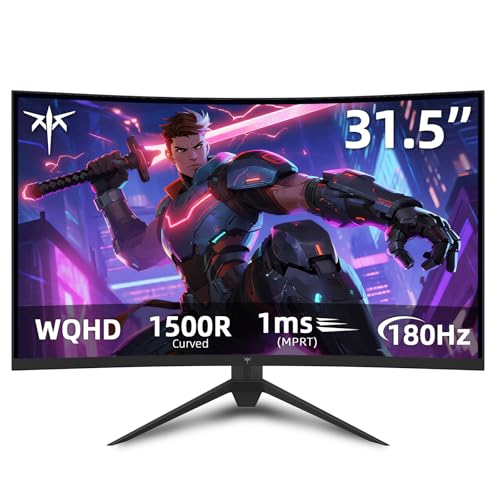
KTC 32-Inch 1440p Curved Gaming Monitor
Best for: immersive large-screen gaming
- Resolution
- 1440p QHD
- Screen Size
- 32 inch
- Refresh Rate
- 180Hz
- Panel Type
- HVA
- Response Time
- 1ms MPRT
- Variable Refresh Rate
- FreeSync Premium, G-SYNC
This 32-inch KTC monitor uses a 1500R curved HVA panel to deliver 2560 x 1440p resolution. It runs at 180Hz with 1ms MPRT response time for smooth gaming. The display covers 120% sRGB and supports HDR10. You get FreeSync Premium and ergonomic tilt adjustments. This model suits gamers who want a large, immersive screen with high refresh rates.
- 180Hz refresh rate for smooth motion
- 1500R curved HVA panel for immersion
- 120% sRGB color gamut coverage
- FreeSync Premium adaptive sync support
- 13.2 pounds weight is heavier than the 27-inch competitors
- 180Hz refresh rate is lower than the 300Hz option
- Only tilt adjustment without height or swivel
- You want a large 32-inch screen for immersive gaming
- You prefer a curved display for wider field of view
- You need high refresh rates for fast-paced titles
- You require a flat panel for precise alignment
- You need height-adjustable stand for ergonomic flexibility
- You prefer a lighter monitor for desk mounting
Verdict: KTC 32 Inch Curved 180Hz QHD Monitor fits players who prioritize screen size and immersion over maximum refresh speed or stand adjustability.
Specifications side by side

| Spec | KTC 27 Inch 220Hz 2K Gaming Monitor | KTC H27E6 27-inch QHD White Monitor | KTC 27-Inch Curved 1440p Gaming Monitor | KTC 27-Inch 1440p IPS Gaming Monitor | KTC 32-Inch 1440p Curved Gaming Monitor |
|---|---|---|---|---|---|
| Screen Size | 27 inch | 27 Inch | 27 inch | 27 inch | 32 inch |
| Resolution | 2560 x 1440 | 2K 1440P | 2560 x 1440p | 2560x1440p | 2560 x 1440p |
| Refresh Rate | 220Hz | 300Hz (up to 320Hz) | 180Hz | 170Hz | 180Hz |
| Panel Type | Fast IPS | Fast IPS | HVA | Fast IPS | HVA |
| Response Time | 1ms | 1ms MPRT | 1ms | 1ms GTG | 1ms MPRT |
| Variable Refresh Rate | Adaptive-Sync, AMD Freesync, G-sync | Adaptive FreeSync | FreeSync / G-Sync Compatible | FreeSync Premium, G-Sync compatible | FreeSync Premium, G-SYNC |
| Ports | DP 1.4, HDMI 2.0 | DP 1.4 x 2, HDMI 2.1 x 2 | DisplayPort, HDMI, USB | HDMI 2.0, DP 1.2 x 2, USB | DisplayPort, HDMI, USB |
| Features | HDR, Built-in Speakers | HDR | Curved Screen | – | HDR, Curved Screen |
| Use | Gaming | Gaming | Gaming | Gaming | Gaming |
| Size | 27 inch | 27 Inch | 27 Inch | 27 Inch | 32 Inch |
| Dimensions | 7.28 × 24.3 × 18.3 inches | 6 × 18 × 30 inches | 31.5 × 17.7 × 4.72 inches | 30.7 × 19.1 × 7.08 inches | 27.6 × 23.6 × 11.8 inches |
| Weight | 11.2 pounds | – | 14.8 pounds | 12.1 pounds | 13.2 pounds |
| Color | Black | White | Black | Black | black |
| Model | H27T22C-3 | H27E6 | H27S17 | H27T22 | H32S17 |
How to choose the right one
Match refresh rate to needs
You should select a refresh rate based on your gaming style. The KTC H27E6 offers 320Hz for competitive players who need maximum speed. The KTC 27 Inch 220Hz model provides 220Hz for balanced performance. Most other options sit at 180Hz or 170Hz. Higher numbers reduce motion blur. You must check the spec sheet for the exact hertz value. Avoid curved screens if you prioritize raw speed over immersion.
Check panel type for color
Panel technology affects image quality and viewing angles. This guide features mostly IPS panels, which deliver accurate colors and wide viewing angles. The KTC 27 Inch Curved model uses an HVA panel for deeper blacks. You should choose IPS if you value color fidelity for work or casual gaming. The KTC 27 Inch 1440p IPS model is a strong choice here. Check the attributes section to confirm the panel type before buying.
Verify variable refresh rate support
Variable Refresh Rate technology prevents screen tearing. You need to check if the monitor supports Adaptive-Sync, FreeSync, or G-SYNC. The KTC 27 Inch Curved model supports both FreeSync and G-SYNC for broad compatibility. The KTC 27 Inch 1440p IPS model also lists both standards. Other models may only list FreeSync or Adaptive-Sync. Ensure your graphics card supports the specific protocol to get smooth gameplay without stuttering.
Consider built-in audio features
You should check if the monitor includes speakers to save desk space. The KTC 27 Inch 220Hz model features built-in speakers, which is rare for high-refresh gaming displays. Most other monitors in this list do not list audio features. If you buy a model without speakers, you will need external audio. This feature is useful for users who want a clean setup without extra cables or devices.
Choose size for immersion
Screen size impacts your viewing distance and immersion. You have 27-inch and 32-inch options in this guide. The KTC 32-Inch Curved model offers a larger canvas for immersive gaming. It is ideal if you sit further from your desk. The 27-inch models are more compact and fit smaller desks. You must measure your available space. The 32-inch option provides a more expansive view for single-player games.
Frequently asked questions
Which KTC monitor has the highest refresh rate?
The KTC H27E6 offers the fastest refresh rate on this list at 320Hz. This model is designed for competitive gamers who prioritize speed over screen size. It features an IPS panel for accurate colors and a white finish. Other models like the top pick reach 220Hz, which is still very smooth for most users.
Does the best overall KTC monitor include speakers?
Yes, the KTC 27 Inch 220Hz QHD Monitor includes built-in speakers. This feature adds convenience for users who want a cleaner desk setup without external audio devices. It also provides a 220Hz refresh rate and 1440p resolution for balanced gaming performance. The IPS panel ensures good color accuracy for this price point.
Are there curved KTC monitors in this selection?
Yes, two models feature curved screens for better immersion. The KTC 27 Inch Curved Monitor uses an HVA panel with a 180Hz refresh rate. The KTC 32 Inch Curved Monitor offers a larger 32-inch display at the same 180Hz speed. Curved designs suit players who want a more engaging visual field without needing the highest possible frame rates.
Which model is best for color accuracy?
The KTC H27E6 and the KTC 27 Inch 170Hz QHD Monitor both use IPS panels, which are known for superior color accuracy. The H27E6 reaches 320Hz, while the other model offers 170Hz. Both support FreeSync and G-SYNC for smooth gameplay. If you need precise colors for work and play, these flat panels are ideal choices.
What resolution do all these monitors support?
All five monitors listed here support 1440p QHD resolution. This provides a sharp image with higher pixel density than 1080p, making text clearer and visuals more detailed. Each model maintains this resolution regardless of their refresh rate or panel shape. It is a sweet spot for modern gaming and productivity tasks.
Can I use G-SYNC with these monitors?
Yes, the KTC 27 Inch Curved Monitor and the KTC 27 Inch 170Hz QHD Monitor support both FreeSync and G-SYNC. This compatibility helps prevent screen tearing when your graphics card frame rate drops below the monitor refresh rate. Other models on the list support Adaptive-Sync or FreeSync, which work with AMD cards or NVIDIA cards respectively.
Which is the largest screen size available?
The KTC 32 Inch Curved Gaming Monitor is the largest option at 32 inches. It provides a 1440p resolution on a bigger canvas, which enhances immersion for gaming. It features an 180Hz refresh rate and FreeSync support. This model fits players who prioritize screen size and visual presence over the highest possible refresh speeds found in smaller 27-inch units.
See also