Best KAMRUI Mini PCs with HDMI: 2 Spec-Based Picks
As Amazon Associates, we earn from qualifying purchases. This means we may receive a small commission at no extra cost to you if you click through and make a purchase.
As an Amazon Associate we earn from qualifying purchases. Links on this page are affiliate links.
Finding the best KAMRUI mini PCs with HDMI requires looking at specific connection options and display capabilities. We compared 2 models based strictly on the specifications published on their listings. The KAMRUI N5030 12GB Mini PC leads because it supports dual 4K displays and includes 12GB of RAM for multitasking. This makes it ideal for compact office setups where space is tight. Other options in this list offer different port configurations, such as VGA support for legacy monitors. Use this guide to decide which mini PC matches your display needs and workspace constraints.
Check HDMI and Resolution Specs

You need to verify port types and maximum output resolution before buying. The KAMRUI N5030 supports dual 4K displays for modern workflows. The KAMRUI Intel Celeron model includes VGA ports for legacy monitors. Match these HDMI and display specs to your existing screen setup to ensure compatibility.
| # | Product | Best for | Price |
|---|---|---|---|
| 1 | KAMRUI N5030 12GB Mini PC Best overall | dual 4K displays and compact office setups | |
| 2 | KAMRUI Intel Celeron 8GB Mini PC Best vga | legacy VGA monitor setups |
The best fit for you

- You need dual 4K displays for tight desk spaces – KAMRUI N5030 12GB Mini PC – It supports 4K UHD resolution and includes 12GB RAM for multitasking.
- You require legacy VGA connectivity for older monitors – KAMRUI Intel Celeron 8GB Mini PC – It features VGA ports alongside HDMI to support triple displays.
- You want the lightest model for easy transport – KAMRUI N5030 12GB Mini PC – It weighs only 12.8 ounces, making it highly portable.
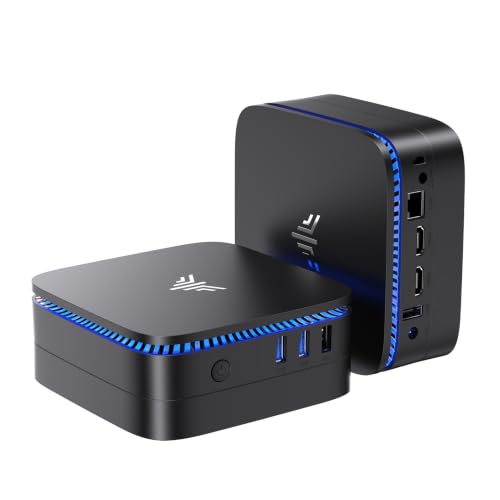
KAMRUI N5030 12GB Mini PC
Best for: dual 4K displays and compact office setups
- Ports
- HDMI, Ethernet
- Processor
- N5030
- Memory Capacity
- 12GB LPDDR4
- Storage Capacity
- 256GB SSD
- Display Support
- Dual HDMI 4K
- Video Ports
- 2x HDMI 2.0
This KAMRUI AK1 Plus mini PC features an Intel N5030 processor with 12 GB of LPDDR4 RAM and a 256 GB SSD. It offers dual HDMI 2.0 ports for simultaneous 4K@30 Hz displays, eliminating the need for a hub. The compact 5-inch chassis supports up to 10 TB of expandable storage via two bays. It suits users who need a quiet, small-footprint system for office work or media playback.
- 12 GB LPDDR4 RAM provides 50% more memory than the 8 GB found in the competing N3350 model.
- Dual HDMI 2.0 ports allow two 4K monitors to run simultaneously at 30 Hz.
- Dual storage bays support up to 10 TB total capacity (2 TB M.2 plus 8 TB SATA).
- Compact 5.04-inch square design weighs only 386 g and includes a VESA mount.
- HDMI output is limited to 4K@30 Hz, which is lower than the 60 Hz standard for smooth motion.
- Wi-Fi 5 and Bluetooth 4.2 are older standards compared to newer Wi-Fi 6 and Bluetooth 5.0 options.
- RAM is onboard LPDDR4 and cannot be upgraded after purchase.
- You need two monitors for side-by-side productivity without using a docking station.
- You want a quiet, fan-cooled system that fits behind a monitor or on a small desk.
- You require more than 8 GB of RAM for smoother multitasking in office applications.
- You need 60 Hz refresh rates on your external displays for gaming or fast motion.
- You require the latest Wi-Fi 6 or Bluetooth 5.0 connectivity for faster wireless transfers.
- You plan to upgrade the system RAM later, as the memory is soldered to the board.
Verdict: KAMRUI N5030 12GB RAM Mini PC is a practical choice for users who need dual 4K displays and extra RAM for multitasking. It fits best on desks where space is tight and two screens are essential for workflow.

KAMRUI Intel Celeron 8GB Mini PC
Best for: legacy VGA monitor setups
- Ports
- HDMI, VGA
- Processor
- Intel Celeron N3350
- Memory Capacity
- 8GB
- Storage Capacity
- 256GB M.2 SSD
- Display Support
- Triple 1080p
- Video Ports
- 2x HDMI 1.4, 1x VGA
This KAMRUI mini PC uses an Intel Celeron N3350 processor with 8GB of RAM and a 256GB SSD. It supports triple displays via two HDMI ports and one VGA port. The device runs Windows 11 Pro and includes WiFi 5 and Gigabit Ethernet. Its low 12W power consumption allows for quiet operation. This setup suits users who need legacy VGA connectivity alongside modern HDMI displays for office or signage tasks.
- Triple display support with 2 HDMI and 1 VGA ports
- 8GB RAM and 256GB SSD for everyday tasks
- Runs Windows 11 Pro for familiar interface
- Low 12W power consumption for quiet operation
- Intel Celeron N3350 processor is less powerful than the N5030 in the other pick
- 8GB RAM is lower than the 12GB in the other pick
- 256GB SSD storage is smaller than the 256GB in the other pick
- You need a VGA port for legacy monitors
- You require triple display output for expanded workspace
- You want a quiet PC for basic office tasks
- You need high performance for heavy multitasking
- You require more than 8GB of RAM
- You prefer the newer N5030 processor architecture
Verdict: KAMRUI N3350 8GB Mini PC fits users who specifically need VGA connectivity and triple displays for signage or office setups. It offers a practical solution for legacy monitor support where the other option does not.
Specifications side by side

| Spec | KAMRUI N5030 12GB Mini PC | KAMRUI Intel Celeron 8GB Mini PC |
|---|---|---|
| Processor | N5030 | Intel Celeron N3350 |
| Memory Capacity | 12GB LPDDR4 | 8GB |
| Storage Capacity | 256GB SSD | 256GB M.2 SSD |
| Display Support | Dual HDMI 4K | Triple 1080p |
| Video Ports | 2x HDMI 2.0 | 2x HDMI 1.4, 1x VGA |
| Operating System | Win 11 | W-11 Pro |
| Resolution | 4K UHD | – |
| Ports | HDMI, Ethernet | HDMI, VGA |
| Use | – | Business & Office, Office, Home Office, Business |
| Memory | – | 8GB RAM |
| Storage | 256GB SSD | 256GB SSD |
| Weight | 12.8 ounces | – |
| Size | N5030/12GB+256GB | N3350/8+256GB |
| Color | Black | Sliver |
| Model | AK1Plus | GK3PLUS |
How to Choose the Right Mini PC
Match Display Resolution Needs
Check the maximum resolution support on the spec sheet. The KAMRUI N5030 supports 4K UHD output, which suits users needing sharp text and detailed images on modern screens. If you only use standard HD monitors, this high resolution is unnecessary. Ensure your monitor matches the PC's output capability to avoid downscaling issues or compatibility errors. Higher resolution support often correlates with better video processing for media tasks.
Verify Port Connectivity Options
Examine the listed ports to ensure compatibility with your existing hardware. The KAMRUI N5030 includes HDMI and Ethernet ports for standard connections. The KAMRUI Intel Celeron model adds VGA support, which is critical for older monitors lacking digital inputs. If you rely on legacy equipment, the VGA port is essential. Verify that the port types match your cables and adapters to prevent connection failures during setup.
Assess RAM for Multitasking
Look at the RAM size to determine multitasking capability. The KAMRUI N5030 includes 12GB of RAM, allowing smoother performance when running multiple applications or browser tabs simultaneously. The Celeron model offers 8GB, which is sufficient for basic office tasks but may lag with heavy workloads. More RAM generally improves system responsiveness. Choose higher capacity if you plan to keep many programs open at once.
Check Storage Capacity
Review the internal storage size for file and application space. Both models feature 256GB SSDs, providing fast boot times and quick file access. This capacity is adequate for operating system files and essential software. If you store large media libraries locally, you may need external storage. SSDs offer better durability and speed than traditional hard drives. Ensure the storage type matches your performance expectations for daily use.
Consider Physical Dimensions
Evaluate the weight and size for your desk space. The KAMRUI N5030 weighs 12.8 ounces, making it easy to mount or place in tight areas. Compact form factors save valuable desk real estate. Lighter models are also easier to transport if you move your setup. Check the listed dimensions to ensure it fits your VESA mount or desk corner. Smaller footprints are ideal for clean, minimalist workspace arrangements.
Frequently asked questions
Does the KAMRUI N5030 support dual monitors?
Yes, it supports dual 4K displays. This makes it ideal for compact office setups where space is tight but two screens are essential for your workflow. The model includes 12GB of RAM to help with multitasking across those screens.
Can I connect a VGA monitor to a KAMRUI mini PC?
The KAMRUI Intel Celeron 8GB Mini PC includes VGA ports alongside HDMI. This allows you to connect legacy monitors for signage or office setups. It supports triple displays, offering a practical solution when other options are not available.
What is the maximum resolution for KAMRUI HDMI output?
The KAMRUI N5030 supports 4K UHD resolution. This output suits users needing sharp text and detailed images on modern screens. You should check the maximum resolution support on the spec sheet to ensure it matches your display needs.
How much RAM does the top KAMRUI model have?
The KAMRUI N5030 12GB Mini PC comes with 12GB of RAM. This extra memory supports multitasking and fits best on desks where space is limited. It pairs well with its 256GB SSD for efficient daily operations.
Which KAMRUI mini PC is best for triple displays?
The KAMRUI Intel Celeron 8GB Mini PC is designed for triple display support. It features both HDMI and VGA ports, making it suitable for business and office environments. This configuration helps users who need multiple screens for specific tasks.
Is the KAMRUI N5030 heavy to move around?
No, it weighs only 12.8 ounces. This lightweight design makes it easy to handle and place in tight spaces. The compact form factor ensures it does not take up much desk area while still providing dual 4K capabilities.
Does the KAMRUI N3350 come with Windows 11 Pro?
Yes, the KAMRUI N3350 8GB Mini PC includes Windows 11 Pro. This operating system supports its triple display setup and business use cases. It provides a stable environment for office tasks and legacy monitor connectivity.
See also