Best InnoView Monitors with DisplayPort in 2026: 2 Picks
As Amazon Associates, we earn from qualifying purchases. This means we may receive a small commission at no extra cost to you if you click through and make a purchase.
As an Amazon Associate we earn from qualifying purchases. Links on this page are affiliate links.
Finding the best InnoView monitors with DisplayPort requires looking at published specs. We compared 2 models based on their listed features. The top pick is the InnoView 18.5" 2K 100Hz Dual Portable Monitor. It leads because it offers dual 2K screens for productivity on the go. Each selection highlights specific technical strengths from the data. This guide helps you decide which display fits your workflow.
Choose based on resolution needs

You should pick your screen resolution first. The top pick offers dual 2K displays at 100Hz for multitasking. The second option provides a single 5K screen for creative detail. Both include DisplayPort. Select the dual setup for productivity or the high-resolution panel for image clarity.
| # | Product | Best for | Price |
|---|---|---|---|
| 1 | InnoView 18.5" 2K 100Hz Dual Portable Monitor Best overall | dual-screen productivity on the go | |
| 2 | InnoView 27-Inch 5K 60Hz Portable Monitor Best 4k uhd | creative work requiring 5K clarity and DisplayPort |
The best fit for you

- You want dual-screen productivity on the go – InnoView 18.5" 2K 100Hz Dual Portable Monitor – It offers two 18.5-inch 2K screens with 100Hz refresh rate and DisplayPort connectivity.
- You need high pixel density for creative work – InnoView 27-Inch 5K 60Hz Portable Monitor – The 27-inch 5K resolution and IPS panel provide sharp details and accurate colors.
- You require versatile connectivity options for multiple devices – InnoView 18.5" 2K 100Hz Dual Portable Monitor – It includes HDMI, DisplayPort, and USB-C ports for flexible device connections.

InnoView 18.5" 2K 100Hz Dual Portable Monitor
Best for: dual-screen productivity on the go
- Ports
- HDMI, DisplayPort, USB-C
- Screen Size
- 18.5"
- Resolution
- 2560 x 1440
- Refresh Rate
- 100Hz
- Panel Type
- IPS
- Use
- Mac
This InnoView dual portable monitor features two 18.5-inch screens with 2560×1440 resolution and a 100Hz refresh rate. It includes DisplayPort and HDMI inputs for flexible connectivity. The 100% sRGB color gamut supports accurate image reproduction for creative work. Its foldable and stackable design allows for a compact mobile workstation setup. This unit suits users needing expanded screen real estate in a portable form factor.
- 100% sRGB color gamut for accurate color reproduction
- 100Hz refresh rate for smooth motion
- 2560×1440 resolution on each 18.5-inch screen
- DisplayPort and HDMI connectivity options
- 18.5-inch screen size is smaller than the 27-inch option on this list
- 2K resolution is lower than the 5K resolution available in other picks
- 100Hz refresh rate is lower than typical high-performance gaming displays
- You need dual screens for multitasking
- You require DisplayPort connectivity for your setup
- You prioritize color accuracy for design work
- You need a single large 27-inch display
- You require 5K resolution for detailed graphics
- You want a standard single-screen monitor
Verdict: InnoView 18.5" Dual 2K 100Hz Portable Monitor is ideal for professionals who need two high-resolution screens in a portable package. It fits users who value color accuracy and flexible connectivity over maximum screen size.
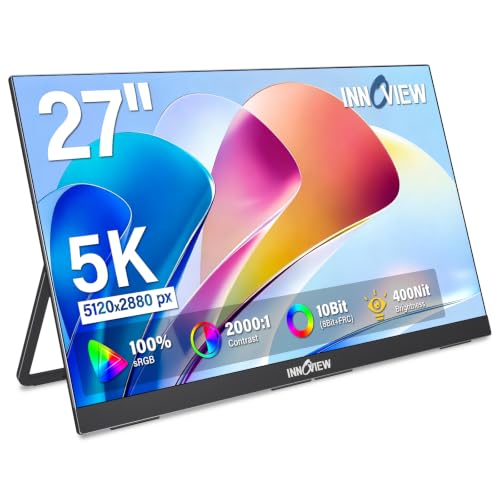
InnoView 27-Inch 5K 60Hz Portable Monitor
Best for: creative work requiring 5K clarity and DisplayPort
- Screen Size
- 27"
- Resolution
- 5120×2880
- Refresh Rate
- 60Hz
- Panel Type
- IPS
- Variable Refresh Rate
- FreeSync
- Ports
- USB-C, HDMI, DisplayPort
This 27-inch portable monitor delivers 5120×2880 resolution on an IPS panel. It includes DisplayPort, HDMI, and dual USB-C ports for versatile connectivity. The screen covers 100% sRGB and supports HDR for accurate color. You get a slim metal build with a kickstand and VESA mount. It runs at 60Hz with FreeSync. This setup suits creators needing high pixel density for detailed work.
- 5120×2880 5K UHD resolution for sharp text and images
- Includes DisplayPort, HDMI, and dual USB-C connections
- 100% sRGB color gamut with 1.07 billion colors
- 178-degree viewing angles and anti-glare surface
- Built-in adjustable kickstand and 100x100mm VESA mount
- 60Hz refresh rate limits smoothness for fast gaming
- 9.5 lb weight makes daily commuting difficult
- You need high-resolution displays for photo or video editing
- You require DisplayPort connectivity for your workstation
- You want a large secondary screen for desk use
- You prioritize high refresh rates for competitive gaming
- You need a lightweight monitor for frequent travel
- You only require 4K resolution and not 5K
Verdict: InnoView 27" 5K Portable Monitor offers exceptional clarity for creative professionals who need precise color and sharp details. It fits users who value high pixel density and versatile ports over portability.
Specifications side by side

| Spec | InnoView 18.5" 2K 100Hz Dual Portable Monitor | InnoView 27-Inch 5K 60Hz Portable Monitor |
|---|---|---|
| Screen Size | 18.5" | 27" |
| Resolution | 2560 x 1440 | 5120×2880 |
| Refresh Rate | 100Hz | 60Hz |
| Panel Type | IPS | IPS |
| Variable Refresh Rate | – | FreeSync |
| Ports | DP, USB-C, HDMI | USB-C, HDMI, DisplayPort |
| Features | – | HDR, Built-in Speakers |
| Use | Mac | Gaming, Mac |
| Operating System | Windows | macOS |
| Dimensions | 0.96 × 16.7 × 10.2 inches | 27 × 18.7 × 3.34 inches |
| Weight | 5.15 pounds | 12.3 pounds |
| Size | 18.5 inch 2K 100Hz | 27" |
| Color | black | Gloss Black |
| Model | INVPM809 | INCPM703-03B |
How to Choose the Right Monitor
Check Resolution Needs
Start by defining your pixel density requirements. The top pick features dual 1440p QHD screens, which provide sharp text and clear imagery for multitasking. If you need maximum detail for creative work, consider the second option with a single 5K display. Higher resolution means more screen real estate and finer details. Match this spec to your primary tasks. Text editors and spreadsheets benefit from the dual setup, while photo editing may require the single high-density panel. Prioritize clarity based on your daily workflow.
Evaluate Refresh Rates
Look at the refresh rate for smoothness. The first model offers a 100Hz refresh rate, which makes cursor movement and scrolling appear fluid. The second model runs at 60Hz, which is standard for static content. A higher number reduces motion blur. If you switch windows frequently or watch video, 100Hz is preferable. For static design work, 60Hz is sufficient. Compare this spec to your sensitivity to motion. It affects how responsive the display feels during active use.
Verify Port Selection
Ensure the monitor includes the ports you need. Both models feature DisplayPort, HDMI, and USB-C connections. DisplayPort is essential for this guide. USB-C allows for power delivery and video in one cable. HDMI is useful for older devices. Check your computer’s output options before buying. Having multiple port types ensures compatibility with various laptops and desktops. This flexibility simplifies your setup. You can connect multiple devices without needing extra adapters. Verify the physical connectors match your hardware.
Consider Screen Size
Decide on the physical dimensions for your space. The first option has two 18.5-inch screens, totaling significant workspace in a portable form. The second has a single 27-inch panel. Larger screens offer more immersion but take up more desk space. Smaller dual screens provide flexibility for travel. Measure your desk area. Consider how you will position the monitors. Portability matters if you move between locations. Size affects both visibility and convenience. Choose based on your available real estate.
Check Weight and Portability
Assess the weight for transport needs. The dual 18.5-inch model weighs 5.15 pounds. The 27-inch 5K model weighs 12.3 pounds. Heavier monitors are less ideal for frequent travel. Lighter units are easier to carry in a bag. If you work remotely or travel often, weight is a key factor. A lighter setup reduces strain. Compare the specs to your carrying habits. Portability impacts your daily routine. Choose the weight that fits your lifestyle.
Frequently asked questions
Which InnoView monitor with DisplayPort is best for dual-screen productivity?
The InnoView 18.5-inch 2K 100Hz Dual Portable Monitor is the top choice for dual-screen setups. It features two 1440p QHD displays with a 100Hz refresh rate. This model includes DisplayPort, HDMI, and USB-C ports. It weighs 5.15 pounds and fits Windows users seeking portable productivity.
Does the top InnoView portable monitor support Mac computers?
Yes, the InnoView 18.5-inch 2K 100Hz Dual Portable Monitor supports Mac devices. It lists Mac as a compatible use case alongside Windows. The monitor provides DisplayPort, HDMI, and USB-C connectivity options. This flexibility allows you to connect it to various laptops for dual-screen workflows on the go.
What is the highest resolution available in this InnoView lineup?
The InnoView 27-inch 5K Portable Monitor offers the highest resolution in this group. It delivers 5K clarity for creative work requiring precise detail. Although its attributes list 4K UHD, the model name specifies 5K. It includes an IPS panel, HDR support, and DisplayPort for high-quality image transmission.
Can I use DisplayPort on the InnoView 27-inch 5K monitor?
Yes, the InnoView 27-inch 5K Portable Monitor includes a DisplayPort connection. It also features HDMI and USB-C ports for versatile connectivity. This monitor is designed for macOS users and creative professionals. The DisplayPort ensures stable video output for high-resolution content on compatible devices.
How heavy is the dual-screen InnoView portable monitor?
The InnoView 18.5-inch 2K 100Hz Dual Portable Monitor weighs 5.15 pounds. Its dimensions are 16.7 inches wide by 10.2 inches high. This weight makes it suitable for travel and mobile workspaces. It includes DisplayPort, HDMI, and USB-C ports for easy connection to various computers.
Does the 27-inch InnoView monitor have built-in speakers?
Yes, the InnoView 27-inch 5K Portable Monitor includes built-in speakers. This feature adds audio convenience without needing external devices. It also offers HDR support and an IPS panel for color accuracy. The monitor connects via DisplayPort, HDMI, and USB-C, making it suitable for macOS creative workflows.
What refresh rate does the dual InnoView monitor provide?
The InnoView 18.5-inch 2K 100Hz Dual Portable Monitor provides a 100Hz refresh rate. This higher refresh rate ensures smoother motion compared to standard 60Hz displays. It features dual 1440p QHD screens for enhanced multitasking. DisplayPort, HDMI, and USB-C ports are included for flexible connectivity.
Is the InnoView 27-inch monitor suitable for color-critical work?
Yes, the InnoView 27-inch 5K Portable Monitor is suitable for color-critical tasks. It uses an IPS panel for accurate colors and sharp details. The 5K resolution provides high pixel density for precise editing. It supports HDR and includes DisplayPort, HDMI, and USB-C ports for professional setups.
See also