3 Best INNOCN 1080p FHD Monitors, Compared
As Amazon Associates, we earn from qualifying purchases. This means we may receive a small commission at no extra cost to you if you click through and make a purchase.
As an Amazon Associate we earn from qualifying purchases. Links on this page are affiliate links.
Finding the best INNOCN 1080p FHD monitors can be tricky with so many options. We compared 3 models to help you decide. Our top pick is the INNOCN 49-Inch Curved 144Hz Ultrawide Monitor. It leads because its 49-inch screen offers immersive multitasking and gaming without requiring a massive desk footprint. These selections are based strictly on the specifications published on the listings. We focused on resolution, refresh rates, and connectivity to ensure accuracy. This guide helps you choose a display that fits your specific workflow and space constraints.
Choose size or speed first

Your choice depends on whether you prioritize screen real estate or motion smoothness. The top two picks are 49-inch ultrawides with 144Hz refresh rates, ideal for immersive multitasking. The third option is a 32-inch model with 240Hz refresh, suited for editing. Select the larger size for workspace, or the higher refresh rate for fast-paced use.
| # | Product | Best for | Price |
|---|---|---|---|
| 1 | INNOCN 49-Inch Curved 144Hz Ultrawide Monitor Best overall | immersive multitasking and gaming | |
| 2 | INNOCN 49" 32:9 144Hz Curved Monitor Best budget | ultrawide multitasking and immersive gaming | |
| 3 | INNOCN 32-Inch 120Hz 90W USB-C Monitor Best 240hz | smooth motion and color accurate editing |
The best fit for you

- You want the most immersive screen for gaming – INNOCN 49-Inch Curved 144Hz Ultrawide Monitor – Its 49-inch curved display and 32:9 aspect ratio provide a wide, immersive field of view.
- You need a budget-friendly ultrawide monitor – INNOCN 49" 32:9 144Hz Curved Monitor – This model offers a 49-inch curved screen and 144Hz refresh rate at a lower price point.
- You want high refresh rates for smooth motion – INNOCN 32-Inch 120Hz 90W USB-C Monitor – It features a 240Hz refresh rate and IPS panel for smooth visuals and accurate colors.

INNOCN 49-Inch Curved 144Hz Ultrawide Monitor
Best for: immersive multitasking and gaming
- Resolution
- 1080p FHD
- Screen Size
- 49"
- Refresh Rate
- 144Hz
- Aspect Ratio
- 32:9
- Variable Refresh Rate
- Adaptive-Sync
- Ports
- DP 1.4, USB-C 65W, HDMI 2.1
This 49-inch curved monitor offers a 3840 x 1080 resolution with a 144Hz refresh rate. The 32:9 aspect ratio provides a wide viewing area suitable for multitasking and gaming. It includes a 1800R curvature to reduce eye strain and supports HDR400 for better contrast. The USB-C port delivers 65W of power, allowing you to connect laptops and other devices efficiently.
- 144Hz refresh rate for smooth motion
- 3840 x 1080 WDFHD resolution
- 1800R curved VA panel
- USB-C with 65W power delivery
- 99% sRGB color gamut
- 1080p resolution is lower than the 4K option on this list
- 49-inch size is significantly larger than standard 32-inch monitors
- 144Hz refresh rate is lower than the 240Hz option on this list
- You want a single screen that replaces dual monitors
- You need USB-C connectivity for your laptop
- You prefer a curved display for immersive gaming
- You require 4K resolution for detailed work
- You need a refresh rate higher than 144Hz
- You have limited desk space for a 49-inch monitor
Verdict: INNOCN 49" 144Hz Curved Ultrawide is ideal for users who prioritize screen real estate and connectivity over maximum pixel density. It suits those who want a wide, immersive display for gaming or multitasking without needing the highest refresh rate available.
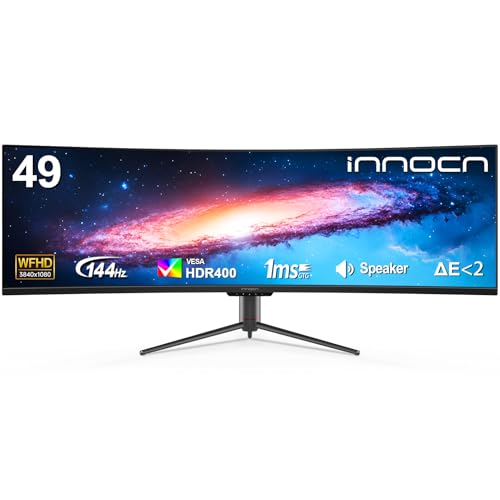
INNOCN 49" 32:9 144Hz Curved Monitor
Best for: ultrawide multitasking and immersive gaming
- Resolution
- 1080p FHD
- Screen Size
- 49"
- Refresh Rate
- 144Hz
- Aspect Ratio
- 32:9
- Variable Refresh Rate
- Adaptive-Sync
- Ports
- USB-C, DisplayPort, HDMI
This 49-inch monitor offers a 3840 x 1080 resolution with a 144Hz refresh rate. Its 32:9 aspect ratio and 1800R curve create a panoramic view that mimics two screens. The USB-C port provides video and power delivery. It includes built-in speakers and supports HDR400. This setup suits users who want a wide workspace or immersive gaming without multiple displays.
- 32:9 aspect ratio for seamless dual-screen feel
- 144Hz refresh rate with Adaptive-Sync for smooth motion
- USB-C port supports video, audio, and power delivery
- 99% sRGB color gamut with VESA DisplayHDR 400
- Fully adjustable stand with height and tilt customization
- Lower resolution than 4K models on this list
- 49-inch size requires significant desk space
- Single 1080p panel across 32:9 width
- You want a single monitor to replace dual displays
- You play games that support ultrawide aspect ratios
- You need USB-C connectivity for a laptop setup
- You require 4K resolution for detailed work
- You have limited desk space for a 49-inch screen
- You prefer a standard 16:9 aspect ratio
Verdict: INNOCN 49-inch 32:9 Ultrawide Monitor delivers a massive, curved canvas for multitasking and gaming. It fits users who value screen real estate over pixel density.

INNOCN 32-Inch 120Hz 90W USB-C Monitor
Best for: smooth motion and color accurate editing
- Resolution
- 1080p FHD
- Screen Size
- 32"
- Refresh Rate
- 120Hz, 240Hz
- Panel Type
- IPS
- Ports
- USB-C, DP 1.4, HDMI 2.1
- Features
- HDR
This INNOCN monitor offers a 32-inch IPS panel with a 240Hz refresh rate in 1080p FHD resolution. It includes HDR400 support and USB-C connectivity with 90W power delivery. The display covers 100% sRGB and 98% DCI-P3 for accurate colors. It suits users needing high refresh rates for smooth motion and reliable color fidelity for editing tasks on Mac or PC systems.
- 240Hz refresh rate for smooth motion
- USB-C port with 90W charging
- Factory-calibrated Delta E < 1 color accuracy
- 100% sRGB and 98% DCI-P3 coverage
- Ergonomic stand with height and pivot adjustments
- 1080p resolution on a 32-inch screen lowers pixel density
- 32-inch size is larger than the 24-inch standard for this resolution
- HDR400 is entry-level brightness compared to higher tiers
- You need a high refresh rate for smooth cursor movement
- You require USB-C connectivity for a single-cable Mac setup
- You prioritize color accuracy for photo or video editing
- You need 4K resolution for sharp text on a large screen
- You prefer a compact 24-inch display for limited desk space
- You require advanced HDR performance with higher peak brightness
Verdict: INNOCN 32-inch 240Hz FHD Monitor provides high refresh rates and accurate colors for editing. It fits users who want smooth motion and USB-C convenience on a large screen.
Specifications side by side

| Spec | INNOCN 49-Inch Curved 144Hz Ultrawide Monitor | INNOCN 49" 32:9 144Hz Curved Monitor | INNOCN 32-Inch 120Hz 90W USB-C Monitor |
|---|---|---|---|
| Screen Size | 49" | 49" | 32" |
| Resolution | 3840 x 1080P | 3840 x 1080P | 4K, FHD |
| Refresh Rate | 144Hz | 144Hz | 120Hz, 240Hz |
| Panel Type | – | – | IPS |
| Aspect Ratio | 32:9 | 32:9 | – |
| Variable Refresh Rate | Adaptive-Sync | Adaptive-Sync | – |
| Ports | DP 1.4, USB-C 65W, HDMI 2.1 | USB-C, DisplayPort, HDMI | USB-C, DP 1.4, HDMI 2.1 |
| Features | HDR, Built-in Speakers, Curved Screen | HDR, Built-in Speakers, Curved Screen | HDR |
| Use | Gaming | Gaming | Mac, Photo & Video Editing |
| Size | 49 Inch | 49 Inch | 32 Inch |
| Operating System | – | – | macOS |
| Dimensions | 6.28 × 45.5 × 14.6 inches | 6.23 × 47.2 × 14.8 inches | 10 × 2 × 50 inches |
| Color | black | Black | White |
| Model | 49C1G | H3CQC-P | CB32U1 |
How to Choose the Right One
Check the aspect ratio
The 32:9 aspect ratio splits the screen into two virtual 16:9 displays. This layout is ideal for multitasking with code, spreadsheets, or video timelines side by side. The top two picks in this guide both use this wide format. You get a continuous, curved canvas that wraps around your peripheral vision. This setup reduces the need for multiple physical monitors. It also creates a more immersive experience for gaming. Consider this ratio if you want maximum screen real estate on a single desk footprint.
Prioritize refresh rate for gaming
Refresh rate determines how many times per second the image updates. A 144Hz panel offers smooth motion for fast-paced games. The first two models in this list provide this rate. If you need even smoother motion for competitive titles, look for 240Hz. The third pick offers this higher speed on a 32-inch screen. Higher refresh rates reduce motion blur and input lag. Choose 144Hz for general gaming and immersion. Choose 240Hz if you play competitive shooters and need every frame of clarity.
Verify USB-C connectivity
USB-C ports allow for video signal and power delivery through one cable. This simplifies your desk setup significantly. The first two models include HDMI, DisplayPort, and USB-C connections. The third model also features USB-C. This port lets you connect a laptop directly. You can often charge your device while viewing content. This reduces cable clutter on your desk. Check the power output if you plan to charge a laptop. This feature is essential for users who want a clean, single-cable workstation.
Consider panel type for color
Panel technology affects color accuracy and viewing angles. IPS panels are known for consistent colors from wide angles. The third pick explicitly lists IPS technology. This makes it suitable for photo and video editing tasks. Accurate colors ensure your work looks correct on other screens. Other models in this list do not specify the panel type in the provided data. If color fidelity is critical for your work, prioritize models that state IPS. This ensures you get reliable color reproduction for professional creative tasks.
Match size to your desk
Screen size impacts both immersion and desk space. The top two picks are 49 inches wide. They require significant desk width and depth. The third model is 32 inches, which fits standard desks better. Check your available space before buying. A 49-inch monitor may need a monitor arm or a large desk. A 32-inch model offers a balance of size and manageability. Consider your viewing distance as well. Larger screens work best when viewed from a comfortable distance. Measure your desk to ensure the monitor fits physically.
Frequently asked questions
Which INNOCN 1080p monitor has the highest refresh rate?
The INNOCN 32-Inch 120Hz 90W USB-C Monitor offers the highest refresh rate at 240Hz. This specification ensures smooth motion for gaming and editing. It features an IPS panel for accurate colors and includes a USB-C port for convenient connectivity.
Does the top pick INNOCN monitor have a curved screen?
Yes, the best overall pick, the INNOCN 49-Inch Curved 144Hz Ultrawide Monitor, features a curved screen. This design enhances immersion for gaming and multitasking. It also includes built-in speakers and HDR support for a complete viewing experience.
What is the aspect ratio of the ultrawide INNOCN monitors?
The two 49-inch models both have a 32:9 aspect ratio. This wide format acts like two 16:9 displays side by side. It is ideal for users who need extensive screen real estate for spreadsheets, coding, or immersive gaming.
Which INNOCN 1080p monitor is best for video editing?
The INNOCN 32-Inch 120Hz 90W USB-C Monitor is best for photo and video editing. It provides a 240Hz refresh rate for smooth motion and accurate colors via its IPS panel. The USB-C port adds convenience for modern workflows.
Do these INNOCN monitors support HDR?
Yes, all three listed models support HDR. This feature enhances contrast and color range for more vivid images. The 49-inch ultrawides and the 32-inch model all include HDR capabilities to improve visual quality for games and media.
Which model is the best budget option for ultrawide viewing?
The INNOCN 49" 32:9 144Hz Curved Monitor is the best budget choice. It delivers a massive curved canvas for multitasking and gaming. It shares the 144Hz refresh rate and 32:9 aspect ratio of the top pick, offering great value.
Does the 32-inch INNOCN monitor work with Mac?
Yes, the INNOCN 32-Inch 120Hz 90W USB-C Monitor is suitable for macOS. It features a USB-C port that simplifies connection to Mac devices. The IPS panel ensures accurate colors, making it a good fit for creative work on Apple systems.
See also