Best Gawfolk 240Hz Monitors in 2026: 2 Picks
As Amazon Associates, we earn from qualifying purchases. This means we may receive a small commission at no extra cost to you if you click through and make a purchase.
As an Amazon Associate we earn from qualifying purchases. Links on this page are affiliate links.
Finding the best gawfolk 240Hz monitors requires comparing key display specifications. We evaluated 2 models based strictly on published listing data. The Gawfolk 45-inch DQHD 240Hz Ultrawide Monitor leads because its 32:9 aspect ratio offers a massive single screen for work and play. This expansive workspace allows you to replace dual monitors with one efficient display. The list includes options for users who prioritize high refresh rates and curved immersion. These picks help you decide which size and connectivity features match your specific needs. Use these specs to choose the right monitor for your setup.
Choose based on aspect ratio

Your choice depends on whether you need a single massive screen or a balanced ultrawide. The 45-inch model offers a 32:9 aspect ratio, effectively replacing dual monitors. The 34-inch option provides a standard ultrawide format. Both deliver 240Hz refresh rates. Select the size that fits your desk space and workflow needs.
| # | Product | Best for | Price |
|---|---|---|---|
| 1 | Gawfolk 45-inch DQHD 240Hz Ultrawide Monitor Best overall | users wanting a single ultra-wide screen for work and play | |
| 2 | Gawfolk 34" 240Hz UWQHD Curved Monitor Best ultrawide qhd | ultrawide gaming with high refresh rates |
The best fit for you

- You want a single screen for work and play – Gawfolk 45-inch DQHD 240Hz Ultrawide Monitor – Its 45-inch 32:9 aspect ratio replaces dual monitors with one massive workspace.
- You need ultrawide gaming with high refresh rates – Gawfolk 34" 240Hz UWQHD Curved Monitor – It combines 240Hz speed with FreeSync and G-SYNC compatibility for smooth visuals.
- You prefer a lighter monitor for your desk – Gawfolk 34" 240Hz UWQHD Curved Monitor – It weighs 12.6 pounds, making it lighter than the 45-inch alternative.

Gawfolk 45-inch DQHD 240Hz Ultrawide Monitor
Best for: users wanting a single ultra-wide screen for work and play
- Refresh Rate
- 240Hz
- Screen Size
- 45"
- Resolution
- 5120×1440
- Response Time
- 1MS
- Aspect Ratio
- 32:9
- Variable Refresh Rate
- FreeSync
This Gawfolk monitor features a 45-inch curved panel with a 32:9 aspect ratio and DQHD (5120×1440) resolution. It runs at a 240Hz refresh rate with Adaptive Sync to prevent tearing. The screen covers 120% of the sRGB gamut and reaches 350 cd/m² brightness. It includes built-in speakers and eye-care features like low blue light and flicker-free technology. It suits users needing a wide workspace for gaming or multitasking.
- 240Hz refresh rate with Adaptive Sync
- 45-inch DQHD (5120×1440) resolution
- 32:9 ultra-wide aspect ratio
- 120% sRGB color gamut coverage
- Built-in speakers
- 350 cd/m² brightness is lower than typical professional standards
- 17.2-pound weight requires a sturdy desk setup
- 3000:1 contrast ratio may not match OLED depth
- You want a single screen for dual-monitor tasks
- You play fast-paced games at 240Hz
- You need wide color accuracy for design work
- You prefer a standard 16:9 aspect ratio
- You have limited desk space for a 45-inch panel
- You need HDR1000 brightness levels
Verdict: Gawfolk 45-inch 240Hz Curved Monitor delivers a massive 32:9 workspace with high-speed gaming support. It is ideal for users who want to replace dual monitors with one ultra-wide screen for work and play.
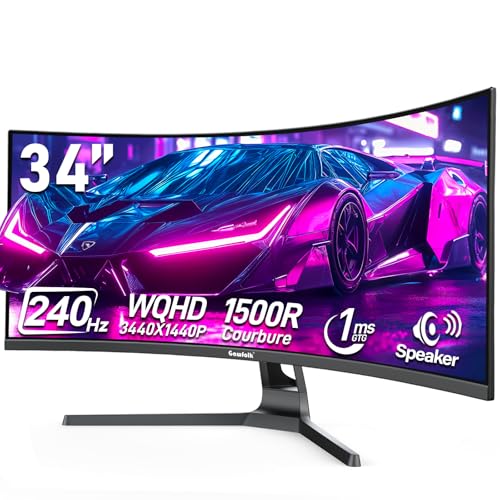
Gawfolk 34" 240Hz UWQHD Curved Monitor
Best for: ultrawide gaming with high refresh rates
- Refresh Rate
- 240Hz
- Screen Size
- 34"
- Resolution
- 3440×1440
- Aspect Ratio
- 21:9
- Variable Refresh Rate
- FreeSync, G-Sync compatible
- Ports
- HDMI 2.0, DP 1.4
This 34-inch curved monitor delivers a 240Hz refresh rate via DisplayPort for smooth gameplay. It features UWQHD resolution (3440×1440) on a 1500R VA panel. The 1.07 billion color support and 3500:1 contrast ratio enhance visual depth. Built-in speakers and dual HDMI 2.0 plus dual DP 1.4 ports add versatility. It suits gamers seeking immersive ultrawide visuals with high responsiveness.
- 240Hz refresh rate for fluid motion
- UWQHD 3440×1440 resolution on 1500R curve
- Supports 1.07 billion colors with 8-bit+FRC
- Dual HDMI 2.0 and dual DP 1.4 ports
- Includes built-in speakers and earphone jack
- 310 cd/m² brightness is lower than typical high-end panels
- 12.6-pound weight is heavier than standard 27-inch monitors
- 1500R curvature is less aggressive than 1000R options
- You want a 240Hz refresh rate for competitive gaming
- You prefer an immersive 21:9 ultrawide aspect ratio
- You need dual DisplayPort 1.4 connectivity for high bandwidth
- You require a flat screen without any curvature
- You need a 4K UHD resolution for maximum detail
- You prefer a lightweight monitor under 10 pounds
Verdict: Gawfolk 34-Inch 240Hz UWQHD Monitor provides a balanced mix of speed and immersion for ultrawide gamers. It fits those who value high refresh rates and flexible connectivity in a curved form factor.
Specifications side by side

| Spec | Gawfolk 45-inch DQHD 240Hz Ultrawide Monitor | Gawfolk 34" 240Hz UWQHD Curved Monitor |
|---|---|---|
| Screen Size | 45" | 34" |
| Resolution | 5120×1440 | 3440×1440 |
| Refresh Rate | 240Hz | 240Hz |
| Response Time | 1MS | – |
| Aspect Ratio | 32:9 | 21:9 |
| Variable Refresh Rate | FreeSync | FreeSync, G-Sync compatible |
| Ports | HDMI 2.1, DP 1.4 | HDMI 2.0, DP 1.4 |
| Features | Built-in Speakers, Curved Screen | Built-in Speakers, Curved Screen |
| Use | Gaming | Gaming |
| Size | 45 inch | 34 Inch |
| Dimensions | 10.6 × 42.9 × 17.3 inches | 10.6 × 31.9 × 18.6 inches |
| Weight | 17.2 pounds | 12.6 pounds |
| Color | Black | black |
| Model | GFTY991 | GFTY985 |
How to choose the right one
Check aspect ratio needs
Decide if you need a single massive screen or a standard ultrawide. The Gawfolk 45-inch model offers a 32:9 aspect ratio, effectively replacing dual monitors with one workspace. This is ideal for users wanting a single ultra-wide screen for work and play. If you prefer a balanced ultrawide format, consider the 34-inch option. Your choice depends on whether you prioritize extreme width for productivity or a more traditional ultrawide experience for gaming.
Verify variable refresh support
Look for FreeSync and G-SYNC compatibility to ensure smooth visuals. The Gawfolk 34-inch 240Hz UWQHD Monitor supports both FreeSync and G-SYNC. This dual compatibility helps prevent screen tearing across different graphics cards. The 45-inch model lists FreeSync support. Check your graphics card brand to ensure the monitor you pick matches your hardware for the best performance during fast-paced gaming sessions.
Review port connectivity
Ensure the monitor has the inputs your computer requires. Both listed Gawfolk monitors include HDMI and DisplayPort connections. This standard setup covers most modern desktops and laptops. Verify your computer has the corresponding cables or adapters. Having both HDMI and DisplayPort provides flexibility for connecting multiple devices or using different output types depending on your specific hardware configuration and setup requirements.
Consider built-in speakers
Check if the monitor includes audio output to simplify your desk. Both the 45-inch and 34-inch Gawfolk models feature built-in speakers. This feature can reduce cable clutter by eliminating the need for external audio devices for basic tasks. However, for high-quality gaming or media consumption, you may still prefer dedicated headphones or speakers. The presence of speakers is a convenient bonus for productivity and casual use.
Assess physical dimensions
Measure your desk space to ensure the monitor fits comfortably. The 45-inch model is significantly larger, with a width of 42.9 inches and a weight of 17.2 pounds. The 34-inch option is more compact at 31.9 inches wide and weighs 12.6 pounds. Consider your available desk depth and width. A larger screen requires more space and may need a sturdy stand or wall mount to support its size and weight safely.
Frequently asked questions
Does the Gawfolk 45-inch monitor support FreeSync?
Yes, the Gawfolk 45-inch DQHD 240Hz Ultrawide Monitor supports FreeSync. This variable refresh rate technology helps reduce screen tearing and stuttering during fast-paced gaming. It ensures smoother visuals by synchronizing the display's refresh rate with your graphics card's frame output.
What is the aspect ratio of the 45-inch Gawfolk model?
The Gawfolk 45-inch monitor features a 32:9 aspect ratio. This ultra-wide format effectively replaces dual monitors by providing a single, massive workspace. It is ideal for users who want an expansive screen for both work tasks and gaming without bezel gaps.
Does the 34-inch model support G-SYNC?
Yes, the Gawfolk 34-inch 240Hz UWQHD Curved Monitor supports G-SYNC. It also includes FreeSync compatibility. These technologies help maintain smooth gameplay by minimizing screen tearing and input lag, making it suitable for high-refresh-rate gaming experiences.
Are both monitors curved screens?
Yes, both the 45-inch and 34-inch Gawfolk monitors feature curved screens. The curvature is designed to provide a more immersive viewing experience. This design wraps the display around your field of vision, which can be beneficial for both gaming and extended work sessions.
Do these monitors have built-in speakers?
Yes, both the 45-inch and 34-inch Gawfolk monitors include built-in speakers. This feature allows you to hear audio directly from the display without needing external speakers or headphones. It simplifies your setup by reducing the number of cables and devices required.
What ports are available on these monitors?
Both the 45-inch and 34-inch models offer HDMI and DisplayPort connections. These standard interfaces allow you to connect various devices, including gaming consoles and computers. The availability of both port types ensures compatibility with most modern graphics cards and video sources.
How heavy is the 45-inch monitor?
The Gawfolk 45-inch monitor weighs 17.2 pounds. Its dimensions are 42.9 inches wide, 17.3 inches high, and 10.6 inches deep. This weight and size reflect the large 45-inch panel and the sturdy construction needed to support the curved ultrawide display.
See also