7 Best Docking Stations with 140W PD, Compared
As Amazon Associates, we earn from qualifying purchases. This means we may receive a small commission at no extra cost to you if you click through and make a purchase.
As an Amazon Associate we earn from qualifying purchases. Links on this page are affiliate links.
Finding the best docking stations with 140W PD requires careful attention to bandwidth and power delivery specs. The Anker Prime 14-in-1 Thunderbolt 5 Dock leads this list because it supports 8K UHD resolution and includes a cooling fan for thermal management. We compared 7 models using only the specifications published on their official listings. This approach ensures you can trust the data without needing personal testing or subjective opinions. Read on to see which dock matches your specific display and connectivity needs.
Match resolution and ports to your needs

You need to check resolution and refresh rate before buying. The Plugable model supports 144Hz, while the iVANKY is limited to 60Hz. Most units handle 8K, but the Razer caps at 4K. If you require internal storage, only the UGREEN and WAVLINK docks include M.2 slots. Verify your laptop supports Thunderbolt 5 to ensure you get the full 140W power delivery.
| # | Product | Best for | Price |
|---|---|---|---|
| 1 | Anker Prime 14-in-1 Thunderbolt 5 Dock Best overall | High-power laptops needing 140W PD and 8K video | |
| 2 | Plugable Thunderbolt 5 Dual HDMI Dock Best budget | Dual 8K display setups and 140W charging | |
| 3 | iVANKY FusionDock Max 2 Thunderbolt 5 Dock Best mac | Apple Silicon Mac users needing 140W charging | |
| 4 | UGREEN Maxidok Thunderbolt 5 Dock with NVMe Slot Best premium | Windows users needing 8K displays and internal SSD storage | |
| 5 | Razer Thunderbolt 5 Dock Chroma Best 4k uhd | Triple 4K gaming and internal SSD storage | |
| 6 | UGREEN Maxidok Thunderbolt 5 Docking Station Also great | Thunderbolt 5 users needing 140W PD | |
| 7 | WAVLINK Thunderbolt 5 Dock with M.2 Slot Also great | Video editors needing fast local SSD caching |
The best fit for you

- You need 8K video and strong thermal management – Anker Prime 14-in-1 Thunderbolt 5 Dock – It supports 8K UHD resolution and includes a cooling fan for stable performance.
- You want the most compact model on the list – Plugable Thunderbolt 5 Dual HDMI Dock – It weighs only 8.92 ounces and measures 1.97 inches in length.
- You use Apple Silicon and need a silent dock – iVANKY FusionDock Max 2 Thunderbolt 5 Dock – It is designed for macOS and supports 140W PD for M-series Macs.
- You need internal SSD storage expansion for Windows – UGREEN Maxidok Thunderbolt 5 Dock with NVMe Slot – It features an M.2 SSD slot and supports triple 8K displays.
- You want triple 4K gaming at high refresh rates – Razer Thunderbolt 5 Dock Chroma – It supports 144Hz refresh rates on triple 4K UHD displays.

Anker Prime 14-in-1 Thunderbolt 5 Dock
Best for: High-power laptops needing 140W PD and 8K video
- Power Delivery
- 140W PD
- Display Support
- Dual
- Max Resolution
- 8K@60Hz
- Host Interface
- Thunderbolt 5
- Data Transfer Speed
- 120Gbps
- Video Ports
- HDMI 2.1, DisplayPort 2.1, TB5
The Anker Prime TB5 is a 14-in-1 Thunderbolt 5 docking station designed for high-performance laptops. It supports up to 8K@60Hz resolution and delivers 140W of Power Delivery to charge your computer. The dock includes active cooling to manage heat under full load. You get dual Thunderbolt 5 downstream ports for video output and a 2.5Gbps Ethernet port for stable networking. It fits users who need fast data transfer and strong charging capabilities.
- 140W Power Delivery via Thunderbolt 5 upstream port
- Active cooling system prevents overheating
- Supports up to 8K@60Hz on single display
- 2.5Gbps Ethernet port included
- Heavier at 2.37 pounds compared to lighter alternatives
- Smaller physical footprint limits port density to 14-in-1
- Only one HDMI or DisplayPort 2.1 output available
- You need 140W charging for a high-power laptop
- You require active cooling for sustained workloads
- You want 8K resolution support on a single monitor
- You need more than 14 ports for connectivity
- You prefer a lighter dock under 2 pounds
- You need triple display support without external adapters
Verdict: Anker Prime TB5 14-in-1 Dock offers robust 140W charging and 8K support for users prioritizing performance and thermal management over sheer port count. It suits professionals who need reliable high-speed data transfer and stable networking in a compact, cooled design.

Plugable Thunderbolt 5 Dual HDMI Dock
Best for: Dual 8K display setups and 140W charging
- Power Delivery
- 140W PD
- Display Support
- Dual
- Max Resolution
- 8K@60Hz
- Host Interface
- Thunderbolt 5
- Video Ports
- HDMI 2.1
- Total Ports
- 16
The Plugable TBT-UDH2 is a 16-in-1 Thunderbolt 5 docking station designed for high-performance setups. It delivers 140W of power delivery to charge your laptop while supporting dual displays up to 8K at 60Hz or 4K at 144Hz. This model includes six USB-C ports, a 2.5Gbps Ethernet connection, and UHS-II card readers. It is built for users who need robust connectivity and high resolution without using adapters.
- 140W Power Delivery for fast laptop charging
- Dual HDMI 2.1 ports support 8K 60Hz or 4K 144Hz
- Six USB-C ports including two front-facing 30W charging ports
- Built-in 2.5Gbps Ethernet and UHS-II card readers
- Supports only dual displays on Thunderbolt 5 hosts, whereas other options on this list offer triple display support
- Limited to two HDMI outputs instead of the four Thunderbolt 5 ports found on competing models
- Heavier build at 8.92 ounces compared to lighter alternatives
- You need a single dock to drive two high-resolution monitors simultaneously
- You require 140W charging to power a high-performance laptop
- You want native HDMI 2.1 ports without needing adapters
- You need to connect three or more external displays
- You are using a Thunderbolt 3 or USB4 host system
- You prefer a lighter, more portable docking station
Verdict: The Plugable TBT-UDH2 Thunderbolt 5 Dock offers strong dual-display performance and 140W charging for users who prioritize high resolution and reliable connectivity. It is an ideal fit for professionals who need two large screens and fast data transfer without extra adapters.
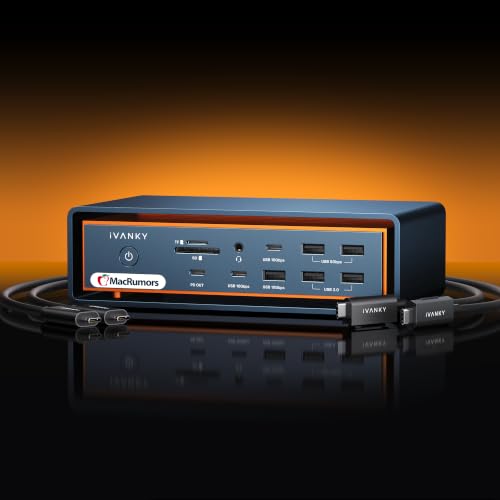
iVANKY FusionDock Max 2 Thunderbolt 5 Dock
Best for: Apple Silicon Mac users needing 140W charging
- Power Delivery
- 140W PD
- Display Support
- Triple
- Max Resolution
- 6K@60Hz
- Host Interface
- Thunderbolt 5
- Data Transfer Speed
- 120Gbps
- Video Ports
- Thunderbolt 5, HDMI
This is a 23-in-1 Thunderbolt 5 dock designed exclusively for Apple Silicon Macs. It delivers 140W Power Delivery to charge your computer while connected. The dock supports up to triple 6K displays at 60Hz, depending on your specific Mac chip. It uses a full-aluminum chassis for passive cooling, meaning there is no internal fan. You get stable performance without fan noise, though the surface may feel warm under heavy load.
- 140W Power Delivery output
- Triple 6K@60Hz display support on M5 Pro/Max
- Passive aluminum cooling with no fan noise
- 2.5Gbps Ethernet connection
- Intel Certified Thunderbolt 5 interface
- Compatible only with Apple Silicon Macs, excluding Intel Macs and Windows PCs
- Supports one Mac at a time with no switching capability
- Surface temperature reaches 49°C under full load
- You use an M-series Mac and need 140W charging
- You require triple high-resolution displays for creative work
- You prefer silent operation without active cooling fans
- You use an Intel-based Mac or Windows PC
- You need to connect multiple computers to one dock
- You require active fan cooling for heat dissipation
Verdict: iVANKY FusionDock Max 2 for Apple Silicon fits users who need a silent, high-power dock for a single M-series Mac with triple display needs.

UGREEN Maxidok Thunderbolt 5 Dock with NVMe Slot
Best for: Windows users needing 8K displays and internal SSD storage
- Power Delivery
- 140W PD
- Display Support
- Triple
- Max Resolution
- 8K@60Hz
- Host Interface
- Thunderbolt 5
- Data Transfer Speed
- 120Gbps
- Video Ports
- Thunderbolt 5, DP 1.4, DP 2.1
The UGREEN Maxidok is a 17-in-1 Thunderbolt 5 docking station featuring 140W Power Delivery. It includes a built-in M.2 NVMe slot for up to 8TB of storage and supports triple 8K displays on Windows. The aluminum chassis houses a 60mm cooling fan and 2.5GbE port. It suits users needing high-speed data transfer, expanded storage, and multi-monitor setups in a compact form factor.
- 140W Power Delivery for laptop charging
- Built-in M.2 NVMe slot supports up to 8TB SSDs
- Triple 8K@60Hz display output on Windows
- 2.5GbE Ethernet port for stable networking
- 17 ports including 3x USB-A and 3x USB-C
- Maximum SSD width limited to 24 mm, excluding many heatsink-equipped drives
- DP port does not support DP++, requiring active adapters for HDMI
- Cooling fan generates noise below 30 dB under load
- You need to expand storage with an internal M.2 SSD up to 8TB
- You require triple 8K displays on a Windows PC
- You want 140W PD for high-power laptop charging
- You use a Mac and need more than dual displays
- You plan to use SSDs wider than 24 mm
- You prefer a silent operation without fan noise
Verdict: UGREEN Maxidok 17-in-1 Thunderbolt 5 Dock fits professionals who need internal storage expansion and triple 8K displays. It is ideal for Windows users with wide SSDs who can use active adapters for HDMI connections.

Razer Thunderbolt 5 Dock Chroma
Best for: Triple 4K gaming and internal SSD storage
- Power Delivery
- 140W PD
- Display Support
- Triple
- Max Resolution
- 8K 60 Hz
- Host Interface
- Thunderbolt 5
- Data Transfer Speed
- 120Gbps
- Video Ports
- Thunderbolt 5
The Razer Thunderbolt 5 Dock Chroma delivers 140W power delivery and supports triple 4K displays at 144Hz. It includes an M.2 slot for up to 8TB of NVMe storage. This dock connects to four computers and offers high-speed data transfer. It suits users who need extensive display flexibility and fast storage expansion in a compact black chassis.
- 140W Power Delivery for fast laptop charging
- Supports triple 4K displays at 144Hz
- Built-in M.2 slot for up to 8TB NVMe SSD
- Connects up to four computers
- Lower port count with 11 ports compared to competitors offering 13 to 23 ports
- Includes a cooling fan which may add operational noise
- You need to drive three 4K monitors at high refresh rates
- You want to expand storage with an internal M.2 SSD
- You require 140W power delivery for high-performance laptops
- You prefer a silent operation without a cooling fan
- You need more than 11 ports for your peripherals
- You only require a single display output
Verdict: Razer Thunderbolt 5 Dock Chroma fits users who prioritize high refresh rate triple displays and internal storage expansion. It is a strong choice for creative professionals and gamers who need robust power delivery and multi-computer support.

UGREEN Maxidok Thunderbolt 5 Docking Station
Best for: Thunderbolt 5 users needing 140W PD
- Power Delivery
- 140W PD
- Display Support
- Triple
- Max Resolution
- 8K
- Host Interface
- Thunderbolt 5
- Data Transfer Speed
- 120Gbps
- Video Ports
- Thunderbolt 5
The UGREEN Maxidok Thunderbolt 5 Dock delivers 140W PD charging and 120Gbps bandwidth for demanding workflows. It supports triple 4K displays or a single 8K output via its four Thunderbolt 5 ports. The unit includes a 2.5G Ethernet port and a UHS-II SD card reader. Its aluminum chassis helps manage heat during heavy loads. This dock suits users who need high-speed data transfer and multiple display connections.
- 140W Power Delivery charging capability
- 120Gbps Thunderbolt 5 bandwidth
- Supports triple 4K or single 8K displays
- Built-in 2.5G Ethernet port
- UHS-II SD card reader for fast transfers
- Fewer total ports than the 23-in-1 iVANKY dock
- No built-in HDMI or DisplayPort video outputs
- Not compatible with Thunderbolt 3 computers
- You need 140W PD for fast laptop charging
- You require high bandwidth for large file transfers
- You use Thunderbolt 5 compatible devices
- You rely on Thunderbolt 3 computers
- You need built-in HDMI or DisplayPort outputs
- You want more than four Thunderbolt ports
Verdict: UGREEN Maxidok Thunderbolt 5 Dock is a high-bandwidth solution for users with Thunderbolt 5 systems who need 140W charging and multiple display outputs. It fits professionals who prioritize speed and do not require legacy port compatibility.

WAVLINK Thunderbolt 5 Dock with M.2 Slot
Best for: Video editors needing fast local SSD caching
- Power Delivery
- 140W PD
- Display Support
- Triple
- Max Resolution
- 8K@144Hz
- Host Interface
- Thunderbolt 5
- Data Transfer Speed
- 120Gbps
- Video Ports
- Thunderbolt 5
This WAVLINK dock offers 140W Power Delivery and a PCIe Gen 4 x4 M.2 SSD slot for local high-speed caching. It supports up to 8K@144Hz on a single display or dual 8K@60Hz screens. The unit includes a 2.5G Ethernet port and an SD 4.0 reader. It suits video editors and designers who need fast local storage for large RAW or 3D files while managing multiple monitors.
- 140W Power Delivery for high-power laptops
- M.2 NVMe SSD slot with 64Gbps transfer speed
- Supports single 8K@144Hz or dual 8K@60Hz displays
- Built-in SD 4.0 card reader for fast media import
- 2.5G RJ45 Ethernet port for stable networking
- Supports only dual external displays on macOS, unlike competitors with triple support
- Includes only one upstream Thunderbolt 5 port compared to the four downstream ports on some rivals
- Requires separate purchase of NVMe SSD and display cables
- You edit high-bitrate RAW footage and need fast local caching
- You require 140W PD to charge a high-power laptop
- You use Windows 11 and need triple 4K@144Hz display support
- You use a Mac and need triple external monitor support
- You prefer a dock that includes the M.2 SSD
- You need more than one upstream Thunderbolt connection
Verdict: WAVLINK 13-in-1 Thunderbolt 5 Dock provides essential 140W charging and a fast internal SSD slot for creators managing large files. It fits professionals who prioritize local caching speed and multi-screen editing on Windows systems.
Specifications side by side

| Spec | Anker Prime 14-in-1 Thunderbolt 5 Dock | Plugable Thunderbolt 5 Dual HDMI Dock | iVANKY FusionDock Max 2 Thunderbolt 5 Dock | UGREEN Maxidok Thunderbolt 5 Dock with NVMe Slot | Razer Thunderbolt 5 Dock Chroma | UGREEN Maxidok Thunderbolt 5 Docking Station | WAVLINK Thunderbolt 5 Dock with M.2 Slot |
|---|---|---|---|---|---|---|---|
| Display Support | Dual | Dual | Triple | Triple | Triple | Triple | Triple |
| Max Resolution | 8K@60Hz | 8K@60Hz | 6K@60Hz | 8K@60Hz | 8K 60 Hz | 8K | 8K@144Hz |
| Host Interface | Thunderbolt 5 | Thunderbolt 5 | Thunderbolt 5 | Thunderbolt 5 | Thunderbolt 5 | Thunderbolt 5 | Thunderbolt 5 |
| Power Delivery | 140W | 140W | 140W | 140W | 140W | 140W | 140W |
| Data Transfer Speed | 120Gbps | – | 120Gbps | 120Gbps | 120Gbps | 120Gbps | 120Gbps |
| Video Ports | HDMI 2.1, DisplayPort 2.1, TB5 | HDMI 2.1 | Thunderbolt 5, HDMI | Thunderbolt 5, DP 1.4, DP 2.1 | Thunderbolt 5 | Thunderbolt 5 | Thunderbolt 5 |
| Total Ports | 14 | 16 | 23 | 17 | 11 | – | 13 |
| Ethernet Speed | 2.5Gbps | 2.5GbE | 2.5GbE | 2.5GbE | Gigabit | 2.5GbE | 2.5GbE |
| Resolution | 8K UHD | 8K UHD | 6K | 8K UHD | 4K UHD | 6K | – |
| Refresh Rate | – | 144Hz | 60Hz | 60Hz | 144Hz | 60Hz | – |
| Ports | Ethernet, Thunderbolt 4 | HDMI, Ethernet, Thunderbolt 4 | Ethernet, Thunderbolt 4 | USB-C, Ethernet, Thunderbolt 4 | Thunderbolt 4 | Ethernet, Thunderbolt 4, USB-A | Ethernet, Thunderbolt 4, USB-A |
| Features | Power Delivery, SD Card Reader, Cooling Fan | Power Delivery | Power Delivery | Power Delivery, Audio Support, M.2 SSD Slot, Cooling Fan | Power Delivery, M.2 SSD Slot, Cooling Fan | Power Delivery, Audio Support, SD Card Reader | Power Delivery, SD Card Reader, M.2 SSD Slot |
| Use | – | – | Mac | – | – | – | – |
| Operating System | – | macOS | macOS | – | – | – | – |
| Number of Computers | 4 Computers | – | – | – | 4 Computers | – | 4 Computers |
| Dimensions | 3 × 4.6 × 4.6 inches | 1.97 × 2.95 × 5.91 inches | – | 5.24 × 5.24 × 2.09 inches | 8.08 × 3.35 × 1.18 inches | 7.6 × 4.06 × 0.94 inches | – |
| Weight | 2.37 pounds | 8.92 ounces | 6.08 pounds | – | – | – | – |
| Size | 4.60" x 4.60" x 3" | – | – | – | 8.08 x 3.35 x 1.18 inches | – | – |
| Color | Gray | Space Gray | Midnight Blue | Bronze | Black | – | Silver |
| Model | A83B5 | TBT-UDH2 | – | U716 | RC21-02290100-R3U1 | U715 | UTD58M |
How to choose the right one
Check host interface speed
You must verify that your computer supports the dock's host interface. All listed models use Thunderbolt 5, which provides the bandwidth needed for 140W power delivery and high-resolution video. If your laptop only has Thunderbolt 4 or USB-C, you may not get the full performance or charging speed. Ensure your device's port matches the dock's requirements to avoid connectivity issues or reduced functionality.
Match display resolution needs
Select a dock based on the maximum resolution your monitors support. The Anker and Plugable models handle 8K UHD, while the iVANKY and UGREEN U715 are limited to 6K. The Razer model caps at 4K UHD. If you plan to use 8K displays, you must choose a dock that explicitly lists 8K support. Choosing a lower-resolution dock will limit your screen quality regardless of your monitor's capabilities.
Consider refresh rate limits
Check the refresh rate if you use high-frequency displays. The Plugable and Razer docks support 144Hz, which is ideal for smooth motion in gaming or fast-paced video. Most other options, like the iVANKY and UGREEN U716, are limited to 60Hz. If you need smooth visuals for creative work or gaming, prioritize models with higher refresh rates. Lower rates may cause stuttering on compatible screens.
Evaluate internal storage options
You may want internal storage for faster file access. The UGREEN U716, Razer, and WAVLINK docks include M.2 SSD slots. This allows you to install an NVMe drive directly into the dock for quick caching or large file storage. Other models lack this feature. If you edit video or manage large datasets, an internal slot reduces latency. You will need to purchase the SSD separately for these units.
Assess thermal management needs
High power and bandwidth generate heat. The Anker and UGREEN U716 models include cooling fans to manage thermal output. This helps maintain stable performance during heavy use. The Plugable and iVANKY models do not list fans, relying on passive cooling. If you plan to run multiple high-resolution displays and charge a laptop simultaneously, active cooling may be necessary to prevent throttling. Check the features list for fan inclusion.
Verify computer compatibility
Some docks are optimized for specific operating systems. The iVANKY FusionDock Max 2 is explicitly designed for Apple Silicon Mac users. It supports macOS and provides 140W charging for M-series chips. Other models, like the UGREEN U716, are noted for Windows users. Ensure the dock's firmware and driver support your operating system. Incompatibility can lead to connection drops or failure to charge your device properly.
Check physical dimensions
Space constraints matter for your desk setup. The Plugable dock is the most compact, weighing only 8.92 ounces and measuring 1.97 inches in length. The Razer model is significantly larger, measuring 8.08 inches in length. The Anker dock is square and measures 4.60 inches on each side. Measure your available desk space before purchasing. A larger dock may require a dedicated spot, while a smaller one fits easily in tight areas.
Frequently asked questions
Can these docks support triple displays?
Yes, several models handle triple displays. The UGREEN Maxidok Thunderbolt 5 Dock with NVMe Slot supports three 8K screens. The Razer Thunderbolt 5 Dock Chroma also supports triple 4K UHD outputs at 144Hz. The iVANKY FusionDock Max 2 is designed for triple display needs on Mac systems. Other models like the Anker Prime support dual displays only.
Do all these docks include a cooling fan?
No, not all models include active cooling. The Anker Prime 14-in-1 Thunderbolt 5 Dock features a cooling fan for thermal management. The UGREEN Maxidok with NVMe Slot and the Razer Thunderbolt 5 Dock Chroma also include fans. The Plugable, iVANKY, and standard UGREEN Maxidok models do not list a cooling fan in their specifications.
Which dock is best for Apple Silicon Macs?
The iVANKY FusionDock Max 2 is the best fit for Apple Silicon. It is specifically designed for Mac users and supports macOS. It provides 140W Power Delivery and handles triple displays. It offers a silent operation suitable for Mac environments. Other docks are compatible but not optimized specifically for Apple hardware in the same way.
Do these docks support internal SSD storage?
Yes, some models support internal storage expansion. The UGREEN Maxidok Thunderbolt 5 Dock with NVMe Slot includes an M.2 SSD slot. The Razer Thunderbolt 5 Dock Chroma also features an M.2 SSD slot for local storage. The WAVLINK Thunderbolt 5 Dock with M.2 Slot provides this feature for video editors. Other models do not list internal storage capabilities.
What is the maximum resolution these docks support?
Most docks support up to 8K UHD resolution. The Anker Prime, Plugable, and UGREEN Maxidok with NVMe Slot all support 8K. The iVANKY and standard UGREEN Maxidok support up to 6K. The Razer Thunderbolt 5 Dock Chroma caps at 4K UHD. You should verify your monitor compatibility with the specific resolution and refresh rate of your chosen dock.
Are these docks compatible with multiple computers?
Yes, several models support switching between multiple computers. The Anker Prime 14-in-1 Thunderbolt 5 Dock supports four computers. The Razer Thunderbolt 5 Dock Chroma also supports four computers. The WAVLINK Thunderbolt 5 Dock with M.2 Slot supports four computers. This allows you to share peripherals and charging across different machines easily.
See also