The Best BenQ Monitors in 2026: 11 Picks
As Amazon Associates, we earn from qualifying purchases. This means we may receive a small commission at no extra cost to you if you click through and make a purchase.
As an Amazon Associate we earn from qualifying purchases. Links on this page are affiliate links.
You need the best BenQ monitors for your specific workflow. BenQ offers a wide range of displays, from compact 24-inch gaming screens to large 32-inch 4K professional monitors. The top pick is the BenQ 27-Inch 1080p USB-C IPS Monitor, which leads for office workers needing USB-C charging and ergonomics. We compared 11 products based strictly on the specifications published on the listings. This guide helps you choose the right size and panel type for your desk.
| # | Product | Best for | Price |
|---|---|---|---|
| 1 | BenQ 27-Inch 1080p USB-C IPS Monitor Best overall | office workers needing USB-C charging and ergonomics | |
| 2 | BenQ 27-Inch 4K Mac USB-C Monitor Best budget | MacBook users needing 90W USB-C charging | |
| 3 | BenQ Zowie 24-Inch 400Hz Gaming Monitor Best premium | competitive esports gaming | |
| 4 | BenQ 32-Inch 4K IPS Designer Monitor Best 32 inch | professional designers needing accurate color on a large screen | |
| 5 | BenQ 28-Inch 3:2 4K Monitor Also great | programmers needing vertical space and ergonomics | |
| 6 | BenQ PV3200U 32" 4K Video Monitor Also great | Video editors needing DCI-P3 color accuracy | |
| 7 | BenQ RD320U 32-inch 4K Programming Monitor Also great | large-screen coding workflows | |
| 8 | BenQ 27-Inch 4K 240Hz QD-OLED Gaming Monitor Best 240hz | 4K gaming with high refresh rates | |
| 9 | BenQ GW2790QT 27-inch 1440p Monitor Also great | office work and video calls | |
| 10 | BenQ RD280UA 28.2" 4K+ Programming Monitor Also great | programmers needing vertical screen space | |
| 11 | BenQ 24-Inch 16:10 Photo Editing Monitor Also great | Compact professional photo editing workflows |
BenQ Monitor Lineup Overview

BenQ monitors split into distinct groups based on your primary needs. The office lineup prioritizes connectivity and ergonomics. The 27-inch 1080p USB-C IPS Monitor offers height-adjustable stands and USB hubs for clean desks. The 27-inch 4K Mac USB-C Monitor provides 90W charging for MacBook users. These models suit professionals who value tidy setups over raw resolution.
Creative and gaming displays focus on speed and color fidelity. The 24-inch 400Hz Gaming Monitor delivers blur reduction for esports. The 27-inch 4K 240Hz QD-OLED combines high refresh rates with deep contrast. Video editors may prefer the 32-inch 4K Video Monitor for its DCI-P3 accuracy. Programmers often choose the 28-inch 4K monitor for its vertical 3:2 aspect ratio.

BenQ 27-Inch 1080p USB-C IPS Monitor
Best for: office workers needing USB-C charging and ergonomics
- Screen Size
- 27 Inch
- Resolution
- 1080p
- Refresh Rate
- 100Hz
- Panel Type
- IPS
- Ports
- USB-C
- Features
- Height-Adjustable Stand, USB Hub
The BenQ GW2786TC is a 27-inch IPS monitor designed for office environments. It features a 1080p FHD resolution and a 100Hz refresh rate for smooth visuals. The display includes a built-in USB-C port delivering 65W charging and a noise-cancellation microphone. You get height-adjustable ergonomics and adaptive brightness technology. This setup suits professionals who need a compact, feature-rich screen for business tasks.
- 100Hz refresh rate for smoother motion
- USB-C port with 65W quick charging
- Height-adjustable stand with tilt, pivot, and swivel
- Built-in noise-cancellation microphone
- Adaptive Brightness Intelligence Tech
- 1080p resolution is lower than the 4K displays on this list
- 27-inch size is smaller than the 32-inch options available
- 9.1-pound weight is lighter but offers less stability than bulkier stands
- You need a single-cable solution with 65W charging for your laptop
- You work in a business office requiring ergonomic adjustments
- You want a microphone for clear audio calls without extra gear
- You require 4K resolution for detailed graphic work
- You prefer a 32-inch screen for more viewing area
- You need high refresh rates for competitive gaming
Verdict: BenQ GW2786TC 27-inch Office Monitor fits office workers who prioritize connectivity and ergonomics over high resolution. It is ideal for those who want a clean desk setup with USB-C charging and built-in audio.

BenQ 27-Inch 4K Mac USB-C Monitor
Best for: MacBook users needing 90W USB-C charging
- Screen Size
- 27”
- Resolution
- 3840×2160
- Ports
- HDMI, USB-C
- Features
- Height-Adjustable Stand, USB Hub, Power Delivery
- Use
- Mac
- Operating System
- macOS
This 27-inch 4K UHD monitor is designed for MacBook users. It features dual USB-C ports with 90W power delivery for single-cable connectivity. The display includes Mac Color Match technology and a P3 wide color gamut. You can adjust the stand for height, tilt, swivel, and pivot. Integrated controls let you manage brightness and volume directly from your keyboard.
- 4K UHD 3840×2160 resolution
- Dual USB-C ports with 90W power delivery
- Mac Color Match calibration for P3 wide color gamut
- Height, tilt, swivel, and pivot adjustable stand
- 27-inch screen is smaller than the 32-inch options on this list
- Standard 60Hz refresh rate is lower than the 120Hz and 240Hz gaming models
- Matte finish offers less reflection control than the Nano Gloss variants
- You use a MacBook Pro or Air and want a single-cable setup
- You need 90W power delivery to charge your laptop while working
- You prefer a 27-inch screen size over larger 32-inch displays
- You require a high refresh rate for competitive gaming
- You need a 32-inch display for more screen real estate
- You prefer a Nano Gloss finish for sharper image clarity
Verdict: BenQ MA270U 27-inch 4K MacBook Monitor suits Mac users who prioritize color accuracy and convenient 90W USB-C charging. It is ideal for creative professionals who want a dedicated, calibrated display for their MacBook workflow.

BenQ Zowie 24-Inch 400Hz Gaming Monitor
Best for: competitive esports gaming
- Refresh Rate
- 400Hz
- Panel Type
- Fast TN
- Use
- Gaming
- Dimensions
- 13 × 2 × 22 inches
- Weight
- 24.1 pounds
The BenQ XL2566X+ is a 24.1-inch Fast TN gaming monitor built for competitive play. It features a 400Hz refresh rate and DyAc 2 technology to reduce motion blur. The native Full HD resolution supports sharp visuals at common esports settings. This model prioritizes speed and clarity over high resolution, making it suitable for players who need maximum responsiveness.
- 400Hz refresh rate for smooth motion
- DyAc 2 dual backlight technology reduces blur
- Fast TN panel with reduced overshoot
- Improved color performance for better enemy identification
- 24.1-inch screen size is smaller than most other BenQ picks
- Full HD resolution is lower than the 4K or 1440p options on this list
- 24.1-pound weight is heavier than typical 24-inch monitors
- You prioritize high refresh rates and motion clarity above all else
- You play competitive esports titles at native Full HD
- You need DyAc 2 technology for competitive advantage
- You require 4K resolution for detailed visuals
- You prefer larger screens for immersive experiences
- You need a monitor for productivity or content creation
Verdict: BenQ XL2566X+ 24.1-inch 400Hz Gaming Monitor is a specialized tool for serious esports competitors who value speed and blur reduction over high resolution. It fits players who compete at Full HD and need the fastest possible response times.
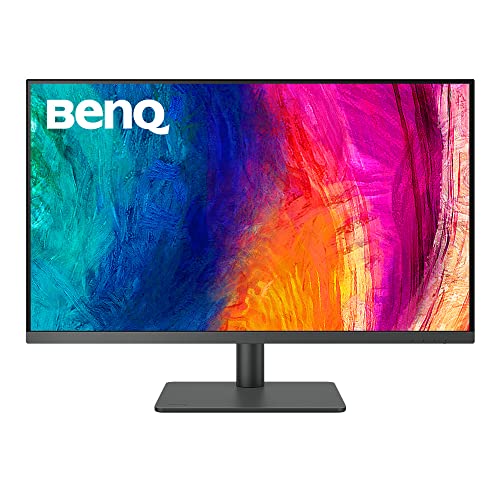
BenQ 32-Inch 4K IPS Designer Monitor
Best for: professional designers needing accurate color on a large screen
- Screen Size
- 31.5"
- Resolution
- 3840×2160
- Panel Type
- IPS
- Ports
- USB-C, HDMI 2.0, DisplayPort 1.4
- Features
- USB Hub, Hotkey Switching
- Use
- Mac
This BenQ PD3205U is a 32-inch 4K UHD monitor with an IPS panel. It covers 99% sRGB and 99% Rec.709 for accurate color work. You get USB-C connectivity with 90W power delivery. The stand offers full ergonomic adjustments. It includes Calman Verified and Pantone Validated certifications. This screen suits designers and Mac users who need precise color reproduction and a large workspace.
- 32-inch 4K UHD IPS display
- 99% sRGB and 99% Rec.709 color coverage
- USB-C with 90W power delivery
- Pantone Validated and Calman Verified accuracy
- Ergonomic stand with tilt, swivel, pivot, and height adjustment
- Heavier build at 20.7 pounds compared to lighter 27-inch options
- Uses HDMI 2.0 instead of HDMI 2.1 found on newer gaming models
- Lower contrast ratio typical of IPS panels versus VA alternatives
- You need a large 32-inch screen for detailed design work
- You want precise color accuracy for professional creative projects
- You prefer a Mac-ready monitor with USB-C connectivity
- You require a high refresh rate for competitive gaming
- You prefer a lighter monitor for easy desk mobility
- You need a smaller 27-inch footprint for limited desk space
Verdict: BenQ PD3205U 32-inch 4K Mac Monitor delivers professional color accuracy and a spacious display for designers. It fits users who prioritize image precision and ergonomic flexibility over gaming speed or portability.

BenQ 28-Inch 3:2 4K Monitor
Best for: programmers needing vertical space and ergonomics
- Screen Size
- 28.2"
- Resolution
- 3840×2560
- Ports
- USB-C
- Panel Type
- IPS
- Features
- Hotkey Switching
- Dimensions
- 18 × 24 × 27 inches
The BenQ RD280UA is a 28.2-inch monitor with a 3840×2560 resolution and IPS panel. It features a 3:2 aspect ratio and 90W USB-C power delivery. The Ergo Arm stand offers flexible positioning. Its Nano Matte panel reduces glare for programmers. You should choose this if you need high vertical pixel density and comfortable viewing angles for coding tasks.
- 3840×2560 resolution on a 28.2-inch IPS panel
- 3:2 aspect ratio provides more vertical space
- 90W USB-C port for device charging
- Ergo Arm stand allows infinite flexibility
- Nano Matte panel reduces reflections
- 28.2-inch size is smaller than the 32-inch options in this list
- 16.8-pound weight is heavier than the 27-inch models
- Standard refresh rate is lower than the 120Hz and 400Hz variants
- You need extra vertical screen real estate for code
- You want a flexible stand for ergonomic adjustments
- You prefer a matte finish to reduce glare
- You require a 16:9 aspect ratio
- You need a 32-inch display for larger spreadsheets
- You prioritize high refresh rates for gaming
Verdict: BenQ RD280UA 28.2-inch 4K Programming Monitor suits developers who value vertical resolution and adjustable stands over screen size or speed.

BenQ PV3200U 32" 4K Video Monitor
Best for: Video editors needing DCI-P3 color accuracy
- Screen Size
- 32”
- Resolution
- 4K UHD
- Ports
- USB-C
- Features
- Built-in Speakers
- Use
- Mac, Photo & Video Editing
- Operating System
- macOS
The BenQ PV320U is a 32-inch 4K UHD monitor designed for video creators. It covers 95% DCI-P3 and 100% Rec.709 color spaces with factory calibration. The display includes 2.1ch built-in speakers and 65W USB-C connectivity. This model suits professionals needing precise color accuracy and ergonomic adjustments for long editing sessions.
- 32-inch 4K UHD resolution
- 95% DCI-P3 color gamut coverage
- Built-in 2.1ch speakers with woofer
- 65W USB-C single-cable connectivity
- Factory-calibrated Delta E ≤ 2
- 65W USB-C power delivery is lower than the 90W on other BenQ models
- 12.6 pounds weight is heavier than many 27-inch competitors
- Standard IPS panel lacks the contrast ratio of IPS Black options
- You need 95% DCI-P3 color accuracy for video editing
- You want built-in speakers to reduce desk clutter
- You prefer a 32-inch screen for detailed timeline work
- You require 90W or higher USB-C power for laptops
- You need a high refresh rate for gaming
- You prefer a lighter, more portable monitor
Verdict: BenQ PV320U 32-inch 4K Video Monitor fits video editors who prioritize color fidelity and integrated audio. It is a solid choice for stationary workstations where screen real estate and accuracy matter more than portability.

BenQ RD320U 32-inch 4K Programming Monitor
Best for: large-screen coding workflows
- Screen Size
- 32"
- Resolution
- 3840×2160
- Ports
- USB-C
- Dimensions
- 37.2 × 20.2 × 37.2 inches
- Weight
- 34.2 pounds
The BenQ RD320U is a 32-inch 4K UHD monitor designed for coding tasks. It features a Nano Matte panel with a 2000:1 contrast ratio to reduce glare and enhance clarity. The display includes specific Coding Modes for both light and dark themes. You also get a 90W USB-C port for connectivity and power delivery. The MoonHalo backlight adds customizable ambient lighting to help protect your eyes during long work sessions.
- 32-inch 4K UHD resolution for sharp text
- Nano Matte panel minimizes reflections
- 90W USB-C port for power and data
- Coding Modes optimize font readability
- MoonHalo backlight for eye comfort
- 2000:1 contrast ratio is lower than typical IPS panels
- 34.2-pound weight is heavy for a desk setup
- 37.2-inch height requires significant vertical space
- You need a large screen for coding
- You want USB-C power delivery
- You prefer matte displays to reduce glare
- You need a high refresh rate for gaming
- You have limited desk space
- You require a lightweight monitor
Verdict: The BenQ RD320U 32-inch 4K Programming Monitor suits developers who need a large, glare-free workspace with USB-C convenience. Its heavy build and specific contrast ratio make it less ideal for those prioritizing portability or high-end multimedia contrast.
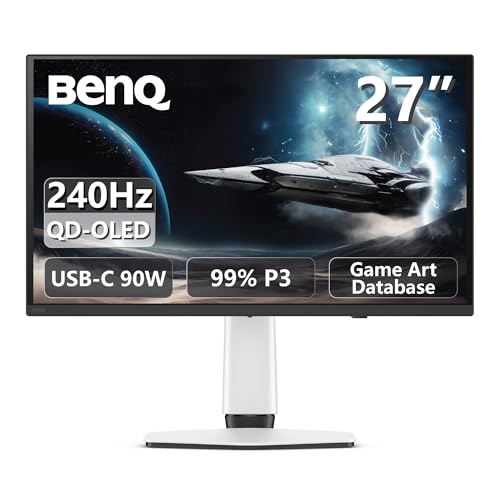
BenQ 27-Inch 4K 240Hz QD-OLED Gaming Monitor
Best for: 4K gaming with high refresh rates
- Screen Size
- 27"
- Resolution
- 4K
- Refresh Rate
- 240Hz
- Panel Type
- QD-OLED
- Response Time
- 0.03ms
- Variable Refresh Rate
- FreeSync Premium Pro
The BenQ EX271UZ is a 27-inch 4K gaming monitor built on QD-OLED technology. It features a 240Hz refresh rate and a 0.03ms response time for fast motion clarity. The panel covers 99% of the DCI-P3 color gamut with 10-bit color depth. You get HDMI 2.1 and USB-C ports with 90W power delivery. This setup suits gamers who want high refresh rates alongside professional-grade color accuracy.
- 240Hz refresh rate for smooth gameplay
- QD-OLED panel with perfect blacks
- 99% DCI-P3 color coverage
- 0.03ms response time
- USB-C port with 90W power delivery
- 27-inch screen is smaller than the 32-inch options in this guide
- DisplayHDR 400 True Black rating is lower than HDR 600 or higher standards
- OLED panel type may have different longevity compared to IPS panels
- You want 4K resolution with a 240Hz refresh rate
- You prioritize color accuracy for gaming and media
- You need USB-C connectivity with high power delivery
- You prefer a larger 32-inch display
- You need a higher HDR brightness rating than 400 nits
- You are on a tight budget for high-refresh-rate OLEDs
Verdict: The BenQ EX271UZ 27" 4K QD-OLED delivers top-tier speed and color for competitive gamers who also value visual fidelity. It fits buyers who want a compact 27-inch screen with modern connectivity.

BenQ GW2790QT 27-inch 1440p Monitor
Best for: office work and video calls
- Screen Size
- 27"
- Resolution
- 1440p
- Panel Type
- IPS
- Ports
- HDMI, DisplayPort, USB-A, USB-C
- Features
- Built-in Speakers, USB Hub
- Size
- 27 Inch
The BenQ GW2790QT is a 27-inch productivity monitor featuring a 1440p IPS panel and 99% sRGB color coverage. It connects via USB-C with 65W charging, eliminating cable clutter for laptops. Built-in speakers and a noise-cancelling microphone support clear audio for calls. The stand offers height adjustment for ergonomic comfort. This display suits users who need a clean, efficient setup for daily office tasks and content consumption.
- 27-inch 1440p IPS panel with 99% sRGB
- USB-C port delivers 65W power delivery
- Built-in speakers and noise-cancelling microphone
- Height-adjustable stand for ergonomic positioning
- 65W USB-C charging is lower than the 90W found on other list items
- 27-inch size is smaller than the 32-inch options available
- 1440p resolution is lower than the 4K panels on the list
- You need a compact 27-inch display for a desk
- You want a single cable for video and 65W charging
- You require built-in audio for conference calls
- You need 4K resolution for detailed work
- You require more than 65W of laptop charging power
- You prefer a larger 32-inch screen size
Verdict: BenQ GW2790QT 27-inch 1440p Monitor fits professionals who prioritize a tidy desk setup with USB-C convenience and reliable color accuracy for standard office work.

BenQ RD280UA 28.2" 4K+ Programming Monitor
Best for: programmers needing vertical screen space
- Screen Size
- 28.2"
- Resolution
- 4K+
- Response Time
- 5 ms
- Aspect Ratio
- 3:2
- Ports
- USB-C, HDMI, DisplayPort
- Features
- HDR, Built-in Speakers
The BenQ RD280UA is a 28.2-inch 4K+ monitor with a 3:2 aspect ratio designed for programming. It features a Nano Matte panel to reduce reflections and includes Coding Modes for better text clarity. The Ergo Arm stand offers flexible positioning. It supports HDR and has built-in speakers. This display suits coders who need vertical space and eye-care features like Night Hours Protection.
- 28.2-inch 4K+ (3840×2560) 3:2 aspect ratio
- Nano Matte panel minimizes reflections
- Coding Modes enhance font clarity
- Ergo Arm stand for flexible positioning
- Built-in speakers and HDR support
- 1200:1 contrast ratio is lower than the 2000:1 ratio found on the RD320U
- 24-inch width dimension may limit desk space differently than wider 16:9 models
- 17.6 pounds weight is heavier than the 24-inch SW242Q variant
- You write code and need extra vertical screen real estate
- You work in bright rooms and want a low-reflection panel
- You prefer an ergonomic arm for flexible monitor positioning
- You require a 400Hz refresh rate for competitive gaming
- You need a 16:9 aspect ratio for standard video content
- You want a lighter monitor under 15 pounds
Verdict: BenQ RD280UA 28.2" 4K+ Programming Monitor is a solid choice for developers who value vertical space and eye comfort. Its 3:2 screen and ergonomic arm make it ideal for long coding sessions.

BenQ 24-Inch 16:10 Photo Editing Monitor
Best for: Compact professional photo editing workflows
- Screen Size
- 24-inch
- Aspect Ratio
- 16:10
- Ports
- USB-C
- Resolution
- 1440p QHD
- Features
- HDR
- Use
- Mac, Photo & Video Editing
The BenQ SW242Q is a 24-inch QHD monitor built for photographers and Mac users. It covers 99% of the Adobe RGB color space with Delta E values of 1.5 or less. Hardware calibration via Palette Master Ultimate ensures precision. You get 90W USB-C power delivery for connected devices. The panel includes a fine-coating for paper texture simulation. This model suits professionals who need accurate color reproduction in a compact form factor.
- 99% Adobe RGB color coverage for professional photography
- Delta E ≤ 1.5 for high color accuracy
- 90W USB-C port for data and power delivery
- Hardware calibration support with Palette Master Ultimate
- Paper Color Sync for screen-to-print matching
- 24-inch screen is smaller than the 27-inch and 32-inch options in this guide
- QHD resolution is lower than the 4K displays available in other picks
- Weight of 17.2 pounds is comparable to or heavier than smaller 1080p models
- You need a compact 24-inch display for photo editing
- You require 99% Adobe RGB coverage for print work
- You want a monitor with 90W USB-C power delivery
- You prefer a larger 27-inch or 32-inch screen size
- You need 4K resolution for detailed video editing
- You require a built-in shading hood rather than a separate accessory
Verdict: BenQ SW242Q 24-inch QHD Photo Monitor fits photographers who prioritize color accuracy and portability over screen size. It delivers professional-grade color fidelity in a compact package suitable for tight workspaces.
Specifications side by side

| Spec | BenQ 27-Inch 1080p USB-C IPS Monitor | BenQ 27-Inch 4K Mac USB-C Monitor | BenQ Zowie 24-Inch 400Hz Gaming Monitor | BenQ 32-Inch 4K IPS Designer Monitor | BenQ 28-Inch 3:2 4K Monitor | BenQ PV3200U 32" 4K Video Monitor | BenQ RD320U 32-inch 4K Programming Monitor | BenQ 27-Inch 4K 240Hz QD-OLED Gaming Monitor | BenQ GW2790QT 27-inch 1440p Monitor | BenQ RD280UA 28.2" 4K+ Programming Monitor | BenQ 24-Inch 16:10 Photo Editing Monitor |
|---|---|---|---|---|---|---|---|---|---|---|---|
| Screen Size | 27 Inch | 27” | – | 31.5" | 28.2" | 32” | 32" | 27" | 27" | 28.2" | 24-inch |
| Resolution | 1080p | 3840×2160 | – | 3840×2160 | 3840×2560 | 4K UHD | 3840×2160 | 4K | 1440p | 4K+ | – |
| Refresh Rate | 100Hz | – | 400Hz | – | – | – | – | 240Hz | – | – | – |
| Panel Type | IPS | – | Fast TN | IPS | – | – | – | QD-OLED | IPS | – | – |
| Response Time | – | – | – | – | – | – | – | 0.03ms | – | 5 ms | – |
| Aspect Ratio | – | – | – | – | – | – | – | – | – | 3:2 | 16:10 |
| Variable Refresh Rate | – | – | – | – | – | – | – | FreeSync Premium Pro | – | – | – |
| Ports | USB-C | HDMI, USB-C | – | USB-C, HDMI 2.0, DisplayPort 1.4 | USB-C | USB-C | USB-C | HDMI 2.1, USB-C 90W | HDMI, DisplayPort, USB-A, USB-C | USB-C, HDMI, DisplayPort | USB-C |
| Features | Height-Adjustable Stand, USB Hub | Height-Adjustable Stand, USB Hub, Power Delivery | – | USB Hub, Hotkey Switching | Hotkey Switching | Built-in Speakers | – | – | Built-in Speakers, USB Hub | HDR, Built-in Speakers | HDR |
| Use | Business & Office, Office | Mac | Gaming | Mac | – | Mac, Photo & Video Editing | – | Gaming | – | – | Mac, Photo & Video Editing |
| Size | 27 Inch | – | Small | 32 Inch | 28.2 | 32 | – | 27" | 27 Inch | 28" 4K+ 3:2 | – |
| Operating System | – | macOS | – | macOS | – | macOS | – | – | – | – | macOS |
| Dimensions | 9 × 24 × 18 inches | 24 × 22 × 8.6 inches | 13 × 2 × 22 inches | 3.98 × 11.1 × 9.13 inches | 18 × 24 × 27 inches | 17 × 8 × 21 inches | 37.2 × 20.2 × 37.2 inches | 24 × 22 × 9.5 inches | 9.39 × 24.2 × 16.7 inches | 18.7 × 24 × 23.7 inches | 2.89 × 21 × 14 inches |
| Weight | 9.1 pounds | – | 24.1 pounds | 20.7 pounds | 16.8 pounds | 12.6 pounds | 34.2 pounds | – | 22.2 pounds | 17.6 pounds | 17.2 pounds |
| Color | White | Sliver | Black | Metallic Grey | Metal Grey | White | Metal Grey | White | White | Black | 2023 27" QHD Photo Editing Monitor |
| Model | GW2786TC | MA270U | XL2566X+ | PD3205U | RD280UA | PV3200U | RD320U | EX271UZ | GW2790QT | RD280UA | SW242Q |
Where BenQ Fits Your Needs

BenQ covers sizes from 24 to 32 inches. You find IPS panels for office and creative work, plus OLED for gaming. The range emphasizes USB-C connectivity and ergonomic stands. You get dedicated options for programmers, video editors, and esports players. Notably, the list lacks 16:9 aspect ratio monitors for standard media consumption. There are no curved displays or budget 1080p options outside the top pick. If you need a specific curvature or a non-USB-C budget screen, this brand may not suit you.
How to choose the right BenQ monitor
Match resolution to your screen size
You need enough pixels to keep text sharp at your viewing distance. A 27-inch 1080p display, like the BenQ GW2786TC, works for office tasks if you sit back. For closer work, choose 4K. The BenQ MA270U and PD3205U offer 4K clarity for Mac users and designers. Larger 32-inch screens benefit greatly from 4K to avoid visible grain. Higher resolution means more screen real estate for windows. Check the listed resolution for each model to ensure it fits your desk depth and visual needs.
Check refresh rate for motion clarity
Refresh rate determines how smoothly moving images appear. Standard office monitors run at 60Hz or 100Hz, like the GW2786TC. This is sufficient for web browsing and documents. Gamers need higher speeds. The BenQ XL2566X+ offers 400Hz for competitive esports, reducing motion blur. The EX271UZ provides 240Hz for high-end gaming. Higher refresh rates make cursor movement and scrolling feel smoother. Match this spec to your activity. Office workers rarely notice the difference between 100Hz and 144Hz, but gamers benefit significantly.
Select the right panel type
Panel technology affects color accuracy and viewing angles. IPS panels, found in the GW2786TC, PD3205U, and RD280UA, offer wide viewing angles and reliable color for office and creative work. OLED panels, like the EX271UZ, provide deep blacks and vibrant colors for gaming. They also deliver high contrast. Choose IPS for general productivity and photo editing. Select OLED if you prioritize visual fidelity and speed for gaming. The panel type dictates how colors appear from different angles and how deep the blacks look.
Use USB-C for single-cable setups
USB-C ports simplify your desk by carrying video, data, and power. The BenQ GW2786TC and MA270U support USB-C charging. The MA270U delivers 90W, enough for many MacBook Pro models. This reduces cable clutter. Look for monitors with USB hubs to connect peripherals. The GW2786TC includes a hub for easy connectivity. If you use a laptop, USB-C is essential. It allows you to connect one cable to power the display and charge your computer simultaneously. Check the port list for USB-C presence.
Consider aspect ratio for productivity
Aspect ratio changes how much vertical space you have. Standard monitors use 16:9. The BenQ RD280UA features a 3:2 aspect ratio, providing more vertical height. This is ideal for programmers reading code or writers viewing documents. The extra vertical space reduces scrolling. The RD320U also offers a large format for coding workflows. If you work with text-heavy applications, a taller screen improves efficiency. Check the product details for aspect ratio information. A 3:2 ratio is a distinct advantage for specific professional tasks.
Frequently asked questions
Which BenQ monitor is best for office work?
The BenQ GW2786TC is the top choice for office environments. It features a 27-inch 1080p IPS panel with a 100Hz refresh rate. The stand is height-adjustable, and it includes a USB hub. This setup supports a clean desk with USB-C charging and built-in audio for business tasks.
What is the best BenQ monitor for Mac users?
The BenQ MA270U is designed for MacBook workflows. It offers a 27-inch 4K UHD display with color accuracy for creative professionals. The USB-C port provides 90W power delivery. This monitor includes a height-adjustable stand and a USB hub, making it ideal for macOS users needing convenient connectivity.
Which BenQ monitor is best for competitive gaming?
The BenQ XL2566X+ is built for esports competitors. It features a 24.1-inch screen with a 400Hz refresh rate for maximum speed. This model prioritizes blur reduction and response times over resolution. It is a specialized tool for players who compete at Full HD and need the fastest possible performance.
What is the best large BenQ monitor for designers?
The BenQ PD3205U is ideal for professional designers. It provides a 32-inch 4K UHD IPS display for spacious, accurate image work. The monitor includes a USB hub and hotkey switching for efficient workflows. It fits users who prioritize precision and ergonomic flexibility over gaming speed or portability.
Which BenQ monitor is best for programmers?
The BenQ RD280UA suits developers who value vertical space. It features a 28.2-inch 4K UHD IPS panel with a 3:2 aspect ratio. The adjustable stand supports long coding sessions. This monitor offers USB-C connectivity and hotkey switching, making it a solid choice for those needing extra vertical resolution.
What is the best BenQ monitor for video editing?
The BenQ PV3200U is tailored for video editors. It features a 32-inch 4K UHD display with DCI-P3 color accuracy for fidelity. The monitor includes built-in speakers and USB-C ports. It is a solid choice for stationary workstations where screen real estate and color accuracy matter more than portability.
Which BenQ monitor offers the best OLED gaming experience?
The BenQ EX271UZ delivers a top-tier OLED gaming experience. It features a 27-inch 4K UHD panel with a 240Hz refresh rate. The QD-OLED technology provides high color fidelity and speed. It supports FreeSync and includes HDMI and USB-C ports, fitting buyers who want compact, modern connectivity for competitive gaming.
See also