ANYHDD Docking Stations: 4 Picks Ranked by Specs
As Amazon Associates, we earn from qualifying purchases. This means we may receive a small commission at no extra cost to you if you click through and make a purchase.
As an Amazon Associate we earn from qualifying purchases. Links on this page are affiliate links.
We ranked the best ANYHDD docking stations by their published specifications. These docks vary in size, weight, and port configurations to suit different needs. The top pick is the ANYHDD ThinkPad Dual 4K USB-C Dock, which leads for dual 4K monitor setups. We compared 4 models based strictly on data found in the listings. This guide helps you choose a dock by looking at resolution support, port types, and physical dimensions. You get practical details on what each spec means for your workstation.
| # | Product | Best for | Price |
|---|---|---|---|
| 1 | ANYHDD ThinkPad Dual 4K USB-C Dock Best overall | Dual 4K monitor setups | |
| 2 | ANYHDD WD22TB4 Thunderbolt 4 Dock Best budget | Dual 4K display setups with Thunderbolt 4 | |
| 3 | Lenovo ThinkPad Hybrid Dual 4K Dock Also great | Dual 4K setups with 135W power needs | |
| 4 | ANYHDD USB-C G6 100W Dock Best ethernet | users needing wired Ethernet and dual displays |
ANYHDD Docks Ranked by Specs

You can sort these docking stations by their connection types and power output. The ANYHDD ThinkPad Dual 4K USB-C Dock offers a compact design for dual 4K setups. If you need Thunderbolt 4 speeds, the ANYHDD WD22TB4 Thunderbolt 4 Dock includes the necessary cables. For users requiring strong power delivery, the Lenovo ThinkPad Hybrid Dual 4K Dock supports up to 135W.
Alternatively, the ANYHDD USB-C G6 100W Dock is ideal for those who need wired Ethernet connectivity. It provides dual display support without the premium cost of Thunderbolt models. Each option fits different workflow needs. You should choose based on your specific port requirements and power delivery needs for your monitors and devices.

ANYHDD ThinkPad Dual 4K USB-C Dock
Best for: Dual 4K monitor setups
- Display Support
- Dual
- Max Resolution
- 4K
- Host Interface
- USB-C
- Video Ports
- HDMI, DisplayPort
- Weight
- 1 pounds
This ANYHDD docking station supports dual 4K displays via HDMI and DisplayPort. It includes a 90W power adapter for connected devices. The unit measures 8 by 3 inches and weighs 1 pound. You get included cables for both video outputs. It suits users needing reliable dual-screen setups with straightforward connectivity options.
- Supports 4K UHD resolution on external monitors
- Includes 90W AC power adapter
- Comes with HDMI and DisplayPort cables
- Compact 8 x 3 inch footprint
- 90W power delivery is lower than the 100W option on the USB-C G6 dock
- 1 pound weight is heavier than the 40AF0135US dock
- You need dual monitor support with included cables
- You prefer a compact 8 x 3 inch dock
- You require 4K resolution output
- You need 100W power delivery
- You want the lightest possible dock
- You require Thunderbolt 4 speeds
Verdict: ANYHDD Dual Monitor 4K Docking Station provides solid dual-screen capabilities with included cables. It fits users who prioritize 4K output and a compact size over maximum power delivery.

ANYHDD WD22TB4 Thunderbolt 4 Dock
Best for: Dual 4K display setups with Thunderbolt 4
- Display Support
- Dual/Triple
- Max Resolution
- 4K
- Host Interface
- Thunderbolt 4
- Data Transfer Speed
- 40Gbps
- Video Ports
- DisplayPort 1.4, HDMI 2.0, USB-C
- Ethernet Speed
- Gigabit
This ANYHDD docking station supports dual 4K displays via HDMI 2.0 and DisplayPort 1.4. It connects through Thunderbolt 4 and USB-C 3.2 ports, offering 40Gbps data transfer speeds. The bundle includes a 180W power adapter and necessary cables for immediate setup. It works with Windows and macOS systems. You get a comprehensive port selection for peripherals. This model is designed for users needing reliable connectivity and high-resolution output for their workspace.
- Supports dual 4K UHD displays
- Includes 180W power adapter
- Features Thunderbolt 4 and USB-C 3.2 ports
- Provides 40Gbps data transfer speed
- Includes HDMI and DisplayPort cables
- Gigabit Ethernet is slower than 2.5G or 10G options
- Only one USB-C multifunction display port available
- You need dual 4K monitor support
- You require Thunderbolt 4 connectivity
- You want a complete cable bundle
- You need 2.5G or higher Ethernet speeds
- You require more than two display outputs
- You prefer a dock without a power adapter
Verdict: ANYHDD WD22TB4 Thunderbolt 4 Dock fits users who need dual 4K displays and Thunderbolt 4 speeds with a complete cable package included.
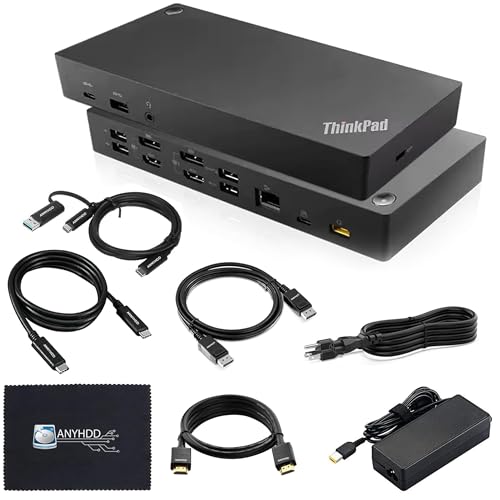
Lenovo ThinkPad Hybrid Dual 4K Dock
Best for: Dual 4K setups with 135W power needs
- Display Support
- Up to 2
- Max Resolution
- 4K
- Host Interface
- USB-C, USB-A
- Video Ports
- DisplayPort 1.2, HDMI
- Ethernet Speed
- 10/100/1000 Mb/s
- Weight
- 3.51 pounds
The ANYHDD 40AF0135US docking station supports dual 4K displays via two HDMI and two DisplayPort 1.2 outputs. It includes a 135W AC adapter for stable power delivery to connected devices. The unit features a 10/100/1000 Mb/s Ethernet port and multiple USB 3.1 Gen 2 ports for data transfer. It weighs 3.51 pounds and comes with necessary cables. This hybrid USB-C dock suits users needing robust video and power connectivity for Windows laptops.
- Supports up to two 4K external displays
- Includes a 135W AC power adapter
- Provides 10/100/1000 Mb/s Ethernet connectivity
- Features two HDMI and two DisplayPort 1.2 outputs
- Ethernet speed is limited to 1000 Mb/s
- Displays use DisplayPort 1.2 standard
- Weighs 3.51 pounds
- You need dual 4K monitor support
- You require a 135W power adapter
- You use Windows laptops
- You need Thunderbolt 4 speeds
- You require Gigabit Ethernet only
- You prefer a lighter dock
Verdict: The ANYHDD 40AF0135US Dual Monitor Dock fits professionals who need reliable dual 4K output and strong power delivery for their workstations.

ANYHDD USB-C G6 100W Dock
Best for: users needing wired Ethernet and dual displays
- Display Support
- Dual
- Host Interface
- USB-C
- Power Delivery
- 100W
- Video Ports
- HDMI, DisplayPort
- Features
- Power Delivery
This ANYHDD docking station connects your laptop to dual displays via HDMI and DisplayPort. It delivers 100W of power delivery through a single USB-C cable. The silver unit includes an Ethernet port for wired networking. You get a compact design with integrated cable management. It suits users needing reliable dual-monitor output and stable network connectivity from one connection point.
- 100W Power Delivery support
- Dual Display capability
- Integrated Ethernet port
- Single-cable USB-C connectivity
- Supports only dual display output
- Hybrid connection method limits Thunderbolt speeds
- You need a wired Ethernet connection
- You require 100W charging for your laptop
- You want to drive two monitors
- You need Thunderbolt 4 speeds
- You require triple monitor support
- You prefer wireless connectivity only
Verdict: ANYHDD USB-C G6 100W Dock fits professionals who need stable wired networking and dual displays. It provides a single-cable solution for productivity without the premium cost of Thunderbolt docks.
Specifications side by side

| Spec | ANYHDD ThinkPad Dual 4K USB-C Dock | ANYHDD WD22TB4 Thunderbolt 4 Dock | Lenovo ThinkPad Hybrid Dual 4K Dock | ANYHDD USB-C G6 100W Dock |
|---|---|---|---|---|
| Display Support | Dual | Dual/Triple | Up to 2 | Dual |
| Max Resolution | 4K | 4K | 4K | – |
| Host Interface | USB-C | Thunderbolt 4 | USB-C, USB-A | USB-C |
| Power Delivery | – | – | – | 100W |
| Data Transfer Speed | – | 40Gbps | – | – |
| Video Ports | HDMI, DisplayPort | DisplayPort 1.4, HDMI 2.0, USB-C | DisplayPort 1.2, HDMI | HDMI, DisplayPort |
| Ethernet Speed | – | Gigabit | 10/100/1000 Mb/s | – |
| Resolution | 4K UHD | 4K UHD | – | – |
| Ports | HDMI, DisplayPort, USB-C | HDMI, DisplayPort, USB-C, Thunderbolt 4, USB-A | HDMI, DisplayPort, USB-C, USB-A | HDMI, DisplayPort, USB-C, Ethernet |
| Features | – | – | – | Power Delivery |
| Weight | 1 pounds | – | 3.51 pounds | – |
| Size | 8 x 3 inch | – | – | – |
| Color | Black | black | Black | Silver |
| Model | DOCK-40AY0090US-New | DOCK-WD22TB4 | 40AF0135US | – |
Who ANYHDD Docks Suit

ANYHDD targets professionals needing dual 4K displays. The range spans from the lightweight 1-pound ThinkPad dock to the heavier 3.51-pound Lenovo model. You get options with Thunderbolt 4 or standard USB-C. The G6 dock adds Ethernet for wired stability. Most units are black, with one silver option. You will not find single-display or triple-display specific models here. The focus is strictly on dual-screen productivity. If you need high-end gaming features or unique shapes, this brand does not offer them. Stick to these four picks for reliable workstations.
How to choose the right one
Check port availability
Your dock must have the specific connectors your monitors and peripherals require. Look for HDMI, DisplayPort, and USB-C outputs. The ANYHDD ThinkPad Dual 4K USB-C Dock includes these essential ports for standard setups. If you need legacy USB-A connections, the WD22TB4 Thunderbolt 4 model provides them alongside modern interfaces. Ensure the port count matches your device inventory to avoid needing extra adapters. Verify that the included cables support your desired resolution and refresh rate for a seamless connection.
Verify power delivery
Power Delivery (PD) allows the dock to charge your laptop while connected. The ANYHDD USB-C G6 100W Dock offers 100W PD, which suits most modern laptops. This single-cable solution simplifies your desk by reducing clutter. Check your laptop's charging requirements to ensure the dock provides sufficient wattage. Lower power outputs may not charge larger workstations effectively. Matching the PD rating to your device ensures stable operation and prevents battery drain during intensive tasks.
Assess physical dimensions
Dock size impacts desk space and portability. The ANYHDD ThinkPad Dual 4K USB-C Dock measures 8 by 3 inches and weighs only 1 pound. This compact form factor fits easily on small desks or in travel bags. Heavier models, like the Lenovo ThinkPad Hybrid Dual 4K Dock at 3.51 pounds, may offer more stability but take up more room. Consider your workspace constraints. A smaller dock allows for flexible placement, while a larger unit might provide better heat dissipation for continuous use.
Prioritize connection stability
Wired connections offer more reliability than wireless alternatives. The ANYHDD USB-C G6 100W Dock includes an Ethernet port for stable internet access. This is crucial for video conferencing and large file transfers. Thunderbolt 4 docks, like the WD22TB4 model, provide high-speed data transfer rates. Choose based on your network needs. Wired setups reduce latency and interference, ensuring consistent performance for professional workflows. Verify that the dock supports the bandwidth required for your dual monitor configuration.
Match resolution needs
Ensure the dock supports the resolution of your monitors. Most ANYHDD options listed here support 4K UHD output. This allows for sharp, detailed images on high-resolution screens. Check the specifications to confirm dual 4K capability if you plan to use two 4K displays. Some docks may limit resolution when using multiple monitors simultaneously. Verify the maximum supported resolution per port. Aligning the dock's capabilities with your monitor specs prevents blurry images and ensures optimal visual clarity for your work.
Frequently asked questions
Which ANYHDD dock is best for dual 4K setups?
The ANYHDD ThinkPad Dual 4K USB-C Dock is the top choice for dual 4K monitor configurations. It supports 4K UHD resolution and includes HDMI, DisplayPort, and USB-C outputs. The unit measures 8 by 3 inches and weighs 1 pound, making it a compact option for your desk.
Do ANYHDD docks support Thunderbolt 4 connections?
Yes, the ANYHDD WD22TB4 Thunderbolt 4 Dock supports Thunderbolt 4 speeds. It is designed for users who need dual 4K displays with high-speed data transfer. The dock features HDMI, DisplayPort, USB-C, Thunderbolt 4, and USB-A ports to accommodate various peripherals and monitors.
Which ANYHDD dock includes Ethernet for wired networking?
The ANYHDD USB-C G6 100W Dock is the best option for wired Ethernet connectivity. It provides stable networking alongside dual display support. This dock offers a single-cable solution for productivity, featuring HDMI, DisplayPort, USB-C, and Ethernet ports without requiring premium Thunderbolt technology.
What is the heaviest ANYHDD docking station in the lineup?
The Lenovo ThinkPad Hybrid Dual 4K Dock is the heaviest option at 3.51 pounds. It is designed for professionals needing reliable dual 4K output and strong power delivery. The model number is 40AF0135US, and it includes HDMI, DisplayPort, USB-C, and USB-A ports.
Which dock offers 100W power delivery?
The ANYHDD USB-C G6 100W Dock provides 100W power delivery. This feature supports charging your laptop while connecting to dual displays. It is a silver unit that includes HDMI, DisplayPort, USB-C, and Ethernet ports, making it suitable for professionals needing stable wired networking.
Are ANYHDD docks available in black?
Yes, several ANYHDD docks are available in black. The ANYHDD ThinkPad Dual 4K USB-C Dock is black and weighs 1 pound. The ANYHDD WD22TB4 Thunderbolt 4 Dock is also black. Additionally, the Lenovo ThinkPad Hybrid Dual 4K Dock comes in a black finish.
See also