Best 60Hz Kvm Switches: 15 Spec-Based Picks
As Amazon Associates, we earn from qualifying purchases. This means we may receive a small commission at no extra cost to you if you click through and make a purchase.
As an Amazon Associate we earn from qualifying purchases. Links on this page are affiliate links.
These are the best 60Hz kvm switches we compared. We evaluated 15 models based strictly on published specifications to help you find the right hardware for your setup. The AV Access 4KEX100-KVM Cat6 Extender leads the list because it supports 4K UHD resolution at 60Hz over long distances via HDMI. This makes it ideal for remote server room management where signal reliability matters. Our picks focus on refresh rate, port types, and resolution limits. Use this guide to decide which switch fits your monitor and computer configuration.
Match ports to your monitor inputs

Most switches here support 4K at 60Hz, but the connection type varies. You must ensure the KVM ports match your monitor inputs. Some models use HDMI, while others rely on DisplayPort or USB-C. Selecting the correct interface prevents compatibility issues and ensures stable signal transmission for your specific dual or multi-monitor setup.
| # | Product | Best for | Price |
|---|---|---|---|
| 1 | AV Access 4KEX100-KVM Cat6 Extender Best overall | remote server room management via HDMI | |
| 2 | StarTech 2-Port DP KVM 4K 60Hz Best usb hub | Dual 4K monitors with DisplayPort and audio | |
| 3 | StarTech 4-Port DP KVM Switch Also great | controlling four PCs with one 4K monitor | |
| 4 | MT-VIKI 8-Port 17.3" LCD KVM Console Best premium | integrated rack console with display | |
| 5 | TESmart 2-Port HDMI KVM Switch Best budget | Dual monitor setups for two computers | |
| 6 | StarTech 2-Port Dual-Monitor DP KVM Best usb-a | Dual 4K 60Hz DisplayPort setups | |
| 7 | TESmart 2-Port 4K@60Hz HDMI+DP KVM Also great | Two-computer dual-monitor setups | |
| 8 | TESmart 2-Port HDMI KVM Switch 4K@60Hz Also great | Two-computer dual-monitor setups with USB 3.0 needs | |
| 9 | TESmart Quad Monitor KVM Switch Best quad display | managing four computers with four monitors | |
| 10 | TESmart 4-Port DisplayPort KVM Switch Also great | managing four computers with dual monitors | |
| 11 | TESmart 2 PC 3 Monitor HDMI KVM Also great | Dual PC setups with triple monitors | |
| 12 | TESmart 3-Monitor 4K KVM Switch Also great | Three monitor setups for two computers | |
| 13 | TESmart 4-Port USB-C KVM Dock Also great | Four-computer setups needing integrated charging | |
| 14 | AV Access iDock M10 Dual 4K KVM Dock Best mac | MacBook and desktop PC dual monitor setups | |
| 15 | CMSTEDCD Thunderbolt 4 KVM Dock Best thunderbolt 4 | Dual 4K@60Hz setups with Thunderbolt 4 laptops |
The best fit for you

- You need to manage a remote server room – AV Access 4KEX100-KVM Cat6 Extender – It extends HDMI and USB 2.0 signals for distant workstation access.
- You want to control four PCs with one monitor – StarTech 4-Port DP KVM Switch – It supports four computers sharing a single 4K@60Hz DisplayPort monitor.
- You need an integrated display for eight systems – MT-VIKI 8-Port 17.3" LCD KVM Console – It includes a 17.3-inch LCD for direct viewing and control.
- You want fast USB 3.0 sharing for two PCs – TESmart 2-Port HDMI KVM Switch – It provides dual monitor support with high-speed USB 3.0 ports.
- You manage four computers with four monitors – TESmart Quad Monitor KVM Switch – It handles four computers and four screens via HDMI and DisplayPort.

AV Access 4KEX100-KVM Cat6 Extender
Best for: remote server room management via HDMI
- Refresh Rate
- 60Hz
- Maximum Resolution
- 4K@60Hz
- Video Interface
- HDMI
- USB Hub Standard
- USB 2.0
- Features
- Audio Support, EDID Emulation
- Dimensions
- 9.84 × 5.12 × 0.79 inches
This AV Access KVM extender transmits 4K@60Hz video and USB 2.0 signals over a single Cat6 cable up to 100 meters. You gain remote control of a PC from a distance using four USB ports and audio pass-through. The unit supports independent EDID control for stable display output. It is designed for server rooms or industrial setups where long-distance signal extension is required without latency.
- Transmits 4K@60Hz video up to 100m over one Cat6 cable
- Includes four USB ports for full peripheral control
- Supports bi-directional RS232 and analog stereo audio
- Uses single power supply with PoH to reduce cable clutter
- Features independent EDID control via DIP switch
- Supports only HDMI ports, limiting monitor connectivity options
- Transmits USB 2.0 speeds, which are slower than USB 3.0 standards
- Extends signal only up to 100m, shorter than some fiber options
- You need to control a computer from up to 100 meters away
- You require audio and RS232 pass-through for AV integration
- You want to reduce cable clutter with Power over HDBaseT
- You need USB 3.0 high-speed data transfer for large files
- You require DisplayPort or USB-C connections for your monitors
- You need to extend signals beyond 100 meters
Verdict: AV Access 4KEX100-KVM 4K60Hz Extender fits professionals who need to manage a workstation from a distance using HDMI and USB 2.0 peripherals. It is ideal for rack installations where long-distance signal reliability matters more than high-speed USB transfer.
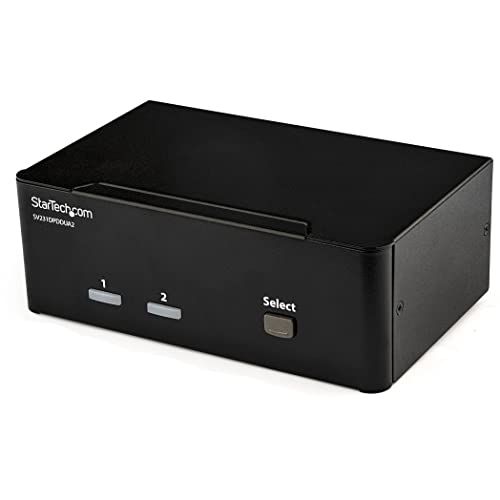
StarTech 2-Port DP KVM 4K 60Hz
Best for: Dual 4K monitors with DisplayPort and audio
- Refresh Rate
- 60Hz
- Computers Supported
- 2
- Monitors Supported
- 2
- Maximum Resolution
- 4K 60Hz
- Video Interface
- DisplayPort 1.2
- Features
- USB Hub, Audio Support
This StarTech KVM switch manages two computers across two DisplayPort monitors at 4K resolution and 60Hz refresh rate. It includes a built-in 2-port USB hub for shared peripherals and 3.5 mm audio jacks for independent sound control. The compact unit measures 6.3 by 3.9 by 2.3 inches. It suits creative professionals needing high-resolution dual displays and reliable peripheral sharing for their workflow.
- Supports 4K UHD resolution at 60Hz on each DisplayPort 1.2 output
- Includes a built-in 2-port USB hub for peripheral sharing
- Features 3.5 mm auxiliary ports for independent audio support
- Compact dimensions of 6.3 by 3.9 by 2.3 inches
- Supports only two ports, limiting you to two computers
- Weighs 1.62 pounds, which is heavier than some lighter alternatives
- Uses DisplayPort only, excluding HDMI connectivity
- You need to control two computers with two 4K@60Hz monitors
- You require independent audio output for each system
- You prefer DisplayPort connections over HDMI
- You need to connect more than two computers
- You require HDMI inputs for your monitors
- You need a portable or lightweight solution under 1 pound
Verdict: StarTech 2-Port DisplayPort KVM Switch delivers reliable dual-monitor 4K@60Hz performance for users who need precise peripheral and audio control. It fits professionals who prioritize DisplayPort connectivity and dedicated audio jacks over multi-computer capacity.

StarTech 4-Port DP KVM Switch
Best for: controlling four PCs with one 4K monitor
- Refresh Rate
- 60Hz
- Computers Supported
- 4
- Monitors Supported
- 1
- Maximum Resolution
- 4K at 60Hz
- Video Interface
- DisplayPort 1.2
- USB Hub Standard
- USB 2.0
This StarTech KVM switch lets you control four computers using a single DisplayPort monitor and USB peripherals. It supports 4K resolution at 60Hz and includes a built-in 2-port USB 2.0 hub. The unit features a steel housing and offers both hotkey and push-button switching. It is designed for users who need to manage multiple systems with high-definition video output and shared USB devices.
- Supports 4K UHD resolution at 60Hz refresh rate
- Includes a 2-port USB 2.0 hub for shared devices
- Offers both hotkey and manual push-button switching methods
- Built with a durable steel housing for stability
- Limited to DisplayPort connections only
- USB hub uses older USB 2.0 specification
- Heavier build at 2.3 pounds
- You need to connect four computers to one monitor
- You require 4K video output at 60Hz
- You want a steel housing for durability
- You need USB 3.0 speeds for data transfer
- Your monitors require HDMI or DisplayPort MST passthrough for multiple screens
- You prefer a lighter, more portable device
Verdict: StarTech 4-Port DP KVM Switch is a solid choice for users managing four systems with a single 4K@60Hz DisplayPort monitor. It suits those who value a steel build and USB 2.0 sharing over higher-speed data transfer.
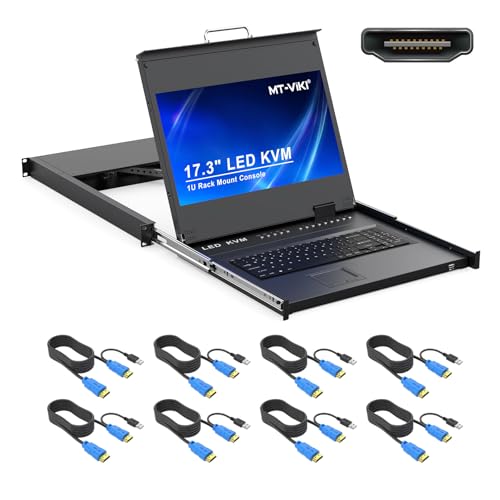
MT-VIKI 8-Port 17.3" LCD KVM Console
Best for: integrated rack console with display
- Refresh Rate
- 60Hz
- Computers Supported
- 8
- Maximum Resolution
- 1080P@60Hz
- Video Interface
- HDMI
- USB Hub Standard
- USB 2.0
- Features
- Hotkey Switching
This MT-VIKI unit combines an 8-port HDMI KVM switch with a built-in 17.3-inch LCD monitor. It delivers 1080p resolution at a 60Hz refresh rate. The design fits into a 1U rack and includes a touchpad and keyboard. You can control connected computers via OSD menus, hotkeys, or physical buttons. The package includes eight USB HDMI cables for immediate setup.
- Integrated 17.3-inch LCD monitor for direct viewing
- Supports 8 computers with included USB HDMI cables
- Three switching methods: OSD, hotkeys, and buttons
- Adjustable monitor angle up to 110 degrees
- Aluminum construction for reduced weight
- Limited to 1080p resolution compared to 4K options
- Uses USB 2.0 speed for peripheral data
- Bulky 1U rack footprint requires specific depth
- You need an all-in-one rack console with a screen
- You manage up to 8 computers in a 1U space
- You prefer physical buttons and hotkey switching
- You require 4K resolution at 60Hz
- You need USB 3.0 data transfer speeds
- You want a compact desktop switch without a monitor
Verdict: MT-VIKI 8-Port 17.3" LCD KVM Console suits data center managers who need an integrated rack solution with a dedicated display. It offers a complete viewing and control experience for eight systems.

TESmart 2-Port HDMI KVM Switch
Best for: Dual monitor setups for two computers
- Refresh Rate
- 60Hz
- Computers Supported
- 2
- Monitors Supported
- 2
- Maximum Resolution
- 4K@60Hz
- Video Interface
- HDMI
- USB Hub Standard
- USB 3.0 (5Gbps)
This TESmart KVM switch manages two computers and two monitors with 4K@60Hz resolution. It includes USB 3.0 ports for fast peripheral sharing and audio support. The unit features EDID emulation to maintain display settings during switching. You can toggle inputs using buttons, hotkeys, or an IR remote. It supports most wired and wireless keyboards and mice, excluding Bluetooth models.
- Supports 4K UHD resolution at 60Hz refresh rate
- Includes USB 3.0 ports for 5Gbps data transfer
- Features EDID emulators to prevent display setting changes
- Integrates microphone and L/R audio output
- Offers multiple switching methods including IR remote
- Supports only two computers compared to four-port options
- Uses HDMI ports instead of DisplayPort for video
- Does not support wireless Bluetooth keyboards or mice
- You need a dual-monitor setup for two computers
- You require USB 3.0 speeds for shared peripherals
- You want to manage audio across different systems
- You need to connect more than two computers
- Your monitors require DisplayPort connections
- You rely exclusively on Bluetooth keyboards or mice
Verdict: TESmart 2-Port HDMI KVM Switch suits users who need dual monitors for two PCs with fast USB 3.0 sharing. It is a practical solution for mixed OS environments where audio switching is also required.

StarTech 2-Port Dual-Monitor DP KVM
Best for: Dual 4K 60Hz DisplayPort setups
- Refresh Rate
- 60Hz
- Computers Supported
- 2
- Monitors Supported
- 2
- Maximum Resolution
- 4K@60Hz
- Video Interface
- DisplayPort
- Ports
- DisplayPort, USB-A
This StarTech unit connects two computers to dual 4K 60Hz DisplayPort monitors. It uses USB-A ports for keyboard and mouse input. The device is bus-powered, meaning it draws energy from the connected computers rather than a wall adapter. Integrated 5ft cables reduce port strain. It supports hotkey switching and remote push buttons for easy control across Windows, macOS, Linux, and ChromeOS systems.
- Supports dual 4K 60Hz DisplayPort monitors
- Bus-powered design eliminates external adapters
- Includes integrated 5ft host cables
- Features remote push button with 1.5m cable
- Compatible with Windows, macOS, Linux, and ChromeOS
- Supports only two host computers
- Uses DisplayPort instead of HDMI or USB-C
- Limited to USB-A peripheral connections
- You need dual 4K 60Hz displays for two PCs
- You prefer a compact, bus-powered solution
- You use DisplayPort monitors and USB-A peripherals
- You require HDMI or USB-C monitor connections
- You need to switch more than two computers
- You prefer HDMI or USB-C peripherals
Verdict: StarTech 2-Port DisplayPort KVM suits professionals managing two desktops with dual 4K 60Hz displays. It fits setups that prioritize DisplayPort connectivity and bus-powered convenience.

TESmart 2-Port 4K@60Hz HDMI+DP KVM
Best for: Two-computer dual-monitor setups
- Refresh Rate
- 60Hz
- Computers Supported
- 2
- Monitors Supported
- 2
- Maximum Resolution
- 4K@60Hz
- Video Interface
- DisplayPort, HDMI
- USB Hub Standard
- USB 3.0 (5Gbps)
This TESmart unit connects two computers to two monitors via HDMI and DisplayPort. It supports 4K@60Hz video with HDR10 and Dolby Vision. USB 3.0 ports share peripherals at 5Gbps. EDID emulation keeps display settings stable. You get IR remote, button, or hotkey switching. It is a practical dual-monitor hub for desktop setups.
- Supports 4K@60Hz resolution with HDR10 and Dolby Vision
- USB 3.0 ports provide 5Gbps data transfer speeds
- EDID emulation prevents display setting changes during switching
- Offers three switching methods: IR remote, buttons, or hotkeys
- Supports only two computers, limiting expansion compared to four-port models
- Requires AAA batteries for the IR remote control
- Does not support wireless Bluetooth keyboards or mice
- You need to switch between two desktops or laptops
- You want dual monitors per system with stable EDID
- You prefer using hotkeys or an IR remote
- You need to connect more than two computers
- You rely exclusively on wireless Bluetooth input devices
- You require a rack-mount form factor
Verdict: TESmart 2-Port HDMI/DP KVM Switch fits users who need a compact dual-monitor hub for two PCs with stable display settings. It suits those who value USB 3.0 speeds and flexible switching options over higher port counts.

TESmart 2-Port HDMI KVM Switch 4K@60Hz
Best for: Two-computer dual-monitor setups with USB 3.0 needs
- Refresh Rate
- 60Hz
- Computers Supported
- 2
- Monitors Supported
- 2
- Maximum Resolution
- 4K@60Hz
- Video Interface
- HDMI
- USB Hub Standard
- USB 3.0 (5Gbps)
This TESmart KVM switch lets you control two computers with two monitors and one set of peripherals. It supports 4K resolution at 60Hz and includes USB 3.0 ports for faster data transfer and device charging. The unit features EDID emulation to maintain display settings during switching. It is a practical solution for users who need to manage dual systems without installing additional software or drivers.
- Supports 4K UHD resolution at 60Hz refresh rate
- Includes USB 3.0 ports for 5Gbps data transfer
- Features EDID emulation to prevent display setting changes
- Allows separate switching of images on each display
- Supports only two computers, which is fewer than many competitors offering four ports
- Maximum resolution is limited to 4K, whereas other options on the list reach 4K at higher bandwidths or support more monitors
- Does not support wireless Bluetooth keyboards or mice
- You need to switch between two desktops with dual monitors
- You require USB 3.0 speeds for shared peripherals
- You want to avoid installing drivers on your operating system
- You need to connect more than two computers
- You require support for wireless Bluetooth input devices
- You need to manage three or more monitors per system
Verdict: TESmart 2-Port HDMI KVM Switch is a solid choice for users who need to toggle between two computers with dual monitors and require fast USB 3.0 connectivity. It fits those who value stable EDID emulation and driver-free operation.

TESmart Quad Monitor KVM Switch
Best for: managing four computers with four monitors
- Refresh Rate
- 60Hz
- Computers Supported
- 4
- Monitors Supported
- 4
- Maximum Resolution
- 4K@60Hz
- Video Interface
- HDMI 2.0, DisplayPort 1.2
- USB Hub Standard
- USB 3.0 (5Gbps), USB 2.0
This TESmart KVM switch manages four computers and drives four monitors simultaneously. It supports 4K resolution at 60Hz over HDMI and DisplayPort. You get USB 3.0 ports for peripherals and audio jacks for sound. The unit includes an LCD screen and remote control for switching. It fits users who need a single station to control multiple desktops with a full quad-display setup.
- Supports 4 monitors and 4 computers
- HDMI 2.0 with 4K@60Hz resolution
- Includes IR remote and LCD display
- USB 3.0 ports with power delivery
- MST technology for extended displays
- Supports only 60Hz refresh rate
- Large 16.5-inch chassis size
- Requires separate HDMI and DP cables
- You need to control four desktops
- You require four simultaneous monitors
- You want USB 3.0 peripheral sharing
- You need higher than 60Hz refresh
- You only have two computers
- You prefer a compact form factor
Verdict: TESmart Quad Monitor KVM Switch is the right pick if you need to manage four computers with four screens. It delivers the necessary ports and resolution for a robust multi-PC workstation.

TESmart 4-Port DisplayPort KVM Switch
Best for: managing four computers with dual monitors
- Refresh Rate
- 60Hz
- Computers Supported
- 4
- Monitors Supported
- 2
- Maximum Resolution
- 4K@60Hz
- Video Interface
- DisplayPort
- USB Hub Standard
- USB 3.0 (5Gbps)
This KVM switch lets you connect four computers to two monitors using DisplayPort. It supports 4K resolution at 60Hz and includes USB 3.0 ports for peripheral sharing. The metal enclosure is rack-mountable, which helps save space in a server room or tidy desk setup. It features EDID emulation to maintain display settings during switching. You get seamless keyboard and mouse control across your devices.
- Supports 4K@60Hz resolution on dual monitors
- Includes USB 3.0 ports for fast data transfer
- Metal enclosure with rack-mount ears
- EDID emulation prevents display setting changes
- Zero latency keyboard and mouse switching
- Supports only two monitors per computer
- Heavier build at 3.7 pounds
- Requires two DP signals per PC
- You need to manage four computers from one desk
- You prefer a durable metal enclosure over plastic
- You want rack-mountable hardware for a tidy setup
- You need to connect three or more monitors per computer
- You require a lightweight portable solution
- You only have two computers to switch between
Verdict: TESmart 4-Port DisplayPort KVM Switch is a sturdy option for users managing four computers with dual monitors. Its metal build and rack-mount capability make it ideal for fixed workstations that need reliable switching without display glitches.

TESmart 2 PC 3 Monitor HDMI KVM
Best for: Dual PC setups with triple monitors
- Refresh Rate
- 60Hz
- Computers Supported
- 2
- Monitors Supported
- 3
- Maximum Resolution
- 4K@60Hz
- Video Interface
- HDMI
- USB Hub Standard
- USB 3.0 (5Gbps), USB 3.2 Gen 1
This TESmart unit connects two computers to three displays at 4K resolution and 60Hz refresh rate. It features EDID emulation for stable visuals and includes a Gigabit Ethernet port for shared network access. You get USB 3.0 connectivity for peripherals and audio support. The device supports four switching methods, including hotkeys and an IR remote. It is designed for users needing multi-monitor setups with dual PC control.
- Supports triple 4K@60Hz displays
- Includes EDID emulation for stable output
- Features Gigabit Ethernet for network sharing
- Provides USB 3.0 data transfer speeds
- Offers four switching options including hotkeys
- Supports only two computers, while other picks handle up to four
- Requires AAA batteries for the IR remote
- Limited to HDMI inputs, lacking DisplayPort options found in competitors
- You need to control two computers from three monitors
- You require EDID emulation to prevent display issues
- You want to share a single Ethernet connection between PCs
- You need to connect more than two computers
- You require DisplayPort inputs for your monitors
- You prefer a built-in remote without battery requirements
Verdict: TESmart 2-PC 3-Monitor 4K@60Hz KVM suits professionals who need to manage two systems across three screens with stable EDID emulation and shared networking. It is less ideal if you need support for four computers or DisplayPort connectivity.

TESmart 3-Monitor 4K KVM Switch
Best for: Three monitor setups for two computers
- Refresh Rate
- 60Hz
- Computers Supported
- 2
- Monitors Supported
- 3
- Maximum Resolution
- 4K@60Hz
- Video Interface
- USB-C, HDMI, DisplayPort
- Power Delivery
- 60W
This KVM switch manages two computers across three 4K@60Hz displays. It supports HDMI, DisplayPort, and USB-C inputs with 60W power delivery. EDID emulation ensures stable visuals without manual adjustments. You get USB 3.0 sharing and a 1000 Mbps LAN port. The unit measures 9.25 by 5.11 by 1.77 inches. It suits users needing triple monitor setups for laptops and desktops.
- Supports triple 4K@60Hz displays
- Includes 60W power delivery
- Features EDID emulation technology
- Shares USB 3.0 and audio peripherals
- Offers four switching methods including hotkeys
- Supports only two computers
- Physical dimensions are 9.25 by 5.11 by 1.77 inches
- Apple Macs cannot support MST for this setup
- You need to connect three monitors to two computers
- You require 60W power delivery for your laptop
- You want stable visuals without manual EDID adjustments
- You need to connect more than two computers
- You plan to use Apple Macs with multiple monitors
- You prefer a smaller form factor than 9.25 inches
Verdict: TESmart 2-PC 3-Monitor KVM Switch fits professionals who need three 4K displays for two machines. It provides stable video through EDID emulation and convenient switching options. This setup is ideal for desktop and laptop combinations requiring shared peripherals.
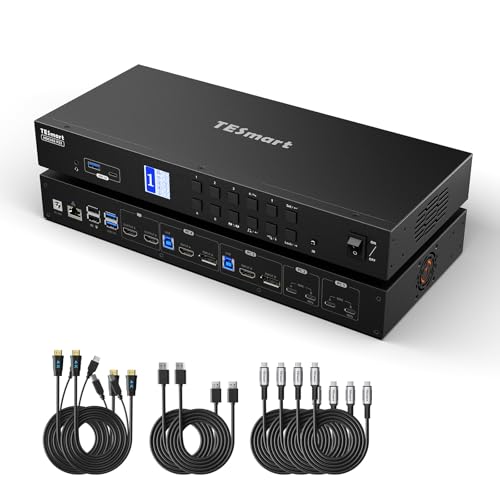
TESmart 4-Port USB-C KVM Dock
Best for: Four-computer setups needing integrated charging
- Refresh Rate
- 60Hz
- Computers Supported
- 4
- Monitors Supported
- 2
- Maximum Resolution
- 4K@60Hz
- Video Interface
- USB-C, HDMI, DisplayPort
- Power Delivery
- 60W
This TESmart unit manages four computers across two monitors at 4K@60Hz. It combines a KVM switch with a docking station, offering USB-C, HDMI, and DisplayPort outputs. The device includes a 60W charging module and a 1000 Mbps LAN port. You get dual USB 3.0 and USB 2.0 ports for peripherals. It supports hotkey switching and EDID emulation to keep your display settings stable.
- Supports 4K@60Hz resolution with 4:4:4 color
- Manages up to four computers
- Includes 60W laptop charging capability
- Provides 1000 Mbps wired LAN connectivity
- Supports only two monitors per computer
- Limited to USB 2.0 for keyboard and mouse data transfer
- You need to switch between four different computers
- You want a single dock for charging and connectivity
- You use both USB-C and HDMI/DisplayPort monitors
- You require more than two monitors per computer
- You need USB 3.0 speeds for input devices
- You only operate one computer at a time
Verdict: TESmart 4-PC USB-C KVM with 60W suits users who need to manage four systems from one desk. It fits those who value integrated charging and wired networking alongside video switching.

AV Access iDock M10 Dual 4K KVM Dock
Best for: MacBook and desktop PC dual monitor setups
- Refresh Rate
- 60Hz
- Computers Supported
- 2
- Monitors Supported
- 2
- Maximum Resolution
- 4K@60Hz
- Video Interface
- HDMI, USB-C
- Power Delivery
- 100W
This KVM dock connects one MacBook and one desktop PC to two 4K monitors at 60Hz. It shares peripherals and provides 100W power delivery to the Mac. The device uses EDID emulation to prevent display flicker during switching. It includes Gigabit Ethernet and SDXC support. This setup suits users who want a single dual-monitor workspace for mixed Mac and PC systems.
- Supports dual 4K displays at 60Hz refresh rate
- Provides up to 100W USB-C Power Delivery
- Includes Gigabit Ethernet port for network connectivity
- Uses EDID emulation for stable switching
- Limited to one MacBook and one desktop PC only
- Base M1 and M2 MacBooks support only one external display
- Base M3 MacBooks require the lid to be closed for dual displays
- You need to share two 4K monitors between a MacBook and a desktop PC
- You want 100W power delivery to keep your MacBook charged
- You require a stable dual-monitor setup with EDID emulation
- You need to connect two laptops simultaneously
- You are using a base M1 or M2 MacBook and need dual external displays
- You need to support more than two computers
Verdict: AV Access iDock M10 Dual 4K KVM is a specialized dock for users pairing a MacBook with a desktop PC. It delivers reliable dual 4K output and 100W charging for that specific two-computer configuration.

CMSTEDCD Thunderbolt 4 KVM Dock
Best for: Dual 4K@60Hz setups with Thunderbolt 4 laptops
- Refresh Rate
- 60Hz
- Computers Supported
- 2
- Monitors Supported
- 2
- Maximum Resolution
- 4K@60Hz
- Video Interface
- HDMI, DisplayPort, USB-C
- Ports
- HDMI, DisplayPort, USB-C, Thunderbolt 4
This CMSTEDCD Thunderbolt 4 KVM dock supports dual 4K@60Hz extended displays for two computers. It connects via USB-C 3.2 or higher ports and includes HDMI and DisplayPort outputs. The unit weighs 10.6 ounces and measures 5.55 inches in length. It requires driver installation and does not provide Power Delivery charging. This spec-based pick suits users needing high-resolution dual monitors with Thunderbolt 4 connectivity.
- Supports dual 4K@60Hz extended displays
- Includes Thunderbolt 4 and USB-C ports
- Offers HDMI and DisplayPort video outputs
- Compatible with macOS, Windows, and Linux
- Weighs 10.6 ounces, which is heavier than compact alternatives
- Does not provide Power Delivery charging for connected laptops
- Requires separate driver installation before use
- You need dual 4K@60Hz monitors for two computers
- You have devices with Thunderbolt 4 or USB-C 3.2 ports
- You want to reduce cable clutter with a docking station
- You require Power Delivery charging from the KVM switch
- You prefer a plug-and-play setup without driver installation
- You only need a single monitor connection
Verdict: The CMSTEDCD Thunderbolt 4 KVM Dock fits users who need dual 4K@60Hz displays and have Thunderbolt 4 capable laptops. It delivers high-resolution video output but requires driver setup and does not charge your devices.
Specifications side by side

| Spec | AV Access 4KEX100-KVM Cat6 Extender | StarTech 2-Port DP KVM 4K 60Hz | StarTech 4-Port DP KVM Switch | MT-VIKI 8-Port 17.3" LCD KVM Console | TESmart 2-Port HDMI KVM Switch | StarTech 2-Port Dual-Monitor DP KVM | TESmart 2-Port 4K@60Hz HDMI+DP KVM | TESmart 2-Port HDMI KVM Switch 4K@60Hz | TESmart Quad Monitor KVM Switch | TESmart 4-Port DisplayPort KVM Switch | TESmart 2 PC 3 Monitor HDMI KVM | TESmart 3-Monitor 4K KVM Switch | TESmart 4-Port USB-C KVM Dock | AV Access iDock M10 Dual 4K KVM Dock | CMSTEDCD Thunderbolt 4 KVM Dock |
|---|---|---|---|---|---|---|---|---|---|---|---|---|---|---|---|
| Computers Supported | – | 2 | 4 | 8 | 2 | 2 | 2 | 2 | 4 | 4 | 2 | 2 | 4 | 2 | 2 |
| Monitors Supported | – | 2 | 1 | – | 2 | 2 | 2 | 2 | 4 | 2 | 3 | 3 | 2 | 2 | 2 |
| Maximum Resolution | 4K@60Hz | 4K 60Hz | 4K at 60Hz | 1080P@60Hz | 4K@60Hz | 4K@60Hz | 4K@60Hz | 4K@60Hz | 4K@60Hz | 4K@60Hz | 4K@60Hz | 4K@60Hz | 4K@60Hz | 4K@60Hz | 4K@60Hz |
| Video Interface | HDMI | DisplayPort 1.2 | DisplayPort 1.2 | HDMI | HDMI | DisplayPort | DisplayPort, HDMI | HDMI | HDMI 2.0, DisplayPort 1.2 | DisplayPort | HDMI | USB-C, HDMI, DisplayPort | USB-C, HDMI, DisplayPort | HDMI, USB-C | HDMI, DisplayPort, USB-C |
| Power Delivery | – | – | – | – | – | – | – | – | – | – | – | 60W | 60W | 100W | – |
| USB Hub Standard | USB 2.0 | – | USB 2.0 | USB 2.0 | USB 3.0 (5Gbps) | – | USB 3.0 (5Gbps) | USB 3.0 (5Gbps) | USB 3.0 (5Gbps), USB 2.0 | USB 3.0 (5Gbps) | USB 3.0 (5Gbps), USB 3.2 Gen 1 | USB 3.0, USB 3.2 Gen 1 | USB 3.0, USB 2.0 | 10Gbps, USB 3.2, USB 3.0 | – |
| Ethernet Speed | – | – | – | – | – | – | – | – | – | – | 1 Gbps | 1000 Mbps | 1000 Mbps | 1 Gbps | – |
| EDID Emulation | – | – | – | – | – | – | – | – | – | – | – | – | – | Supported | – |
| Resolution | 4K UHD | 4K UHD | 4K UHD | 1080p FHD | 4K UHD | 4K UHD | 4K UHD | 4K UHD | 4K UHD | 4K UHD | 4K UHD | 4K UHD | 4K UHD | 4K UHD | 4K UHD |
| Refresh Rate | 60Hz | 60Hz | 60Hz | 60Hz | 60Hz | 60Hz | 60Hz | 60Hz | 60Hz | 60Hz | 60Hz | 60Hz | 60Hz | 60Hz | 60Hz |
| Ports | HDMI | DisplayPort | DisplayPort | HDMI | HDMI, USB 3.0 | DisplayPort, USB-A | HDMI, DisplayPort, USB 3.0 | HDMI, USB 3.0 | HDMI, DisplayPort, USB 3.0 | DisplayPort, USB 3.0 | HDMI, Ethernet, USB 3.0 | HDMI, DisplayPort, USB-C, Ethernet, USB 3.0 | HDMI, DisplayPort, USB-C, USB 3.0 | Ethernet | HDMI, DisplayPort, USB-C, Thunderbolt 4 |
| Features | Audio Support, EDID Emulation | USB Hub, Audio Support | Audio Support | Hotkey Switching | Audio Support, EDID Emulation, Hotkey Switching | Hotkey Switching | EDID Emulation, Hotkey Switching | Audio Support, EDID Emulation, Hotkey Switching | Audio Support, EDID Emulation, MST | Audio Support, EDID Emulation, Hotkey Switching | Audio Support, EDID Emulation, Hotkey Switching | Power Delivery, EDID Emulation, Hotkey Switching, MST | EDID Emulation, Hotkey Switching | Power Delivery, EDID Emulation | DisplayLink |
| Use | – | – | – | – | – | – | – | – | – | – | – | – | – | Mac | – |
| Display Support | – | – | – | – | – | – | – | – | Quad Display | – | – | – | – | Dual Display | Dual Display |
| Operating System | – | – | – | – | – | Windows | – | – | Windows | – | – | – | – | macOS | – |
| Number of Computers | – | – | – | – | 2 Computers | – | 2 Computers | 2 Computers | 4 Computers | 4 Computers | 2 Computers | 2 Computers | 4 Computers | 2 Computers | 2 Computers |
| Dimensions | 9.84 × 5.12 × 0.79 inches | 3.9 × 6.3 × 2.3 inches | 8.7 × 5.2 × 1.8 inches | 9.06 × 3.7 × 8.66 inches | 11.8 × 4.33 × 1.18 inches | 4.9 × 3.5 × 1 inches | 11.8 × 4.33 × 1.18 inches | 11.8 × 4.33 × 1.18 inches | 16.5 × 8.7 × 4.7 inches | 12 × 5.9 × 1.7 inches | 7.4 × 4.9 × 0.2 inches | 9.25 × 5.11 × 1.77 inches | 13.8 × 5.9 × 1.77 inches | 8.66 × 3.94 × 0.98 inches | 5.55 × 3.03 × 1.5 inches |
| Weight | 1.01 pounds | 1.62 pounds | 2.3 pounds | – | 1.1 pounds | 1.32 pounds | 1.32 pounds | 1.32 pounds | – | 3.7 pounds | – | – | – | 12 ounces | 10.6 ounces |
| Size | 100 | 2.3" x 6.3" x 3.9" | 1.8"x5.2"x8.7" | 8 port KVM HDMI+ 17.3'' LCD | USB3.0 for 2 PCs Dual Monitor | [Output] 2 x DP | USB 3.0 HDMI+DP KVM | For 2 Desktops (HDMI+HDMI) | For 4 Desktops PCs | USB 3.0 DP KVM 4 In 2 Out | For 2 PC & 3 Monitor | – | – | – | – |
| Color | Black | Black | Black | Black | Black | black | Black | Red | Black | Black | Black | Black | Black | black | Deep Grey |
| Model | 4KEX100-KVM | SV231DPDDUA2 | SV431DPUA2 | MT-17308HL | HKS202-P23 | C2-DD46-UA2-CBL-KVM | TES-HDK0202A2U-USBK | HKS202-P23 | HDK404-P23 | PKS0402A20 | HKS203-P24 | HDC203-P24 | HDC402-P23-USBK | iDock M10 | CMSTEDCD-GMXHK-US-SW900 |
How to choose the right kvm switch
Check port compatibility
Ensure the switch ports match your monitor inputs. The AV Access 4KEX100-KVM uses HDMI, while the StarTech 2-Port DP KVM relies on DisplayPort. Mismatched ports cause connection failures. If your monitors use DisplayPort, select a DP switch. If they use HDMI, choose an HDMI model. Some units support both, offering flexibility. Verify the physical connector type before purchasing to avoid buying incompatible hardware for your existing display setup.
Verify computer capacity
Select a switch that supports the number of systems you own. The StarTech 4-Port DP KVM handles four computers, while the StarTech 2-Port DP KVM manages only two. Using a two-port unit for four PCs requires multiple switches, adding complexity. The TESmart Quad Monitor KVM Switch supports four computers directly. Match the input count to your hardware to ensure all systems connect without extra adapters or daisy-chaining.
Assess monitor configuration
Determine if you need single or multiple displays per computer. The StarTech 2-Port DP KVM supports dual 4K monitors. The TESmart 2-Port 4K@60Hz HDMI+DP KVM also handles dual monitors. The TESmart 3-Monitor 4K KVM Switch supports three displays for two computers. If you require triple-screen setups, standard dual-port switches will not suffice. Check the display support specifications carefully to ensure the unit handles your desired screen arrangement.
Evaluate usb speed
USB version affects peripheral performance. The TESmart 2-Port HDMI KVM Switch offers USB 3.0 for faster data transfer. Older models may only support USB 2.0, which is slower for large file transfers. If you use high-speed external drives, prioritize USB 3.0 models. The StarTech 4-Port DP KVM Switch uses USB 2.0, which is sufficient for keyboards and mice but slower for storage devices. Match the USB spec to your peripheral needs.
Consider power delivery
Some docks charge your devices while switching signals. The AV Access iDock M10 provides 100W Power Delivery for MacBooks. The TESmart 3-Monitor 4K KVM Switch also includes power delivery. Other units, like the CMSTEDCD Thunderbolt 4 KVM Dock, do not charge devices. If you need to charge laptops through the KVM, select a model with PD support. Otherwise, you will need separate chargers for each computer.
Frequently asked questions
Can I use a 60Hz KVM switch with dual monitors?
Yes, several models support dual-monitor configurations. The StarTech 2-Port DP KVM 4K 60Hz and the TESmart 2-Port HDMI KVM Switch both allow you to connect two monitors to two computers. These units handle 4K UHD resolution at 60Hz while sharing peripherals. You can toggle between systems without disconnecting displays.
Which KVM switch is best for Mac users?
The AV Access iDock M10 Dual 4K KVM Dock is designed for macOS environments. It supports dual 4K displays at 60Hz and pairs a MacBook with a desktop PC. The unit includes 100W Power Delivery for charging. It provides EDID emulation for stable video output across both systems.
Do these switches support USB 3.0 data transfer?
Many models include USB 3.0 ports for faster peripheral sharing. The TESmart 2-Port HDMI KVM Switch and the TESmart 4-Port DisplayPort KVM Switch both feature USB 3.0 connectivity. This allows you to share high-speed devices like external drives. Some older units, like the AV Access 4KEX100-KVM, only support USB 2.0.
Can I control four computers with one KVM switch?
Yes, there are options for managing four systems. The StarTech 4-Port DP KVM Switch controls four PCs using a single 4K monitor. The TESmart Quad Monitor KVM Switch supports four computers with four screens. These units allow you to switch between all four systems using hotkeys or buttons.
Is EDID emulation important for 60Hz setups?
EDID emulation helps maintain stable video signals when switching computers. It ensures the monitor displays the correct resolution and refresh rate. Most listed switches, including those from TESmart and StarTech, include this feature. It prevents display glitches or black screens when toggling between different source devices.
Do I need a KVM switch with audio support?
You need audio support if you want to share speakers or headphones. Several models, such as the StarTech 2-Port DP KVM 4K 60Hz and the TESmart 2-Port HDMI KVM Switch, include audio jacks. This allows you to route sound from the active computer to your audio output. It simplifies your desk setup.
Can I use a KVM switch with Thunderbolt 4 laptops?
Yes, the CMSTEDCD Thunderbolt 4 KVM Dock supports Thunderbolt 4 laptops. It delivers dual 4K displays at 60Hz using a single cable connection. Note that this unit requires driver setup and does not provide power delivery. It is ideal for users who prioritize high-bandwidth video output over charging capabilities.
What is the difference between HDMI and DisplayPort KVM switches?
The main difference lies in the connector type and bandwidth. HDMI is common for consumer electronics and supports audio. DisplayPort is often preferred for professional monitors and can support higher resolutions. The AV Access 4KEX100-KVM uses HDMI, while the StarTech 2-Port DP KVM uses DisplayPort. Choose the port that matches your monitor inputs.
See also