Best 27 Inch Monitors: 15 Spec-Based Picks
As Amazon Associates, we earn from qualifying purchases. This means we may receive a small commission at no extra cost to you if you click through and make a purchase.
As an Amazon Associate we earn from qualifying purchases. Links on this page are affiliate links.
Finding the best 27 Inch monitors requires matching specific specs to your daily tasks. We compared 15 models based strictly on published listing data. The Dell 27-Inch 1440p USB-C Monitor leads because its USB-C port simplifies connectivity for office setups. This guide helps you decide between high refresh rates for gaming or color accuracy for creative work. You will see how panel types and resolution impact your visual experience. Use these spec-based picks to narrow your options quickly.
Match resolution and refresh rate to your needs

Choose 4K for sharp text and creative work, or 1440p for smoother gaming. High refresh rates like 240Hz benefit competitive players, while 75Hz suits office tasks. Panel type matters too: OLED offers deep contrast, while IPS provides reliable color accuracy. Check ports for USB-C if you need a single cable for data and power.
| # | Product | Best for | Price |
|---|---|---|---|
| 1 | Dell 27-Inch 1440p USB-C Monitor Best overall | office setups requiring USB-C connectivity | |
| 2 | KTC 27-Inch 4K 160Hz Fast IPS Monitor Also great | 4K gaming with high refresh rates | |
| 3 | LG UltraGear 27-Inch OLED Gaming Monitor Best premium | competitive gaming and fast motion | |
| 4 | BenQ 27-Inch 1080p USB-C IPS Monitor Best budget | Office desks needing USB-C and ergonomics | |
| 5 | ASUS ProArt 27-Inch 1440p Monitor Also great | Color-accurate creative work and ergonomic setups | |
| 6 | ViewSonic 27-Inch 4K UHD IPS Monitor Also great | Office productivity and general computing | |
| 7 | KTC 27-Inch 4K 160Hz Fast IPS Monitor Also great | 4K gaming with high refresh rates and color accuracy | |
| 8 | ASUS ProArt 27-Inch 4K USB-C Monitor Also great | Professional color-accurate 4K work | |
| 9 | ASUS ProArt 27-Inch 4K 120Hz QD-OLED Monitor Best 120hz | Professional color work and Mac users | |
| 10 | Acer Predator 27-Inch 280Hz OLED Gaming Monitor Also great | high-refresh-rate competitive gaming | |
| 11 | Samsung 27-Inch Odyssey G5 180Hz QHD Monitor Best 180hz | 1440p gaming with high refresh rates | |
| 12 | ASUS 27-Inch 4K UHD IPS Monitor Also great | 4K office work and media viewing | |
| 13 | Acer Nitro 27-Inch 240Hz QHD IPS Monitor Also great | Competitive gaming with ergonomic adjustments | |
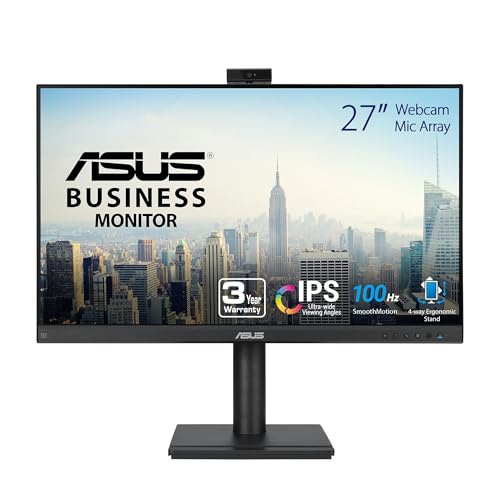
| 14 | ASUS 27-Inch QHD Conferencing Monitor Best webcam | video conferencing and office work | |
| 15 | ViewSonic 27-Inch 4K USB-C Monitor Also great | Office work and home office setups |
The best fit for you

- You need simple USB-C connectivity for office work – Dell 27-Inch 1440p USB-C Monitor – The Dell S2722DC offers 1440p resolution and USB-C ports for streamlined desk setups.
- You want high refresh rate 4K gaming performance – KTC 27-Inch 4K 160Hz Fast IPS Monitor – The KTC U27T6 delivers 4K resolution and a 160Hz refresh rate for smooth visuals.
- You require professional color accuracy for creative work – ASUS ProArt 27-Inch 1440p Monitor – The ASUS ProArt PA278QV provides 1440p clarity and an ergonomic stand for precise editing.
- You want a webcam for video conferencing – ASUS 27-Inch QHD Conferencing Monitor – The ASUS BE27ACSBK integrates a webcam and speakers for cleaner office desk setups.
Is a 27-inch screen size right for you?

A 27-inch display balances desk space and visual clarity. This size fits most standard monitors, offering enough real estate for multitasking without overwhelming your workspace. You get sharper text in 4K models, while 1440p remains crisp for general use. The footprint is manageable for office desks and gaming setups alike. It provides a middle ground between compact 24-inch screens and massive 32-inch panels, making it a versatile choice for most users.
Worth it if
- You need extra screen real estate for multitasking
- You want a balance of desk space and image clarity
- You prefer 4K sharpness without a massive footprint
Skip it if
- You have limited desk space
- You prioritize portability over screen size
- You are satisfied with 24-inch displays

Dell 27-Inch 1440p USB-C Monitor
Best for: office setups requiring USB-C connectivity
- Size
- 27 Inch
- Screen Size
- 27-inch
- Resolution
- 2560×1440
- Refresh Rate
- 75Hz
- Response Time
- 4Ms
- Variable Refresh Rate
- AMD FreeSync
The Dell S2722DC is a 27-inch WQHD monitor with a 75Hz refresh rate and AMD FreeSync. It features USB-C connectivity with 65W power delivery, allowing you to charge laptops and transmit video through a single cable. The stand offers height, tilt, swivel, and pivot adjustments. Built-in speakers provide basic audio. This model suits office workers and casual users who value clean desk setups over high-speed gaming performance.
- USB-C port with 65W power delivery
- 27-inch WQHD (2560×1440) resolution
- Height-adjustable stand with pivot support
- Built-in speakers for basic audio
- AMD FreeSync for tear-free viewing
- 75Hz refresh rate is lower than the 144Hz to 240Hz rates on other list items
- 11.9 pounds weight is heavier than many slim competitors
- QHD resolution is lower than the 4K UHD panels found on several other picks
- You want a single-cable USB-C solution for your laptop
- You need height and pivot adjustments for ergonomic comfort
- You prioritize a clutter-free desk over high refresh rates
- You require 4K resolution for detailed creative work
- You need a high refresh rate for competitive gaming
- You prefer a lightweight monitor for easy portability
Verdict: Dell S2722DC 27-inch USB-C Monitor fits professionals who need ergonomic flexibility and simple USB-C connectivity for their daily workflow. It is a practical pick for users who value cable management and adjustable positioning more than high-speed gaming specs.

KTC 27-Inch 4K 160Hz Fast IPS Monitor
Best for: 4K gaming with high refresh rates
- Size
- 27 Inch
- Screen Size
- 27 Inch
- Resolution
- 3840 x 2160
- Refresh Rate
- 160Hz
- Panel Type
- Fast IPS
- Response Time
- 1ms MPRT
This KTC 27-inch monitor delivers 4K UHD resolution on a Fast IPS panel with a 160Hz refresh rate. It covers 140% of the sRGB color gamut and supports HDR 400 for vivid visuals. The design includes an ergonomic stand with height, tilt, pivot, and swivel adjustments. You get two HDMI 2.1 and two DisplayPort 1.4 ports for versatile connectivity.
- 4K UHD (3840×2160) resolution for sharp detail
- 160Hz refresh rate with Adaptive-Sync for smooth gameplay
- 140% sRGB color gamut for accurate colors
- Full ergonomic stand with height, tilt, pivot, and swivel
- Dual HDMI 2.1 and dual DisplayPort 1.4 connectivity
- 1000:1 contrast ratio is standard for IPS panels
- 13.8 pounds weight is heavier than some lighter competitors
- HDR 400 brightness is lower than high-end HDR options
- You want 4K resolution with a high 160Hz refresh rate for gaming
- You need flexible stand adjustments for ergonomic viewing positions
- You require multiple HDMI 2.1 ports for console and PC connections
- You need a high contrast ratio for deep black levels
- You prefer a lighter monitor under 10 pounds
- You require advanced HDR performance beyond 400 nits
Verdict: KTC 27 Inch 4K Fast IPS Gaming Monitor suits gamers who prioritize high resolution and smooth frame rates. It offers a solid balance of color accuracy and connectivity for modern setups.

LG UltraGear 27-Inch OLED Gaming Monitor
Best for: competitive gaming and fast motion
- Size
- 27 Inch
- Screen Size
- 27"
- Refresh Rate
- 240Hz
- Panel Type
- OLED
- Response Time
- 0.03ms
- Variable Refresh Rate
- FreeSync Premium Pro, G-Sync Compatible
The LG 27GS95QE is a 27-inch OLED gaming monitor featuring QHD resolution and a 240Hz refresh rate. Its 0.03ms response time and 1,500,000:1 contrast ratio deliver sharp, fluid visuals. It supports AMD FreeSync Premium Pro and NVIDIA G-SYNC Compatible for tear-free gameplay. This display suits gamers who prioritize speed and image quality over standard LCD panels.
- 240Hz refresh rate for smooth motion
- 0.03ms response time reduces lag
- OLED panel with 1,500,000:1 contrast ratio
- Supports both FreeSync and G-SYNC
- 16.2 pounds weight is heavier than many LCD competitors
- QHD resolution is lower than the 4K panels on this list
- VESA DisplayHDR True Black 400 rating is modest for HDR
- You want the fastest response times available
- You play competitive games at high refresh rates
- You prefer OLED contrast over LCD brightness
- You need 4K resolution for productivity
- You prefer a lighter, more portable display
- You want high HDR peak brightness
Verdict: LG 27GS95QE OLED Gaming Monitor offers top-tier speed and contrast for serious gamers who prioritize frame rate and image depth over higher resolution.

BenQ 27-Inch 1080p USB-C IPS Monitor
Best for: Office desks needing USB-C and ergonomics
- Size
- 27 Inch
- Screen Size
- 27 Inch
- Resolution
- 1080p
- Refresh Rate
- 100Hz
- Panel Type
- IPS
- Ports
- USB-C
This 27-inch IPS monitor offers 1080p FHD resolution and a 100Hz refresh rate. It includes a height-adjustable stand and a USB-C port with 65W charging. The built-in noise-cancellation microphone and adaptive brightness tech suit office tasks. It is a practical pick for business environments where connectivity and ergonomics matter more than high pixel density.
- 100Hz refresh rate for smoother motion
- USB-C port with 65W quick charging
- Height-adjustable stand with tilt, pivot, and swivel
- Built-in noise-cancellation microphone
- 1080p resolution is lower than the 1440p or 4K options on this list
- 9.1-pound weight is heavier than many slim office monitors
- You need a USB-C port for single-cable charging
- You prioritize ergonomic adjustments over high resolution
- You work in a business office setting
- You require 4K UHD resolution for detailed work
- You want a lightweight monitor under 8 pounds
- You need a refresh rate above 100Hz
Verdict: BenQ 27-inch 100Hz Office Monitor suits professionals who value ergonomic flexibility and USB-C connectivity over high pixel density. It fits office desks where a microphone and height adjustment are useful.

ASUS ProArt 27-Inch 1440p Monitor
Best for: Color-accurate creative work and ergonomic setups
- Size
- 27 Inch
- Screen Size
- 27 Inch
- Resolution
- 2560 x 1440
- Panel Type
- IPS
- Ports
- DisplayPort, HDMI, DVI-D, Mini DP, USB
- Features
- Height-Adjustable Stand
This 27-inch IPS monitor delivers 2560 x 1440 resolution with Calman Verified color accuracy and Delta E < 2 precision. It covers 100% sRGB and Rec. 709 gamuts, making it suitable for photo and video editing. The stand offers height, tilt, swivel, and pivot adjustments. It includes DisplayPort, HDMI, DVI-D, and Mini DP ports with a built-in USB hub for connected devices.
- Calman Verified with Delta E < 2 color accuracy
- 100% sRGB and Rec. 709 color gamut coverage
- Height-adjustable stand with tilt, swivel, and pivot
- Multiple ports including DisplayPort, HDMI, and USB hub
- 17-pound weight is heavier than many competitors
- 1440p resolution is lower than the 4K options on this list
- Standard 3-year warranty is shorter than some rivals
- You need precise color accuracy for professional creative work
- You require a height-adjustable stand for ergonomic comfort
- You want a versatile display with multiple connection options
- You need 4K UHD resolution for high-detail tasks
- You require a lightweight monitor for frequent transport
- You want a 5-year standard warranty without registration
Verdict: ASUS ProArt PA278QV 27-Inch QHD Monitor suits professionals who prioritize color accuracy and ergonomic adjustability over higher resolutions. It is a solid choice for editors who value precise color reproduction and flexible stand positioning.

ViewSonic 27-Inch 4K UHD IPS Monitor
Best for: Office productivity and general computing
- Size
- 27 Inch
- Screen Size
- 27 Inch
- Resolution
- 3840 x 2160
- Panel Type
- IPS
- Ports
- Dual HDMI, DisplayPort
- Features
- HDR
This ViewSonic monitor offers a 27-inch 4K UHD IPS display with 3840 x 2160 resolution. It supports HDR10 for better contrast and includes dual HDMI and DisplayPort inputs. The anti-glare screen and Eye Care technology help reduce strain during long work sessions. It is designed for office productivity, creative work, and everyday computing on Windows or Mac systems.
- 4K UHD resolution for sharp detail
- IPS panel for consistent color
- HDR10 support for enhanced contrast
- Dual HDMI and DisplayPort connectivity
- 65W USB-C power delivery is lower than the 100W+ found on some competitors
- 12.1-pound weight is heavier than many 27-inch models
- No height adjustment stand included in the base design
- You need a 4K display for detailed office work
- You want a simple HDMI or DisplayPort connection
- You prefer an anti-glare screen for bright rooms
- You require high refresh rates for competitive gaming
- You need adjustable stand height for ergonomics
- You want a lighter monitor for easy desk movement
Verdict: ViewSonic 27 Inch 4K IPS Monitor is a solid choice for users who prioritize 4K clarity and basic connectivity for office tasks. It suits those who do not need advanced ergonomic adjustments or high-speed gaming features.

KTC 27-Inch 4K 160Hz Fast IPS Monitor
Best for: 4K gaming with high refresh rates and color accuracy
- Size
- 27 Inch
- Screen Size
- 27"
- Resolution
- 3840 x 2160
- Refresh Rate
- 160Hz
- Panel Type
- Fast IPS
- Response Time
- 1ms
This KTC H27P22S monitor offers a 27-inch Fast IPS panel with 4K UHD resolution and a 160Hz refresh rate. It includes HDR400 support and covers 132% of the sRGB color gamut for vivid visuals. The stand provides tilt, height, and pivot adjustments for ergonomic positioning. It supports both FreeSync and G-Sync for smooth gameplay. This display is a solid option for gamers who want high resolution and speed in one package.
- 4K UHD (3840 x 2160) resolution for sharp detail
- 160Hz refresh rate with Fast IPS panel
- 132% sRGB color gamut coverage
- Tilt, height, and pivot adjustable stand
- HDR400 and Flicker-free technology
- 1000:1 contrast ratio is standard for IPS panels
- 18.3 pounds weight is heavier than many 27-inch monitors
- Limited to HDMI 2.1 and DP 1.4 ports
- You want 4K resolution combined with a high 160Hz refresh rate
- You need an ergonomic stand with height and pivot adjustments
- You prioritize wide color gamut coverage for gaming or media
- You require OLED technology for perfect blacks and infinite contrast
- You need a refresh rate higher than 160Hz for competitive esports
- You prefer a lighter monitor for easy desk repositioning
Verdict: KTC 27 Inch 4K 160Hz Gaming Monitor delivers a balanced mix of high resolution and speed for gamers who value color accuracy and ergonomic flexibility. It suits those who want a detailed, smooth visual experience without the premium price of OLED displays.

ASUS ProArt 27-Inch 4K USB-C Monitor
Best for: Professional color-accurate 4K work
- Size
- 27 Inch
- Screen Size
- 27-inch
- Resolution
- 3840 x 2160
- Panel Type
- IPS
- Ports
- DisplayPort, USB-C, HDMI, USB
- Features
- HDR, Height-Adjustable Stand, Power Delivery
This 27-inch 4K UHD monitor uses an IPS panel with 178-degree viewing angles. It covers 99% of the DCI-P3 and Adobe RGB color spaces. Factory calibration ensures Delta E is less than 2. You get 96-watt power delivery over USB-C and a height-adjustable stand. It suits professionals who need precise color accuracy for design work.
- 99% DCI-P3 and Adobe RGB color coverage
- Delta E < 2 factory calibration
- 96-watt USB-C power delivery
- Height-adjustable ergonomic stand
- 18.3-pound weight is heavier than many 27-inch peers
- 16.1-inch height is lower than some adjustable alternatives
- You need 4K resolution for detailed work
- You require accurate color reproduction for design
- You want USB-C connectivity with high power delivery
- You need a high refresh rate for gaming
- You prefer a lighter monitor for easy moving
- You want a taller stand adjustment range
Verdict: ASUS ProArt PA279CRV 27 Inch 4K Monitor delivers professional color accuracy and robust connectivity. It fits designers who prioritize precision and USB-C convenience over lightweight portability.

ASUS ProArt 27-Inch 4K 120Hz QD-OLED Monitor
Best for: Professional color work and Mac users
- Size
- 27 Inch
- Screen Size
- 26.5-inch
- Resolution
- 3840 × 2160
- Refresh Rate
- 120 Hz
- Panel Type
- QD-OLED
- Response Time
- 0.1 ms
This 27-inch ASUS ProArt monitor features a 4K UHD QD-OLED panel with a 120Hz refresh rate. It offers 1000 nits peak brightness and factory calibration for Delta E < 1.5 color accuracy. You get USB-C connectivity with 96W power delivery and Mac compatibility. The ergonomic stand supports tilt, swivel, pivot, and height adjustments. It suits professionals needing precise color and smooth motion.
- 4K UHD (3840×2160) QD-OLED panel
- 120Hz refresh rate with 0.1ms response time
- Delta E < 1.5 factory calibration
- USB-C with 96W Power Delivery
- 1000 nits peak brightness
- 120Hz refresh rate is lower than the 160Hz and 240Hz options on this list
- 12.4 pounds weight is heavier than many IPS alternatives in this guide
- 27-inch size is smaller than the 32-inch variation available for this model
- You need accurate color grading for professional creative work
- You want a single USB-C cable for display and device charging
- You use a Mac and prefer optimized color temperature settings
- You require a refresh rate above 120Hz for competitive gaming
- You prefer a lighter monitor for easy desk repositioning
- You want a larger 32-inch display area
Verdict: ASUS PA279CDV 27-inch 4K OLED delivers exceptional color fidelity and contrast for professionals. It is the right choice for creatives who prioritize visual accuracy and Mac integration over high-speed gaming performance.

Acer Predator 27-Inch 280Hz OLED Gaming Monitor
Best for: high-refresh-rate competitive gaming
- Size
- 27 Inch
- Screen Size
- 27"
- Resolution
- 2560 x 1440
- Refresh Rate
- 280Hz
- Panel Type
- QD-OLED
- Response Time
- 0.03ms (G to G)
This Acer Predator monitor delivers a 27-inch WQHD (2560×1440) OLED display with a 280Hz refresh rate and 0.03ms response time. It features AMD FreeSync Premium Pro, 99% DCI-P3 color coverage, and HDR10 support. The panel includes two HDMI 2.1 ports and one DisplayPort 1.4 for versatile connectivity. This model suits competitive gamers who need high speed and vivid imagery without the need for professional color calibration tools.
- 280Hz refresh rate for smooth motion
- 0.03ms (G to G) response time
- 99% DCI-P3 color gamut with Delta E<2
- Two HDMI 2.1 ports for multiple devices
- 12.2 pounds weight is heavier than many IPS peers
- 1440p resolution is lower than the 4K options on this list
- OLED panel requires Image Retention Refresh to manage burn-in risk
- You play fast-paced competitive games at high frame rates
- You want vivid colors and deep blacks from an OLED panel
- You need multiple HDMI 2.1 connections for consoles and PC
- You require 4K UHD resolution for detailed work
- You prefer a lighter display for easy desk movement
- You need built-in speakers or a webcam for calls
Verdict: Acer Predator 27" WQHD 280Hz OLED offers top-tier speed and color for gamers who prioritize performance over 4K clarity or professional calibration features.

Samsung 27-Inch Odyssey G5 180Hz QHD Monitor
Best for: 1440p gaming with high refresh rates
- Size
- 27 Inch
- Screen Size
- 27"
- Resolution
- 2560 x 1440
- Refresh Rate
- 180Hz
- Response Time
- 1ms
- Variable Refresh Rate
- AMD FreeSync
The Samsung Odyssey G5 is a 27-inch gaming monitor with QHD resolution and an 180Hz refresh rate. It includes AMD FreeSync to reduce screen tearing and a 1ms response time for fast action. The stand offers height, tilt, and pivot adjustments. This monitor suits players who want smooth visuals and ergonomic flexibility without needing higher refresh rates.
- 180Hz refresh rate for smooth gameplay
- QHD 1440p resolution for detailed images
- 1ms response time for fast reactions
- AMD FreeSync reduces screen tearing
- Height, tilt, and pivot adjustable stand
- 180Hz refresh rate is lower than the 240Hz on other picks
- 10.1 pounds weight is heavier than many competitors
- HDR10 support is basic compared to OLED models
- You want a high refresh rate for competitive gaming
- You need height and tilt adjustments for comfort
- You prefer QHD resolution over 4K
- You need 4K resolution for professional work
- You want OLED panel technology
- You require a refresh rate above 180Hz
Verdict: Samsung Odyssey G5 27" 180Hz QHD fits gamers who prioritize smooth motion and ergonomic adjustments over the highest possible refresh rates or 4K clarity. It is a solid mid-range option for 1440p gaming.

ASUS 27-Inch 4K UHD IPS Monitor
Best for: 4K office work and media viewing
- Size
- 27 Inch
- Screen Size
- 27"
- Resolution
- 3840 x 2160
- Panel Type
- IPS
- Variable Refresh Rate
- Adaptive Sync
- Ports
- DisplayPort, HDMI
The ASUS VY27UQ is a 27-inch monitor featuring a 4K UHD (3840 x 2160) IPS panel. It supports HDR10 and Adaptive Sync for smooth visuals. The display includes built-in speakers and Eye Care Plus technology to reduce strain. This model is designed for users who need high resolution and color accuracy for office work or casual gaming.
- 4K UHD resolution (3840 x 2160)
- IPS panel with 178-degree viewing angles
- HDR10 support for enhanced contrast
- Adaptive Sync for fluid motion
- Built-in speakers and Eye Care Plus
- No refresh rate listed in specifications
- Heavier build at 11.2 pounds
- Limited to HDMI and DisplayPort inputs
- You need a sharp 4K display for detailed work
- You want built-in speakers for simple setups
- You prefer IPS panels for wide viewing angles
- You require a high refresh rate for competitive gaming
- You need USB-C connectivity for docking
- You want a lightweight or space-saving design
Verdict: The ASUS VY27UQ 27 Inch 4K IPS Monitor suits professionals seeking high resolution and color accuracy. It is a solid choice for general office tasks and media consumption where 4K clarity matters more than speed.

Acer Nitro 27-Inch 240Hz QHD IPS Monitor
Best for: Competitive gaming with ergonomic adjustments
- Size
- 27 Inch
- Screen Size
- 27"
- Resolution
- 2560 x 1440
- Refresh Rate
- 240Hz
- Panel Type
- IPS
- Response Time
- 1ms (G to G) – Up to 0.5ms (G to G)
This 27-inch Acer Nitro monitor delivers WQHD resolution on an IPS panel. It supports a 240Hz refresh rate via DisplayPort, making it suitable for fast-paced gaming. The stand offers height adjustment, tilt, swivel, and pivot. It includes built-in 2W speakers and AMD FreeSync Premium. You get solid performance for competitive play without needing external audio.
- 27-inch WQHD (2560×1440) IPS display
- 240Hz refresh rate via DisplayPort
- Height-adjustable ergonomic stand with pivot
- AMD FreeSync Premium support
- Built-in 2W stereo speakers
- 11.5 pounds weight is heavier than lighter alternatives
- Only 2W built-in speakers limit audio quality
- 144Hz max refresh rate on HDMI ports
- You want high refresh rates for competitive gaming
- You need a height-adjustable stand for ergonomics
- You prefer IPS panel color accuracy
- You require 4K resolution for detailed work
- You need USB-C connectivity for docking
- You want OLED panel technology
Verdict: Acer Nitro XV272U 27-inch 240Hz Monitor fits gamers who prioritize speed and ergonomic flexibility. Its 240Hz IPS panel and adjustable stand serve those who play fast titles and value screen positioning.
ASUS 27-Inch QHD Conferencing Monitor
Best for: video conferencing and office work
- Size
- 27 Inch
- Screen Size
- 27-inch
- Resolution
- 2560×1440
- Panel Type
- IPS
- Ports
- HDMI, DisplayPort, USB-C
- Features
- Built-in Speakers, Height-Adjustable Stand, USB Hub, Webcam
This 27-inch IPS monitor delivers 1440p resolution with a frameless design. It stands out by including a built-in Full HD webcam, microphone array, and stereo speakers. USB-C connectivity supports video, data, and power delivery. The AI noise-canceling technology enhances voice clarity for calls. It suits users who want an all-in-one setup for video conferencing and daily computing without extra peripherals.
- Built-in Full HD webcam with microphone array
- Integrated stereo speakers for audio
- USB-C port with video, data, and power delivery
- 27-inch 1440p IPS panel with wide viewing angles
- AI Noise-Canceling Technology for clearer voice communication
- 1440p resolution is lower than the 4K options on this list
- 23.6 pound weight is heavier than many competitors
- 75Hz refresh rate is lower than gaming-focused monitors
- You need a built-in webcam and microphone for video calls
- You want a single cable solution for power and data via USB-C
- You prefer an all-in-one display for office or learning tasks
- You require 4K resolution for professional creative work
- You are looking for a high-refresh-rate gaming monitor
- You prefer a lighter monitor for easy desk mobility
Verdict: ASUS BE27ACSBK 27 Inch 1440p Monitor is a practical choice for professionals who prioritize video conferencing features over high refresh rates or 4K clarity. It fits users who want to minimize desk clutter with integrated audio and video hardware.

ViewSonic 27-Inch 4K USB-C Monitor
Best for: Office work and home office setups
- Size
- 27 Inch
- Screen Size
- 27 Inch
- Resolution
- 3840 x 2160
- Panel Type
- IPS
- Ports
- USB-C, HDMI, DisplayPort
- Features
- HDR, Built-in Speakers, Power Delivery
This ViewSonic monitor delivers 4K UHD resolution on a 27-inch IPS panel. It features HDR10 support for richer visuals and integrated eye care technologies like Flicker-Free and Blue Light Filters. The USB-C port provides 65W power delivery and video input, simplifying your desk setup. It includes built-in speakers and multiple connectivity options. This display is designed for office and home use, offering a clear, detailed image for productivity and media consumption.
- 4K UHD (3840 x 2160) resolution
- 65W USB-C power delivery
- HDR10 support
- Built-in Flicker-Free and Blue Light Filter
- IPS panel technology
- 8.6 pounds weight is heavier than many competitors
- Standard 60Hz refresh rate implied by non-gaming focus
- No mention of adaptive sync technologies like FreeSync or G-Sync
- You need a single-cable USB-C connection for your laptop
- You prioritize high resolution for text clarity and detail
- You want built-in speakers to reduce desk clutter
- You require high refresh rates for competitive gaming
- You need adaptive sync to prevent screen tearing
- You prefer a lighter, more portable monitor
Verdict: ViewSonic 27-Inch 4K USB-C Monitor is a solid choice for professionals and home office users who value sharp 4K detail and convenient USB-C connectivity. It suits those who want a clean setup with power delivery and eye care features, rather than high-speed gaming performance.
Specifications side by side

| Spec | Dell 27-Inch 1440p USB-C Monitor | KTC 27-Inch 4K 160Hz Fast IPS Monitor | LG UltraGear 27-Inch OLED Gaming Monitor | BenQ 27-Inch 1080p USB-C IPS Monitor | ASUS ProArt 27-Inch 1440p Monitor | ViewSonic 27-Inch 4K UHD IPS Monitor | KTC 27-Inch 4K 160Hz Fast IPS Monitor | ASUS ProArt 27-Inch 4K USB-C Monitor | ASUS ProArt 27-Inch 4K 120Hz QD-OLED Monitor | Acer Predator 27-Inch 280Hz OLED Gaming Monitor | Samsung 27-Inch Odyssey G5 180Hz QHD Monitor | ASUS 27-Inch 4K UHD IPS Monitor | Acer Nitro 27-Inch 240Hz QHD IPS Monitor | ASUS 27-Inch QHD Conferencing Monitor | ViewSonic 27-Inch 4K USB-C Monitor |
|---|---|---|---|---|---|---|---|---|---|---|---|---|---|---|---|
| Screen Size | 27-inch | 27 Inch | 27" | 27 Inch | 27 Inch | 27 Inch | 27" | 27-inch | 26.5-inch | 27" | 27" | 27" | 27" | 27-inch | 27 Inch |
| Resolution | 2560×1440 | 3840 x 2160 | – | 1080p | 2560 x 1440 | 3840 x 2160 | 3840 x 2160 | 3840 x 2160 | 3840 × 2160 | 2560 x 1440 | 2560 x 1440 | 3840 x 2160 | 2560 x 1440 | 2560×1440 | 3840 x 2160 |
| Refresh Rate | 75Hz | 160Hz | 240Hz | 100Hz | – | – | 160Hz | – | 120 Hz | 280Hz | 180Hz | – | 240Hz | – | – |
| Panel Type | – | Fast IPS | OLED | IPS | IPS | IPS | Fast IPS | IPS | QD-OLED | QD-OLED | – | IPS | IPS | IPS | IPS |
| Response Time | 4Ms | 1ms MPRT | 0.03ms | – | – | – | 1ms | – | 0.1 ms | 0.03ms (G to G) | 1ms | – | 1ms (G to G) – Up to 0.5ms (G to G) | – | – |
| Variable Refresh Rate | AMD FreeSync | Adaptive Sync | FreeSync Premium Pro, G-Sync Compatible | – | – | – | FreeSync, G-SYNC, Adaptive Sync | – | – | AMD FreeSync Premium Pro | AMD FreeSync | Adaptive Sync | AMD FreeSync Premium | – | – |
| Ports | USB-C, USB 3.2 Gen 1 Type-A | HDMI 2.1 x 2, DisplayPort 1.4 x 2 | HDMI 2.1, DisplayPort 1.4 | USB-C | DisplayPort, HDMI, DVI-D, Mini DP, USB | Dual HDMI, DisplayPort | HDMI 2.1 x 2, DP 1.4 x 2 | DisplayPort, USB-C, HDMI, USB | USB-C, HDMI, DisplayPort | DisplayPort 1.4, HDMI 2.1 | – | DisplayPort, HDMI | 1 x Display Port 1.4, 2 x HDMI 2.0 | HDMI, DisplayPort, USB-C | USB-C, HDMI, DisplayPort |
| Features | Built-in Speakers | HDR | – | Height-Adjustable Stand, USB Hub | Height-Adjustable Stand | HDR | HDR | HDR, Height-Adjustable Stand, Power Delivery | HDR, Power Delivery | – | HDR | HDR, Built-in Speakers | HDR, Built-in Speakers, Height-Adjustable Stand | Built-in Speakers, Height-Adjustable Stand, USB Hub, Webcam | HDR, Built-in Speakers, Power Delivery |
| Use | – | Gaming | Gaming | Business & Office, Office | – | Business & Office, Mac, Office, Home Office | Gaming | Mac | Mac | Gaming | Gaming | – | Gaming | – | Business & Office, Mac, Office, Home Office |
| Size | 27 Inch | 27 Inch | 27 Inch | 27 Inch | 27 Inch | 27 Inch | 27 Inch | 27 Inch | 27 Inch | 27 Inch | 27 Inch | 27 Inch | 27 Inch | 27 Inch | 27 Inch |
| Operating System | – | – | – | – | – | macOS | – | macOS | macOS | – | – | – | – | – | macOS |
| Dimensions | 6.88 × 24.1 × 15.8 inches | 8.38 × 24.3 × 21.1 inches | 10.2 × 23.8 × 22.6 inches | 9 × 24 × 18 inches | 15 × 24.2 × 8.9 inches | 2.1 × 24.2 × 14.5 inches | 7.09 × 30.7 × 19.1 inches | 24.1 × 8.46 × 16.1 inches | 7.4 × 24.1 × 16.1 inches | 12.3 × 24 × 19.5 inches | 9.22 × 24.3 × 20.5 inches | 21 × 38 × 49 inches | 9.2 × 24.2 × 18 inches | 28.1 × 8.98 × 19.8 inches | 8.2 × 24.2 × 17.2 inches |
| Weight | 11.9 pounds | 13.8 pounds | 16.2 pounds | 9.1 pounds | 17 pounds | 12.1 pounds | 18.3 pounds | 18.3 pounds | 12.4 pounds | 12.2 pounds | 10.1 pounds | 11.2 pounds | 11.5 pounds | 23.6 pounds | 8.6 pounds |
| Color | Platinum Silver | White | Black | White | BLACK | Black | Black | BLACK | Black/Silver | Black | Black | BLACK | Black | BLACK | Black |
| Model | S2722DC | U27T6 | 27GS95QE-B | GW2786TC | PA278QV | VA2756-4K-MHD | H27P22S | PA279CRV | PA279CDV | X27U Z1bmiiprx | S27FG512EB | VY27UQ | UM.HX2AA.201 | BE27ACSBK | VS19281 |
If you prefer wider aspect ratios, you can examine published specifications for best 27 Inch ultrawide monitors.
How We Selected 27 Inch Monitors

We identified these monitors by scanning Amazon listings for the specific size of 27 Inch. Each product appears in its title or feature list. We included only one variant per product family to keep the list clean. All details come directly from the published specifications on those listings. We did not handle any units physically.
The list prioritizes products currently in stock. We then ordered the remaining items by their overall rating, weighted by the number of ratings received. Finally, we ranked them by how many of our core criteria their specs met. This approach ensures you see the most relevant and highly rated options first.
Key Specs for Choosing Your Monitor

Match resolution to your tasks
Resolution determines text sharpness and screen real estate. 4K UHD provides dense pixel density for detailed creative work and media consumption. The ViewSonic VA2756-4K-MHD offers this clarity for office productivity. 1440p QHD balances sharpness with performance for gaming. The Dell S2722DC uses 1440p for a clear office display. Lower resolutions like 1080p on a 27-inch screen reduce pixel density. The BenQ GW2786TC uses 1080p, which may look less crisp. Choose 4K for precision. Choose 1440p for a versatile middle ground.
Check refresh rate for motion
Refresh rate measures how many times the screen updates per second. Higher numbers reduce motion blur in fast scenes. Competitive gamers benefit from rates like 240Hz. The Acer Nitro XV272U offers 240Hz for smooth gameplay. Office users rarely need high speeds. A 75Hz panel, like the Dell S2722DC, is sufficient for web browsing and documents. The ASUS VY27UQ uses Adaptive-Sync for general tasks. Match your usage. High refresh rates cost more. Standard rates save money while remaining functional for daily work.
Select the right panel type
Panel technology affects color accuracy and contrast. OLED panels deliver infinite contrast and deep blacks. The LG 27GS95QE uses OLED for superior image depth. IPS panels offer wide viewing angles and consistent colors. The ASUS ProArt PA278QV relies on IPS for color-critical work. OLED is ideal for media and gaming. IPS is better for design and office use. Consider your primary activity. OLED provides visual impact. IPS provides reliability and color consistency. Choose based on whether you prioritize contrast or color accuracy.
Verify port connectivity needs
Ports determine how you connect devices. USB-C allows single-cable connection for video, data, and power. The Dell S2722DC features USB-C for streamlined office setups. HDMI and DisplayPort are standard for gaming and desktops. The KTC U27T6 uses HDMI and DisplayPort for high-speed signals. Check your computer outputs. USB-C simplifies desk clutter for laptops. HDMI and DisplayPort offer broad compatibility. Ensure the monitor has the inputs your devices support. Missing ports require adapters. Plan your connections before buying.
Consider ergonomic and extra features
Physical adjustments and added hardware improve comfort. Height-adjustable stands allow proper eye alignment. The ASUS ProArt PA278QV includes this feature for long work sessions. Built-in speakers reduce desk clutter. The Dell S2722DC has speakers for basic audio. Webcams aid video calls. The ASUS BE27ACSBK includes a webcam for remote work. USB hubs consolidate connections. Prioritize features that match your workflow. Ergonomics protect your health. Extra hardware simplifies your setup. Evaluate what you actually need versus what is nice to have.
Frequently asked questions
Which 27-inch monitor is best for office work with USB-C?
The Dell S2722DC is the top choice for office setups requiring USB-C connectivity. It features 1440p QHD resolution and a 75Hz refresh rate. The built-in speakers and ergonomic design support daily workflow efficiency. This model simplifies desk connections while maintaining clear visuals for professional tasks.
What is the best 27-inch monitor for 4K gaming?
The KTC U27T6 is ideal for 4K gaming with high refresh rates. It uses a Fast IPS panel to deliver 4K UHD resolution and a 160Hz refresh rate. Adaptive-Sync technology ensures smooth frame rates. This monitor balances color accuracy and speed for modern gaming setups.
Which 27-inch monitor offers the best OLED performance?
The LG 27GS95QE-B is the best premium OLED option for competitive gaming. It features a 1440p QHD resolution and a 240Hz refresh rate. FreeSync and G-SYNC compatibility reduce screen tearing. This panel delivers top-tier speed and contrast for serious gamers prioritizing motion clarity.
Is there a budget-friendly 27-inch monitor for office use?
The BenQ GW2786TC serves as the best budget option for office desks. It provides 1080p FHD resolution with a 100Hz refresh rate. USB-C connectivity and a height-adjustable stand enhance ergonomic flexibility. This model fits professionals who value practical adjustments over high pixel density.
Which 27-inch monitor is best for color-accurate creative work?
The ASUS ProArt PA279CRV delivers professional color accuracy for creative tasks. It features 4K UHD resolution and USB-C ports with power delivery. The height-adjustable stand supports ergonomic positioning. This monitor fits designers who prioritize precision and Mac integration over lightweight portability.
What is the best 27-inch monitor for video conferencing?
The ASUS BE27ACSBK is the best choice for video conferencing and office work. It includes a built-in webcam, built-in speakers, and a USB hub. The 1440p QHD resolution ensures clear visuals during calls. This monitor minimizes desk clutter by integrating essential audio and video hardware.
See also