Best 240Hz Monitors in 2026: 15 Picks Ranked by Specs
As Amazon Associates, we earn from qualifying purchases. This means we may receive a small commission at no extra cost to you if you click through and make a purchase.
As an Amazon Associate we earn from qualifying purchases. Links on this page are affiliate links.
Finding the best 240Hz monitors requires matching refresh rates to your specific display needs. We compared 15 options using only the specifications published on the product listings. The Sceptre 34-Inch Curved 240Hz Ultrawide Monitor leads because it combines a large 34-inch ultrawide QHD screen with built-in speakers. This setup provides a wide field of view without requiring external audio hardware. Each pick here prioritizes distinct technical advantages, from OLED contrast to budget-friendly IPS panels. Use this guide to decide which size, panel type, and port selection fits your desk and gaming style.
Match resolution to your needs

You must choose between ultrawide QHD and standard 1440p. Ultrawide models like the Sceptre 34-inch offer a wider field of view. Standard 1440p options like the ASUS OLED provide higher pixel density on a 27-inch screen. Both run at 240Hz. Pick the resolution that fits your desk space and visual preference.
| # | Product | Best for | Price |
|---|---|---|---|
| 1 | Sceptre 34-Inch Curved 240Hz Ultrawide Monitor Best overall | Large ultrawide gaming with built-in audio | |
| 2 | SANSUI 34-Inch 240Hz Curved Ultrawide Monitor Best va | Ultrawide gaming on a budget | |
| 3 | ASUS 27-Inch 240Hz Glossy OLED Gaming Monitor Also great | gamers prioritizing color accuracy and OLED contrast | |
| 4 | KTC 27 Inch 240Hz IPS Gaming Monitor Best budget | 27-inch 1440p gaming with audio | |
| 5 | LG UltraGear 27-Inch OLED Gaming Monitor Best 27 inch | 27-inch OLED gaming with G-SYNC support | |
| 6 | Alienware 27-Inch 240Hz Gaming Monitor Also great | 1440p gamers wanting accurate colors and ergonomic flexibility | |
| 7 | Alienware 34.2-inch QD-OLED 240Hz Monitor Best premium | immersive ultrawide gaming with vivid colors | |
| 8 | Amzfast 34-Inch 240Hz Curved Ultrawide Monitor Also great | ultrawide gaming and multitasking | |
| 9 | KTC 24.1-inch 400Hz Fast TN Monitor Also great | Competitive esports and fast shooters | |
| 10 | ASUS ROG 32-Inch 4K OLED Gaming Monitor Best 4k uhd | 4K OLED gaming with high refresh rates | |
| 11 | AOC 27-inch 240Hz QD-OLED Gaming Monitor Also great | OLED color accuracy at 240Hz | |
| 12 | KTC 32-Inch 240Hz Curved Gaming Monitor Also great | Gamers wanting a large 32-inch curved display | |
| 13 | KTC 32-Inch 240Hz 1000R Curved Monitor Also great | Immersive gaming with tight curvature | |
| 14 | CRUA 34-Inch 240Hz Curved Ultrawide Monitor Also great | immersive ultrawide gaming and multitasking | |
| 15 | KOORUI 27-Inch 240Hz Gaming Monitor Also great | 1080p competitive gaming with high refresh rates |
The best fit for you

- You want the best overall ultrawide gaming experience – Sceptre 34-Inch Curved 240Hz Ultrawide Monitor – It features a 34-inch curved screen with built-in speakers for immersive play.
- You need a budget-friendly ultrawide display for gaming – SANSUI 34-Inch 240Hz Curved Ultrawide Monitor – This 34-inch VA panel offers 240Hz refresh rate and HDR support.
- You prioritize color accuracy and OLED contrast – ASUS 27-Inch 240Hz Glossy OLED Gaming Monitor – The 27-inch glossy OLED panel delivers precise color reproduction and deep blacks.
- You want a balanced 27-inch monitor with audio – KTC 27 Inch 240Hz IPS Gaming Monitor – This IPS model includes built-in speakers and 1440p resolution for clear visuals.
- You seek immersive ultrawide gaming with vivid colors – Alienware 34.2-inch QD-OLED 240Hz Monitor – The QD-OLED panel provides fast refresh rates and a curved design.
Is 240Hz Worth It for Your Setup?
A 240Hz refresh rate updates the image 240 times per second. This reduces motion blur and makes fast movements appear smoother. You notice this difference most in competitive shooters or fast-paced racing games. Standard 60Hz monitors often show streaking during rapid turns. The listed models maintain this speed across various panel types, including OLED and IPS. If you play strategy games or watch videos, the extra smoothness offers little benefit. Your graphics card must also output enough frames to utilize the higher refresh rate.
Worth it if
- You play competitive first-person shooters where split-second reactions matter
- You want to reduce motion blur during rapid camera movements
- Your GPU can consistently output high frame rates
Skip it if
- You primarily play turn-based strategy or casual games
- You mostly watch movies or browse the web
- Your computer cannot sustain high frame rates

Sceptre 34-Inch Curved 240Hz Ultrawide Monitor
Best for: Large ultrawide gaming with built-in audio
- Refresh Rate
- 240Hz
- Screen Size
- 34 inches
- Resolution
- 3440 x 1440
- Response Time
- 1ms
- Ports
- DisplayPort x2, HDMI x2
- Features
- Built-in Speakers, Curved Screen
This Sceptre monitor delivers a 34-inch ultrawide QHD display with a 240Hz refresh rate and 1ms response time. The 1500R curvature and 100% sRGB coverage support immersive gaming and accurate colors. Built-in speakers and Blue-Light Shift technology add convenience and eye comfort. It suits players who want a large, smooth screen without external audio gear.
- 240Hz refresh rate for smooth motion
- 100% sRGB color gamut for accurate visuals
- Built-in speakers reduce desk clutter
- 1500R curved screen for immersion
- 14-pound weight is heavier than smaller 27-inch competitors
- QHD resolution is lower than 4K Tandem OLED options on the list
- 1500R curvature is less aggressive than 1800R or 1000R rivals
- You want a large 34-inch ultrawide screen for immersive gaming
- You prefer built-in speakers to keep your setup simple
- You need 100% sRGB coverage for color-accurate content
- You require 4K resolution for maximum detail
- You want a glossy OLED panel for deeper blacks
- You need a 27-inch form factor for tighter spaces
Verdict: Sceptre 34-Inch 240Hz Curved Gaming Monitor fits gamers who prioritize a large ultrawide field of view and integrated audio. It offers solid 240Hz performance and color accuracy for those who do not need 4K resolution or OLED technology.

SANSUI 34-Inch 240Hz Curved Ultrawide Monitor
Best for: Ultrawide gaming on a budget
- Refresh Rate
- 240Hz
- Screen Size
- 34 Inch
- Resolution
- 3440×1440
- Panel Type
- Fast VA
- Response Time
- 1ms
- Aspect Ratio
- 21:9
This SANSUI monitor delivers a 34-inch ultrawide 21:9 display with a 240Hz refresh rate and UWQHD 3440×1440 resolution. It uses a fast VA panel with a 1500R curve and HDR400 support. The stand offers tilt adjustment and VESA compatibility. You get HDMI 2.1 and DisplayPort 1.4 inputs for high-speed connections. It includes AI crosshair and bluelight filters for gaming comfort.
- 240Hz refresh rate on a 34-inch UWQHD screen
- Fast VA panel with 1ms MRPT response time
- 1500R curved design for immersive viewing
- HDMI 2.1 and DisplayPort 1.4 connectivity
- AI crosshair and bluelight filter features
- HDR400 rating is lower than the OLED HDR options on this list
- 1500R curve is less aggressive than the 1800R or 1500R options found on other curved monitors here
- Panel is VA, which typically has slower pixel transitions than the OLED or IPS panels used by competitors
- You want a large 34-inch ultrawide screen for gaming
- You need a 240Hz refresh rate for fast-paced titles
- You prefer a curved display for immersive coverage
- You require OLED or QD-OLED panel technology
- You need a standard 16:9 aspect ratio
- You want the highest possible HDR performance
Verdict: SANSUI 34-inch 240Hz Curved Monitor is a solid ultrawide choice for gamers who prioritize screen size and refresh rate over panel technology. It suits those who want a curved 34-inch display without the premium cost of OLED.

ASUS 27-Inch 240Hz Glossy OLED Gaming Monitor
Best for: gamers prioritizing color accuracy and OLED contrast
- Refresh Rate
- 240Hz
- Screen Size
- 26.5-inch
- Resolution
- 2560 x 1440
- Panel Type
- WOLED
- Response Time
- 0.03ms (GtG)
- Features
- HDR
The ASUS ROG XG27AQDMGR is a 27-inch QHD gaming monitor featuring a glossy WOLED panel and 240Hz refresh rate. It delivers a 0.03ms response time and covers 99% of the DCI-P3 color gamut with true 10-bit color. The display includes VESA DisplayHDR 400 True Black compliance. This monitor targets gamers who prioritize color accuracy and motion clarity, supported by OLED Care Pro technology to mitigate burn-in risks.
- 240Hz refresh rate on a 27-inch QHD WOLED panel
- 0.03ms gray-to-gray response time for smooth motion
- 99% DCI-P3 color gamut with Delta E < 2 accuracy
- OLED Care Pro with Neo Proximity Sensor for burn-in protection
- Glossy screen finish may reflect ambient light in bright rooms
- 14.6-pound weight is heavier than many standard IPS alternatives
- VESA DisplayHDR 400 True Black is less vibrant than HDR1000+ options
- You want accurate colors and fast response times for competitive gaming
- You prefer a 27-inch QHD display with OLED contrast
- You need built-in burn-in protection features
- You require a matte screen to reduce glare
- You need a higher peak brightness for HDR content
- You prefer a lighter monitor for easy desk adjustments
Verdict: The ASUS ROG XG27AQDMGR 27-inch 240Hz OLED suits gamers seeking precise color reproduction and rapid motion clarity. Its glossy panel and OLED technology make it ideal for users who value visual fidelity over glare resistance.
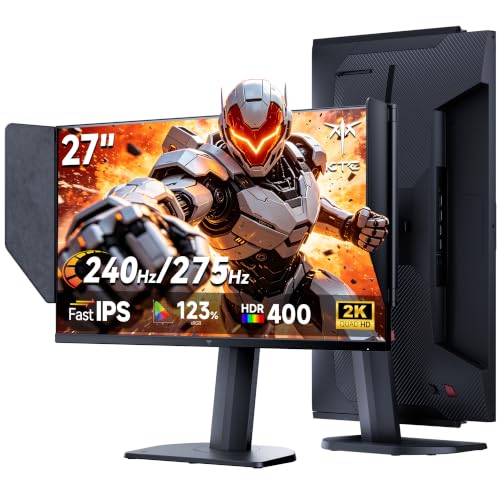
KTC 27 Inch 240Hz IPS Gaming Monitor
Best for: 27-inch 1440p gaming with audio
- Refresh Rate
- 240Hz
- Screen Size
- 27"
- Panel Type
- Fast IPS
- Response Time
- 1ms MPRT
- Variable Refresh Rate
- Adaptive Sync
- Ports
- HDMI, DP 1.4
This KTC monitor gives you a 27-inch 1440p IPS display with a 240Hz refresh rate. It overclocks to 275Hz for smoother gameplay. The panel includes Adaptive Sync to reduce tearing. You also get built-in speakers and HDR support. This model is a solid option for gamers who want high refresh rates and good color accuracy on a standard 16:9 screen.
- 27-inch 1440p IPS panel
- Overclocks to 275Hz
- Built-in speakers
- Adaptive Sync support
- Standard 16:9 aspect ratio limits horizontal view compared to ultrawide competitors
- 12.3 pounds weight is heavier than some lighter 24-inch alternatives
- 27-inch size is smaller than the 32-inch and 34-inch options available
- You want a 1440p resolution on a 27-inch screen
- You prefer a standard 16:9 aspect ratio for gaming
- You need built-in speakers for casual use
- You need an ultrawide 34-inch display for immersive gaming
- You prefer a 4K resolution for higher pixel density
- You want a lighter monitor for easy desk mobility
Verdict: KTC 27 Inch 240Hz IPS Gaming Monitor delivers a crisp 1440p image with high refresh rates for competitive play. It fits buyers who want a balanced 27-inch screen with audio included.

LG UltraGear 27-Inch OLED Gaming Monitor
Best for: 27-inch OLED gaming with G-SYNC support
- Refresh Rate
- 240Hz
- Screen Size
- 27"
- Panel Type
- OLED
- Response Time
- 0.03ms
- Variable Refresh Rate
- FreeSync Premium Pro, G-Sync Compatible
- Ports
- HDMI 2.1, DisplayPort 1.4
This 27-inch OLED monitor delivers a 240Hz refresh rate and a 1440p QHD resolution. It features a 0.03ms response time and a 1,500,000:1 contrast ratio for deep blacks. The display supports NVIDIA G-SYNC and AMD FreeSync Premium Pro. It includes HDMI 2.1 and DisplayPort 1.4 connections. The design allows for height, tilt, and swivel adjustments. It suits gamers seeking high speed and image quality.
- 240Hz refresh rate for smooth gameplay
- 0.03ms (GtG) response time reduces lag
- 1,500,000:1 OLED contrast ratio
- NVIDIA G-SYNC Compatible and AMD FreeSync Premium Pro
- VESA DisplayHDR True Black 400 certification
- 16.2 pounds weight is heavier than many 27-inch competitors
- 240Hz refresh rate matches the list average rather than exceeding it
- 27-inch size is smaller than several 34-inch ultrawide options on the list
- You want a 27-inch screen with OLED contrast
- You need G-SYNC and FreeSync compatibility
- You prioritize a 0.03ms response time
- You prefer a 34-inch ultrawide display
- You need a lighter monitor under 15 pounds
- You want a refresh rate above 240Hz
Verdict: LG 27GS95QE 27-inch OLED Gaming Monitor offers a balanced mix of speed and image quality for 27-inch OLED enthusiasts. It fits players who value G-SYNC support and deep blacks over ultrawide formats.

Alienware 27-Inch 240Hz Gaming Monitor
Best for: 1440p gamers wanting accurate colors and ergonomic flexibility
- Refresh Rate
- 240Hz
- Screen Size
- 27-inch
- Resolution
- 2560 x 1440
- Panel Type
- Fast IPS
- Response Time
- 1ms GtG
- Aspect Ratio
- 16:9
The Alienware AW2723DF is a 27-inch gaming monitor with a 1440p resolution and 240Hz refresh rate. It uses a Fast IPS panel for a 1ms response time and covers 95% of the DCI-P3 color gamut. NVIDIA G-SYNC Compatible and VESA Adaptive Sync support reduce screen tearing. The stand offers height, tilt, swivel, and pivot adjustments. This model suits players who want accurate colors and smooth motion in a standard 16:9 format.
- 240Hz native refresh rate with up to 280Hz overclocking
- 1ms GtG response time on a Fast IPS panel
- 95% DCI-P3 color coverage with VESA DisplayHDR 600
- NVIDIA G-SYNC Compatible and VESA Adaptive Sync support
- Fully adjustable stand with height, tilt, swivel, and pivot
- 19.6 pounds weight is heavier than many 27-inch competitors
- 1440p resolution is lower than the 4K or 3440×1440 options on this list
- 240Hz refresh rate is lower than the 275Hz and 400Hz models available
- You want a 16:9 aspect ratio with high color accuracy
- You need a fully adjustable stand for ergonomic positioning
- You prefer NVIDIA G-SYNC Compatible certification for tear-free gaming
- You require 4K resolution for sharper image detail
- You need a refresh rate higher than 240Hz for extreme competitive play
- You want a curved display for a wider field of view
Verdict: Alienware 27-inch 240Hz IPS Monitor delivers strong color accuracy and smooth motion for 1440p gamers. It fits players who value ergonomic flexibility and G-SYNC compatibility over higher resolutions or refresh rates.

Alienware 34.2-inch QD-OLED 240Hz Monitor
Best for: immersive ultrawide gaming with vivid colors
- Refresh Rate
- 240Hz
- Screen Size
- 34.2-inch
- Resolution
- 3440 x 1440
- Panel Type
- QD-OLED
- Response Time
- 0.03ms
- Variable Refresh Rate
- AMD FreeSync Premium Pro, G-SYNC
The Alienware AW3425DW is a 34.2-inch curved QD-OLED monitor with a 3440 x 1440 resolution and 240Hz refresh rate. It offers 99.3% DCI-P3 color coverage and 1000 nits peak brightness. This ultrawide display suits gamers who want high speed and vivid colors. The 1800R curve enhances immersion. It supports adaptive sync for smooth motion.
- 34.2-inch QD-OLED panel with 240Hz refresh rate
- 99.3% DCI-P3 color coverage with Delta E<2 accuracy
- 1000 nits peak HDR brightness and infinite contrast
- 1800R curved screen for immersive field of view
- Heavier build at 20 pounds compared to many flat panels
- 1800R curve is less aggressive than the 1500R curve on the CRUA monitor
- WQHD resolution is lower than the 4K options on this list
- You want a curved ultrawide display for immersive gaming
- You prioritize color accuracy and high peak brightness
- You need adaptive sync compatibility with NVIDIA or AMD GPUs
- You prefer a flat screen over a curved one
- You need 4K resolution for higher pixel density
- You want a lighter monitor for easier desk setup
Verdict: Alienware 34-inch QD-OLED 240Hz Monitor delivers vivid colors and fast refresh rates for ultrawide gaming enthusiasts. It fits players who value immersive curves and high brightness over maximum pixel count.

Amzfast 34-Inch 240Hz Curved Ultrawide Monitor
Best for: ultrawide gaming and multitasking
- Refresh Rate
- 240Hz
- Screen Size
- 34 inches
- Resolution
- 3440 x 1440
- Response Time
- 1ms
- Variable Refresh Rate
- Adaptive Sync, FreeSync
- Ports
- DisplayPort 1.4, HDMI 2.1
This 34-inch ultrawide monitor delivers a 3440×1440 resolution at a 240Hz refresh rate. The 1500R curvature wraps around your field of view for immersive gameplay. It includes a height-adjustable stand and supports FreeSync to reduce tearing. The panel offers 450 nits of brightness and covers 96% of the DCI-P3 color gamut. It is designed for gamers who want a wide, high-speed display.
- 240Hz refresh rate for smooth motion
- 3440×1440 UWQHD resolution
- 1500R curved screen design
- Height-adjustable stand with pivot
- 96% DCI-P3 color coverage
- Lower peak brightness at 450 nits compared to OLED options
- Standard IPS-like contrast ratio of 3000:1
- Larger physical footprint at 31.8 inches wide
- You need a wide ultrawide display for multitasking
- You prefer a curved screen for immersion
- You want a height-adjustable stand
- You require HDR brightness above 600 nits
- You prefer a flat screen over a curved one
- You need a 4K resolution for this size
Verdict: Amzfast 34 Inch Curved Gaming Monitor fits users who want a wide, high-refresh-rate display with ergonomic adjustments. It suits those who prioritize screen real estate and color accuracy over extreme HDR brightness.

KTC 24.1-inch 400Hz Fast TN Monitor
Best for: Competitive esports and fast shooters
- Refresh Rate
- 240Hz
- Screen Size
- 24.1-inch
- Resolution
- 1080p
- Panel Type
- Fast TN
- Response Time
- 0.5ms GTG
- Variable Refresh Rate
- Adaptive Sync
The KTC 25M1 is a 24.1-inch FHD monitor with a 400Hz refresh rate and 0.5ms GTG response. It uses a Fast TN panel with 125% sRGB coverage and 350 cd/m² brightness. The stand offers height, tilt, swivel, and pivot adjustments. It includes a shielding hood to reduce reflections. This setup targets competitive gamers who prioritize speed and precise tracking over high resolution.
- 400Hz refresh rate for smooth motion
- 0.5ms GTG response time
- Height-adjustable stand with pivot
- 125% sRGB color gamut
- Built-in shielding hood
- 1080p resolution is lower than the 1440p or 4K panels on this list
- 24.1-inch size is smaller than the 27-inch or 34-inch options
- Fast TN panel offers lower contrast than the OLED or IPS displays here
- You play fast-paced shooters like CS2 or Valorant
- You want a monitor with a built-in anti-glare hood
- You need height and pivot adjustment for ergonomic comfort
- You require 1440p or 4K resolution for detailed visuals
- You prefer OLED or IPS panels for better color accuracy
- You want a screen larger than 24 inches
Verdict: The KTC 24.1-inch FHD 400Hz Monitor delivers top-tier speed for competitive esports. It fits players who value response time and refresh rate above pixel density.

ASUS ROG 32-Inch 4K OLED Gaming Monitor
Best for: 4K OLED gaming with high refresh rates
- Refresh Rate
- 240Hz
- Screen Size
- 32 Inch
- Resolution
- 3840 x 2160
- Panel Type
- QD-OLED
- Response Time
- 0.03ms
- Variable Refresh Rate
- G-SYNC Compatible
This 32-inch monitor delivers 4K resolution at 240Hz using QD-OLED technology. It offers a 0.03ms response time and 99.5% DCI-P3 color coverage. The display includes VESA DisplayHDR 500 True Black compliance and G-SYNC compatibility. It connects via DisplayPort 2.1 and USB-C with 90-watt power delivery. The package includes a three-year warranty with burn-in coverage.
- 3840 x 2160 resolution with 240Hz refresh rate
- 0.03ms response time for smooth gameplay
- 99.5% DCI-P3 color gamut and true 10-bit color
- DisplayPort 2.1 with 80Gbps bandwidth
- Three-year warranty with burn-in coverage
- Heavier at 19.2 pounds compared to many 240Hz alternatives
- VESA DisplayHDR 500 rating is lower than HDR 1000 options
- 20.9-inch height is bulkier than standard 27-inch models
- You need 4K resolution with high refresh rates
- You want USB-C connectivity with 90-watt power delivery
- You require G-SYNC compatibility for NVIDIA graphics cards
- You prefer a lighter monitor under 15 pounds
- You need a higher HDR rating than DisplayHDR 500
- You want a smaller 27-inch form factor
Verdict: ASUS ROG 32-inch 4K 240Hz OLED suits players who prioritize 4K clarity and OLED contrast over portability. It fits those who value USB-C power delivery and specific warranty protections for their display.

AOC 27-inch 240Hz QD-OLED Gaming Monitor
Best for: OLED color accuracy at 240Hz
- Refresh Rate
- 240Hz
- Screen Size
- 27"
- Resolution
- 2560 x 1440
- Panel Type
- QD OLED
- Response Time
- 0.03ms (GtG)
- Variable Refresh Rate
- G-SYNC Compatible, Adaptive-Sync
This 27-inch monitor uses QD OLED technology to deliver 1440p resolution at 240Hz. It features a 0.03ms response time and HDR400 True Black certification for high contrast. The panel covers 110.2% DCI-P3 for accurate color. It supports G-SYNC compatible variable refresh rates. You get smooth visuals with deep blacks. This setup suits gamers who want fast refresh rates and rich color accuracy in a compact 27-inch form factor.
- 240Hz refresh rate for smooth motion
- 0.03ms response time reduces blur
- QD OLED panel with 110.2% DCI-P3 coverage
- HDR400 True Black certification for contrast
- 27-inch size is smaller than the 34-inch ultrawides on this list
- 1440p resolution is lower than the 4K models included
- Weight of 17.7 pounds is substantial for a 27-inch screen
- You want OLED contrast with a 240Hz refresh rate
- You prefer a 27-inch screen over ultrawide formats
- You need G-SYNC compatibility for tear-free gaming
- You require 4K resolution for maximum detail
- You prefer a 34-inch ultrawide display for immersion
- You need a higher 360Hz refresh rate for competitive play
Verdict: AOC 27-inch QD OLED 240Hz offers a balanced mix of speed and color fidelity. It fits players who value OLED contrast and 1440p clarity over larger screen real estate.

KTC 32-Inch 240Hz Curved Gaming Monitor
Best for: Gamers wanting a large 32-inch curved display
- Refresh Rate
- 240Hz
- Screen Size
- 32 Inch
- Resolution
- 2560×1440
- Response Time
- 1ms
- Variable Refresh Rate
- Adaptive Sync
- Ports
- HDMI, DisplayPort
This KTC 32-inch monitor delivers a 240Hz refresh rate and 1ms response time for smooth gaming. It features a 1000R curved screen and 1440p QHD resolution. The design includes adaptive sync to reduce tearing. You get four video ports for flexible connectivity. The stand offers tilt adjustments. This setup suits players who want immersion on a larger display.
- 240Hz refresh rate for fast motion
- 1000R curvature for immersion
- 1440p QHD resolution
- Four video ports (HDMI and DisplayPort)
- Adaptive sync technology
- 1000R curvature is less aggressive than the 1500R curvature on the CRUA 34-inch option
- 240Hz is lower than the 275Hz peak on the KTC 27-inch model
- Only tilt adjustment is available, unlike models with height or swivel adjustments
- You want a 32-inch display for a more immersive field of view
- You prefer a moderate 1000R curve that matches eye curvature
- You need multiple connection options with two HDMI and two DP ports
- You require height or swivel adjustments for ergonomic positioning
- You prefer a sharper 4K resolution over 1440p
- You want the most aggressive 1500R curvature available
Verdict: KTC 32 Inch 240Hz Curved Monitor fits gamers who prioritize a large 32-inch canvas with a 1000R curve for immersion. It is a solid choice if you value multiple connection ports over height-adjustable stands.

KTC 32-Inch 240Hz 1000R Curved Monitor
Best for: Immersive gaming with tight curvature
- Refresh Rate
- 240Hz
- Screen Size
- 32 inch
- Resolution
- 2560×1440
- Response Time
- 1ms MPRT
- Variable Refresh Rate
- Adaptive Sync, FreeSync, G-Sync
- Ports
- HDMI 2.0, DP 1.4, USB, Headphone jack
The KTC 32-inch monitor delivers a 240Hz refresh rate on a 1440p QHD panel. Its 1000R curvature offers a tighter wrap than the 1500R curves found on many competitors. You get 122% color gamut coverage and 99% sRGB accuracy for vivid visuals. The frameless bezel design supports multi-monitor setups. It includes adaptive sync for smooth gameplay.
- 240Hz refresh rate via DisplayPort 1.4
- 1000R curved screen for immersive viewing
- 122% color gamut with 99% sRGB coverage
- Frameless edge-to-edge bezel design
- 13-pound weight is heavier than many 27-inch competitors
- 1440p resolution is lower than the 4K options in this guide
- HDMI ports are limited to 144Hz output
- You want a tight 1000R curve for immersion
- You prioritize color accuracy with 99% sRGB coverage
- You need a large 32-inch canvas for gaming
- You require 4K resolution for sharper detail
- You prefer a flat panel over a curved one
- You need HDMI ports to support 240Hz
Verdict: KTC 32-inch 240Hz Curved Monitor fits players who want a large, immersive display with accurate colors. It suits those who value the 1000R curve and frameless design over higher resolution or lighter weight.

CRUA 34-Inch 240Hz Curved Ultrawide Monitor
Best for: immersive ultrawide gaming and multitasking
- Refresh Rate
- 240Hz
- Screen Size
- 34"
- Resolution
- 3440 x 1440
- Aspect Ratio
- 21:9
- Variable Refresh Rate
- FreeSync
- Ports
- HDMI 2.1, DP 1.4, 3.5mm Audio Jack
This CRUA monitor offers a 34-inch ultrawide display with a 3440×1440 resolution and a 1500R curve. It runs at a 240Hz refresh rate with FreeSync support to reduce tearing. The VA panel provides 120% sRGB coverage and 300 nits of brightness. You get built-in speakers and standard HDMI and DisplayPort connections. It fits well for gaming and multitasking on a single screen.
- 240Hz refresh rate for smooth motion
- 3440×1440 ultrawide resolution
- 120% sRGB color gamut
- Built-in speakers
- 1500R curved screen
- 300 nits brightness is lower than many OLED competitors
- VA panel has slower response times than TN or IPS
- You want an ultrawide screen for multitasking
- You prefer a curved display for immersion
- You need built-in speakers for simplicity
- You require HDR10 certification
- You need a glossy display for better contrast
- You want a smaller 27-inch form factor
Verdict: CRUA 34-inch 240Hz Curved Monitor delivers a spacious ultrawide experience with high color coverage. It suits gamers who value immersion and multitasking over peak brightness or fastest panel speeds.

KOORUI 27-Inch 240Hz Gaming Monitor
Best for: 1080p competitive gaming with high refresh rates
- Refresh Rate
- 240Hz
- Screen Size
- 27"
- Resolution
- 1920×1080
- Response Time
- 1ms
- Variable Refresh Rate
- FreeSync Premium, G-SYNC Compatible
- Ports
- DisplayPort 1.4, HDMI 2.0, 3.5mm
This 27-inch KOORUI monitor delivers a 240Hz refresh rate at 1080p resolution. It supports FreeSync and G-SYNC for tear-free gameplay. The panel covers 95% DCI-P3 and 100% sRGB for accurate colors. It includes a tilt-adjustable stand and VESA mount compatibility. This FHD option suits gamers prioritizing high frame rates over pixel density.
- 240Hz refresh rate for smooth motion
- 1ms response time reduces input lag
- 95% DCI-P3 color gamut coverage
- Compatible with FreeSync and G-SYNC
- 1080p resolution is lower than the 1440p or 4K options on this list
- Tilt-only stand lacks height or swivel adjustment
- 24.2-inch width is bulkier than 24-inch alternatives
- You prioritize maximum frame rates over screen sharpness
- You have a GPU optimized for 1080p gaming
- You want wide color accuracy on a budget
- You require 1440p or 4K clarity
- You need height-adjustable ergonomics
- You want an ultrawide aspect ratio
Verdict: KOORUI 27-inch 240Hz FHD Monitor offers high refresh rates and good color coverage for 1080p gamers who value smoothness over pixel density.
Specifications side by side

| Spec | Sceptre 34-Inch Curved 240Hz Ultrawide Monitor | SANSUI 34-Inch 240Hz Curved Ultrawide Monitor | ASUS 27-Inch 240Hz Glossy OLED Gaming Monitor | KTC 27 Inch 240Hz IPS Gaming Monitor | LG UltraGear 27-Inch OLED Gaming Monitor | Alienware 27-Inch 240Hz Gaming Monitor | Alienware 34.2-inch QD-OLED 240Hz Monitor | Amzfast 34-Inch 240Hz Curved Ultrawide Monitor | KTC 24.1-inch 400Hz Fast TN Monitor | ASUS ROG 32-Inch 4K OLED Gaming Monitor | AOC 27-inch 240Hz QD-OLED Gaming Monitor | KTC 32-Inch 240Hz Curved Gaming Monitor | KTC 32-Inch 240Hz 1000R Curved Monitor | CRUA 34-Inch 240Hz Curved Ultrawide Monitor | KOORUI 27-Inch 240Hz Gaming Monitor |
|---|---|---|---|---|---|---|---|---|---|---|---|---|---|---|---|
| Screen Size | 34 inches | 34 Inch | 26.5-inch | 27" | 27" | 27-inch | 34.2-inch | 34 inches | 24.1-inch | 32 Inch | 27" | 32 Inch | 32 inch | 34" | 27" |
| Resolution | 3440 x 1440 | 3440×1440 | 2560 x 1440 | – | – | 2560 x 1440 | 3440 x 1440 | 3440 x 1440 | 1080p | 3840 x 2160 | 2560 x 1440 | 2560×1440 | 2560×1440 | 3440 x 1440 | 1920×1080 |
| Refresh Rate | 240Hz | 240Hz | 240 Hz | 240Hz oc 275Hz | 240Hz | 240Hz | 240Hz | 240Hz | 400Hz, 240Hz | 240 Hz | 240Hz | 240Hz | 240Hz | 240Hz | 240Hz |
| Panel Type | – | Fast VA | WOLED | Fast IPS | OLED | Fast IPS | QD-OLED | – | Fast TN | QD-OLED | QD OLED | – | – | – | – |
| Response Time | 1ms | 1ms | 0.03ms (GtG) | 1ms MPRT | 0.03ms | 1ms GtG | 0.03ms | 1ms | 0.5ms GTG | 0.03ms | 0.03ms (GtG) | 1ms | 1ms MPRT | – | 1ms |
| Aspect Ratio | – | 21:9 | – | – | – | 16:9 | – | – | – | – | – | – | – | 21:9 | – |
| Variable Refresh Rate | – | Freesync | – | Adaptive Sync | FreeSync Premium Pro, G-Sync Compatible | NVIDIA G-SYNC Compatible | AMD FreeSync Premium Pro, G-SYNC | Adaptive Sync, FreeSync | Adaptive Sync | G-SYNC Compatible | G-SYNC Compatible, Adaptive-Sync | Adaptive Sync | Adaptive Sync, FreeSync, G-Sync | FreeSync | FreeSync Premium, G-SYNC Compatible |
| Ports | DisplayPort x2, HDMI x2 | 2x HDMI 2.1, 2x DP 1.4 | – | HDMI, DP 1.4 | HDMI 2.1, DisplayPort 1.4 | DP 1.4 | – | DisplayPort 1.4, HDMI 2.1 | DisplayPort 1.4, HDMI 2.0 | DisplayPort 2.1, HDMI 2.1, USB-C | DP 1.4, HDMI 2.0, Earphone Out | HDMI, DisplayPort | HDMI 2.0, DP 1.4, USB, Headphone jack | HDMI 2.1, DP 1.4, 3.5mm Audio Jack | DisplayPort 1.4, HDMI 2.0, 3.5mm |
| Features | Built-in Speakers, Curved Screen | HDR, Curved Screen | HDR | HDR, Built-in Speakers | – | – | Curved Screen | Curved Screen, Height-Adjustable Stand | Height-Adjustable Stand | HDR | HDR | Curved Screen | Curved Screen | Built-in Speakers, Curved Screen | – |
| Use | Gaming | Gaming | Gaming | Gaming | Gaming | Gaming | Gaming | Gaming | Gaming | Gaming | Gaming | Gaming | Gaming | Gaming | Gaming |
| Size | 34 Inch | 34 Inch | 14.5" x 23.8" x 2.5" | 27in 275hz w/ hood | 27 Inch | – | 34.2" QD-OLED | 34 Inch | 24.1 Inch | 16.3" x 28.3" x 2.6" | 27" 240Hz AOC Gaming | 32" 2K Curved 240Hz | 32-In | 34inch | 27" 240hz/FHD |
| Dimensions | 8.5 × 31.8 × 18 inches | 7.48 × 31.8 × 17.9 inches | 7.4 × 23.8 × 19.7 inches | 8.5 × 24.1 × 21.2 inches | 10.2 × 23.8 × 22.6 inches | 23.9 × 10.6 × 20.3 inches | 31.7 × 9.13 × 21.8 inches | 10.8 × 31.8 × 21.5 inches | 9.64 × 22.9 × 12.9 inches | 10.9 × 28.3 × 20.9 inches | 7.5 × 24 × 17.9 inches | 7.28 × 32.1 × 21.1 inches | 8.27 × 3.15 × 3.94 inches | 1 × 29 × 17 inches | 21.4 × 24.2 × 9.17 inches |
| Weight | 14 pounds | – | 14.6 pounds | 12.3 pounds | 16.2 pounds | 19.6 pounds | 20 pounds | – | 11.5 pounds | 19.2 pounds | 17.7 pounds | – | 13 pounds | – | – |
| Color | Machine Black | Black | BLACK | Black | Black | Lunar Light | Black | Black | Black | BLACK | Black | Black | Black | Black | BLACK |
| Model | C345B-QU240T | ES-G34C5 PRO | XG27AQDMGR | H27E8 | 27GS95QE-B | AW2723DF | AW3425DW | AMZG34C8 Pro | H25N7 | PG32UCDM3 | Q27GAZD | H32S25E | H32S25E | CR340BM | GN02 |
If you prefer wider aspect ratios, you can compare the best 240Hz ultrawide monitors by their panel dimensions and curvature.
How We Selected 240Hz Picks

We identified monitors by scanning Amazon listings for titles or feature lists explicitly stating a 240Hz refresh rate. This ensures every product meets your core speed requirement. We excluded any display that did not clearly advertise this specific frame rate in its published specifications. Only one size or variant from each product family appears in this guide to keep the comparison clean and focused. The list prioritizes in-stock items first. We then ordered the remaining monitors by their overall rating weighted by review count. Finally, we ranked them by how many guide criteria their specs met. All details come from the listing data. We do not test products physically. Prices and availability update daily on the page.
How to Choose the Right 240Hz Monitor
Match Resolution to Screen Size
Select a resolution that matches your viewing distance and panel size. The ASUS ROG 32-inch 4K OLED offers high pixel density for sharp images. If you prefer a wider field of view, consider the Sceptre 34-inch ultrawide QHD model. Standard 1440p panels provide a balanced pixel count for 27-inch displays. Lower resolutions like 1080p on a 27-inch screen may appear less crisp. Choose based on whether you prioritize detail or screen real estate for your specific setup.
Choose Panel Type for Image Quality
Panel technology defines color accuracy and contrast. OLED models like the ASUS XG27AQDMGR deliver perfect blacks and vivid colors. IPS panels, such as the KTC H27E8, provide accurate colors and wide viewing angles. VA panels, found in the SANSUI ES-G34C5 PRO, offer high contrast ratios for darker scenes. TN panels, like the KTC H25N7, prioritize speed over color fidelity. Select your panel type based on whether you value visual fidelity or competitive response times.
Check Variable Refresh Rate Support
Variable refresh rate technology syncs the monitor with your GPU to prevent screen tearing. The LG 27GS95QE supports both FreeSync and G-SYNC for broad compatibility. The Alienware AW2723DF features G-SYNC compatibility for NVIDIA users. Many models, including the Amzfast AMZG34C8 Pro, support FreeSync. Ensure your graphics card supports the specific VRR standard. This feature is essential for smooth gameplay, especially when frame rates fluctuate during intense gaming sessions.
Verify Port Compatibility
Ensure your monitor has the correct input ports for your devices. Most models, like the KOORUI GN02, include HDMI and DisplayPort connections. Some monitors, such as the ASUS PG32UCDM3, offer USB-C for video and power delivery. The Alienware AW2723DF lists DisplayPort as its primary connection. Check your GPU outputs before purchasing. Having the right ports ensures you can connect your system without needing unnecessary adapters or converters for your setup.
Consider Built-in Audio Features
Built-in speakers can save desk space by eliminating the need for external audio. The Sceptre C345B-QU240T includes integrated speakers for convenient audio output. The KTC H27E8 also features built-in audio for a cleaner setup. Not all monitors include this feature, so check the specifications carefully. If you require high-quality sound, you may still need external speakers. However, built-in audio is useful for casual gaming or multitasking when you do not want to wear headphones.
Frequently asked questions
Which 240Hz monitor offers the best ultrawide experience?
The Sceptre 34-Inch Curved 240Hz Ultrawide Monitor is the top pick for large displays. It features an ultrawide QHD resolution and a curved screen for immersion. Built-in speakers add convenience for gaming. This model prioritizes screen real estate and integrated audio over higher resolutions like 4K.
What is the best budget 240Hz monitor for 27-inch gaming?
The KTC 27 Inch 240Hz IPS Gaming Monitor is the best budget choice. It delivers a crisp 1440p image with an IPS panel for accurate colors. Built-in speakers and Adaptive-Sync support enhance the experience. It fits buyers seeking a balanced 27-inch screen for competitive play without extra costs.
Are there 240Hz monitors with OLED panels for better contrast?
Yes, several options use OLED technology for superior contrast and color accuracy. The ASUS ROG XG27AQDMGR and LG 27GS95QE both offer 27-inch 1440p OLED displays. The Alienware AW3425DW provides an ultrawide QD-OLED experience. These models prioritize visual fidelity and deep blacks over standard panel types.
Which 240Hz monitor is best for competitive esports?
The KTC 24.1-inch FHD 400Hz Monitor is ideal for competitive esports. Although it exceeds 240Hz, it offers top-tier speed for fast shooters. It features a 1080p resolution and Adaptive-Sync. Players who value response time and refresh rate above pixel density will find this 24.1-inch display suitable.
Do any 240Hz monitors support G-SYNC compatibility?
Several monitors support NVIDIA G-SYNC for smoother gameplay. The LG 27GS95QE and ASUS ROG 32-inch 4K OLED include G-SYNC support. The Alienware AW2723DF also offers G-SYNC compatibility. These models help reduce screen tearing and stuttering for gamers using NVIDIA graphics cards.
What is the largest curved 240Hz monitor available?
The Sceptre 34-Inch Curved 240Hz Ultrawide Monitor is a leading large option. It features a 34-inch curved screen with ultrawide QHD resolution. The Alienware AW3425DW also offers a 34.2-inch QD-OLED curved display. These models provide an immersive field of view for gaming and multitasking.
Which monitor has the most ergonomic stand adjustments?
The Amzfast 34 Inch Curved Gaming Monitor features a height-adjustable stand. This allows you to customize the viewing angle for comfort. The Alienware AW2723DF also emphasizes ergonomic flexibility. These models suit users who want to adjust the screen position without needing an external monitor arm.
See also