Best 144Hz Monitors: 15 Spec-Based Picks
As Amazon Associates, we earn from qualifying purchases. This means we may receive a small commission at no extra cost to you if you click through and make a purchase.
As an Amazon Associate we earn from qualifying purchases. Links on this page are affiliate links.
Finding the best 144Hz monitors requires matching refresh rates to your specific needs. We compared 15 options based strictly on published specifications. The Dell 27 Plus QHD USB-C Monitor leads this list because it offers a clean USB-C connectivity setup alongside standard QHD performance. This single-cable solution simplifies your desk while delivering reliable 1440p visuals at 144Hz. Our picks are organized by practical specs like resolution, panel type, and port selection. This guide helps you decide which display fits your workspace and usage habits.
Choose resolution before panel type

Most 144Hz monitors offer QHD resolution. Some provide 4K or ultrawide formats. Panel types vary from IPS to OLED. Check the aspect ratio and port list first. This determines if the screen fits your desk and devices. Prioritize the resolution that matches your GPU capabilities for the best experience.
| # | Product | Best for | Price |
|---|---|---|---|
| 1 | Dell 27 Plus QHD USB-C Monitor Best overall | Clean USB-C connectivity and standard QHD performance | |
| 2 | KTC M27U6 27-inch 4K Mini-LED Also great | HDR gaming and creative work on a 27-inch screen | |
| 3 | AOC 27-Inch QD-OLED Gaming Monitor Best oled | gamers seeking OLED contrast and color accuracy | |
| 4 | KTC 27-Inch 4K QD-Mini LED Monitor Also great | High brightness HDR gaming and media on a budget | |
| 5 | ASUS TUF 27-Inch 1440p 170Hz Monitor Best budget | desktop gaming with built-in audio | |
| 6 | VisionOwl 19-Inch 4K 144Hz Portable Monitor Also great | portable 4K productivity and gaming | |
| 7 | Upperizon 19-Inch 4K 144Hz Portable Monitor Also great | Portable 4K gaming and travel productivity | |
| 8 | UPERFECT 27-Inch 144Hz 4K Portable Gaming Monitor Best premium | portable 4K gaming and travel workstations | |
| 9 | ASUS TUF 27-Inch 1440p Gaming Monitor Also great | standard 16:9 gaming setups | |
| 10 | ASUS ROG Strix 27-Inch 4K 144Hz Gaming Monitor Best usb 3.0 | 4K gaming on a 27-inch screen | |
| 11 | Samsung Odyssey G9 49-Inch 144Hz Curved Monitor Also great | Immersive ultrawide gaming and multitasking | |
| 12 | Pisichen 24-Inch 144Hz Touchscreen Monitor Best touchscreen | users needing touch input on a compact screen | |
| 13 | LG 34-Inch Curved Ultrawide 144Hz Monitor Best ultrawide qhd | multitasking and dual-PC workflows | |
| 14 | ASUS ROG 49-Inch Curved 144Hz Gaming Monitor Also great | immersive ultrawide gaming and multitasking | |
| 15 | INNOCN 49-Inch Curved 144Hz Ultrawide Monitor Also great | Users needing a massive 32:9 display for multitasking |
The best fit for you

- You want clean USB-C connectivity for daily use – Dell 27 Plus QHD USB-C Monitor – It features USB-C ports alongside HDMI and DisplayPort for a single-cable setup.
- You need a portable 4K screen for travel – VisionOwl 19-Inch 4K 144Hz Portable Monitor – This 19-inch model weighs just 2.35 pounds and includes built-in speakers.
- You seek immersive ultrawide gaming on a large desk – Samsung Odyssey G9 49-Inch 144Hz Curved Monitor – Its 32:9 aspect ratio and 45.2-inch width provide a panoramic view.
- You require touch input on a compact desktop monitor – Pisichen 24-Inch 144Hz Touchscreen Monitor – It offers a 24-inch 1440p display with integrated touchscreen functionality.
Is 144Hz Worth It for Your Setup?
A 144Hz refresh rate updates the image 144 times per second. This creates smoother motion for gaming and faster cursor movement for productivity. Most monitors in this list maintain this speed at QHD or 4K resolutions. Some models offer higher rates like 170Hz for competitive play. The benefit is clearer in fast-paced titles. Static tasks like web browsing show less difference. Check your GPU capabilities to ensure it can drive the frame rate.
Worth it if
- You play fast-paced competitive games
- You want smoother cursor movement for productivity
- You have a GPU capable of driving high frame rates
Skip it if
- You only browse the web or read documents
- You use your monitor for static office work
- Your computer cannot sustain high frame rates

Dell 27 Plus QHD USB-C Monitor
Best for: Clean USB-C connectivity and standard QHD performance
- Refresh Rate
- 144Hz
- Screen Size
- 27-inch
- Resolution
- 2560×1440
- Response Time
- 1ms
- Variable Refresh Rate
- AMD FreeSync
- Ports
- USB-C, HDMI, DisplayPort 1.4, USB-A
This Dell monitor offers a 27-inch QHD display with a 144Hz refresh rate and 1ms MPRT for smooth visuals. It includes TÜV-certified eye comfort features and integrated dual 3W speakers. A single USB-C connection provides up to 65W power delivery, simplifying your desk setup. It is a practical choice for users who want clean connectivity and reliable performance.
- 144Hz refresh rate and 1ms MPRT for smooth motion
- QHD 2560×1440 resolution with 1500:1 contrast ratio
- USB-C port with up to 65W power delivery
- Integrated dual 3W speakers for audio
- TÜV-certified blue light reduction for eye comfort
- 144Hz refresh rate is lower than the 170Hz found on some competitors
- 27-inch screen size is smaller than the 34-inch and 49-inch ultrawide options available
- 1500:1 contrast ratio is standard, lacking the high contrast of OLED panels
- You want a single USB-C cable to connect your device and charge it
- You prefer a 27-inch QHD screen for clear text and detail
- You need built-in speakers to reduce desk clutter
- You require a 4K resolution for maximum sharpness
- You are looking for a curved display for immersive gaming
- You need an ultrawide 32:9 aspect ratio for multitasking
Verdict: Dell 27-inch QHD 144Hz Monitor fits users who value a clean, single-cable USB-C setup and reliable QHD performance. It is ideal for those who prefer a standard 27-inch screen over ultrawide or 4K options.

KTC M27U6 27-inch 4K Mini-LED
Best for: HDR gaming and creative work on a 27-inch screen
- Refresh Rate
- 144Hz
- Screen Size
- 27"
- Panel Type
- Fast IPS
- Response Time
- 1ms MPRT
- Variable Refresh Rate
- Adaptive Sync
- Ports
- 2x HDMI 2.0, 1x DP 1.4
This KTC monitor offers a 27-inch Fast IPS panel with QD-Mini LED technology. It supports dual modes: 4K at 75Hz for sharp detail or FHD at 144Hz for smooth gameplay. The display features 1152 local dimming zones and 1000 nits peak brightness. It includes Adaptive Sync and a 1ms MPRT response time. The stand allows height, tilt, swivel, and pivot adjustments. This setup suits gamers who value color accuracy and contrast.
- QD-Mini LED with 1152 local dimming zones
- Dual mode: 4K @ 75Hz or FHD @ 144Hz
- 1000 nits peak brightness and HDR1000 support
- Height-adjustable stand with pivot capability
- 148% sRGB color gamut coverage
- Max refresh rate is 144Hz in FHD mode, lower than the 170Hz+ options on this list
- Weighs 14.6 pounds, making it bulkier than many 27-inch competitors
- Refresh rate drops to 75Hz when using the native 4K resolution
- You want high contrast and brightness for HDR content
- You need a monitor that can switch between 4K productivity and 144Hz gaming
- You prefer a white aesthetic for your desk setup
- You require native 4K refresh rates above 75Hz
- You need a monitor lighter than 14 pounds for easy portability
- You strictly want 144Hz at 4K resolution without downscaling
Verdict: KTC M27U6 27-inch Dual Mode Monitor delivers strong HDR performance and flexible resolution switching. It fits users who prioritize visual fidelity and contrast over maximum refresh rates at 4K.

AOC 27-Inch QD-OLED Gaming Monitor
Best for: gamers seeking OLED contrast and color accuracy
- Refresh Rate
- 144Hz
- Screen Size
- 27"
- Resolution
- 2560×1440
- Panel Type
- QD-OLED
- Response Time
- 0.03ms GtG
- Variable Refresh Rate
- NVIDIA G-SYNC Compatible
This 27-inch monitor uses QD-OLED technology to deliver deep blacks and vibrant colors. It features a 144Hz refresh rate and a 0.03ms response time for smooth motion clarity. The panel covers 147.6% sRGB and 110.2% DCI-P3 for accurate color reproduction. It supports HDR10 and is compatible with NVIDIA G-SYNC. This display suits gamers and creators who prioritize visual fidelity and fast response speeds.
- QD-OLED panel provides true blacks and high contrast
- 0.03ms GtG response time ensures minimal motion blur
- 147.6% sRGB and 110.2% DCI-P3 color gamut coverage
- NVIDIA G-SYNC Compatible for tear-free gameplay
- 144Hz refresh rate is lower than the 240Hz or 360Hz options available from the same brand
- 27-inch screen size is smaller than the 34-inch or 49-inch ultrawide monitors on this list
- You want the best possible contrast and color accuracy from an OLED panel
- You play competitive games and need a fast 0.03ms response time
- You prefer a standard 27-inch QHD resolution over ultrawide formats
- You require a refresh rate higher than 144Hz for extreme competitive gaming
- You need an ultrawide 32:9 or 21:9 aspect ratio for immersive productivity
- You are looking for a 4K resolution display for high-detail work
Verdict: AOC 27-inch QHD QD-OLED 144Hz delivers exceptional visual quality and speed for gamers who value contrast and color. It is the right pick if you want OLED performance in a standard 27-inch form factor.

KTC 27-Inch 4K QD-Mini LED Monitor
Best for: High brightness HDR gaming and media on a budget
- Refresh Rate
- 144Hz
- Screen Size
- 27"
- Panel Type
- Fast IPS
- Variable Refresh Rate
- Adaptive-Sync
- Ports
- 2x HDMI 2.0, 1x DP 1.4
- Resolution
- 4K UHD
This 27-inch KTC M27U6 monitor offers a white finish and QD-Mini LED backlighting with 1152 dimming zones. It supports dual modes: 4K UHD at 72Hz or Full HD at 144Hz. The Fast IPS panel delivers 1000 nits peak brightness and HDR1000 support. You get ergonomic adjustments and versatile connectivity via HDMI and DisplayPort. It suits those who want high brightness and color accuracy for mixed gaming and media use.
- QD-Mini LED backlight with 1152 dimming zones
- Dual mode switching between 4K UHD 72Hz and FHD 144Hz
- Fast IPS panel with 1000 nits peak brightness
- HDR1000 and 148% sRGB wide color gamut
- Ergonomic stand with height, pivot, swivel, and tilt
- 4K resolution is limited to 72Hz refresh rate
- 144Hz refresh rate only available in FHD mode
- Ports are HDMI 2.0 and DP 1.4, not the latest standard
- You want a white monitor for a specific desk aesthetic
- You need high peak brightness for HDR content
- You can switch resolution to maintain 144Hz in gaming
- You require native 4K at 144Hz or higher
- You prefer a standard black monitor design
- You need HDMI 2.1 or DP 2.1 connectivity
Verdict: KTC M27U6 27-inch White QD-Mini LED Monitor delivers exceptional brightness and color for mixed use, but you must accept lower refresh rates at 4K resolution. It fits users who prioritize visual fidelity and can toggle to FHD for smoother gaming.

ASUS TUF 27-Inch 1440p 170Hz Monitor
Best for: desktop gaming with built-in audio
- Refresh Rate
- 144Hz
- Screen Size
- 27"
- Resolution
- 2560 x 1440
- Response Time
- 1ms (MPRT)
- Variable Refresh Rate
- FreeSync Premium
- Ports
- DisplayPort 1.2, HDMI(v2.0) x2
The ASUS TUF VG27AQA1A is a 27-inch QHD gaming monitor with a 170Hz refresh rate and 1ms MPRT response time. It uses FreeSync Premium for tear-free visuals and supports HDR-10. This model includes built-in speakers and robust connectivity via DisplayPort and dual HDMI ports. It suits gamers who want smooth motion and solid image quality without needing a high-end GPU.
- 170Hz overclocked refresh rate for smooth gameplay
- 1ms MPRT response time with ELMB technology
- FreeSync Premium variable refresh rate support
- Built-in speakers for basic audio needs
- Dual HDMI 2.0 and DisplayPort 1.2 connectivity
- 10.3-pound weight is heavier than portable alternatives
- Standard 1440p resolution is lower than 4K models on the list
- Fixed stand limits height adjustment compared to premium variants
- You want a reliable 1440p gaming monitor with built-in audio
- You prefer FreeSync compatibility over G-SYNC
- You need a standard 27-inch desktop display
- You require 4K resolution for detailed work
- You need height-adjustable stand functionality
- You are looking for a portable screen
Verdict: ASUS TUF 27-inch 1440p 170Hz Monitor delivers solid 1440p performance with FreeSync and built-in speakers, making it a practical choice for desktop gamers who value motion clarity over high resolution.
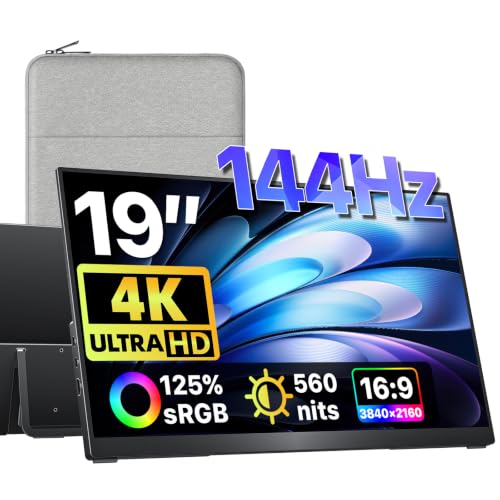
VisionOwl 19-Inch 4K 144Hz Portable Monitor
Best for: portable 4K productivity and gaming
- Refresh Rate
- 144Hz
- Screen Size
- 19"
- Resolution
- 3840 x 2160
- Ports
- HDMI, 2x USB-C
- Features
- HDR, Built-in Speakers
- Use
- Mac, Travel
This 19-inch portable monitor delivers 4K UHD resolution at a 144Hz refresh rate. It offers 560 nits of peak brightness and covers 125% of the sRGB color gamut. The metal build includes a built-in kickstand and VESA mount holes. You can connect via USB-C or HDMI. It is designed for travelers and users needing a second screen for productivity or gaming on the go.
- 4K UHD (3840×2160) resolution for sharp detail
- 144Hz refresh rate for smooth motion
- 560 nits peak brightness for clear visibility
- 125% sRGB color gamut for accurate colors
- Built-in kickstand and VESA mountable design
- Smaller 19-inch screen size compared to 27-inch or ultrawide options
- Lower 1080p-equivalent pixel density on a small panel
- Requires external power for full 560-nit brightness
- You need a compact second screen for travel
- You want 4K clarity in a portable form factor
- You require a monitor with a built-in kickstand
- You prefer a large 27-inch or ultrawide display
- You need a monitor that fits standard desk setups
- You want a single-cable solution for full brightness
Verdict: VisionOwl 19-inch 4K 144Hz Portable Monitor is a compact, high-resolution option for travelers who need a portable second screen. It suits users who prioritize portability and color accuracy over large screen real estate.

Upperizon 19-Inch 4K 144Hz Portable Monitor
Best for: Portable 4K gaming and travel productivity
- Refresh Rate
- 144Hz
- Screen Size
- 19"
- Resolution
- 3840 x 2160
- Ports
- 2x USB-C, 1x HDMI
- Features
- HDR, Built-in Speakers
- Use
- Mac, Travel
This 19-inch portable display offers 4K UHD resolution and a 144Hz refresh rate. It features 125% sRGB color coverage and 560 nits of peak brightness. The aluminum build keeps it lightweight at 2.31 pounds. You can connect via USB-C or HDMI. It suits travelers and laptop users needing a sharp, high-refresh second screen for work or gaming on the go.
- 19-inch 4K UHD (3840×2160) resolution
- 144Hz refresh rate via USB-C
- 125% sRGB color gamut coverage
- 560 nits peak brightness
- Lightweight 2.31-pound aluminum design
- 19-inch size is smaller than the 27-inch and 34-inch options on this list
- Peak brightness drops to 340 nits when powered by a single USB-C cable
- Requires a power adapter for full 560-nit brightness output
- You need a high-resolution portable screen for travel
- You want a 4K display with a 144Hz refresh rate
- You prefer an aluminum build for durability
- You require a larger primary desktop monitor
- You need a built-in stand that does not require VESA mounting
- You want full brightness without an external power adapter
Verdict: Upperizon 19-inch 4K Portable Monitor delivers sharp 4K visuals and smooth 144Hz motion in a lightweight aluminum chassis. It fits travelers and laptop users who need a high-quality portable second screen for work or gaming.

UPERFECT 27-Inch 144Hz 4K Portable Gaming Monitor
Best for: portable 4K gaming and travel workstations
- Refresh Rate
- 144Hz
- Screen Size
- 27"
- Resolution
- 4K UHD, FHD
- Panel Type
- Fast IPS
- Response Time
- 0.1ms
- Variable Refresh Rate
- FreeSync
This 27-inch portable monitor offers 4K UHD resolution at 144Hz for sharp, smooth visuals. It features a 600-nit brightness level and 0.1ms response time, making it suitable for gaming on the go. The device supports Dual Mode, allowing you to switch to FHD at 288Hz for higher frame rates. It connects via HDMI, DisplayPort, and USB-C. Weighing 2.2 pounds, it is designed for travel.
- 4K UHD resolution provides high detail
- 144Hz refresh rate ensures smooth motion
- 600 nits brightness improves visibility
- 0.1ms response time reduces ghosting
- Dual Mode supports FHD 288Hz
- 2.2 pounds weight is higher than many 19-inch portable competitors
- Requires external power connection for operation
- 27-inch size is larger than standard 15-19 inch portable monitors
- You need a large 27-inch screen for portable setups
- You want 4K resolution with 144Hz refresh rate
- You require high brightness for varied lighting conditions
- You prefer a lighter monitor under 2 pounds
- You need a battery-powered display without external power
- You are limited to 15 or 19-inch screen sizes
Verdict: UPERFECT 27" Portable 4K 144Hz Monitor suits travelers who prioritize screen real estate and 4K clarity over ultra-lightweight portability. It is ideal for users who need a desktop-class experience in a portable form factor.

ASUS TUF 27-Inch 1440p Gaming Monitor
Best for: standard 16:9 gaming setups
- Refresh Rate
- 144Hz
- Screen Size
- 27"
- Resolution
- 2560 x 1440
- Panel Type
- IPS
- Response Time
- 1ms
- Aspect Ratio
- 16:9
The ASUS TUF VG27AQL1A is a 27-inch IPS monitor with a 2560 x 1440 resolution. It supports a 170Hz refresh rate, which covers the 144Hz standard. The panel includes NVIDIA G-SYNC compatibility and DisplayHDR 400 certification. It weighs 14.6 pounds and measures 24.2 inches wide. This setup suits gamers who want smooth motion and accurate colors without the bulk of larger displays.
- 170Hz overclocked refresh rate supports 144Hz gaming
- 27-inch IPS panel delivers 178-degree viewing angles
- NVIDIA G-SYNC compatibility reduces screen tearing
- DisplayHDR 400 certification for improved contrast
- ELMB SYNC technology minimizes ghosting
- 14.6 pounds weight is heavier than many portable alternatives
- 24.2-inch width is narrower than the 34-inch and 49-inch ultrawide options
- 350 cd/m² brightness is lower than Mini-LED competitors
- You want a standard 16:9 aspect ratio for gaming
- You prefer IPS panel color accuracy over OLED
- You need G-SYNC compatibility for smooth frame rates
- You require a 4K resolution for high-detail work
- You need a portable monitor under 20 inches
- You want a curved display for immersive viewing
Verdict: ASUS TUF VG27AQL1A 27-inch 1440p 170Hz provides solid 1440p performance with G-SYNC support. It fits gamers who prioritize standard aspect ratios and reliable color reproduction over ultrawide formats or higher brightness levels.

ASUS ROG Strix 27-Inch 4K 144Hz Gaming Monitor
Best for: 4K gaming on a 27-inch screen
- Refresh Rate
- 144Hz
- Screen Size
- 27-inch
- Resolution
- 3840 x 2160
- Panel Type
- IPS
- Response Time
- 1ms
- Variable Refresh Rate
- G-SYNC Compatible
The ASUS ROG Strix XG27UQR is a 27-inch IPS gaming monitor with a 4K UHD resolution and 144Hz refresh rate. It supports Display Stream Compression for high-speed video transport. The panel covers 90% of the DCI-P3 color gamut and features DisplayHDR 400 certification. It includes G-SYNC Compatible technology for tear-free visuals. This monitor is designed for gamers who want high resolution and smooth motion on a standard 27-inch screen.
- 27-inch IPS panel with 4K UHD resolution
- 144Hz refresh rate with G-SYNC Compatible support
- 90% DCI-P3 color gamut coverage
- DisplayHDR 400 certification for enhanced contrast
- Ergonomic stand with tilt, swivel, and height adjustment
- 17.6 pounds weight is heavier than many 27-inch competitors
- DisplayHDR 400 rating is lower than the HDR1000+ ratings found on some other list items
- 144Hz refresh rate is slightly lower than the 160Hz or 170Hz rates available on other models
- You want 4K resolution on a 27-inch screen
- You need an ergonomic stand with height adjustment
- You prefer G-SYNC Compatible technology over FreeSync
- You need a 160Hz or higher refresh rate
- You require a higher HDR brightness rating than 400 nits
- You prefer a lighter monitor for easy desk movement
Verdict: The ASUS ROG Strix 27" 4K 144Hz Monitor delivers sharp 4K visuals and smooth 144Hz gaming with solid color accuracy. It fits gamers who prioritize resolution and ergonomic adjustability over the highest possible refresh rates or peak HDR brightness.

Samsung Odyssey G9 49-Inch 144Hz Curved Monitor
Best for: Immersive ultrawide gaming and multitasking
- Refresh Rate
- 144Hz
- Screen Size
- 49-inch
- Resolution
- DQHD
- Response Time
- 1ms
- Aspect Ratio
- 32:9
- Variable Refresh Rate
- AMD FreeSync Premium Pro, VRR
This Samsung monitor gives you a massive 49-inch curved screen with a 32:9 aspect ratio. It runs at 144Hz with a 1ms response time for smooth gaming. The 1000R curve wraps around your view, and DisplayHDR 600 helps with contrast. It supports FreeSync to reduce tearing. You get a single ultra-wide display that replaces two standard monitors.
- 144Hz refresh rate for smooth motion
- 32:9 aspect ratio for wide viewing
- 1000R curved screen design
- DisplayHDR 600 certification
- Heavier build at 34.4 pounds
- Large footprint requiring 45.2 inches of width
- You want an immersive curved gaming experience
- You need a single wide screen for multitasking
- You have a large desk for the 49-inch panel
- You prefer a compact 27-inch or smaller display
- You have limited desk space for a 45-inch width
- You want a standard 16:9 aspect ratio
Verdict: Samsung 49-inch Odyssey G9 32:9 Monitor is ideal for gamers who want a panoramic view and have the desk space for its large 45.2-inch width. It fits those seeking a single ultra-wide display for immersive play.

Pisichen 24-Inch 144Hz Touchscreen Monitor
Best for: users needing touch input on a compact screen
- Refresh Rate
- 144Hz
- Screen Size
- 24"
- Resolution
- 2560 x 1440
- Panel Type
- IPS
- Ports
- HDMI, DP, USB-C
- Features
- Touchscreen
This Pisichen monitor pairs a 24-inch IPS panel with 1440p resolution and a 144Hz refresh rate. Its standout feature is 10-point touch support, allowing you to tap, swipe, and zoom directly on the screen. It connects via USB-C, HDMI, or DisplayPort. The white frameless design mounts easily to walls or arms. It suits users who want standard gaming performance with interactive control.
- 144Hz refresh rate for smooth motion
- 10-point touch screen support
- 2560×1440 QHD resolution
- USB-C, HDMI, and DisplayPort inputs
- 24-inch size is smaller than the 27-inch and 49-inch options on this list
- Standard IPS panel lacks the high brightness of Mini-LED or OLED displays
- 1440p resolution is lower than the 4K and DQHD panels found in other picks
- You need direct touch interaction for navigation or drawing
- You prefer a compact 24-inch display for limited desk space
- You want a white frameless monitor that mounts to a wall
- You require a screen larger than 24 inches
- You need 4K resolution for high-density text or media
- You prioritize high brightness levels over touch capability
Verdict: Pisichen 24-Inch 144Hz Touchscreen Monitor fits users who value tactile control and a compact footprint. It delivers solid 1440p gaming performance while offering a unique interactive experience for creative or productivity tasks.

LG 34-Inch Curved Ultrawide 144Hz Monitor
Best for: multitasking and dual-PC workflows
- Refresh Rate
- 144Hz
- Screen Size
- 34"
- Resolution
- 3440 x 1440
- Response Time
- 5ms
- Aspect Ratio
- 21:9
- Variable Refresh Rate
- AMD FreeSync Premium
This LG 34U640B-B offers a 34-inch 21:9 WQHD display with a 144Hz refresh rate. The 1800R curve and 99% sRGB coverage support multitasking and color accuracy. USB-C provides 65W power delivery and connectivity. A KVM switch lets you control two PCs with one keyboard and mouse. It suits users who need screen real estate and smooth motion for work or gaming.
- 3440 x 1440 resolution with 21:9 aspect ratio
- 144Hz refresh rate and AMD FreeSync Premium
- USB-C with 65W power delivery
- Built-in KVM switch for dual PC control
- 99% sRGB color coverage
- 17-pound weight is bulkier than 27-inch QHD picks
- WQHD resolution is lower than the 4K models on this list
- 1800R curve may not suit users who prefer flat panels
- You need extra horizontal screen space for multitasking
- You want USB-C connectivity with laptop charging
- You manage two computers with one input setup
- You prefer a standard 16:9 aspect ratio
- You require 4K resolution for detailed work
- You want a portable or lightweight display
Verdict: LG 34-inch Curved Ultrawide Monitor delivers ample workspace and smooth visuals for users who value multitasking efficiency and clean desk setups over maximum pixel density.

ASUS ROG 49-Inch Curved 144Hz Gaming Monitor
Best for: immersive ultrawide gaming and multitasking
- Refresh Rate
- 144Hz
- Screen Size
- 49"
- Resolution
- 3840 x 1080
- Variable Refresh Rate
- Adaptive Sync, FreeSync 2 HDR
- Ports
- DisplayPort, HDMI
- Features
- HDR, Curved Screen
The ASUS ROG XG49VQ offers a 49-inch 21:9 ultrawide display with a 144Hz refresh rate. It features a 1800R curve and 1080p resolution. The panel covers 90% of the DCI-P3 color space. You get ergonomic adjustments including height, tilt, and swivel. This setup suits users who want a wide, immersive field of view for gaming.
- 49-inch 21:9 aspect ratio provides a 3840 x 1080 ultrawide viewing area
- 144Hz refresh rate ensures smooth motion during fast-paced gameplay
- 90% DCI-P3 color coverage delivers high color contrast and cinematic performance
- 1800R curvature wraps around your field of vision for immersion
- Height, tilt, and swivel adjustability supports ergonomic viewing positions
- 1080p resolution on a 49-inch screen results in lower pixel density than competitors
- 21.4-pound weight and 47-inch length require significant desk space
- 21:9 aspect ratio limits compatibility with standard 16:9 content formats
- You want a single large screen to replace multiple monitors
- You prioritize immersive field of view over pixel sharpness
- You need height-adjustable ergonomics for long gaming sessions
- You require 4K or QHD resolution for sharp text
- You have a small desk that cannot accommodate a 47-inch width
- You primarily watch standard 16:9 video content
Verdict: ASUS ROG XG49VQ 49-inch Curved Monitor delivers a massive ultrawide canvas for players who value immersion and wide visibility over pixel density. It fits users with ample desk space who want a single screen for multitasking or gaming.

INNOCN 49-Inch Curved 144Hz Ultrawide Monitor
Best for: Users needing a massive 32:9 display for multitasking
- Refresh Rate
- 144Hz
- Screen Size
- 49"
- Resolution
- 3840 x 1080P
- Aspect Ratio
- 32:9
- Variable Refresh Rate
- Adaptive-Sync
- Ports
- DP 1.4, USB-C 65W, HDMI 2.1
This 49-inch ultrawide monitor offers a 32:9 aspect ratio with a 3840 x 1080 resolution. It features a 144Hz refresh rate and Adaptive-Sync for smooth gaming. The VA panel provides 99% sRGB color coverage and HDR400 support. A 1800R curvature reduces eye strain. You get USB-C connectivity with 65W power delivery, along with PIP/PBP split-screen modes for multitasking.
- 144Hz refresh rate with Adaptive-Sync
- 32:9 aspect ratio for wide viewing
- USB-C port with 65W power delivery
- 99% sRGB color gamut coverage
- PIP/PBP split-screen technology
- 1080p resolution per half is lower than the QHD or 4K panels on this list
- 49-inch size and 45.5-inch width require significant desk space
- 1800R curvature is less aggressive than the 1000R or 1500R curves found on other ultrawide picks
- You want a single screen that replaces dual monitors
- You need USB-C connectivity for laptop charging
- You prefer a curved display to reduce eye strain
- You require high pixel density for sharp text
- You have a small desk or limited workspace
- You want a standard 16:9 aspect ratio
Verdict: INNOCN 49 Inch Curved Ultrawide Monitor fits users who need a massive 32:9 display for multitasking or immersive gaming without buying two screens. The USB-C connectivity adds convenience for laptop users.
Specifications side by side

| Spec | Dell 27 Plus QHD USB-C Monitor | KTC M27U6 27-inch 4K Mini-LED | AOC 27-Inch QD-OLED Gaming Monitor | KTC 27-Inch 4K QD-Mini LED Monitor | ASUS TUF 27-Inch 1440p 170Hz Monitor | VisionOwl 19-Inch 4K 144Hz Portable Monitor | Upperizon 19-Inch 4K 144Hz Portable Monitor | UPERFECT 27-Inch 144Hz 4K Portable Gaming Monitor | ASUS TUF 27-Inch 1440p Gaming Monitor | ASUS ROG Strix 27-Inch 4K 144Hz Gaming Monitor | Samsung Odyssey G9 49-Inch 144Hz Curved Monitor | Pisichen 24-Inch 144Hz Touchscreen Monitor | LG 34-Inch Curved Ultrawide 144Hz Monitor | ASUS ROG 49-Inch Curved 144Hz Gaming Monitor | INNOCN 49-Inch Curved 144Hz Ultrawide Monitor |
|---|---|---|---|---|---|---|---|---|---|---|---|---|---|---|---|
| Screen Size | 27-inch | 27" | 27" | 27" | 27" | 19" | 19" | 27" | 27" | 27-inch | 49-inch | 24" | 34" | 49" | 49" |
| Resolution | 2560×1440 | – | 2560×1440 | – | 2560 x 1440 | 3840 x 2160 | 3840 x 2160 | 4K UHD, FHD | 2560 x 1440 | 3840 x 2160 | DQHD | 2560 x 1440 | 3440 x 1440 | 3840 x 1080 | 3840 x 1080P |
| Refresh Rate | 144Hz | 144Hz | 144Hz | 144Hz | 170Hz | 144Hz | 144Hz | 144Hz, 288Hz | 170Hz | 144Hz | 144Hz | 144Hz | 144Hz | 144Hz | 144Hz |
| Panel Type | – | Fast IPS | QD-OLED | Fast IPS | – | – | – | Fast IPS | IPS | IPS | – | IPS | – | – | – |
| Response Time | 1ms | 1ms MPRT | 0.03ms GtG | – | 1ms (MPRT) | – | – | 0.1ms | 1ms | 1ms | 1ms | – | 5ms | – | – |
| Aspect Ratio | – | – | – | – | – | – | – | – | 16:9 | – | 32:9 | – | 21:9 | – | 32:9 |
| Variable Refresh Rate | AMD FreeSync | Adaptive Sync | NVIDIA G-SYNC Compatible | Adaptive-Sync | FreeSync Premium | – | – | FreeSync | G-SYNC Compatible | G-SYNC Compatible | AMD FreeSync Premium Pro, VRR | – | AMD FreeSync Premium | Adaptive Sync, FreeSync 2 HDR | Adaptive-Sync |
| Ports | USB-C, HDMI, DisplayPort 1.4, USB-A | 2x HDMI 2.0, 1x DP 1.4 | HDMI 2.1, DisplayPort 1.4 | 2x HDMI 2.0, 1x DP 1.4 | DisplayPort 1.2, HDMI(v2.0) x2 | HDMI, 2x USB-C | 2x USB-C, 1x HDMI | USB-C, HDMI 2.1, DP 1.4 | HDMI, DisplayPort | DisplayPort 1.4, HDMI 2.0, USB 3.0 | – | HDMI, DP, USB-C | HDMI, DisplayPort, USB-C, USB | DisplayPort, HDMI | DP 1.4, USB-C 65W, HDMI 2.1 |
| Features | Built-in Speakers | HDR, Height-Adjustable Stand | HDR | – | HDR, Built-in Speakers | HDR, Built-in Speakers | HDR, Built-in Speakers | – | HDR | HDR | Curved Screen | Touchscreen | HDR, Curved Screen, Height-Adjustable Stand, Power Delivery | HDR, Curved Screen | HDR, Built-in Speakers, Curved Screen |
| Use | – | Gaming | Gaming | Gaming | Gaming | Mac, Travel | Mac, Travel | Gaming | Gaming | Gaming | Gaming | Gaming | – | Gaming | Gaming |
| Size | 27 Inch | 27" Dual Mode | 27" 144Hz AOC Gaming | 27" | – | 19 inch | 19 inch | 27" | – | 15"x24.9"x3.7" | 144Hz Refresh Rate | 24" | – | 49 Inch | 49 Inch |
| Operating System | – | – | – | – | – | macOS | macOS | – | – | – | – | – | – | – | – |
| Dimensions | 7.95 × 24.1 × 15.4 inches | 8.3 × 24.1 × 21.5 inches | 7.56 × 24 × 17.9 inches | 8.3 × 24 × 21.5 inches | 24.2 × 8.41 × 17.9 inches | 0.47 × 16.9 × 10.2 inches | 0.47 × 10.2 × 16.9 inches | 0.39 × 13.8 × 9.84 inches | 14.5 × 24.2 × 2 inches | 9.82 × 6.55 × 3.94 inches | 16.6 × 45.2 × 22.4 inches | 0.75 × 21.5 × 12.7 inches | 8.7 × 31.9 × 18.3 inches | 47 × 20.8 × 13.6 inches | 6.28 × 45.5 × 14.6 inches |
| Weight | 14.3 pounds | 14.6 pounds | – | – | 10.3 pounds | 2.36 pounds | 2.31 pounds | 2.2 pounds | 14.6 pounds | 17.6 pounds | 34.4 pounds | – | 17 pounds | 21.4 pounds | – |
| Color | Ash White | White | Black | white | BLACK | Black | Black | Black | BLACK | BLACK | Aluminum Silver | white | Black | Black | black |
| Model | S2725DC | M27U6 | Q27GADE | M27U6 | VG27AQA1A | V19UH | UX190UHLH | 270kij | VG27AQL1A | XG27UQR | LS49FG910ENXZA | HD-24INTS-2KWHITE | 34U640B-B.AUS | XG49VQ | 49C1G |
If you want wider screen space, review the best 144Hz ultrawide monitors to compare their native resolutions and panel types.
How We Selected These Monitors

We identified monitors by scanning Amazon listings for the specific refresh rate of 144Hz. We only included products where the listing explicitly states this feature in the title or feature list. We selected just one size or variant for each product family to keep the list clean. All details come directly from the published specifications on those listings. We do not physically handle or test these products. The data reflects what the manufacturers declare. This approach ensures you see only monitors that meet your speed requirements. We rely on the specs provided by the sellers. Our goal is to give you a clear view of what is available. We avoid guessing or adding outside information. You get only what is listed. This keeps the guide accurate and focused on the specs you care about most.
How to choose the right one
Check resolution and size
Resolution determines pixel density and clarity. The Dell 27 Plus QHD USB-C Monitor offers 1440p on a 27-inch screen, which balances sharpness and performance. If you prefer higher detail, consider the KTC M27U6 4K Mini-LED, though it may require more graphics power. Portable options like the VisionOwl 19-inch 4K provide high pixel density in a compact form. Decide if you need standard QHD for speed or 4K for visual fidelity. Larger screens like the Samsung Odyssey G9 49-inch require higher resolution to maintain clarity at close viewing distances.
Verify variable refresh rate
Variable Refresh Rate (VRR) technology synchronizes the monitor's refresh rate with your graphics card to prevent screen tearing. The ASUS ROG Strix 27-Inch 4K 144Hz Monitor supports G-SYNC, which is ideal for NVIDIA users. The AOC 27-Inch QD-OLED Gaming Monitor also features G-SYNC compatibility. If you use AMD graphics, look for FreeSync support, found on the Dell 27 Plus and Samsung Odyssey G9. Adaptive-Sync is another standard found on the KTC M27U6. Ensure your GPU supports the specific VRR technology to get the smoothest experience.
Evaluate port connectivity
Ports determine how you connect devices. The Dell 27 Plus QHD USB-C Monitor includes USB-C, allowing for video, data, and power delivery through a single cable. The LG 34-Inch Curved Ultrawide Monitor also offers USB-C with Power Delivery. Most gaming monitors like the ASUS TUF 27-Inch 1440p rely on HDMI and DisplayPort. If you need extra USB connections, the ASUS ROG Strix 27-Inch 4K 144Hz Monitor includes USB 3.0 ports. Check your device requirements before buying to ensure compatibility with your current setup.
Consider panel type benefits
Panel type affects color accuracy, contrast, and response time. The AOC 27-Inch QD-OLED Gaming Monitor uses QD-OLED technology for exceptional contrast and color accuracy. The KTC M27U6 27-inch 4K Mini-LED and KTC 27-Inch 4K QD-Mini LED Monitor offer high brightness and HDR performance. Most other options, like the ASUS TUF and LG Ultrawide, use IPS panels for reliable color reproduction and wide viewing angles. Choose OLED for deep blacks and IPS for consistent color performance across different viewing angles.
Match aspect ratio to use
Aspect ratio defines the screen shape and field of view. Standard 16:9 monitors like the Dell 27 Plus and ASUS TUF 27-Inch 1440p are ideal for most games and productivity. Ultrawide 21:9 models like the LG 34-Inch Curved Ultrawide Monitor provide more horizontal space for multitasking. The Samsung Odyssey G9 and INNOCN 49-Inch Curved 144Hz Ultrawide Monitor use a 32:9 ratio, effectively doubling the width for immersive gaming or extensive spreadsheets. Select the ratio that fits your desk space and workflow requirements.
Frequently asked questions
Which 144Hz monitor is best for a clean USB-C setup?
The Dell 27 Plus QHD USB-C Monitor is the top choice for this need. It features HDMI, DisplayPort, and USB-C ports alongside built-in speakers. This 27-inch model offers 1440p resolution and 144Hz refresh rate. It supports FreeSync for smoother motion. The design is available in Ash White and weighs 14.3 pounds.
Are there 144Hz monitors with OLED panels?
Yes, the AOC 27-Inch QD-OLED Gaming Monitor uses an OLED panel. It delivers 1440p resolution at 144Hz with G-SYNC support. This model emphasizes contrast and color accuracy for gaming. It includes HDR features and connects via HDMI and DisplayPort. The black chassis measures 24 inches wide and weighs under 15 pounds.
What is the best portable 4K 144Hz monitor?
The VisionOwl 19-Inch 4K 144Hz Portable Monitor is a strong option for travelers. It weighs just 2.35 pounds and includes built-in speakers. The screen supports macOS and offers HDR visuals. Connectivity includes HDMI and USB-C ports. It provides a compact solution for productivity or gaming on the go.
Which 144Hz monitor offers the largest screen size?
The Samsung Odyssey G9 49-Inch Curved Monitor provides a massive 45.2-inch width. It features a 32:9 aspect ratio for immersive ultrawide gaming. The display runs at 144Hz with FreeSync support. It has a curved screen design and weighs 34.4 pounds. This model is ideal for users with ample desk space.
Can I find a 144Hz monitor with a touchscreen?
The Pisichen 24-Inch 144Hz Touchscreen Monitor includes tactile control capabilities. It offers 1440p resolution on a 24-inch IPS panel. The unit supports gaming and creative tasks with its interactive surface. Connectivity options include HDMI, DisplayPort, and USB-C. The white model has a compact footprint for various setups.
Which monitor supports G-SYNC for tear-free gaming?
The ASUS ROG Strix 27-Inch 4K 144Hz Gaming Monitor supports G-SYNC. It delivers 4K UHD resolution with smooth 144Hz performance. The IPS panel ensures solid color accuracy. It includes HDMI, DisplayPort, and USB 3.0 ports. The black chassis weighs 17.6 pounds and features ergonomic adjustability.
See also