Best 144Hz Docking Stations: 3 Spec-Based Picks
As Amazon Associates, we earn from qualifying purchases. This means we may receive a small commission at no extra cost to you if you click through and make a purchase.
As an Amazon Associate we earn from qualifying purchases. Links on this page are affiliate links.
Finding the best 144Hz docking stations requires matching high refresh rates to your host computer’s capabilities. We compared 3 options based strictly on published specifications. The Plugable Thunderbolt 5 Dual HDMI Dock leads because it supports 8K UHD resolution and delivers 140W Power Delivery over a Thunderbolt 5 connection. This ensures robust performance for users prioritizing bandwidth and charging speed. Our picks focus on display output limits and port availability. This guide helps you decide which dock meets your specific multi-monitor and connectivity needs.
Match Host Interface to Dock Specs

Your computer’s host interface determines which docks work. All three listed models require a Thunderbolt 5 connection. This ensures you can drive 4K 144Hz or 8K UHD displays. Check your laptop ports first. If you lack Thunderbolt 5, these docks will not function. The interface must match the dock's requirement for stable high refresh rates.
| # | Product | Best for | Price |
|---|---|---|---|
| 1 | Plugable Thunderbolt 5 Dual HDMI Dock Best overall | Thunderbolt 5 users needing 4K 144Hz | |
| 2 | Razer Thunderbolt 5 Dock Chroma Best budget | users needing triple 4K 144Hz and internal storage | |
| 3 | Belkin 140W Thunderbolt 5 Dock Best usb-c | Triple 4K@144Hz monitor setups |
The best fit for you

- You need the best overall 144Hz dock – Plugable Thunderbolt 5 Dual HDMI Dock – It offers 4K 144Hz output via Thunderbolt 5 with 140W power delivery.
- You want to connect three 4K 144Hz monitors – Belkin 140W Thunderbolt 5 Dock – This dock supports triple 4K displays at 144Hz for multi-screen productivity.
- You need triple 4K 144Hz and internal storage – Razer Thunderbolt 5 Dock Chroma – It provides triple 4K 144Hz outputs and includes an M.2 SSD slot.

Plugable Thunderbolt 5 Dual HDMI Dock
Best for: Thunderbolt 5 users needing 4K 144Hz
- Refresh Rate
- 144Hz
- Display Support
- Dual
- Max Resolution
- 8K@60Hz
- Host Interface
- Thunderbolt 5
- Power Delivery
- 140W
- Video Ports
- HDMI 2.1
This Plugable dock delivers 140W charging and dual 8K 60Hz or 4K 144Hz video. It features six USB-C ports and 2.5G Ethernet. The device supports Thunderbolt 5, Thunderbolt 4, and USB4 hosts. It suits users needing high-resolution displays and fast data transfer. The compact design fits well in modern workspaces.
- 140W Power Delivery for laptop charging
- Dual HDMI 2.1 ports support 4K 144Hz
- Six USB-C ports including front-facing options
- 2.5Gbps Ethernet connectivity
- Heavier at 8.92 ounces than the Razer dock
- Slightly bulkier dimensions than the Belkin dock
- Requires Thunderbolt 5, 4, or USB4 host systems
- You need 4K 144Hz dual display support
- You require 140W fast laptop charging
- You use Thunderbolt 5 or 4 computers
- You only have Thunderbolt 3 or USB-C hosts
- You prefer a lighter portable dock
- You need support for Windows ARM systems
Verdict: Plugable 140W Thunderbolt 5 Dock provides robust 4K 144Hz output and ample connectivity for users with compatible Thunderbolt hosts who prioritize performance over minimal weight.

Razer Thunderbolt 5 Dock Chroma
Best for: users needing triple 4K 144Hz and internal storage
- Refresh Rate
- 144Hz
- Display Support
- Triple
- Max Resolution
- 8K 60 Hz
- Host Interface
- Thunderbolt 5
- Power Delivery
- 140W
- Data Transfer Speed
- 120Gbps
This docking station offers 140W power delivery and supports up to three 4K displays at 144Hz. It includes an M.2 SSD slot for up to 8TB of storage. The unit measures 8.08 by 3.35 by 1.18 inches. It connects via Thunderbolt 5. This setup suits users who need high refresh rates and extra storage space for their workflow.
- 140W power delivery for compatible laptops
- Supports triple 4K displays at 144Hz
- Integrated M.2 SSD slot for up to 8TB
- Thunderbolt 5 host interface
- Supports only triple 4K displays, whereas competitors offer dual 8K or higher single-display resolutions
- Physical dimensions are 8.08 by 3.35 by 1.18 inches, which is bulkier than slimmer dock designs
- You need to drive three 4K monitors at 144Hz
- You want to add up to 8TB of internal NVMe storage
- You require 140W power delivery for your laptop
- You prefer a compact dock with minimal footprint
- You only need to connect a single display
- You do not need internal M.2 SSD expansion
Verdict: Razer Thunderbolt 5 Dock Chroma is a high-capacity hub for users who need triple 4K 144Hz outputs and built-in storage. It fits those prioritizing display count and internal drive space over a smaller physical footprint.
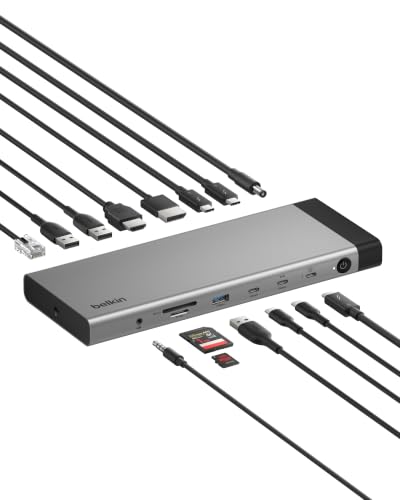
Belkin 140W Thunderbolt 5 Dock
Best for: Triple 4K@144Hz monitor setups
- Refresh Rate
- 144Hz
- Display Support
- Triple
- Max Resolution
- 8K@60Hz, 4K@144Hz
- Host Interface
- Thunderbolt 5
- Power Delivery
- 140W
- Data Transfer Speed
- 80Gbps
This Belkin dock connects up to three 4K displays at 144Hz or one 8K screen at 60Hz. It delivers 140W of power to your laptop over a single cable. You get 80Gbps data speeds and a 2.5Gb Ethernet port for stable networking. The unit supports daisy-chaining up to six Thunderbolt devices. It includes a Kensington lock and fire-resistant materials for security.
- Supports triple 4K monitors at 144Hz refresh rate
- 140W power delivery charges your host laptop
- 80Gbps data transfer speeds with 120Gbps bandwidth boost
- 2.5Gb Ethernet port for fast wired networking
- Supports only one 8K display at 60Hz, whereas the Plugable model handles dual 8K
- Includes a 3-year warranty, which is shorter than the typical 4-year coverage on higher-end Thunderbolt docks
- You need to drive three 4K monitors at 144Hz from a single connection
- You require 140W of power delivery to keep your laptop charged while docked
- You want a secure setup with a Kensington lock and fire-resistant materials
- You need to connect two 8K displays simultaneously
- You prefer a dock with a longer warranty period than three years
- You only need a single external display and want a simpler, less expensive hub
Verdict: Belkin 140W Thunderbolt 5 Triple 4K Dock is a robust solution for users who need to run three high-refresh-rate 4K monitors while keeping their laptop charged. It fits professionals who prioritize multi-screen productivity and secure, high-speed connectivity.
Specifications side by side

| Spec | Plugable Thunderbolt 5 Dual HDMI Dock | Razer Thunderbolt 5 Dock Chroma | Belkin 140W Thunderbolt 5 Dock |
|---|---|---|---|
| Display Support | Dual | Triple | Triple |
| Max Resolution | 8K@60Hz | 8K 60 Hz | 8K@60Hz, 4K@144Hz |
| Host Interface | Thunderbolt 5 | Thunderbolt 5 | Thunderbolt 5 |
| Power Delivery | 140W | 140W | 140W |
| Data Transfer Speed | – | 120Gbps | 80Gbps |
| Video Ports | HDMI 2.1 | Thunderbolt 5 | – |
| Total Ports | 16 | 11 | 14 |
| Ethernet Speed | 2.5GbE | Gigabit | 2.5Gb |
| Resolution | 8K UHD | 4K UHD | 4K UHD |
| Refresh Rate | 144Hz | 144Hz | 144Hz |
| Ports | HDMI, Ethernet, Thunderbolt 4 | Thunderbolt 4 | USB-C, Ethernet, Thunderbolt 4 |
| Features | Power Delivery | Power Delivery, M.2 SSD Slot, Cooling Fan | – |
| Operating System | macOS | – | – |
| Number of Computers | – | 4 Computers | – |
| Dimensions | 1.97 × 2.95 × 5.91 inches | 8.08 × 3.35 × 1.18 inches | – |
| Weight | 8.92 ounces | – | – |
| Color | Space Gray | Black | Gray |
| Model | TBT-UDH2 | RC21-02290100-R3U1 | INC031ttSGY |
| Size | – | 8.08 x 3.35 x 1.18 inches | – |
Choosing the Right 144Hz Dock

Check Resolution Needs
Verify the maximum resolution the dock supports. The Plugable model handles 8K UHD, while others cap at 4K UHD. Higher resolutions require more bandwidth. Ensure your host interface can sustain the data rate. If you need sharper images, prioritize docks with higher resolution limits. Match the spec to your monitor’s panel capability. This prevents signal loss or reduced refresh rates. Always confirm the dock’s listed resolution matches your display requirements for a clear image.
Match Port Types
Look at the specific ports available on the dock. The Plugable unit includes HDMI and Ethernet. The Belkin model offers USB-C and Ethernet. The Razer dock focuses on Thunderbolt 4 connectivity. Choose the ports that align with your peripherals. HDMI is common for monitors. Ethernet provides stable wired internet. USB-C offers versatility. Ensure the physical connector matches your cable. This avoids the need for extra adapters. Proper port selection simplifies your setup and reduces clutter on your desk.
Verify Power Delivery
Check the Power Delivery wattage for your laptop. All listed docks provide 140W PD. This amount suffices for most high-performance laptops. It charges your device while running displays. If your laptop requires more power, this may not be enough. Lower wattage might charge slowly. Ensure the dock’s PD output meets your laptop’s minimum requirement. This keeps your battery healthy. It also ensures stable performance under load. Always check your laptop’s charging specs before buying.
Consider Display Count
Determine how many monitors you need to connect. The Belkin dock supports triple 4K displays. The Razer model also handles three screens. The Plugable unit is a dual HDMI dock. More screens increase bandwidth demands. Ensure your host computer can drive multiple high-refresh-rate outputs. If you need a single monitor, a dual dock may suffice. Triple setups require robust connectivity. Plan your workspace layout first. This helps you select the right capacity dock for your workflow.
Check Storage Options
Decide if you need internal storage expansion. The Razer dock includes an M.2 SSD slot. This allows you to add fast storage directly. Other docks do not mention this feature. Internal storage reduces cable clutter. It provides quick access to large files. If you work with video or large datasets, this is useful. Otherwise, external drives may suffice. Check if the dock supports the SSD type you prefer. This adds flexibility to your setup without extra cables.
Frequently asked questions
Can a Thunderbolt 5 dock support 8K resolution?
Yes, the Plugable Thunderbolt 5 Dual HDMI Dock supports 8K UHD resolution. This allows you to connect high-resolution displays while maintaining a 144Hz refresh rate. Other models in this selection cap at 4K UHD, so verify your monitor requirements before purchasing.
What power delivery do these docks provide?
All three listed docks provide 140W of Power Delivery. This allows you to charge compatible laptops while connected. The Plugable and Razer models explicitly list this wattage. The Belkin model is also rated for 140W, ensuring sufficient power for high-performance devices.
Do these docks work with multiple monitors?
The Razer and Belkin docks support triple display setups at 4K 144Hz. The Plugable dock focuses on dual HDMI outputs but handles 8K resolution. Check the specific display support in the attributes to ensure the dock matches your multi-monitor configuration needs.
Is internal storage available on any of these docks?
The Razer Thunderbolt 5 Dock Chroma includes an M.2 SSD slot. This feature allows you to add internal storage directly to the dock. Neither the Plugable nor the Belkin models list internal storage capabilities in their published specifications.
Which dock is the most compact?
The Plugable Thunderbolt 5 Dual HDMI Dock is the most compact option. It measures 2.95 inches in width and weighs 8.92 ounces. The Razer model is significantly larger at 8.08 inches in length. Choose the Plugable model if portability and small footprint are priorities.
Do these docks support macOS?
The Plugable Thunderbolt 5 Dual HDMI Dock explicitly lists macOS in its operating system attributes. The other models do not specify operating system compatibility in the provided data. Verify your laptop’s OS requirements before relying on the listed specifications for the Razer or Belkin units.
Can I connect an Ethernet cable to these docks?
The Plugable and Belkin docks include Ethernet ports. The Razer model lists Thunderbolt 4 ports but does not explicitly mention an Ethernet port in the provided attributes. Check the port list carefully if wired networking is a requirement for your setup.
Do these docks require a specific host interface?
All three docks require a Thunderbolt 5 host interface. This ensures the bandwidth necessary for 4K 144Hz or 8K UHD outputs. Your computer must have a compatible Thunderbolt 5 port to use any of these models effectively.
See also