Best 1080p FHD Kvm Switches: 4 Spec-Based Picks
As Amazon Associates, we earn from qualifying purchases. This means we may receive a small commission at no extra cost to you if you click through and make a purchase.
As an Amazon Associate we earn from qualifying purchases. Links on this page are affiliate links.
Finding the best 1080p FHD kvm switches requires looking at the published specifications. We compared 4 models to help you choose. Our top pick is the MT-VIKI 8-Port 17.3" LCD KVM Console. It leads because it integrates a 17.3-inch display for secure 8-server rack management. This setup offers clear 1080p viewing directly on the unit. The selections here rely strictly on the specs listed on the product pages. You will find options for different port types and refresh rates. This guide helps you decide which switch fits your specific hardware needs.
Check refresh rate and ports

Most 1080p KVM switches run at 60Hz. The AV Access iDock C10 and iDock-C20 support 240Hz refresh rates. This matters for fast-moving content. You also need to check ports. The MT-VIKI uses HDMI. The iDock models use USB-C and Ethernet. Match these specs to your computer connections. This ensures the switch works with your setup without extra adapters.
| # | Product | Best for | Price |
|---|---|---|---|
| 1 | MT-VIKI 8-Port 17.3" LCD KVM Console Best overall | secure 8-server rack management | |
| 2 | AV Access Dual 1080p HDMI KVM Extender Best budget | Long-distance dual 1080p extension | |
| 3 | AV Access iDock C10 Dual Monitor KVM Best usb 3.0 | 1080p 240Hz dual monitor setups | |
| 4 | AV Access iDock-C20 Dual Monitor KVM Dock Best usb-c | dual-laptop setups with single-cable charging |
The best fit for you

- You manage a secure eight-server rack – MT-VIKI 8-Port 17.3" LCD KVM Console – It integrates an 17.3-inch 1080p LCD screen for direct rack management.
- You need long-distance dual 1080p extension – AV Access Dual 1080p HDMI KVM Extender – This model extends dual HDMI signals over 60 meters without drivers.
- You want high refresh rate dual monitors – AV Access iDock C10 Dual Monitor KVM – It supports 240Hz refresh rates for smooth 1080p visuals on two screens.
- You need single-cable charging for laptops – AV Access iDock-C20 Dual Monitor KVM Dock – The USB-C port delivers 60W power while transmitting 1080p video.
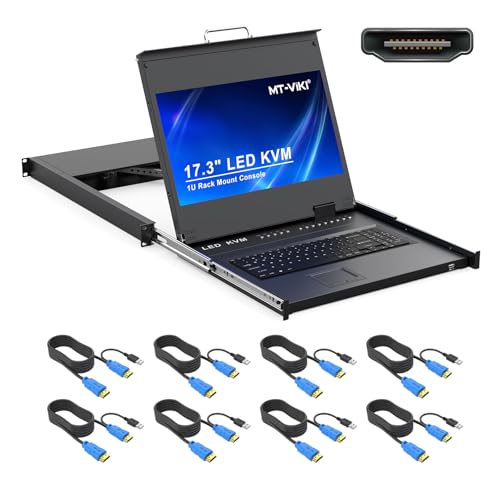
MT-VIKI 8-Port 17.3" LCD KVM Console
Best for: secure 8-server rack management
- Resolution
- 1080p FHD
- Computers Supported
- 8
- Maximum Resolution
- 1080P@60Hz
- Video Interface
- HDMI
- USB Hub Standard
- USB 2.0
- Features
- Hotkey Switching
This MT-VIKI unit combines an 8-port KVM switch with a 17.3-inch LCD monitor. It delivers 1080p FHD resolution at 60Hz for clear server management. The device mounts into a standard 19-inch rack and includes eight USB HDMI cables. You can control connected computers using OSD menus, hotkeys, or physical buttons. It also features password security and an adjustable screen angle for ergonomic use.
- Integrated 17.3-inch LCD monitor for direct viewing
- Supports 1080p FHD resolution at 60Hz refresh rate
- Includes eight USB HDMI KVM cables in the package
- Offers three switching methods: OSD, hotkey, and button
- Limited to 8 ports compared to higher-capacity options
- HDMI-only connectivity excludes VGA monitor support
- Bulkier 1U rack footprint requires more rack space
- You need an all-in-one rack solution with a built-in display
- You manage up to eight computers via HDMI connections
- You require password-protected access for secure server management
- You need to connect more than eight computers
- Your servers use VGA monitors instead of HDMI
- You prefer a compact desktop unit over rackmount hardware
Verdict: MT-VIKI 8-Port 1080p Rackmount KVM suits IT professionals who need a secure, integrated rack solution for managing eight HDMI-connected servers. It provides clear 1080p viewing and multiple control options for efficient data center operations.

AV Access Dual 1080p HDMI KVM Extender
Best for: Long-distance dual 1080p extension
- Resolution
- 1080p FHD
- Monitors Supported
- 2
- Maximum Resolution
- 1080p@60Hz
- Video Interface
- HDMI
- USB Hub Standard
- USB 2.0
- Dimensions
- 4 × 2 × 1 inches
This HDMI KVM extender supports dual 1080p@60Hz signals over a single Cat5e/6/6a/7 cable up to 197 feet. It includes four USB 2.0 ports, two of which provide 5V/1A output for higher-power devices. The transmitter receives power from the receiver via Power over Cable, reducing setup complexity. It works with Windows, Mac, and Linux without drivers.
- Dual 1080p@60Hz HDMI output
- Transmits up to 197 feet
- Four USB 2.0 ports
- Power over Cable function
- USB 2.0 speed limits
- 1080p resolution cap
- You need to extend signals up to 197 feet
- You require dual 1080p displays
- You want plug-and-play setup
- You need 4K resolution
- You require USB 3.0 speeds
- You need multi-monitor setups beyond two
Verdict: AV Access HDEX60-DM Dual 1080p KVM fits users who need reliable dual 1080p extension over long distances without driver installation.

AV Access iDock C10 Dual Monitor KVM
Best for: 1080p 240Hz dual monitor setups
- Resolution
- 1080p FHD
- Computers Supported
- 2
- Monitors Supported
- 2
- Maximum Resolution
- 4K@60Hz
- Video Interface
- HDMI, DisplayPort, USB-C
- Power Delivery
- 60W
The AV Access iDock C10 is a dual-monitor KVM switch and docking station. It supports 1080p FHD resolution at up to 240Hz. You can connect two computers and share two displays. A single USB-C cable handles video, data, and 60W charging. It includes three USB 3.0 ports and gigabit Ethernet. This setup reduces cable clutter for professionals managing multiple systems.
- Supports 1080p FHD at 240Hz refresh rate
- Single USB-C connection for video, data, and 60W charging
- Includes three USB 3.0 ports for peripherals
- Built-in gigabit Ethernet port for stable wired networking
- Switches between two computers in 2–3 seconds
- Supports only 1080p FHD resolution, while other picks on this list handle 4K
- Heavier build at 2.2 pounds compared to lighter alternatives
- macOS users are limited to mirrored displays only
- You need to switch between two computers and share two monitors
- You require fast 240Hz refresh rates for 1080p content
- You want a single cable to charge your laptop while connecting peripherals
- You need true dual extended displays on a macOS system
- You require 4K resolution support for your workflow
- You prefer a lighter, more portable docking station
Verdict: AV Access iDock C10 10-in-1 Dock is a robust solution for Windows users who need high refresh rates and extensive portability. It fits professionals who manage two desktops and want to minimize desk cables.

AV Access iDock-C20 Dual Monitor KVM Dock
Best for: dual-laptop setups with single-cable charging
- Resolution
- 1080p FHD
- Computers Supported
- 2
- Monitors Supported
- 2
- Maximum Resolution
- 4K
- Video Interface
- USB-C, HDMI
- Power Delivery
- 60W
This AV Access KVM dock lets you control two laptops using one dual-monitor setup, keyboard, and mouse. It features two USB-C ports that support 4K video and 60W power delivery for each computer. The unit includes 12-in-1 connectivity with USB 3.0, Ethernet, and SD slots. It switches between systems in 2-3 seconds. This device suits users who want a single cable connection for video, data, and charging.
- Two full-featured USB-C ports with 20Gbps data and 60W charging
- Switches between computers in 2-3 seconds via front button
- Includes 12-in-1 connectivity with USB 3.0, Ethernet, and SD slot
- Supports EDID emulation and automatic PC wake-up
- Mac models only support mirrored displays due to macOS limitations
- Not compatible with 5K monitors or FreeSync/G-Sync
- Maximum resolution for 49-inch ultrawide monitors is limited to 3840×1080
- You need to manage two laptops from a single desk
- You want to replace multiple cables with one USB-C connection
- You require 60W power delivery for each connected laptop
- You use a 5K monitor or G-Sync display
- You need extended dual displays on a Mac
- You require compatibility with Dell Display Manager
Verdict: AV Access iDock-C20 Dual Monitor KVM is a solid choice for professionals managing two laptops who need fast switching and 60W charging. It works best for users who prioritize a clutter-free desk with a single cable solution for video and data.
Specifications side by side

| Spec | MT-VIKI 8-Port 17.3" LCD KVM Console | AV Access Dual 1080p HDMI KVM Extender | AV Access iDock C10 Dual Monitor KVM | AV Access iDock-C20 Dual Monitor KVM Dock |
|---|---|---|---|---|
| Computers Supported | 8 | – | 2 | 2 |
| Monitors Supported | – | 2 | 2 | 2 |
| Maximum Resolution | 1080P@60Hz | 1080p@60Hz | 4K@60Hz | 4K |
| Video Interface | HDMI | HDMI | HDMI, DisplayPort, USB-C | USB-C, HDMI |
| Power Delivery | – | – | 60W | 60W |
| USB Hub Standard | USB 2.0 | USB 2.0 | USB 3.0 | USB 3.0 (5Gbps), USB 2.0 |
| Ethernet Speed | – | – | 1 Gbps | 1 Gbps |
| EDID Emulation | – | – | – | Supported |
| Resolution | 1080p FHD | 1080p FHD | 1080p FHD | 1080p FHD |
| Refresh Rate | 60Hz | 60Hz | 240Hz | 240Hz |
| Ports | HDMI | HDMI | Ethernet, USB 3.0 | USB-C, Ethernet |
| Features | Hotkey Switching | – | Power Delivery, EDID Emulation | Power Delivery, EDID Emulation, MST |
| Use | – | – | Business & Office, Office, Home Office | Business & Office, Office, Home Office |
| Number of Computers | – | – | 2 Computers | 2 Computers |
| Dimensions | 9.06 × 3.7 × 8.66 inches | 4 × 2 × 1 inches | 5.5 × 3.7 × 1.9 inches | 6.69 × 4.33 × 1.77 inches |
| Weight | – | – | 2.2 pounds | 3.88 pounds |
| Size | 8 port KVM HDMI+ 17.3'' LCD | 60 | 10 | 20 |
| Color | Black | Black | Grey | Grey |
| Model | MT-17308HL | HDEX60-DM | iDock C10 | iDock-C20-US |
How to choose the right 1080p KVM switch
Check the refresh rate
Most 1080p KVM switches operate at 60Hz. This is standard for office work and general computing. If you need smoother motion for fast-moving content, look for higher refresh rates. The AV Access iDock C10 and iDock-C20 both support 240Hz. This is significantly faster than the MT-VIKI 8-Port, which runs at 60Hz. A higher refresh rate reduces motion blur. It makes scrolling and cursor movement feel more responsive. Choose 240Hz if you prioritize fluidity. Stick with 60Hz if you only need basic productivity tasks.
Match the port types
The connection type determines what devices you can use. The MT-VIKI 8-Port uses HDMI ports. This is common for desktop computers and rack servers. The AV Access iDock models use USB-C and Ethernet. These are better for modern laptops and docking stations. USB-C carries video, data, and power. HDMI only carries video and audio. Check your computer outputs first. If you use laptops, USB-C is likely the right choice. If you manage servers, HDMI is standard. Ensure your cables match the switch ports.
Consider power delivery
Some KVM docks charge your laptop while you work. This reduces cable clutter on your desk. The AV Access iDock-C20 supports Power Delivery. It can provide up to 60W of charging power. This allows you to connect your laptop with a single cable. The MT-VIKI 8-Port does not mention power delivery. It is designed for rack mounting, not desk charging. If you want a clean desk setup, look for Power Delivery. It simplifies your workspace by combining video and power into one connection.
Verify the switching method
You need to know how to switch between computers. The MT-VIKI 8-Port features Hotkey Switching. This lets you use keyboard shortcuts to toggle between servers. It is efficient for managing multiple machines in a rack. The AV Access iDock models do not list hotkey switching. They may rely on physical buttons or software. Check the manual for your preferred method. Hotkeys save time if you switch frequently. Physical buttons are simpler but require reaching the device. Choose the method that fits your workflow.
Assess the physical size
The form factor depends on where you place the device. The MT-VIKI 8-Port is a rackmount unit. It measures 9.06 inches in length. It fits into standard server racks. It is not designed for a desk. The AV Access iDock models are compact docks. The iDock-C20 is 6.69 inches long. It sits on your desk next to your laptop. Choose rackmount for data centers. Choose desktop docks for home offices. Size affects where you can install the KVM switch safely.
Frequently asked questions
Does the MT-VIKI 8-Port KVM support hotkey switching?
Yes, the MT-VIKI 8-Port 17.3" LCD KVM Console supports hotkey switching. This feature allows you to toggle between connected servers quickly without navigating complex menus. It is designed for efficient data center operations where time is critical. The console integrates a 17.3-inch screen for clear 1080p viewing of all connected systems.
Can the AV Access iDock C10 support dual monitors?
Yes, the AV Access iDock C10 is built for dual monitor setups. It connects two computers and supports a 240Hz refresh rate for smooth visuals. The dock includes USB 3.0 and Ethernet ports to manage peripherals and network connections. It helps minimize desk cables for professionals managing two desktops.
What is the maximum distance for the AV Access HDEX60-DM extender?
The AV Access HDEX60-DM Dual 1080p HDMI KVM Extender supports distances up to 60 meters. It extends dual HDMI signals reliably without requiring driver installation. This makes it suitable for users who need to place their workstation far from the source computers while maintaining 1080p FHD resolution.
Does the AV Access iDock-C20 provide power delivery?
Yes, the AV Access iDock-C20 Dual Monitor KVM Dock includes Power Delivery. It provides up to 60W of charging power through a single USB-C cable. This simplifies desk setups for users managing two laptops. The dock also supports MST for dual monitor configurations at 240Hz refresh rates.
Is the MT-VIKI console rackmount compatible?
Yes, the MT-VIKI 8-Port 17.3" LCD KVM Console is designed for rackmount installation. It measures 3.7 inches in width and 8.66 inches in height. This form factor allows IT professionals to integrate it directly into secure eight-server racks. It provides a compact solution for managing multiple HDMI-connected servers in a data center environment.
Do the AV Access iDock models support EDID emulation?
Yes, both the AV Access iDock C10 and iDock-C20 support EDID emulation. This feature ensures consistent display detection and optimal resolution settings across connected computers. It helps maintain stable video output when switching between different systems. Both models also offer high refresh rates and extensive connectivity options for professional use.
See also