BenQ RD320U 32” 4K 3840×2160 Programming Monitor Alternatives: 6 Similar Picks Compared
As Amazon Associates, we earn from qualifying purchases. This means we may receive a small commission at no extra cost to you if you click through and make a purchase.
As an Amazon Associate we earn from qualifying purchases. Links on this page are affiliate links.
The BenQ RD320U 32 4k 3840×2160 programming monitor alternatives list helps you find screens with similar specs for coding and daily use. This guide compares 6 options that share key features like 4K UHD resolution and USB-C connectivity with the original BenQ model. You might look elsewhere if you need a different screen size, a higher refresh rate, or a specific panel type. The original monitor offers a 32-inch Nano Matte panel with a 2000:1 contrast ratio and dedicated coding modes. It also provides 90W USB-C power delivery and eye comfort features like MoonHalo backlighting. Some users may prefer a smaller 27-inch display for tighter desk spaces or a portable option for travel. Others might want faster gaming performance with 120Hz or 240Hz refresh rates. We selected these alternatives because their published specifications overlap with the BenQ RD320U in areas like resolution, connectivity, and panel technology. Each pick addresses different priorities while maintaining core similarities to the original product.
How alternatives compare to BenQ
Dell 27-Inch 4K 120Hz USB-C Monitor
The Dell S2725QC drops the 32-inch size for a 27-inch IPS panel, which may suit smaller desks better. It offers a higher 120Hz refresh rate and FreeSync support, making it smoother for mixed use than the BenQ RD320U. The Dell uses an Ash White finish, contrasting with BenQ’s Metal Grey. It includes HDMI and DisplayPort alongside USB-C, providing more connection flexibility. You lose the Nano Matte glare reduction and Coding Modes found on the BenQ. This model fits professionals who value color accuracy and a clean aesthetic over the larger screen real estate and specialized eye comfort features of the original.
KTC 27-Inch 4K Dual-Mode Gaming Monitor
The KTC H27P6 shifts focus to gaming with a 160Hz refresh rate and Adaptive-Sync, significantly faster than the BenQ’s standard panel. It uses a 27-inch IPS display, smaller than the 32-inch BenQ. This model includes HDR support and a height-adjustable stand, adding versatility for color work and gaming. It retains USB-C connectivity with Power Delivery, similar to the BenQ. You give up the MoonHalo backlight and specific coding modes for higher speed. The KTC is ideal for users who want a dual-purpose screen for professional color accuracy and fast-paced gaming, rather than a dedicated programming tool.
Cocopar 15.6" 4K 60Hz Portable Monitor
The Cocopar Y156ULH is a portable 15.6-inch 4K monitor, much smaller and lighter than the 34.2-pound BenQ RD320U. Weighing only 1.55 pounds, it is designed for travelers and secondary displays. It supports macOS and includes built-in speakers, features the BenQ lacks. The Cocopar uses HDMI and USB-C ports but does not offer the height-adjustable stand or USB-C power delivery of the original. You sacrifice the large 32-inch canvas and specialized eye comfort technologies for extreme portability. This pick suits users who need a reliable compact 4K screen for work or media on the go, rather than a stationary desk monitor.
ASUS ProArt 27-Inch 4K USB-C Monitor
The ASUS ProArt PA279CV is a 27-inch 4K monitor, smaller than the 32-inch BenQ but focused on professional color work. It features an IPS panel and a height-adjustable stand with a built-in USB hub, offering more connectivity options than the BenQ. It includes HDMI, DisplayPort, and USB-C with Power Delivery. The ASUS lacks the Nano Matte panel and Coding Modes of the BenQ, prioritizing color accuracy instead. Its black finish contrasts with BenQ’s Metal Grey. This model is best for professionals who need precise color reproduction and convenient hub connectivity, accepting a smaller screen size and fewer specialized coding features for higher professional utility.
KTC 27-Inch Dual-Mode Mini LED Monitor
The KTC M27P6 uses Mini LED technology on a 27-inch IPS panel, offering better contrast and brightness than the BenQ’s standard 4K display. It supports a 160Hz refresh rate with Adaptive-Sync, providing smoother motion for gaming and general use. The monitor includes a height-adjustable stand and USB-C connectivity, similar to the BenQ. It lacks the MoonHalo backlight and specific coding modes, focusing instead on visual performance. The white finish differs from BenQ’s grey. This option suits users who want high refresh rates and superior backlighting for mixed use, trading the larger 32-inch size and specialized eye comfort features for enhanced image quality and speed.
ASUS ROG 32-Inch 4K OLED Gaming Monitor
The ASUS ROG PG32UCDM3 is a 32-inch OLED monitor, matching the BenQ’s size but offering vastly different technology. It features a 240Hz refresh rate and G-SYNC support, far exceeding the BenQ’s capabilities for gaming. The OLED panel provides deep blacks and high contrast, differing from the BenQ’s 2000:1 ratio. It includes USB-C connectivity and HDR support. The ASUS lacks the Coding Modes and Nano Matte panel, focusing on high-end gaming visuals. Its black chassis is heavier than the BenQ. This pick is for gamers who want the largest screen with the fastest refresh rate and best contrast, sacrificing specialized programming features and eye comfort tools for top-tier gaming performance.
| # | Product | Best for | Price |
|---|---|---|---|
| 1 | BenQ RD320U 32-inch 4K Programming Monitor Best overall | programmers needing eye comfort and USB-C | |
| 2 | Dell 27-Inch 4K 120Hz USB-C Monitor Best premium | Color-accurate work and clean USB-C setups | |
| 3 | KTC 27-Inch 4K Dual-Mode Gaming Monitor Also great | Dual-purpose gaming and professional color work | |
| 4 | Cocopar 15.6" 4K 60Hz Portable Monitor Best budget | Travelers needing a compact 4K secondary display | |
| 5 | ASUS ProArt 27-Inch 4K USB-C Monitor Best usb hub | professional color-critical work with USB-C connectivity | |
| 6 | KTC 27-Inch Dual-Mode Mini LED Monitor Also great | High refresh rate gaming and color-critical work | |
| 7 | ASUS ROG 32-Inch 4K OLED Gaming Monitor Best 240hz | High-end 4K OLED gaming with fast refresh rates |

BenQ RD320U 32-inch 4K Programming Monitor
Best for: programmers needing eye comfort and USB-C
- Screen Size
- 32"
- Resolution
- 3840×2160
- Ports
- USB-C
- Dimensions
- 37.2 × 20.2 × 37.2 inches
- Weight
- 34.2 pounds
The BenQ RD320U is a 32-inch 4K UHD monitor designed for coding. It features a Nano Matte panel to reduce glare and a 2000:1 contrast ratio for deep blacks. You get 90W USB-C power delivery and specialized Coding Modes with dark and light themes. The MoonHalo backlight helps reduce eye strain. This screen suits developers who need clarity and comfort during long sessions.
- 32-inch 4K UHD resolution
- Nano Matte panel for low reflection
- 90W USB-C power delivery
- Coding Modes with dark and light themes
- MoonHalo backlight for eye protection
- 2000:1 contrast ratio is lower than typical IPS panels
- 34.2 pounds weight is heavier than 27-inch alternatives
- 60Hz refresh rate is slower than 120Hz or 240Hz competitors
- You write code for many hours and need eye comfort
- You want a single USB-C cable for power and video
- You prefer a larger 32-inch screen for multitasking
- You need high refresh rates for competitive gaming
- You want a lighter, more portable setup
- You require high contrast for professional color grading
Verdict: BenQ RD320U 32-inch 4K Programming Monitor is ideal for developers who prioritize eye comfort and a large display over high refresh rates. It fits those who want USB-C convenience and glare reduction for daily coding tasks.

Dell 27-Inch 4K 120Hz USB-C Monitor
Best for: Color-accurate work and clean USB-C setups
- Screen Size
- 27"
- Resolution
- 3840×2160
- Refresh Rate
- 120Hz
- Panel Type
- IPS
- Response Time
- 4ms
- Variable Refresh Rate
- AMD FreeSync Premium
The Dell S2725QC is a 27-inch 4K UHD IPS monitor designed for clarity and comfort. It features a 120Hz refresh rate and AMD FreeSync Premium for smooth visuals. The panel covers 99% sRGB for accurate colors and includes USB-C connectivity with 65W power delivery. Low blue light technology helps reduce eye strain. This monitor suits users who need a sharp, versatile display for work and light gaming.
- 4K UHD resolution delivers sharp 163 PPI detail
- 120Hz refresh rate with AMD FreeSync Premium
- 99% sRGB color gamut for accurate visuals
- USB-C port with 65W power delivery
- ComfortView Plus reduces blue light to ≤35%
- 1500:1 contrast ratio is lower than OLED or Mini LED alternatives
- 27-inch size is smaller than the 32-inch options in this comparison
- You need a single USB-C cable for video and power
- You prioritize color accuracy with 99% sRGB coverage
- You want a 120Hz refresh rate for smooth motion
- You require a 32-inch display for larger workspace
- You need high-end gaming specs like 240Hz or OLED
- You prefer a higher contrast ratio for deep blacks
Verdict: Dell S2725QC 27-inch 4K Monitor fits professionals and mixed-use users who value color accuracy and clean desk setups. It is a solid choice for those who do not need the largest screen size or the highest gaming refresh rates available.
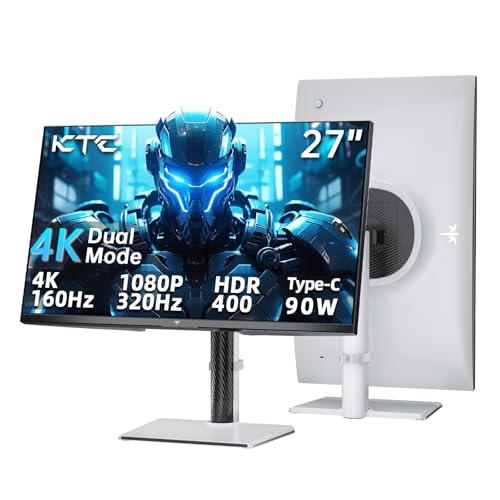
KTC 27-Inch 4K Dual-Mode Gaming Monitor
Best for: Dual-purpose gaming and professional color work
- Screen Size
- 27 Inch
- Resolution
- 4K, 1080P
- Refresh Rate
- 160Hz, 320Hz
- Panel Type
- Fast IPS
- Response Time
- 1ms
- Variable Refresh Rate
- Adaptive Sync
The KTC 27-inch monitor offers a versatile dual-mode display, switching between 4K at 160Hz and 1080p at 320Hz. It features a Fast IPS panel with 125% sRGB coverage and Delta E<2 color accuracy. A USB-C port delivers 90W power delivery for convenient laptop connectivity. The ergonomic stand includes height, tilt, swivel, and pivot adjustments to reduce eye strain during long sessions.
- Dual mode: 4K @ 160Hz or 1080p @ 320Hz
- USB-C with 90W Power Delivery
- 125% sRGB color gamut with Delta E<2 accuracy
- Fully adjustable ergonomic stand
- 27-inch screen is smaller than the 32-inch alternatives
- 1000:1 contrast ratio is lower than typical IPS competitors
- 13.9-pound weight is heavier than many 27-inch models
- You need a single monitor for both high-res work and fast gaming
- You want to charge a laptop via USB-C while using the display
- You prefer a white monitor color for your desk setup
- You require a 32-inch screen for larger viewing space
- You need a higher contrast ratio for dark room usage
- You are looking for a 240Hz refresh rate for competitive esports
Verdict: KTC 27 Inch 4K 160Hz Gaming Monitor is a solid choice for users who value color accuracy and USB-C convenience over maximum screen size or contrast depth.

Cocopar 15.6" 4K 60Hz Portable Monitor
Best for: Travelers needing a compact 4K secondary display
- Screen Size
- 15.6 Inch
- Resolution
- 4K UHD
- Refresh Rate
- 60Hz
- Ports
- HDMI, USB-C
- Features
- Built-in Speakers
- Use
- Mac, Travel
This Cocopar portable monitor offers a 15.6-inch 4K UHD display with 60Hz refresh rate and 145% sRGB color coverage. It features a lightweight metal chassis weighing 1.55 pounds and includes built-in speakers. The device connects via USB-C and HDMI, supporting plug-and-play functionality with compatible devices. It is designed for travelers and professionals needing a secondary screen for macOS or PC setups.
- 4K UHD resolution with 145% sRGB color gamut
- Lightweight 1.55-pound metal chassis
- Built-in dual speakers
- USB-C and HDMI connectivity options
- 15.6-inch screen is smaller than the 27-inch or 32-inch panels on this list
- 60Hz refresh rate is lower than the 120Hz or 160Hz rates found on other picks
- 1.55-pound weight is heavier than typical tablet-sized portable displays
- You need a high-resolution secondary screen for travel
- You want a lightweight monitor that fits in a backpack
- You require 4K clarity for creative work on the go
- You need a large primary desk monitor
- You require high refresh rates for fast-paced gaming
- You prefer a screen larger than 16 inches
Verdict: Cocopar 15.6" 4K Portable Monitor is a compact solution for users who prioritize portability and color accuracy over screen size and speed. It suits travelers who need a reliable 4K display for work or media in tight spaces.

ASUS ProArt 27-Inch 4K USB-C Monitor
Best for: professional color-critical work with USB-C connectivity
- Screen Size
- 27 inches
- Panel Type
- IPS
- Response Time
- 5.0 milliseconds
- Ports
- USB-C, DisplayPort, HDMI, USB 3.1
- Resolution
- 4K UHD
- Features
- Height-Adjustable Stand, USB Hub, Power Delivery
This 27-inch 4K UHD IPS monitor delivers professional-grade color accuracy with Calman verification and Delta E < 2. It features a versatile USB-C port supporting 65W power delivery, allowing you to connect and charge devices through a single cable. The included USB hub adds connectivity options. With a 5-year warranty and factory calibration, it suits content creators who need precise color reproduction and reliable hardware for daily professional workflows.
- 4K UHD resolution on a 27-inch IPS panel
- Calman verified with Delta E < 2 color accuracy
- USB-C port with 65W power delivery
- Built-in USB hub for device connectivity
- 5-year warranty coverage
- 27-inch size is smaller than the 32-inch options on this list
- 19-pound weight is heavier than many portable or standard 27-inch monitors
- 65W power delivery is lower than the 90W PD found on some competitors
- You need factory-calibrated color accuracy for professional design work
- You want a single USB-C cable for video, data, and power
- You prefer a larger 27-inch screen over smaller portable displays
- You require a 32-inch display for more screen real estate
- You need high refresh rates for fast-paced gaming
- You are looking for a lightweight portable monitor for travel
Verdict: ASUS ProArt 27 Inch 4K USB-C Monitor is a solid choice for professionals who prioritize color accuracy and convenient USB-C connectivity over larger screen sizes or high refresh rates.
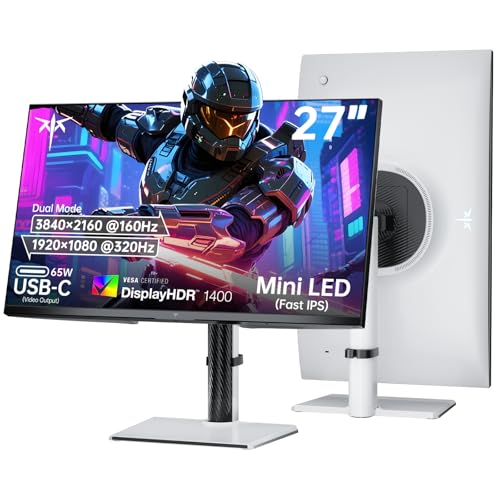
KTC 27-Inch Dual-Mode Mini LED Monitor
Best for: High refresh rate gaming and color-critical work
- Screen Size
- 27 Inch
- Resolution
- 4K UHD / 1080P FHD
- Refresh Rate
- 160Hz / 320Hz
- Panel Type
- Fast IPS
- Variable Refresh Rate
- Adaptive-Sync, Freesync, G-sync
- Ports
- 65W Type-C, DP 1.4, 2 x HDMI 2.1
The KTC M27P6 offers a 27-inch Fast IPS panel with Mini LED backlighting and 1152 dimming zones. It supports dual modes: 4K at 160Hz or 1080p at 320Hz. The display covers 145% sRGB and achieves VESA Display HDR 1400. It includes a 65W USB-C port and height-adjustable stand. This monitor suits users who need high refresh rates and vivid color accuracy for gaming or professional work.
- Dual mode: 4K 160Hz or 1080p 320Hz
- Mini LED with 1152 dimming zones
- 145% sRGB color gamut and HDR 1400
- 65W USB-C connectivity
- Height-adjustable stand with tilt, swivel, and pivot
- 27-inch size is smaller than the 32-inch options on this list
- 15-pound weight is lighter than the 32-inch OLED model
- 65W USB-C power delivery is lower than the 90W on the KTC dual mode variant
- You want a 27-inch screen with high refresh rates
- You need Mini LED backlighting for better contrast
- You prefer a compact desk footprint
- You require a 32-inch display
- You need more than 65W of USB-C power
- You prefer OLED technology over Mini LED
Verdict: KTC 27-Inch Dual Mode Mini LED Monitor provides a sharp 4K 160Hz experience with Mini LED benefits. It fits users who prioritize color accuracy and high refresh rates on a 27-inch panel.

ASUS ROG 32-Inch 4K OLED Gaming Monitor
Best for: High-end 4K OLED gaming with fast refresh rates
- Screen Size
- 32 Inch
- Resolution
- 3840 x 2160
- Refresh Rate
- 240 Hz
- Panel Type
- QD-OLED
- Response Time
- 0.03ms
- Variable Refresh Rate
- G-SYNC Compatible
This 32-inch 4K monitor uses a QD-OLED panel for deep blacks and vivid color. It runs at 240Hz with a 0.03ms response time for smooth gaming. The display covers 99.5% of the DCI-P3 gamut and supports DisplayHDR 500 True Black. You get extensive connectivity including DisplayPort 2.1 and USB-C with 90W power delivery. It also includes G-SYNC compatibility and OLED Care Pro to protect the screen.
- 240Hz refresh rate on a 4K QD-OLED panel
- 0.03ms response time for fast gameplay
- 99.5% DCI-P3 color gamut coverage
- DisplayPort 2.1 with 80Gbps bandwidth
- USB-C port with 90W power delivery
- Heavier build at 19.2 pounds compared to lighter alternatives
- VESA DisplayHDR 500 rating is lower than HDR 1000+ standards found in some competitors
- Limited to G-SYNC compatibility rather than native NVIDIA G-SYNC certification
- You want a 4K OLED panel with high refresh rates for gaming
- You need USB-C connectivity with significant power delivery for laptops
- You prioritize color accuracy with 99.5% DCI-P3 coverage
- You prefer a lighter monitor under 15 pounds
- You require native G-SYNC certification instead of compatibility
- You need a higher brightness rating than DisplayHDR 500
Verdict: ASUS ROG PG32UCDM3 32" 4K 240Hz OLED suits gamers who want high-end OLED visuals with 240Hz speed and robust connectivity options. It fits users who value color accuracy and fast response times over a lighter chassis.
Specifications side by side

| Spec | BenQ RD320U 32-inch 4K Programming Monitor | Dell 27-Inch 4K 120Hz USB-C Monitor | KTC 27-Inch 4K Dual-Mode Gaming Monitor | Cocopar 15.6" 4K 60Hz Portable Monitor | ASUS ProArt 27-Inch 4K USB-C Monitor | KTC 27-Inch Dual-Mode Mini LED Monitor | ASUS ROG 32-Inch 4K OLED Gaming Monitor |
|---|---|---|---|---|---|---|---|
| Screen Size | 32" | 27" | 27 Inch | 15.6 Inch | 27 inches | 27 Inch | 32 Inch |
| Resolution | 3840×2160 | 3840×2160 | 4K, 1080P | 4K UHD | – | 4K UHD / 1080P FHD | 3840 x 2160 |
| Refresh Rate | – | 120Hz | 160Hz, 320Hz | 60Hz | – | 160Hz / 320Hz | 240 Hz |
| Panel Type | – | IPS | Fast IPS | – | IPS | Fast IPS | QD-OLED |
| Response Time | – | 4ms | 1ms | – | 5.0 milliseconds | – | 0.03ms |
| Variable Refresh Rate | – | AMD FreeSync Premium | Adaptive Sync | – | – | Adaptive-Sync, Freesync, G-sync | G-SYNC Compatible |
| Ports | USB-C | USB-C, HDMI, DisplayPort | USB-C, HDMI 2.1, DisplayPort 1.4 | – | USB-C, DisplayPort, HDMI, USB 3.1 | 65W Type-C, DP 1.4, 2 x HDMI 2.1 | DisplayPort 2.1, HDMI 2.1, USB-C |
| Features | – | – | HDR, Height-Adjustable Stand, Power Delivery | Built-in Speakers | Height-Adjustable Stand, USB Hub, Power Delivery | Height-Adjustable Stand | HDR |
| Use | – | – | Gaming | Mac, Travel | – | Gaming | Gaming |
| Size | – | S2725QC | 27-In | 15.6 Inches | 27 Inch | 27 Inch | 16.3" x 28.3" x 2.6" |
| Operating System | – | – | – | macOS | – | – | – |
| Dimensions | 37.2 × 20.2 × 37.2 inches | 7.89 × 24.1 × 15.3 inches | 8.38 × 24.3 × 21.1 inches | 0.2 × 14 × 8.66 inches | 20.6 × 24.2 × 8.97 inches | 8.32 × 24.3 × 21.5 inches | 10.9 × 28.3 × 20.9 inches |
| Weight | 34.2 pounds | 14.8 pounds | 13.9 pounds | 1.55 pounds | 19 pounds | 15 pounds | 19.2 pounds |
| Color | Metal Grey | Ash White | White | black | BLACK | White 4K | BLACK |
| Model | RD320U | S2725QC | H27P6 | Y156ULH | PA279CV | M27P6 | PG32UCDM3 |
Frequently asked questions
Which monitor is best for programmers needing eye comfort?
The BenQ RD320U is the top choice for developers who prioritize eye comfort. It features a 32-inch 4K UHD display that provides ample screen real estate for coding. The monitor includes USB-C ports for convenient connectivity. Its design focuses on reducing glare for daily coding tasks, making it ideal for long work sessions.
What is the best premium alternative to the BenQ RD320U?
The Dell S2725QC serves as the best premium option for color-accurate work. It uses a 27-inch IPS panel with a 120Hz refresh rate and FreeSync support. This monitor offers HDMI, DisplayPort, and USB-C connectivity. It suits professionals who value clean setups and color fidelity over the larger 32-inch size of the BenQ.
Can I find a dual-purpose monitor for gaming and color work?
Yes, the KTC H27P6 is a solid choice for dual-purpose use. It features a 27-inch 4K UHD IPS panel with 160Hz refresh rates and Adaptive-Sync. The monitor includes USB-C ports and supports HDR. It is designed for users who need color accuracy for professional tasks and high speed for gaming on a compact 27-inch screen.
Is there a portable 4K monitor for travelers?
The Cocopar Y156ULH is a compact 4K portable monitor for travelers. It measures 15.6 inches and weighs only 1.55 pounds. The display supports 60Hz refresh rates and includes HDMI and USB-C ports. It features built-in speakers and is compatible with macOS, making it a reliable secondary display for work or media in tight spaces.
Which monitor offers the best USB hub functionality?
The ASUS ProArt PA279CV is the best option for USB hub connectivity. It features a 27-inch 4K UHD IPS panel with HDMI, DisplayPort, and USB-C ports. The monitor includes a built-in USB hub and power delivery capabilities. It is designed for professionals who prioritize color accuracy and convenient connectivity over larger screen sizes.
What is the best high-refresh-rate 4K monitor for gaming?
The ASUS ROG PG32UCDM3 is the best high-end option for gaming. It features a 32-inch 4K UHD OLED panel with a 240Hz refresh rate. The monitor supports G-SYNC and HDR for fast response times. It includes USB-C connectivity and suits users who value color accuracy and speed over a lighter chassis design.
Does the KTC M27P6 offer Mini LED benefits?
Yes, the KTC M27P6 provides a sharp 4K 160Hz experience with Mini LED technology. It features a 27-inch IPS panel with Adaptive-Sync support. The monitor includes HDMI, DisplayPort, and USB-C ports. It is designed for users who prioritize color accuracy and high refresh rates on a 27-inch panel, making it suitable for both gaming and color-critical work.
See also