BenQ 27-Inch 4K Mac USB-C Monitor or BenQ 32-Inch 4K IPS Designer Monitor? Which BenQ Model to Buy
As Amazon Associates, we earn from qualifying purchases. This means we may receive a small commission at no extra cost to you if you click through and make a purchase.
As an Amazon Associate we earn from qualifying purchases. Links on this page are affiliate links.
The comparison of the benq 27 inch 4k mac USB c monitor vs 32 inch 4k ips designer monitor highlights two distinct 4K displays. Both models offer 4K UHD resolution and USB-C connectivity with 90W power delivery. They also feature height-adjustable stands for ergonomic comfort. The main difference lies in their target audiences and color technologies. One is tuned specifically for MacBook integration, while the other emphasizes professional design workflows with broader color certifications.
Size
27 inches
32 inches
Panel Type
not listed
IPS
Color Gamut
P3 wide color gamut
99% sRGB and 99% Rec.709
Certifications
Mac Color Match
Calman Verified and Pantone Validated
Control Features
Integrated MacBook Controls
Hotkey Puck G2 and KVM Switch
Choose the first if
- You want a smaller 27-inch screen that integrates directly with macOS controls.
- You prefer a display calibrated specifically for MacBook color accuracy.
- You need a compact setup with dual USB-C ports for charging multiple devices.
Choose the second if
- You require a larger 32-inch canvas for detailed design work.
- You need industry-standard color certifications like Pantone Validation.
- You want enhanced productivity tools like a KVM switch and Hotkey Puck.
Verdict
Choose the 27-inch model if you prioritize seamless MacBook integration and a compact footprint. Opt for the 32-inch model if you need a larger workspace and professional color certifications for creative projects. Both monitors deliver 4K clarity and USB-C convenience.
27-Inch Mac vs 32-Inch Designer

Screen Size
Edge: BenQ 32-Inch 4K IPS Designer Monitor
The BenQ 27-Inch 4K Mac USB-C Monitor features a 27-inch display, offering a compact footprint that fits well on smaller desks. The BenQ 32-Inch 4K IPS Designer Monitor provides a significantly larger 32-inch viewing area. This extra screen real estate allows for more workspace and better visibility of detailed design elements. If you need more room for multiple windows or large canvases, the 32-inch model is the clear choice. The 27-inch option remains ideal for users with limited desk space who still want 4K clarity.
Color Accuracy
Edge: BenQ 32-Inch 4K IPS Designer Monitor
The BenQ 32-Inch 4K IPS Designer Monitor emphasizes professional color fidelity. It covers 99% of the sRGB and Rec.709 color spaces and holds Calman Verified and Pantone Validated certifications. It also includes a calibration report for precise workflow adjustments. The BenQ 27-Inch 4K Mac USB-C Monitor focuses on Mac compatibility with BenQ’s exclusive color tuning for P3 wide color gamut. While both deliver vibrant images, the 32-inch model offers verified industry-standard accuracy, making it better suited for professional creative work requiring strict color matching.
Connectivity
Edge: BenQ 27-Inch 4K Mac USB-C Monitor
Both monitors support USB-C with 90W power delivery, allowing you to connect and charge your laptop with a single cable. The BenQ 27-Inch 4K Mac USB-C Monitor includes two USB-C ports and two HDMI ports, providing versatile connection options for multiple devices. The BenQ 32-Inch 4K IPS Designer Monitor offers USB-C alongside HDMI 2.0 and DisplayPort 1.4 inputs. While both provide essential connectivity, the 27-inch model’s dual USB-C ports may benefit users needing to connect two USB-C devices simultaneously.
Special Features
Edge: Tie
The BenQ 32-Inch 4K IPS Designer Monitor includes the Hotkey Puck G2 and KVM Switch, which streamline workflow and allow control over multiple computers. It also supports DualView for split-screen productivity. The BenQ 27-Inch 4K Mac USB-C Monitor integrates directly with macOS, allowing you to adjust brightness and volume from your MacBook keyboard. It also features Mac Color Match for seamless integration. If you value hardware controls and multi-PC switching, the 32-inch model is superior. If you prefer native Mac keyboard integration, the 27-inch model excels.
Panel Type
Edge: BenQ 32-Inch 4K IPS Designer Monitor
The BenQ 32-Inch 4K IPS Designer Monitor explicitly uses an IPS panel, known for consistent color reproduction and wide viewing angles. This is crucial for design work where color shifts at different angles are unacceptable. The BenQ 27-Inch 4K Mac USB-C Monitor does not list its specific panel technology in the provided data. While it is optimized for Mac colors, the lack of specified panel type makes it harder to compare viewing angle consistency directly. For known IPS performance, the 32-inch model is the safer bet.
Choose Your BenQ 4K Monitor

MacBook users wanting simple plug-and-play
Our pick: BenQ 27-Inch 4K Mac USB-C Monitor
This 27-inch model connects with a single USB-C cable. It delivers 90W power to charge your laptop while displaying video. The screen is calibrated for Mac colors. You can adjust brightness and volume directly from your keyboard. This integration simplifies your workspace significantly.
Designers needing certified color accuracy
Our pick: BenQ 32-Inch 4K IPS Designer Monitor
The 32-inch display covers 99% of sRGB and Rec.709 standards. It holds Pantone validation and Calman verification. This ensures precise color reproduction for professional creative work. The larger screen real estate helps you see more detail while editing high-resolution images or videos with confidence.
Professionals managing multiple devices
Our pick: BenQ 32-Inch 4K IPS Designer Monitor
This monitor includes a KVM switch and Hotkey Puck G2. These tools let you control two computers with one keyboard and mouse. The 32-inch IPS panel offers wide viewing angles. This setup boosts productivity by streamlining your workflow and reducing desk clutter during intensive tasks.

BenQ 27-Inch 4K Mac USB-C Monitor
Best for: MacBook users needing 27-inch 4K with 90W charging
- Screen Size
- 27”
- Resolution
- 3840×2160
- Ports
- HDMI, USB-C
- Features
- Height-Adjustable Stand, USB Hub, Power Delivery
- Use
- Mac
- Operating System
- macOS
The BenQ MA270U is a 27-inch 4K UHD monitor designed for macOS users. It features a matte screen and dual USB-C ports with 90W power delivery. The display offers a P3 wide color gamut and includes Mac Color Match calibration. You can adjust the stand for height, tilt, swivel, and pivot. This model connects to MacBook Pro or Air with a single cable for video and charging.
- 27-inch 4K UHD resolution for sharp detail
- Dual USB-C ports with 90W power delivery
- Calibrated for Mac with P3 wide color gamut
- Height-adjustable stand with tilt, swivel, and pivot
- 27-inch screen is smaller than the 32-inch alternative
- Matte finish may feel less vibrant than glossy options
- No 5K resolution option in this specific model
- You use a MacBook Pro or Air and want a single-cable connection
- You prefer a 27-inch screen for desk space efficiency
- You need 90W power delivery to charge your laptop while working
- You require a 32-inch display for larger workspace needs
- You prefer a glossy screen for higher contrast visuals
- You need 5K resolution for maximum pixel density
Verdict: BenQ MA270U 27-Inch 4K USB-C Monitor is ideal for MacBook users who want a compact 27-inch 4K display with strong color accuracy and convenient 90W charging. It suits those who value a matte screen and adjustable ergonomics over larger screen real estate.
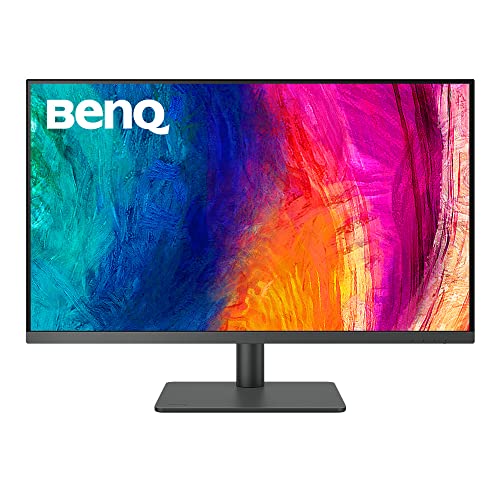
BenQ 32-Inch 4K IPS Designer Monitor
Best for: Mac designers needing large 4K canvas and 90W charging
- Screen Size
- 31.5"
- Resolution
- 3840×2160
- Panel Type
- IPS
- Ports
- USB-C, HDMI 2.0, DisplayPort 1.4
- Features
- USB Hub, Hotkey Switching
- Use
- Mac
This BenQ PD3205U is a 32-inch 4K UHD monitor built for Mac users and designers. It features an IPS panel with 99% sRGB and Rec.709 coverage. The display offers DeltaE ≤3 color accuracy. You get USB-C connectivity with 90W power delivery. It includes a Hotkey Puck and KVM switch for workflow efficiency. The stand allows height, tilt, swivel, and pivot adjustments.
- 32-inch 4K UHD (3840×2160) IPS display
- 99% sRGB and Rec.709 color coverage
- USB-C with 90W power delivery
- Includes Hotkey Puck G2 and KVM switch
- Height, tilt, swivel, and pivot adjustments
- Heavier build at 20.7 pounds
- Larger 32-inch screen size
- HDMI port limited to version 2.0
- You need a larger 32-inch canvas for design work
- You require 90W USB-C charging for your laptop
- You value precise color accuracy with DeltaE ≤3
- You prefer a more compact 27-inch footprint
- You need a lighter monitor under 20 pounds
- You want a QHD resolution instead of 4K
Verdict: BenQ 32-Inch 4K IPS Designer Monitor suits creatives who prioritize screen real estate and color fidelity over portability. It is ideal for stationary desks where a 32-inch display and 20.7-pound weight are manageable.
Specifications side by side

| Spec | BenQ 27-Inch 4K Mac USB-C Monitor | BenQ 32-Inch 4K IPS Designer Monitor |
|---|---|---|
| Screen Size | 27” | 31.5" |
| Resolution | 3840×2160 | 3840×2160 |
| Panel Type | – | IPS |
| Ports | HDMI, USB-C | USB-C, HDMI 2.0, DisplayPort 1.4 |
| Features | Height-Adjustable Stand, USB Hub, Power Delivery | USB Hub, Hotkey Switching |
| Use | Mac | Mac |
| Size | – | 32 Inch |
| Operating System | macOS | macOS |
| Dimensions | 24 × 22 × 8.6 inches | 3.98 × 11.1 × 9.13 inches |
| Weight | – | 20.7 pounds |
| Color | Sliver | Metallic Grey |
| Model | MA270U | PD3205U |
Frequently asked questions
Does the BenQ 27-inch Mac monitor support USB-C charging?
Yes, the BenQ MA270U includes USB-C connectivity that supports power delivery. This feature allows you to charge your MacBook with up to 90W through a single cable. You get both video output and power in one connection, simplifying your desk setup.
Is the BenQ 32-inch monitor compatible with macOS?
Yes, the BenQ PD3205U is designed for use with macOS. It features an IPS panel and USB-C ports that work well with Mac systems. This makes it a suitable choice for designers who need a large, color-accurate display for their stationary workflow.
Which BenQ monitor is better for MacBook users?
The BenQ 27-inch MA270U is ideal for MacBook users. It offers a compact 27-inch 4K display with a matte screen and adjustable ergonomics. The 90W charging capability and Mac-specific color calibration make it a convenient plug-and-play solution for Apple laptop owners.
Does the 32-inch model have a height-adjustable stand?
The product data for the BenQ PD3205U does not explicitly list a height-adjustable stand. It does feature a USB hub and hotkey switching. You should check the physical stand specifications if vertical adjustment is a strict requirement for your desk setup.
What is the weight of the BenQ 32-inch monitor?
The BenQ PD3205U weighs 20.7 pounds. This heavier weight reflects its larger 32-inch screen size and metallic grey construction. It is designed for stationary desks where portability is not a primary concern, providing a stable and substantial viewing experience.
Can I use the 27-inch monitor with a Windows PC?
The product data lists the operating system as macOS for the BenQ MA270U. While it has USB-C ports, the data emphasizes its suitability for Mac users. You should verify Windows compatibility through the manufacturer's technical specifications before purchasing for a non-Apple system.
See also