6 Best Alternatives to the BenQ 27-Inch 1080p USB-C IPS Monitor (2026)
As Amazon Associates, we earn from qualifying purchases. This means we may receive a small commission at no extra cost to you if you click through and make a purchase.
As an Amazon Associate we earn from qualifying purchases. Links on this page are affiliate links.
The BenQ 27-Inch 1080p USB-C IPS Monitor offers office workers ergonomic flexibility and audio features through its height-adjustable stand and built-in microphone. If you need benq 27 inch 1080p USB c ips monitor alternatives, you might want a different resolution, size, or brand. This monitor provides a balanced setup for daily tasks, but its 1080p resolution may not suit everyone. Some users prefer higher pixel density or a larger screen for their specific workflow needs.
We selected these alternatives because their specifications overlap with the original model. The list includes options with varying resolutions, such as 4K or QHD, and different screen sizes. You will find monitors with additional ports like Ethernet or enhanced power delivery. These choices allow you to prioritize specific features, such as color accuracy or touch capabilities, while maintaining the core connectivity and panel type you may already value.
How these alternatives compare
ViewSonic VG2751 27-Inch 1080p Monitor
The ViewSonic VG2751 shares the same 27-inch 1080p IPS panel and 100Hz refresh rate as the BenQ. It offers similar ergonomic flexibility with a height-adjustable stand and USB hub. However, it weighs 15 pounds, which is heavier than the BenQ’s 9.1 pounds. It supports macOS and includes HDMI and DisplayPort alongside USB-C. You should choose this if you need a black finish or prefer the ViewSonic brand. It lacks the BenQ’s noise-canceling microphone and built-in brightness intelligence tech. It is a solid choice for office setups prioritizing standard connectivity and adjustability over audio features.
ViewSonic VG2458 24-Inch 1080p Docking Monitor
The ViewSonic VG2458 shifts to a 24-inch 1080p screen, making it more compact than the 27-inch BenQ. It features a 100W USB-C port, which delivers more power than the BenQ’s 65W. A key difference is the built-in Ethernet port, allowing wired internet connectivity directly through the monitor. It also includes a height-adjustable stand and USB hub. This model is ideal for users who value wired networking and laptop docking capabilities. It weighs 13.6 pounds. You should pick this if you need Ethernet access and prefer a smaller footprint. It does not include a microphone or the BenQ’s brightness intelligence features.
FYHXele 32 Inch Touchscreen Monitor
The FYHXele 32 Inch Touchscreen Monitor offers a significantly larger 32-inch display with QHD resolution, a step up from the BenQ’s 1080p. It features an IPS panel and 100Hz refresh rate. The standout feature is the touchscreen capability, which the BenQ lacks entirely. It includes a height-adjustable stand and standard connectivity ports. This monitor is best for users who need a spacious screen for creative tasks or direct interaction. It weighs more due to its size. You should choose this if you prioritize screen real estate and touch input. It gives up the BenQ’s compact size and built-in audio features for a larger, interactive display experience.
ASUS ProArt 27-Inch 4K USB-C Monitor
The ASUS ProArt PA279CV upgrades to a 27-inch 4K UHD display, providing much sharper visuals than the BenQ’s 1080p panel. It retains the IPS panel type and USB-C connectivity. This model is designed for professional color work and precise calibration needs. It includes a height-adjustable stand and USB hub. The ASUS weighs 19 pounds, making it heavier than the BenQ. You should pick this if you prioritize image clarity and color accuracy for content creation. It lacks the BenQ’s microphone and brightness intelligence tech. It is the better choice for professionals who need high resolution over the BenQ’s ergonomic and audio features.
ASUS 27-Inch QHD Conferencing Monitor
The ASUS BE27ACSBK offers a 27-inch QHD display, improving resolution over the BenQ’s 1080p screen. It integrates a Full HD webcam, which replaces the BenQ’s microphone for video conferencing. It includes built-in speakers, a height-adjustable stand, and a USB hub. The monitor supports USB-C connectivity. It weighs 23.6 pounds, significantly more than the BenQ. You should choose this if you prioritize video call clarity and sharp visuals. It lacks the BenQ’s noise-canceling microphone and brightness intelligence features. This model is ideal for users who want a built-in camera solution and higher resolution without needing 4K.
ViewSonic 27-Inch 4K USB-C Monitor
The ViewSonic VX2776 provides a 27-inch 4K UHD display, offering superior resolution compared to the BenQ’s 1080p panel. It features an IPS panel and USB-C connectivity. This monitor supports HDR and includes built-in speakers. It has a height-adjustable stand and USB hub. The ViewSonic weighs 8.6 pounds, which is lighter than the BenQ. You should pick this if you prioritize sharp 4K visuals and efficient USB-C connectivity. It lacks the BenQ’s microphone and brightness intelligence tech. It is a strong option for home office setups with USB-C laptops that require high resolution and HDR support.
| # | Product | Best for | Price |
|---|---|---|---|
| 1 | BenQ 27-Inch 1080p USB-C IPS Monitor Best overall | Office workers needing ergonomic flexibility and audio | |
| 2 | ViewSonic VG2751 27-Inch 1080p Monitor Best budget | office setups needing ergonomic adjustability | |
| 3 | ViewSonic VG2458 24-Inch 1080p Docking Monitor Best ethernet | wired Ethernet connectivity and laptop docking | |
| 4 | FYHXele 32 Inch Touchscreen Monitor Best premium | Users needing a large touchscreen display | |
| 5 | ASUS ProArt 27-Inch 4K USB-C Monitor Also great | Professional color work and precise calibration needs | |
| 6 | ASUS 27-Inch QHD Conferencing Monitor Best webcam | video conferencing with 1440p clarity | |
| 7 | ViewSonic 27-Inch 4K USB-C Monitor Best hdr | 4K home office setups with USB-C laptops |

BenQ 27-Inch 1080p USB-C IPS Monitor
Best for: Office workers needing ergonomic flexibility and audio
- Screen Size
- 27 Inch
- Resolution
- 1080p
- Refresh Rate
- 100Hz
- Panel Type
- IPS
- Ports
- USB-C
- Features
- Height-Adjustable Stand, USB Hub
This 27-inch IPS monitor offers 1080p resolution and a 100Hz refresh rate for smooth daily use. It includes USB-C connectivity with 65W charging and a built-in noise-cancellation microphone. The stand provides height, tilt, swivel, and pivot adjustments. Brightness Intelligence Tech adapts to ambient light. It suits office workers who need ergonomic flexibility and audio clarity.
- 100Hz refresh rate for smoother motion
- USB-C port with 65W power delivery
- Built-in noise-cancellation microphone
- Height-adjustable stand with pivot capability
- Adaptive Brightness Technology
- 1080p resolution is lower than the 4K and 1440p options on this list
- 65W USB-C power is less than the 100W docking monitor
- 9.1-pound weight is heavier than the 24-inch alternatives
- You need a 27-inch screen with ergonomic adjustments
- You require a built-in microphone for calls
- You want USB-C charging for your laptop
- You need 4K or 1440p resolution
- You require more than 65W of USB-C power
- You prefer a lighter or more compact 24-inch design
Verdict: BenQ GW2786TC 27-Inch 1080p USB-C Monitor fits office workers who prioritize ergonomic flexibility and audio features over high resolution. It provides a balanced setup for daily tasks and video calls.
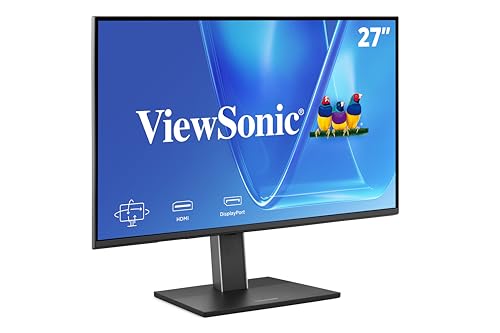
ViewSonic VG2751 27-Inch 1080p Monitor
Best for: office setups needing ergonomic adjustability
- Screen Size
- 27-Inch
- Resolution
- 1920 x 1080
- Refresh Rate
- 100Hz
- Panel Type
- IPS
- Ports
- USB-C, HDMI, DisplayPort, VGA
- Features
- Height-Adjustable Stand, USB Hub
This ViewSonic VG2751 is a 27-inch IPS monitor with 1080p resolution and a 100Hz refresh rate. It connects via USB-C, HDMI, DisplayPort, and VGA. The stand offers height, tilt, swivel, and rotate adjustments. Eye care features include Flicker-Free technology and a Blue Light Filter. It is designed for business, office, and home office use.
- 27-inch IPS panel with 100Hz refresh rate
- USB-C port with passthrough power
- Fully adjustable ergonomic stand
- Flicker-Free and Blue Light Filter technology
- 1080p resolution is lower than the 1440p and 4K options on this list
- 65W USB-C power delivery is less than the 100W on the ViewSonic VG2458
- 15-pound weight is heavier than some competitors
- You need a 27-inch screen with a 100Hz refresh rate
- You want a monitor with a fully adjustable stand
- You require USB-C connectivity for a single-cable setup
- You need 4K resolution for professional color work
- You require 100W USB-C power delivery for your laptop
- You prefer a lighter monitor under 10 pounds
Verdict: ViewSonic VG2751 27-Inch 1080p USB-C Monitor suits office workers who value ergonomic adjustability and a 100Hz refresh rate over higher resolution. It is a solid choice for those prioritizing screen size and connectivity flexibility.

ViewSonic VG2458 24-Inch 1080p Docking Monitor
Best for: wired Ethernet connectivity and laptop docking
- Screen Size
- 24"
- Resolution
- 1920 x 1080
- Refresh Rate
- 100Hz
- Panel Type
- IPS
- Ports
- USB-C, HDMI, DisplayPort, RJ45
- Features
- Height-Adjustable Stand, USB Hub
The ViewSonic VG2458 is a 24-inch 1080p IPS monitor designed for office environments. It features a 100Hz refresh rate and 100W USB-C charging. The standout specification is the built-in RJ45 Ethernet port, which distinguishes it from other alternatives. It includes a height-adjustable stand and supports daisy-chaining. This monitor suits professionals who need a reliable docking solution with wired network connectivity for their workspace.
- Built-in RJ45 Ethernet port for wired networking
- 100W USB-C charging for laptops
- 100Hz refresh rate on IPS panel
- Height-adjustable stand with tilt, swivel, and rotate
- 24-inch screen size is smaller than the 27-inch or 32-inch options on this list
- 1080p resolution is lower than the 1440p or 4K displays available elsewhere
- 13.6-pound weight is heavier than typical 24-inch monitors
- You need a wired Ethernet connection on your monitor
- You prefer a 24-inch display for close-up work
- You require 100W USB-C power delivery for your laptop
- You need a 27-inch or larger screen
- You require 4K or 1440p resolution
- You prefer wireless networking over wired connections
Verdict: The ViewSonic VG2458 24-Inch 100W USB-C Docking Monitor is a practical choice for users who prioritize wired Ethernet connectivity and compact desk setups. It fits professionals who value the RJ45 port and 100W charging over higher resolution or larger screen size.
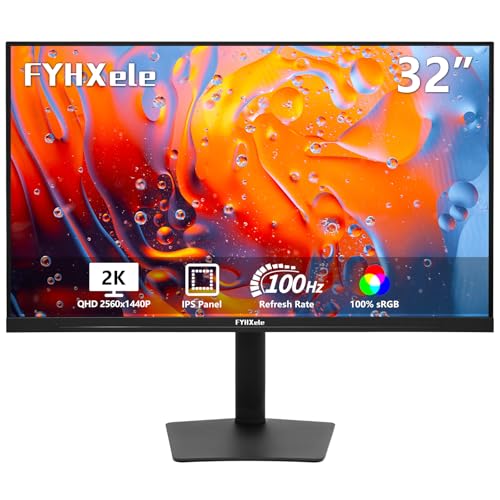
FYHXele 32 Inch Touchscreen Monitor
Best for: Users needing a large touchscreen display
- Screen Size
- 32"
- Refresh Rate
- 100Hz
- Panel Type
- IPS
- Ports
- USB-C, HDMI, DisplayPort
- Resolution
- 1440p QHD
- Features
- Height-Adjustable Stand, Touchscreen
This FYHXele monitor offers a 32-inch QHD display with 100Hz refresh rate and IPS panel. It includes a 10-point touchscreen for direct interaction. The USB-C port supports video and charging. You get a fully adjustable stand with height, swivel, tilt, and rotation. It suits users needing a large, responsive screen for office or creative work.
- 32-inch QHD resolution for sharp imagery
- 100Hz refresh rate for smoother motion
- 10-point touchscreen for intuitive control
- Height-adjustable, swivel, tilt, and rotate stand
- USB-C port for video and charging
- 32-inch size is larger than the 27-inch standard on this list
- 100Hz refresh rate is lower than the 1440p 100W USB-C option
- Touch function is incompatible with gaming consoles like PS5 or Switch
- You need a large 32-inch screen for detailed work
- You want direct touchscreen interaction for presentations or design
- You require a fully adjustable stand for ergonomic comfort
- You prefer a standard 27-inch monitor size
- You need compatibility with gaming consoles like Xbox or Switch
- You require a higher refresh rate than 100Hz
Verdict: FYHXele 32 Inch QHD Touchscreen Monitor provides a large, responsive display for users who value size and direct interaction. It fits those needing a spacious screen for creative or office tasks where touch input is beneficial.

ASUS ProArt 27-Inch 4K USB-C Monitor
Best for: Professional color work and precise calibration needs
- Screen Size
- 27 inches
- Panel Type
- IPS
- Response Time
- 5.0 milliseconds
- Ports
- USB-C, DisplayPort, HDMI, USB 3.1
- Resolution
- 4K UHD
- Features
- Height-Adjustable Stand, USB Hub, Power Delivery
This ASUS ProArt PA279CV is a 27-inch 4K UHD IPS monitor designed for professional color work. It features Calman Verified accuracy with Delta E < 2 and covers 100% sRGB and Rec. 709. You get USB-C connectivity with 65W power delivery and a built-in USB hub. The stand is height-adjustable, and it includes a five-year warranty. This model suits creators who need precise color reproduction and reliable connectivity for their workflow.
- 27-inch 4K UHD IPS panel for sharp detail
- Calman Verified with Delta E < 2 color accuracy
- 100% sRGB and 100% Rec. 709 color gamut coverage
- USB-C port with 65W power delivery and USB hub
- Height-adjustable stand for ergonomic positioning
- 65W USB-C power delivery is lower than the 100W option on the ViewSonic VG2458
- 19-pound weight is heavier than the 27-inch 1080p BenQ and ViewSonic models on this list
- 27-inch size is smaller than the 32-inch FYHXele touchscreen alternative
- You need factory-calibrated color accuracy for professional design work
- You want a single cable for video, data, and 65W charging
- You require a height-adjustable stand for ergonomic comfort
- You need 100W USB-C power delivery for high-power laptops
- You prefer a larger 32-inch display for more screen real estate
- You are on a tight budget and need a lower-cost 1080p option
Verdict: The ASUS ProArt PA279CV 27-Inch 4K Monitor delivers professional-grade color accuracy and versatile USB-C connectivity for content creators who prioritize precision over raw power delivery or large screen size.

ASUS 27-Inch QHD Conferencing Monitor
Best for: video conferencing with 1440p clarity
- Screen Size
- 27-inch
- Resolution
- 2560×1440
- Panel Type
- IPS
- Ports
- HDMI, DisplayPort, USB-C
- Features
- Built-in Speakers, Height-Adjustable Stand, USB Hub, Webcam
- Dimensions
- 28.1 × 8.98 × 19.8 inches
This 27-inch monitor features a 1440p QHD IPS panel and a built-in Full HD webcam with AI noise-canceling. It includes a USB-C port for video, data, and power delivery, along with stereo speakers. The frameless design supports multitasking, and the stand offers height adjustment. It suits users who need integrated communication tools and higher resolution than 1080p.
- 27-inch WQHD 1440p IPS display
- Built-in Full HD webcam with AI noise-canceling
- USB-C port with power delivery
- Integrated stereo speakers
- Height-adjustable stand
- 1440p resolution is lower than the 4K UHD panels on the ASUS ProArt and ViewSonic VX2776
- 23.6 pounds weight is heavier than the 27-inch BenQ GW2786TC and ViewSonic VG2751
- No RJ45 Ethernet port unlike the ViewSonic VG2458
- You need a built-in webcam for video calls
- You want 1440p resolution on a 27-inch screen
- You prefer a frameless design for multitasking
- You require 4K UHD resolution
- You need an Ethernet port for wired internet
- You want a lighter monitor under 20 pounds
Verdict: ASUS BE27ACSBK 27-Inch QHD USB-C Monitor integrates a Full HD webcam and 1440p display for users prioritizing video conferencing clarity and sharp visuals over 4K resolution.

ViewSonic 27-Inch 4K USB-C Monitor
Best for: 4K home office setups with USB-C laptops
- Screen Size
- 27 Inch
- Resolution
- 3840 x 2160
- Panel Type
- IPS
- Ports
- USB-C, HDMI, DisplayPort
- Features
- HDR, Built-in Speakers, Power Delivery
- Use
- Business & Office, Mac, Office, Home Office
This 27-inch IPS monitor delivers 4K UHD resolution for sharp detail. It uses a single USB-C cable for video, data, and 65W charging. HDR10 support enhances contrast in media. Eye care features like Flicker-Free technology reduce fatigue. It includes built-in speakers and multiple ports for flexible connectivity in a home office setup.
- 4K UHD resolution for high detail
- 65W USB-C power delivery
- HDR10 content support
- Built-in speakers
- Flicker-Free eye care technology
- 1080p refresh rate is lower than the 100Hz or 144Hz options on this list
- 65W charging is less than the 100W offered by the ViewSonic VG2458
- No built-in webcam unlike the ASUS BE27ACSBK
- You need 4K clarity for detailed work
- You want a single USB-C cable for charging and display
- You prefer monitors with HDR10 support
- You require a resolution higher than 4K
- You need more than 65W of USB-C charging power
- You want a monitor with a built-in webcam
Verdict: ViewSonic VX2776 27-Inch 4K USB-C Monitor suits users who prioritize sharp 4K visuals and efficient USB-C connectivity over high refresh rates or extra power delivery.
Specifications side by side

| Spec | BenQ 27-Inch 1080p USB-C IPS Monitor | ViewSonic VG2751 27-Inch 1080p Monitor | ViewSonic VG2458 24-Inch 1080p Docking Monitor | FYHXele 32 Inch Touchscreen Monitor | ASUS ProArt 27-Inch 4K USB-C Monitor | ASUS 27-Inch QHD Conferencing Monitor | ViewSonic 27-Inch 4K USB-C Monitor |
|---|---|---|---|---|---|---|---|
| Screen Size | 27 Inch | 27-Inch | 24" | 32" | 27 inches | 27-inch | 27 Inch |
| Resolution | 1080p | 1920 x 1080 | 1920 x 1080 | – | – | 2560×1440 | 3840 x 2160 |
| Refresh Rate | 100Hz | 100Hz | 100Hz | 100Hz | – | – | – |
| Panel Type | IPS | IPS | IPS | IPS | IPS | IPS | IPS |
| Response Time | – | – | – | – | 5.0 milliseconds | – | – |
| Ports | USB-C | USB-C, HDMI, DisplayPort, VGA | USB-C, HDMI, DisplayPort, RJ45 | USB-C, HDMI, DisplayPort | USB-C, DisplayPort, HDMI, USB 3.1 | HDMI, DisplayPort, USB-C | USB-C, HDMI, DisplayPort |
| Features | Height-Adjustable Stand, USB Hub | Height-Adjustable Stand, USB Hub | Height-Adjustable Stand, USB Hub | Height-Adjustable Stand, Touchscreen | Height-Adjustable Stand, USB Hub, Power Delivery | Built-in Speakers, Height-Adjustable Stand, USB Hub, Webcam | HDR, Built-in Speakers, Power Delivery |
| Use | Business & Office, Office | Business & Office, Mac, Office, Home Office | Business & Office, Mac, Office, Home Office | Gaming, Business & Office, Office | – | – | Business & Office, Mac, Office, Home Office |
| Size | 27 Inch | 27 Inch | 12.5" x 21.2" x 1.8" | – | 27 Inch | 27 Inch | 27 Inch |
| Operating System | – | macOS | macOS | – | – | – | macOS |
| Dimensions | 9 × 24 × 18 inches | 8.6 × 24.1 × 15.8 inches | 8.08 × 21.2 × 19.9 inches | 2.69 × 28.2 × 16.7 inches | 20.6 × 24.2 × 8.97 inches | 28.1 × 8.98 × 19.8 inches | 8.2 × 24.2 × 17.2 inches |
| Weight | 9.1 pounds | 15 pounds | 13.6 pounds | – | 19 pounds | 23.6 pounds | 8.6 pounds |
| Color | White | Black | Black | Black-32" | BLACK | BLACK | Black |
| Model | GW2786TC | VG2751 | VG2458 | FYHXTGM | PA279CV | BE27ACSBK | VS19281 |
Frequently asked questions
Is there a 4K alternative to the BenQ 27-inch 1080p monitor?
Yes, the ASUS ProArt PA279CV and ViewSonic VX2776 both offer 4K UHD resolution. The ASUS model targets professional color work with precise calibration, while the ViewSonic option suits home office setups with efficient USB-C connectivity. Both maintain the 27-inch size and IPS panel type found in the original BenQ monitor.
Which alternative has the best built-in webcam?
The ASUS BE27ACSBK includes a Full HD webcam integrated into the display. It pairs this feature with a 1440p QHD screen, providing sharper visuals than 1080p options. This setup prioritizes video conferencing clarity and sharp images for users who need reliable communication tools without external hardware.
Can I find a monitor with Ethernet connectivity?
The ViewSonic VG2458 provides wired Ethernet connectivity via an RJ45 port. This 24-inch model focuses on laptop docking and compact desk setups. It includes a 100W USB-C port for charging, making it practical for professionals who value stable network connections and efficient power delivery over larger screen sizes.
Is there a touchscreen option in this list?
The FYHXele FYHXTGM is a 32-inch QHD touchscreen monitor. It offers a large, responsive display suitable for creative or office tasks where direct interaction is beneficial. This model provides a spacious screen and height-adjustable stand, catering to users who prioritize size and touch input over standard monitor functions.
Do these alternatives support USB-C power delivery?
Several models support USB-C power delivery. The ASUS ProArt PA279CV and ViewSonic VX2776 both include power delivery features alongside their USB-C ports. The ViewSonic VG2458 also offers 100W charging. These features allow you to connect your laptop and charge it simultaneously through a single cable connection.
Which monitor is best for professional color accuracy?
The ASUS ProArt PA279CV is designed for professional color work and precise calibration needs. It delivers 4K UHD resolution on a 27-inch IPS panel. This monitor prioritizes color precision over raw power delivery or large screen size, making it ideal for content creators who require accurate visual representation.
Are there options with built-in speakers?
Yes, the ASUS BE27ACSBK and ViewSonic VX2776 include built-in speakers. The ASUS model integrates audio with its Full HD webcam and 1440p display. The ViewSonic option provides audio alongside its 4K visuals. These features help reduce cable clutter by eliminating the need for external audio devices.
See also