BENFEI HDMI and DisplayPort Adapters: Decisive Buyer Guide
As Amazon Associates, we earn from qualifying purchases. This means we may receive a small commission at no extra cost to you if you click through and make a purchase.
Connecting modern display hardware frequently presents an unexpected stumbling block: signal directionality. If you are searching for a benfei hdmi to displayport solution, verifying the transmission path prior to purchase is essential. DisplayPort and HDMI rely on fundamentally incompatible signaling protocols. DisplayPort sends packetized micro-packets across low-voltage differential signaling lanes, while HDMI uses Transition-Minimized Differential Signaling (TMDS). Standard conversion hardware operates strictly in one direction. Routing an HDMI source from a laptop to a DisplayPort monitor requires an active converter to synthesize TMDS data into DisplayPort packets. Conversely, connecting a DisplayPort graphics card to an HDMI display relies on level-shifting circuits. Choosing the wrong direction results in a blank screen.
This benfei adapter cable comparison examines four hardware models built by BENFEI to solve these connection challenges. These products divide cleanly into two operational groups based on signal direction and form factor. Two models function as DisplayPort-to-HDMI converters—a modular pocket dongle and an integrated three-foot cable—both delivering dependable 4K at 30Hz or 1080p at 60Hz. The remaining two models operate in reverse as active HDMI-to-DisplayPort converters, offering high-bandwidth performance reaching 4K at 60Hz and 1080p at 165Hz. By evaluating port orientations, resolution thresholds, and cable builds, this guide helps busy professionals choose the correct adapter immediately.
Which BENFEI HDMI to DisplayPort Adapters Should You Buy

Best for: Direct HDMI console connections to DP screens
Pros
- Complete six-foot braided nylon build
- Supports 4K 60Hz and 2K 144Hz
- Aluminum alloy heat-dissipating shell
Cons
- Less portable than compact dongles
- Fixed cable length cannot be extended

Best for: High-refresh HDMI laptops connecting to DisplayPort monitors
Pros
- Full 4K at 60Hz and 1080p at 165Hz
- Ultra-compact one-ounce form factor
- HDCP 2.2 and HBR2 support
Cons
- Requires standalone DisplayPort cable
- Unidirectional HDMI source limitation
- For connecting an enterprise desktop DisplayPort output to an HDMI monitor or projector: BENFEI 4K DisplayPort to HDMI Adapter.
- For direct single-cable routing from a DisplayPort tower to an adjacent HDMI screen: BENFEI 4K DisplayPort to HDMI 3.
- For linking an HDMI laptop or console to a high-resolution DisplayPort monitor at 4K 60Hz: BENFEI HDMI to DisplayPort.
- For durable six-foot cabling from an HDMI workstation or console to a high-refresh DisplayPort display: BENFEI HDMI to DisplayPort Cable.
BENFEI 4K DisplayPort to HDMI Adapter

Benfei
8.4/10 Our score
- Color
- Black
- Size
- 4K@30Hz
- Weight
- 0.06 pounds
Listed by the seller on the product page.
Best for: Clutter-free direct desktop DisplayPort to HDMI runs
Pros
- Integrated three-foot direct cable
- Uncompressed multi-channel audio pass-through
- Latch-release DisplayPort head
Cons
- Limited three-foot reach
- Restricted to 30Hz at 4K
Best for: Legacy DisplayPort desktops connecting to HDMI displays
Pros
- Secure locking latch
- Pocket-sized modular build
- Broad resolution compatibility
Cons
- 4K refresh rate capped at 30Hz
- Requires separate HDMI cable
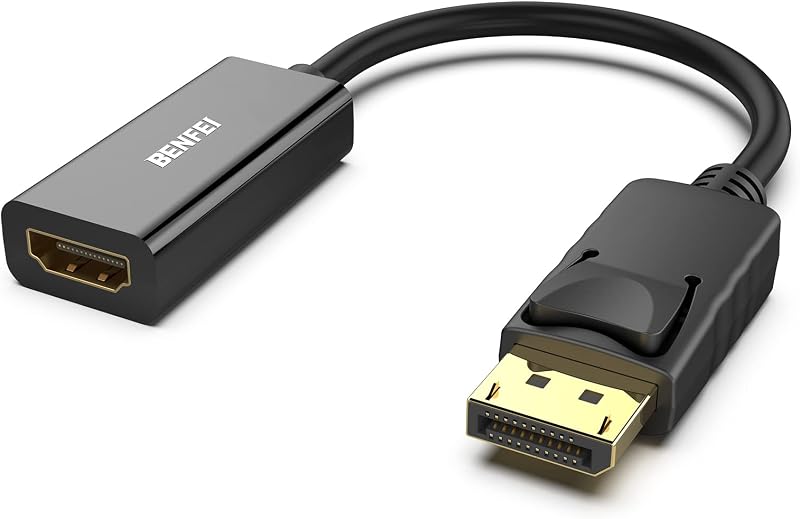
The BENFEI 4K DisplayPort to HDMI Adapter connects a host computer’s DisplayPort output to an HDMI monitor, television, or projector. Inside this compact dongle, an integrated circuit converts native DisplayPort signaling into an HDMI-compatible TMDS stream. This hardware operates strictly unidirectionally; it cannot convert an HDMI source signal for a DisplayPort display. The pocketable form factor stows easily in a laptop bag for presentations and multi-display desktop expansion.
The internal converter supports resolutions up to 3840×2160 at 30Hz, alongside 1920×1080 at 60Hz, 1600×1200, 1280×1024, and 720p. The unit runs on bus power with an input rating of 12 volts and 1A, drawing a nominal 12 watts from the video port. Gold-plated DisplayPort contacts resist corrosion and maintain steady signal transfer. A mechanical latching system anchors the male plug into the source port, preventing accidental disconnections from desk movement.
This adapter suits professionals using an existing HDMI cable with a DisplayPort tower or corporate dock. When setting up multi-screen environments alongside a plugable docking station dual monitor configuration, this dongle adapts standard DisplayPort outputs to HDMI screens cleanly. It gives way if your source machine outputs HDMI or if your workflow requires 4K at 60Hz.
- DisplayPort male connector with mechanical release latches
- Internal IC supporting resolutions up to 3840×2160 at 30Hz and 1080p at 60Hz
- Gold-plated contacts resisting corrosion and signal degradation
- Unconditional 18-month manufacturer warranty protection
BENFEI 4K DisplayPort to HDMI 3

Benfei
9.4/10 Our score
- Color
- Black
- Size
- 6 Feet
- Weight
- 0.09 Pounds
Listed by the seller on the product page.
The BENFEI 4K DisplayPort to HDMI 3 feet cable houses conversion hardware inside an integrated direct-attach cable. Terminated with a male DisplayPort plug on one end and a male HDMI plug on the other, it removes the need for an intermediate HDMI lead. Designed for organized desks, this three-foot cable uses an advanced IC chipset with multi-layer shielding. This unit is strictly a benfei displayport to hdmi converter and cannot transmit signals from an HDMI computer to a DisplayPort screen.
Technical specifications include a 39-pin architecture and a rated transfer speed of 2.25 Gbps. It supports display resolutions up to 3840×2160 at 30Hz, 1920×1080 at 60Hz, 1600×1200, and 720p. Beyond sharp video output, the cable delivers uncompressed digital audio pass-through for 7.1, 5.1, or 2-channel sound configurations. Its maximum voltage tolerance reaches 15 volts, providing durable electrical isolation against standard line fluctuations.
This cable suits professionals seeking an uncluttered desk where a PC tower sits beside an HDMI monitor. The three-foot length minimizes cable clutter, while the latching DisplayPort connector prevents accidental disconnection. It yields when your source computer relies on an HDMI port, or when greater cable reach is required across wider desk arrangements.
- Three-foot direct male-to-male cable eliminating extra patching cords
- Multi-layer shielding delivering 2.25 Gbps throughput across 39 pins
- Uncompressed audio pass-through for 7.1, 5.1, and 2-channel sound
- Latching DisplayPort connector backed by an 18-month warranty
BENFEI HDMI to DisplayPort

Benfei
8.4/10 Our score
- Color
- Black
- Size
- 1 PACK
- Weight
- 0.0625 Pounds
Listed by the seller on the product page.
The BENFEI HDMI to DisplayPort adapter is the active hardware solution for connecting an HDMI computer to a DisplayPort monitor. Inside its compact shell, a dedicated conversion IC translates HDMI TMDS signals into native DisplayPort digital data. This device is strictly unidirectional; it operates solely from an HDMI source to a DisplayPort screen and will not convert in reverse. Measuring 0.79 x 1.18 x 0.79 inches and weighing one ounce, this portable dongle fits easily into any travel kit.
Resolution support is higher on this active adapter. Compliant with DisplayPort 1.2a, HDMI 2.0, and HBR2 standards, it handles 3840×2160 at 60Hz, 2560×1600 at 144Hz, and 1080p at 165Hz. It also features HDCP 1.3, 1.4, and 2.2 compliance alongside 8-channel digital audio support up to 192kHz. The converter operates on a 5V DC input at 1.2A, drawing power directly from the source HDMI interface without requiring external power supplies.
This adapter is ideal for users connecting HDMI laptops, notebooks, or gaming consoles to high-resolution DisplayPort monitors. While mobile users might consider a cable matters usb c to hdmi cable for USB-C laptops, this adapter is the exact tool needed when connecting a native HDMI host port to a DisplayPort screen. Because it ends in a female DisplayPort jack, a separate DisplayPort cable is required.
- Active IC converting HDMI 2.0 source input to DisplayPort 1.2a output
- High-resolution performance supporting 4K at 60Hz and 1080p at 165Hz
- HDCP 2.2 compliance, HBR2 support, and 8-channel digital audio
- Compact one-ounce chassis backed by an 18-month warranty
BENFEI HDMI to DisplayPort Cable

The BENFEI HDMI to DisplayPort Cable provides a six-foot direct link from an HDMI source to a DisplayPort monitor. Integrating active conversion circuitry into the connector housing eliminates separate couplers. It features a braided nylon jacket for durability, an aluminum alloy casing to dissipate heat, and non-slip grips for easy handling. As a benfei unidirectional display adapter, it converts HDMI 2.0b input signals into a DisplayPort 1.4 output.
The cable accommodates demanding visual tasks, supporting resolutions up to 3840×2160 at 60Hz and high-refresh rates including 2K at 144Hz and 1080p at 165Hz. Built-in support for HBR2 and HDCP 1.4/2.3 ensures protected media streams and gaming video pass through cleanly without handshake errors. It supports 8-channel uncompressed digital audio for high-fidelity sound. Rated at 1.5A with an overall weight of 0.12 kg, it delivers dependable build quality.
This cable is the decisive recommendation for professionals and gamers connecting an HDMI desktop graphics card, laptop, PS5, or Xbox directly to a DisplayPort screen. For readers evaluating other adapter designs, our ugreen dp to hdmi guide provides useful background on unidirectional signal conversion. This cable is ideal for permanent desktop setups, giving way to the compact dongle only when portability is paramount.
- Six-foot braided nylon cable with aluminum alloy connector shells
- Active conversion pipeline converting HDMI 2.0b input to DisplayPort 1.4
- High-refresh support covering 4K at 60Hz and 1080p up to 165Hz
- HDCP 2.3 content protection and 8-channel digital audio support
What Sets These Models Apart
| Product Name | Signal Direction | Maximum Resolution | Form Factor |
|---|---|---|---|
| BENFEI 4K DisplayPort to HDMI Adapter | DisplayPort Source to HDMI Display | 3840×2160 @ 30Hz | Compact Dongle (Female HDMI) |
| BENFEI 4K DisplayPort to HDMI 3 | DisplayPort Source to HDMI Display | 3840×2160 @ 30Hz | 3-Foot Cable (Male-to-Male) |
| BENFEI HDMI to DisplayPort | HDMI Source to DisplayPort Display | 3840×2160 @ 60Hz | Pocket Dongle (Female DP) |
| BENFEI HDMI to DisplayPort Cable | HDMI Source to DisplayPort Display | 3840×2160 @ 60Hz | 6-Foot Braided Cable (Male-to-Male) |
Buying Tips for BENFEI HDMI to DisplayPort Adapters
When deciding which benfei adapter cable to buy, your first task is confirming the signal direction between your devices. DisplayPort and HDMI use different transmission architectures. Dual-mode DisplayPort (DP++) allows a DisplayPort computer to output HDMI signals passively using simple level shifters. In contrast, an HDMI output cannot output DisplayPort signals without an active converter chip that reconstructs the TMDS video stream into DisplayPort micro-packets. If your host computer has an HDMI port and your monitor requires DisplayPort, you must choose an active HDMI-to-DisplayPort model.
Resolution and refresh rate requirements should match your daily workload. For standard spreadsheets, document editing, and web browsing, 4K at 30Hz or 1080p at 60Hz provides crisp visuals. However, creative professionals editing video or gamers seeking responsive control will find 30Hz noticeably laggy. In those situations, choosing hardware that supports benfei hdmi to dp 4k 60hz or 1080p at 165Hz ensures smooth mouse tracking and clean video playback.
Finally, consider the physical layout of your workspace. Integrated cables provide a clean connection between your computer and screen, reducing intermediate joints that can loosen over time. A three-foot run works well when the PC sits next to the monitor, while a six-foot braided cable provides the length required for height-adjustable sit-stand desks. If you already have existing cables, a modular dongle keeps your workspace flexible and light for travel.
FAQ
Can a BENFEI DisplayPort to HDMI adapter work in reverse to connect an HDMI PC to a DisplayPort monitor?
No, standard BENFEI DisplayPort to HDMI adapters are strictly unidirectional. They convert DisplayPort source signals into HDMI monitor signals. Connecting one of these adapters to an HDMI port on a computer will not produce an image on a DisplayPort screen. To connect an HDMI computer to a DisplayPort monitor, you must use a dedicated active HDMI-to-DisplayPort adapter.
Why is 4K output limited to 30Hz on some BENFEI DisplayPort to HDMI models?
The 30Hz limit on entry-level DisplayPort to HDMI adapters is determined by the bandwidth of their internal level-shifting chips. Delivering 4K at 60Hz requires roughly 18 Gbps of throughput, while basic level-shifter chips operate at lower data rates. While 30Hz is adequate for office productivity, workflows demanding fluid motion benefit from higher-bandwidth active adapters.
Does the BENFEI HDMI to DisplayPort adapter require external power to operate?
The BENFEI HDMI to DisplayPort adapter draws power directly through the 5V DC line of the source HDMI port at 1.2A. Standard desktop graphics cards, modern laptops, and gaming consoles supply sufficient bus power to run the internal conversion chip without requiring an external wall adapter or separate USB power cable.
Will these BENFEI adapters support high-refresh-rate gaming on 144Hz and 165Hz monitors?
Yes, high-refresh-rate gaming is supported on the active HDMI-to-DisplayPort models. Both the modular dongle and the six-foot cable support 2560×1600 at 144Hz and 1080p at 165Hz under DisplayPort HBR2 specifications. Conversely, the DisplayPort-to-HDMI models are limited to 60Hz at 1080p and 30Hz at 4K.
How do the mechanical latching DisplayPort connectors on BENFEI adapters disconnect safely?
BENFEI DisplayPort connectors feature mechanical retention latches to prevent accidental disconnections. To remove the connector safely, press down firmly on the release button on top of the connector shell. This retracts the locking pins, allowing you to pull the connector free without damaging the video port.
Selecting the correct adapter configuration prevents unwanted signal loss and keeps complex workstation displays running at their intended refresh rates. If your setup includes high-draw computing infrastructure or studio equipment, reviewing our Power Rack Guide can help you safely manage connected devices alongside these video runs. Double-checking both cable directionality and overall layout ensures reliable day-to-day display performance.