Belkin Thunderbolt 4 Triple Display vs Belkin 140W Thunderbolt™ 5 Dock: Spec Comparison
As Amazon Associates, we earn from qualifying purchases. This means we may receive a small commission at no extra cost to you if you click through and make a purchase.
As an Amazon Associate we earn from qualifying purchases. Links on this page are affiliate links.
You are comparing the belkin thunderbolt 4 triple display vs 140w thunderbolt 5 dock. Both are 14-in-1 hubs with triple display support, 2.5Gb Ethernet, and 96W or 140W power delivery. They share a gray finish and Belkin Smart Safety System. The main difference lies in their Thunderbolt generation. The T4 model offers 40Gbps speeds and 4K@60Hz video. The T5 model doubles the bandwidth to 80Gbps and supports 4K@144Hz refresh rates for smoother visuals.
Thunderbolt Generation
Thunderbolt 4
Thunderbolt 5
Data Transfer Speed
Up to 40Gbps
Up to 80Gbps
Video Refresh Rate
4K@60Hz
4K@144Hz
Power Delivery
96W
140W
Max Resolution
4K
8K@60Hz
Weight
2.55 pounds
not listed
Choose the first if
- You need reliable 4K@60Hz output for standard productivity tasks.
- You prefer a dock with a listed weight of 2.55 pounds for desk planning.
- You want 96W power delivery for most laptops without needing higher wattage.
Choose the second if
- You require high refresh rates up to 144Hz for smoother motion.
- You need faster data transfers at 80Gbps for large media files.
- You charge power-hungry laptops needing up to 140W of power delivery.
Verdict
The Thunderbolt 4 dock suits users who need solid triple-display performance at 60Hz. The Thunderbolt 5 dock is better for those needing higher refresh rates and faster data speeds. Choose the T5 version if you want future-proof bandwidth and smoother visuals.
Thunderbolt 5 vs Thunderbolt 4 Specs

Thunderbolt Speed
Edge: Belkin 140W Thunderbolt 5 Dock
The Belkin 140W Thunderbolt 5 Dock offers data transfer speeds up to 80Gbps, with a bandwidth boost reaching 120Gbps. This is a significant upgrade over the Belkin Thunderbolt 4 Triple Display Dock, which provides standard 40Gbps transfer rates. If you frequently move large files or high-resolution media, the higher bandwidth of the Thunderbolt 5 model ensures smoother workflows. The Thunderbolt 4 dock remains capable for general tasks, but the newer standard in the 140W model provides more headroom for demanding data-intensive applications.
Display Refresh Rate
Edge: Belkin 140W Thunderbolt 5 Dock
Both docks support triple 4K monitors, but they differ in refresh rates. The Belkin 140W Thunderbolt 5 Dock supports displays at 4K@144Hz, while the Belkin Thunderbolt 4 Triple Display Dock is limited to 4K@60Hz. The higher refresh rate on the Thunderbolt 5 dock allows for smoother motion and better responsiveness, which is beneficial for gaming or fast-paced video editing. The Thunderbolt 4 dock is sufficient for standard productivity and streaming at 60Hz, but the 144Hz capability gives the Thunderbolt 5 model a clear advantage for high-frame-rate content.
Power Delivery
Edge: Belkin 140W Thunderbolt 5 Dock
Power delivery capabilities vary between the two hubs. The Belkin 140W Thunderbolt 5 Dock delivers up to 140W of power to your host laptop through a single USB-C cable. In contrast, the Belkin Thunderbolt 4 Triple Display Dock provides up to 96W. The higher wattage on the Thunderbolt 5 dock allows you to charge more power-hungry devices, such as larger MacBook Pros, without draining the dock's resources. If your laptop requires more than 96W to charge efficiently while running multiple peripherals, the 140W model is the better choice.
Daisy Chaining
Edge: Belkin 140W Thunderbolt 5 Dock
Both docks allow you to expand your workspace by connecting additional devices. The Belkin Thunderbolt 5 Dock supports daisy chaining up to six Thunderbolt devices through the host laptop. The Belkin Thunderbolt 4 Triple Display Dock also supports daisy chaining but does not specify a maximum number of devices in the provided data. The Thunderbolt 5 standard generally supports more devices in a chain due to its increased bandwidth. This makes the 140W model more suitable for complex setups requiring multiple high-speed peripherals.
Weight and Build
Edge: Tie
The Belkin Thunderbolt 4 Triple Display Dock has a listed weight of 2.55 pounds. The Belkin 140W Thunderbolt 5 Dock does not have a weight specification listed in the data. Both docks share a gray color and a similar 14-in-1 port layout. They also both include the Belkin Smart Safety System with a 6-point protection mechanism. Without weight data for the Thunderbolt 5 model, it is difficult to determine if one is more portable or stable than the other. Both appear to be built for stationary desk use.
Choose Your Belkin Dock By Need

High-refresh gaming or creative pro
Our pick: Belkin 140W Thunderbolt 5 Dock
The Belkin 140W Thunderbolt 5 Dock supports 4K at 144Hz refresh rates. This matters if you need smoother motion for gaming or fast-paced video editing. The 80Gbps bandwidth also helps with large media files. If visual fluidity and speed are your priorities, this dock delivers the higher performance specs you require for demanding tasks.
Standard office multitasker
Our pick: Belkin Thunderbolt 4 Triple Display Dock
The Belkin Thunderbolt 4 Triple Display Dock handles 4K at 60Hz. This is sufficient for standard office work, spreadsheets, and web browsing. It still offers 40Gbps data speeds and 96W power delivery. If you do not need extreme frame rates or massive bandwidth, this model provides all the essential connectivity for a clean, efficient workstation setup.
Heavy file transfer user
Our pick: Belkin 140W Thunderbolt 5 Dock
You move large files and high-resolution media frequently. The Thunderbolt 5 dock offers up to 80Gbps transfer speeds, double the Thunderbolt 4 model. The 120Gbps bandwidth boost further accelerates data movement. If your workflow relies on quick backups or editing high-res video directly from the dock, this higher speed spec saves you significant time.
Budget-conscious power user
Our pick: Belkin Thunderbolt 4 Triple Display Dock
You want triple display support and strong power delivery without the premium cost of the latest interface. The Thunderbolt 4 dock provides 96W charging and 40Gbps speeds. It includes 2.5Gb Ethernet and 14 ports. If you do not need 144Hz refresh rates or 80Gbps data transfer, this model meets your core expansion needs effectively.

Belkin Thunderbolt 4 Triple Display Dock
Best for: Triple 4K@60Hz setups with 96W charging
- Display Support
- Triple
- Max Resolution
- 4K@60Hz
- Host Interface
- Thunderbolt 4
- Power Delivery
- 96W
- Data Transfer Speed
- 40Gbps
- Video Ports
- HDMI
This Belkin dock expands your workspace with 14 ports, including triple 4K@60Hz monitor support and 2.5Gb Ethernet. It delivers 96W of power to your laptop while transferring data at 40Gbps. The unit weighs 2.55 pounds and includes a Kensington lock. It suits users needing a single-cable connection for multiple displays and fast wired networking.
- Supports up to 3 extended monitors at 4K@60Hz
- Delivers 96W power delivery to your laptop
- Features 2.5Gb Ethernet for faster wired networking
- Provides 40Gbps data transfer speeds
- Includes a Kensington lock for security
- Offers 96W power delivery, which is less than the 140W on the other product
- Weighs 2.55 pounds, adding bulk to your setup
- Limited to Thunderbolt 4 speeds, unlike the Thunderbolt 5 alternative
- You need to drive three 4K displays simultaneously
- You require a 2.5Gb Ethernet connection for stable networking
- You want a single cable to charge your laptop and connect peripherals
- You need more than 96W of power delivery for your laptop
- You want the highest possible data transfer speeds available
- You prefer a lighter docking station for portability
Verdict: Belkin Thunderbolt 4 Triple Display Dock is a solid choice for professionals who need triple 4K@60Hz monitors and 96W charging. It fits users who prioritize wired networking speed over maximum power delivery.
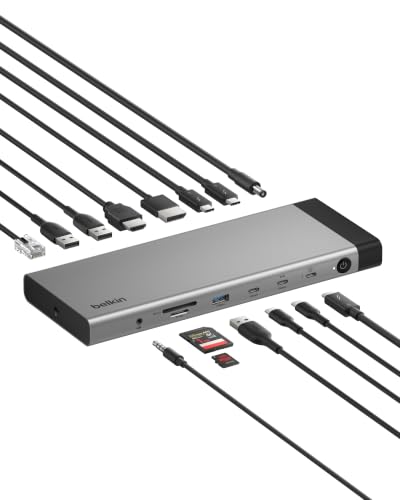
Belkin 140W Thunderbolt 5 Dock
Best for: Triple 4K setups and high-speed data transfer
- Display Support
- Triple
- Max Resolution
- 8K@60Hz, 4K@144Hz
- Host Interface
- Thunderbolt 5
- Power Delivery
- 140W
- Data Transfer Speed
- 80Gbps
- Total Ports
- 14
This Belkin dock uses Thunderbolt 5 to deliver up to 80Gbps data speeds and 140W power delivery. It supports triple 4K displays at 144Hz or a single 8K screen. The unit includes a 2.5Gb Ethernet port for fast wired networking. You get 14 ports in total, allowing you to connect multiple peripherals. It is designed for users who need high bandwidth and robust video output for demanding workflows.
- Thunderbolt 5 interface with 80Gbps transfer speeds
- 140W power delivery for host laptops
- Supports triple 4K@144Hz or single 8K@60Hz displays
- Built-in 2.5Gb Ethernet port
- 14 total expansion ports
- Thunderbolt 5 standard may require newer host devices
- Higher port count increases desk footprint
- 140W power is shared across all connected devices
- You need to drive three 4K monitors simultaneously
- You require fast 2.5Gb wired internet speeds
- You want to charge a laptop while connecting many peripherals
- You only need a single display connection
- Your laptop does not support Thunderbolt 5
- You prefer a compact single-port USB-C hub
Verdict: Belkin 140W Thunderbolt 5 Dock is a high-capacity hub for professionals who need triple 4K output and 140W charging. It suits users with compatible Thunderbolt 5 laptops who require extensive port expansion and fast Ethernet.
Specifications side by side

| Spec | Belkin Thunderbolt 4 Triple Display Dock | Belkin 140W Thunderbolt 5 Dock |
|---|---|---|
| Display Support | Triple | Triple |
| Max Resolution | 4K@60Hz | 8K@60Hz, 4K@144Hz |
| Host Interface | Thunderbolt 4 | Thunderbolt 5 |
| Power Delivery | 96W | 140W |
| Data Transfer Speed | 40Gbps | 80Gbps |
| Video Ports | HDMI | – |
| Total Ports | 14 | 14 |
| Ethernet Speed | 2.5GbE | 2.5Gb |
| Resolution | – | 4K UHD |
| Refresh Rate | – | 144Hz |
| Ports | USB-C, Ethernet, Thunderbolt 4 | USB-C, Ethernet, Thunderbolt 4 |
| Use | Mac | – |
| Operating System | macOS | – |
| Weight | 2.55 pounds | – |
| Color | Gray | Gray |
| Model | INC030ttSGY | INC031ttSGY |
Frequently asked questions
Which Belkin dock supports higher refresh rates for gaming?
The Belkin 140W Thunderbolt 5 Dock supports 144Hz refresh rates at 4K UHD resolution. This makes it better for smooth motion in games or video editing. The Thunderbolt 4 model is optimized for steady 60Hz output on three displays, which suits office work rather than high-frame-rate tasks.
Can I use these docks with Mac computers?
Yes, both docks are compatible with macOS. The Thunderbolt 4 Triple Display Dock lists macOS as its operating system in its attributes. The Thunderbolt 5 Dock also works with Macs, provided your laptop has the required Thunderbolt ports for connection and power delivery.
How much charging power does each dock provide?
The Belkin Thunderbolt 4 Triple Display Dock provides 96W of charging power. The Belkin 140W Thunderbolt 5 Dock delivers up to 140W. If your laptop requires more than 96W, the Thunderbolt 5 version is the necessary choice to keep your device powered during heavy use.
What is the weight difference between the two docks?
The Belkin Thunderbolt 4 Triple Display Dock weighs 2.55 pounds. The specifications for the Thunderbolt 5 Dock do not list a weight. You should check the product page for the exact weight of the second model if portability is a key factor for your setup.
Do both docks include Ethernet ports?
Yes, both docks feature Ethernet ports. The Thunderbolt 4 model includes wired networking for stable internet connections. The Thunderbolt 5 dock also lists Ethernet in its ports attribute, ensuring you have wired connectivity options regardless of which version you choose for your workspace.
Which dock is better for triple 4K monitor setups?
Both docks support triple display outputs at 4K resolution. The Thunderbolt 4 model handles three 4K@60Hz screens efficiently. The Thunderbolt 5 version offers 4K at 144Hz, which is superior if you need high refresh rates on any of the three displays for creative or gaming work.
Are both docks gray in color?
Yes, both units are gray. The Thunderbolt 4 Triple Display Dock is listed as Gray. The 140W Thunderbolt 5 Dock also has a gray color specification. They share a similar visual finish, so you can match them easily if you are using both or keeping one as a backup.
What model numbers identify these Belkin docks?
The Thunderbolt 4 Triple Display Dock is model INC030ttSGY. The Thunderbolt 5 Dock is model INC031ttSGY. You can use these codes to verify compatibility with your laptop or to find the correct drivers and manuals specific to each hardware version.
See also