Looking Beyond the Belkin Thunderbolt 4 Triple Display? 6 Alternatives Worth a Look
As Amazon Associates, we earn from qualifying purchases. This means we may receive a small commission at no extra cost to you if you click through and make a purchase.
As an Amazon Associate we earn from qualifying purchases. Links on this page are affiliate links.
The Belkin Thunderbolt 4 Triple Display Dock handles three 4K monitors and delivers 96W charging through a single cable. You might look for belkin thunderbolt 4 triple display alternatives if you need more screens, faster Ethernet, or a different size. This dock works well for macOS users who value stable video output and reliable power delivery.
The 6 options here share key specifications with the original, such as Thunderbolt 4 connectivity and multi-monitor support. Some picks offer quad displays or higher wattage charging, while others provide a more compact footprint or 8K resolution. Each alternative focuses on a specific spec that differs from the Belkin model, helping you find a dock that matches your exact hardware requirements and workspace constraints.
Key differences from Belkin dock

Tobenone Quad 4K 20-in-1 DisplayLink Dock
The Tobenone Quad dock supports four 4K displays at 60Hz, adding a screen compared to the Belkin’s triple setup. It uses DisplayLink technology to achieve this expansion, which requires software drivers rather than native hardware support. The Tobenone connects via Thunderbolt 5, offering a newer interface standard. It weighs 2.27 pounds, slightly lighter than the Belkin. If you need a fourth monitor for extended multitasking, this alternative provides that extra real estate. You trade the Belkin’s 2.5Gb Ethernet for potentially different network speeds depending on the port configuration. This option suits users who prioritize maximum screen count over native video signal efficiency.
WAVLINK Quad 4K@60Hz DisplayLink Dock
The WAVLINK Quad dock also offers four 4K displays at 60Hz, exceeding the Belkin’s three-screen limit. It includes 100W Power Delivery, providing slightly more charging power than the Belkin’s 96W. This dock features a DisplayLink architecture, meaning it relies on software processing for multiple monitors rather than direct hardware connections. It supports Thunderbolt 5 connectivity. The WAVLINK unit weighs 1.96 pounds, making it lighter than the Belkin’s 2.55 pounds design. You gain an extra display and faster charging, but you accept the complexity of DisplayLink drivers. This alternative is best for professionals who need four screens and higher wattage charging without needing the Belkin’s specific 2.5Gb Ethernet speed.
Plugable 16-in-1 Thunderbolt 4 Dock
The Plugable 16-in-1 dock focuses on dual 4K displays rather than the Belkin’s triple setup. It delivers 100W Power Delivery, offering more charging capacity than the Belkin’s 96W. This dock uses native Thunderbolt 4 connectivity for its video outputs, avoiding the need for DisplayLink software drivers. It weighs 1.42 pounds, significantly lighter than the Belkin. You lose one monitor but gain a simpler driver-free experience and higher charging wattage. The Plugable option is ideal for users who prefer reliable dual-monitor performance without the overhead of additional software. It suits those who do not need three screens and want a lighter, more efficient docking station for their workflow.
UGREEN 8-in-1 Thunderbolt 4 Dock
The UGREEN 8-in-1 dock provides dual 4K displays at 60Hz, reducing your screen count from three to two compared to the Belkin. It features Thunderbolt 4 connectivity and includes Ethernet ports for network needs. The UGREEN unit weighs 3.09 pounds, making it heavier than the Belkin’s 2.55 pounds. It does not specify high-wattage Power Delivery in the provided data, so you may need a separate charger for your laptop. This alternative is suitable for users who find three monitors excessive and prefer a simpler dual-screen setup. You trade screen real estate for a potentially more straightforward connection method. It works well for those who prioritize display reliability over maximum port count or triple-display expansion.
Plugable 13-in-1 Triple 4K USB-C Dock
The Plugable 13-in-1 dock supports three 4K displays, matching the Belkin’s screen count. However, it is optimized for ChromeOS users rather than macOS. It delivers 100W Power Delivery, offering more charging power than the Belkin’s 96W. This dock weighs 1.07 pounds, significantly lighter than the Belkin’s 2.55 pounds. It uses Thunderbolt 4 connectivity for its video outputs. You gain a lighter device and higher charging wattage, but you sacrifice macOS compatibility. This alternative is best for ChromeOS users who need three screens and want a more portable docking solution. It is not suitable for Mac users who require native macOS driver support and specific Thunderbolt 4 features found in the Belkin.
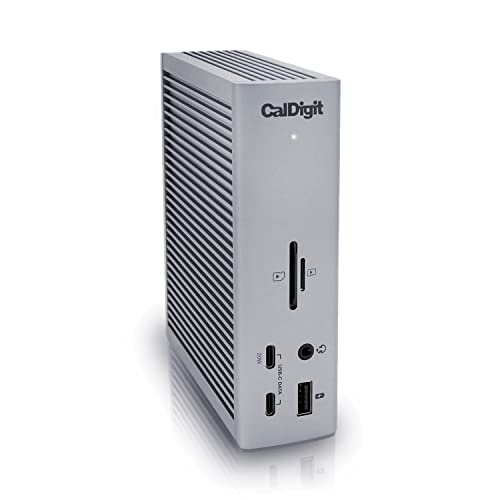
CalDigit TS4 Thunderbolt 4 Dock
The CalDigit TS4 dock supports 8K resolution at 60Hz, far exceeding the Belkin’s 4K limit. It offers 18 ports, providing significantly more connectivity options than the Belkin’s 14 ports. This dock uses Thunderbolt 4 connectivity and weighs 1.41 pounds, lighter than the Belkin. It supports both macOS and Windows systems. You gain high-resolution display support and extensive port expansion, but you may not need 8K output for standard productivity tasks. The CalDigit option is ideal for power users who require maximum resolution and connectivity. It suits those who prioritize future-proof display capabilities and a higher port count over the Belkin’s specific Ethernet speed or triple 4K focus.
| # | Product | Best for | Price |
|---|---|---|---|
| 1 | Belkin Thunderbolt 4 Triple Display Dock Best overall | macOS users needing three 4K monitors and fast Ethernet | |
| 2 | Tobenone Quad 4K 20-in-1 DisplayLink Dock Also great | Users needing four 4K displays | |
| 3 | WAVLINK Quad 4K@60Hz DisplayLink Dock Best budget | users needing four 4K monitors and 100W charging | |
| 4 | Plugable 16-in-1 Thunderbolt 4 Dock Best premium | dual 4K setups with 100W charging | |
| 5 | UGREEN 8-in-1 Thunderbolt 4 Dock Also great | Dual monitor setups with Ethernet needs | |
| 6 | Plugable 13-in-1 Triple 4K USB-C Dock Best chromeos | ChromeOS users needing three 4K displays | |
| 7 | CalDigit TS4 Thunderbolt 4 Dock Best 8k uhd | 8K resolution and high port count |

Belkin Thunderbolt 4 Triple Display Dock
Best for: macOS users needing three 4K monitors and fast Ethernet
- Display Support
- Triple
- Max Resolution
- 4K@60Hz
- Host Interface
- Thunderbolt 4
- Power Delivery
- 96W
- Data Transfer Speed
- 40Gbps
- Video Ports
- HDMI
The Belkin Thunderbolt 4 dock supports three 4K monitors at 60Hz for a triple-display setup. It delivers 96W of power to your laptop and includes 2.5Gb Ethernet for fast wired networking. With 40Gbps data transfer speeds, it handles large files efficiently. This gray hub is designed for macOS users who need a clean, single-cable connection for their MacBook Pro or Chromebook.
- Supports up to 3 extended monitors at 4K@60Hz
- Delivers 96W of power delivery to your laptop
- Includes 2.5Gb Ethernet for faster wired networking
- Offers 40Gbps data transfer speeds via Thunderbolt 4
- Lower power delivery at 96W compared to competitors offering 98W or 100W
- Heavier build at 2.55 pounds compared to lighter alternatives
- Fewer total ports (14) than quad-monitor docks with 20 ports
- You need a dedicated triple-monitor workstation for productivity
- You require 2.5Gb Ethernet for stable wired internet
- You use a macOS device and want a single-cable solution
- You need more than three displays for your workflow
- You require 100W or higher charging for your laptop
- You prefer a lighter, more portable docking station
Verdict: The Belkin Thunderbolt 4 Triple Display Dock is a solid choice for macOS users who need three 4K screens and fast Ethernet. It fits those who prioritize a stable, high-bandwidth connection over maximum port count or ultra-fast charging.

Tobenone Quad 4K 20-in-1 DisplayLink Dock
Best for: Users needing four 4K displays
- Display Support
- Quad
- Max Resolution
- 4K@60Hz
- Power Delivery
- 100W
- Video Ports
- HDMI, DisplayPort
- Total Ports
- 20
- Features
- DisplayLink
The TobenONE docking station supports four 4K@60Hz displays via DisplayLink technology. It includes a 150W power adapter delivering 100W to your laptop. The unit offers 20 ports, including four HDMI and four DisplayPort outputs. It connects through Thunderbolt 5, Thunderbolt 4, or USB-C. This dock suits users needing extensive screen real estate for multitasking. It works with Windows and macOS systems.
- Supports four 4K@60Hz monitors simultaneously
- Includes 20 expansion ports
- Provides 100W laptop charging via 150W adapter
- Compatible with Thunderbolt 5 and Thunderbolt 4 hosts
- Requires DisplayLink driver installation
- Does not support HDCP
- M1 MacBooks limited to three monitors
- You need four external displays for heavy multitasking
- You want a single dock for many peripherals
- You use Thunderbolt 4 or Thunderbolt 5 laptops
- You require HDCP support for protected content
- You use an M1 MacBook and need four screens
- You prefer plug-and-play without driver installation
Verdict: TobenONE 20-in-1 DisplayLink Quad Dock delivers extensive connectivity for users needing four 4K displays. It fits professionals who prioritize screen count over native hardware support.

WAVLINK Quad 4K@60Hz DisplayLink Dock
Best for: users needing four 4K monitors and 100W charging
- Display Support
- Quad
- Max Resolution
- 5K@60Hz, 4K@60Hz
- Host Interface
- USB-C
- Power Delivery
- 100W
- Video Ports
- 4x HDMI, 4x DisplayPort
- Ethernet Speed
- 2.5Gbps
This WAVLINK dock supports four monitors at 4K resolution and 60Hz refresh rate using DisplayLink technology. It delivers 100W of power delivery to charge your laptop while you work. The unit includes a 2.5Gbps Ethernet port and an SD 4.0 card reader for fast data access. It works with Thunderbolt 3, 4, and 5 ports on Windows and Mac devices. You get a comprehensive set of ports for a multi-screen setup.
- Supports four displays at 4K resolution and 60Hz
- 100W Power Delivery for fast laptop charging
- Includes 2.5Gbps Ethernet for high-speed internet
- Features an SD 4.0 card reader
- Compatible with Thunderbolt 3, 4, and 5 hosts
- Relies on DisplayLink technology instead of native Thunderbolt video output
- Heavier build at 1.96 pounds compared to lighter alternatives
- Requires external driver installation for full functionality
- You need to connect four monitors to a single laptop
- You require 100W charging for your host device
- You use Thunderbolt 3, 4, or 5 compatible computers
- You prefer native Thunderbolt video output without drivers
- You only need two or three monitors
- You want a lighter, more portable docking station
Verdict: WAVLINK Quad 4K DisplayLink Dock offers a robust solution for users needing four screens and high-speed data transfer. It is best for professionals who prioritize screen count and charging speed over native Thunderbolt video performance.

Plugable 16-in-1 Thunderbolt 4 Dock
Best for: dual 4K setups with 100W charging
- Display Support
- Dual
- Max Resolution
- 4K@60Hz
- Host Interface
- Thunderbolt 4
- Power Delivery
- 100W
- Data Transfer Speed
- 40Gbps
- Video Ports
- 2x HDMI, 2x DisplayPort
This Plugable dock supports dual 4K displays at 60Hz via HDMI or DisplayPort. It delivers 100W of power delivery to charge your laptop while you work. The silver unit weighs 1.42 pounds and measures 11.6 inches by 5.8 inches. It includes seven USB ports, 2.5Gbps Ethernet, and SD card slots. You get a clean setup for Mac and Windows systems without extra drivers.
- Supports dual 4K monitors at 60Hz
- Provides 100W power delivery for laptops
- Includes 2.5Gbps Ethernet connectivity
- Features SD and microSD card readers
- Works with macOS and Windows systems
- Supports only two displays instead of three or four
- Weighs 1.42 pounds, which is heavier than some competitors
- Offers fewer total ports than 16-in-1 or 18-port alternatives
- You need a simple dual-monitor setup for your laptop
- You want 100W charging for your device
- You prefer a silver dock for your desk
- You require support for three or more monitors
- You need an 18-port configuration for many peripherals
- You prefer a lighter docking station under 1 pound
Verdict: Plugable TBT4-UDZ Thunderbolt 4 Dock fits users who want reliable dual 4K output and 100W charging without managing multiple drivers. It is a solid choice for professionals who do not need quad-display expansion.

UGREEN 8-in-1 Thunderbolt 4 Dock
Best for: Dual monitor setups with Ethernet needs
- Display Support
- Dual
- Max Resolution
- 8K@30Hz
- Host Interface
- Thunderbolt 4
- Power Delivery
- 85W
- Data Transfer Speed
- 40Gbps
- Video Ports
- Thunderbolt 4
This UGREEN dock offers dual 4K@60Hz or single 8K display support via three Thunderbolt 4 ports. It includes an 85W power delivery charger and a gigabit Ethernet port. The unit weighs 3.09 pounds and measures 9.5 by 2.5 inches. It suits users needing solid expansion with reliable display output for compatible Windows or Mac systems.
- Supports dual 4K@60Hz or single 8K displays
- Includes 85W power delivery for laptops
- Features three downstream Thunderbolt 4 ports
- Provides gigabit Ethernet connectivity
- Supports only dual displays, unlike quad options
- Weighs 3.09 pounds, which is heavier than some alternatives
- Limited to 85W charging, lower than 96W or 100W peers
- You need reliable dual monitor setups
- You require gigabit Ethernet for stable connections
- You use Thunderbolt 4 compatible computers
- You need to drive three or four monitors simultaneously
- You require 100W or higher charging speeds
- You prefer a lighter and more compact dock
Verdict: UGREEN 8-in-1 Thunderbolt 4 Dock delivers solid dual-display performance and essential ports for users who do not need quad-monitor support. It is a practical choice for those prioritizing display reliability over maximum charging wattage.

Plugable 13-in-1 Triple 4K USB-C Dock
Best for: ChromeOS users needing three 4K displays
- Display Support
- Triple
- Max Resolution
- 4K@60Hz
- Host Interface
- USB-C
- Power Delivery
- 100W
- Data Transfer Speed
- 10Gbps
- Video Ports
- 3x HDMI, 3x DisplayPort
This 13-in-1 docking station supports three 4K displays at 60Hz via HDMI and DisplayPort outputs. It delivers 100W Power Delivery to charge your laptop while providing a separate 20W front port for accessories. The device connects through a single USB-C link and works with ChromeOS, Windows, and macOS. It includes wired Ethernet and SD card slots for a complete workstation setup.
- Supports up to three 4K monitors at 60Hz
- Provides 100W Power Delivery for laptop charging
- Includes 20W accessory charging on the front port
- Features HDMI and DisplayPort outputs for mixed connections
- Supports only three displays while competitors offer four
- Requires DisplayLink drivers on macOS systems
- Does not support HDCP for protected content
- You need three 4K monitors for your workflow
- You use a ChromeOS device for daily tasks
- You want a single cable for charging and data
- You require four monitor outputs for your setup
- You need HDCP support for protected streaming
- You want a Thunderbolt 4 connection for maximum speed
Verdict: Plugable 13-in-1 ChromeOS Triple 4K Dock is a solid choice for ChromeOS users who need three screens. It offers reliable charging and display expansion for office productivity.
CalDigit TS4 Thunderbolt 4 Dock
Best for: 8K resolution and high port count
- Display Support
- Dual
- Max Resolution
- 8K@30Hz, 6K@60Hz
- Host Interface
- Thunderbolt 4
- Power Delivery
- 98W
- Data Transfer Speed
- 40Gb/s
- Video Ports
- DisplayPort 1.4, Thunderbolt 4
The CalDigit TS4 is a compact, Space Gray dock featuring 18 ports and 98W power delivery. It supports a single 8K UHD display at 60Hz on Windows or dual 6K displays on M1–M4 Pro/Max Macs. The 2.5GbE port offers faster networking than standard gigabit. It suits users needing high-resolution visuals and extensive connectivity through a single Thunderbolt 4 cable.
- Supports single 8K UHD or dual 6K 60Hz displays
- 98W power delivery for laptop charging
- 18 ports including 3x Thunderbolt 4
- 2.5GbE Ethernet port
- Windows users limited to dual 4K 60Hz displays
- M1–M3 (Non Pro) Macs limited to single display
- Heavier at 1.41 pounds
- You need 8K resolution on Windows
- You use M1–M4 Pro/Max Macs
- You require 2.5GbE networking
- You need triple displays on Windows
- You use M1–M3 (Non Pro) Macs
- You prefer a lighter dock
Verdict: CalDigit TS4 18-Port Thunderbolt 4 Dock delivers high-resolution support and robust connectivity for power users with compatible Macs or Windows systems needing 8K output.
Specifications side by side

| Spec | Belkin Thunderbolt 4 Triple Display Dock | Tobenone Quad 4K 20-in-1 DisplayLink Dock | WAVLINK Quad 4K@60Hz DisplayLink Dock | Plugable 16-in-1 Thunderbolt 4 Dock | UGREEN 8-in-1 Thunderbolt 4 Dock | Plugable 13-in-1 Triple 4K USB-C Dock | CalDigit TS4 Thunderbolt 4 Dock |
|---|---|---|---|---|---|---|---|
| Display Support | Triple | Quad | Quad | Dual | Dual | Triple | Dual |
| Max Resolution | 4K@60Hz | 4K@60Hz | 5K@60Hz, 4K@60Hz | 4K@60Hz | 8K@30Hz | 4K@60Hz | 8K@30Hz, 6K@60Hz |
| Host Interface | Thunderbolt 4 | – | USB-C | Thunderbolt 4 | Thunderbolt 4 | USB-C | Thunderbolt 4 |
| Power Delivery | 96W | 100W | 100W | 100W | 85W | 100W | 98W |
| Data Transfer Speed | 40Gbps | – | – | 40Gbps | 40Gbps | 10Gbps | 40Gb/s |
| Video Ports | HDMI | HDMI, DisplayPort | 4x HDMI, 4x DisplayPort | 2x HDMI, 2x DisplayPort | Thunderbolt 4 | 3x HDMI, 3x DisplayPort | DisplayPort 1.4, Thunderbolt 4 |
| Total Ports | 14 | 20 | – | 16 | 8 | 13 | 18 |
| Ethernet Speed | 2.5GbE | – | 2.5Gbps | 2.5Gbps | Gigabit | – | 2.5GbE |
| Resolution | – | 4K UHD | 4K UHD | 4K UHD | 4K UHD | 4K UHD | 8K UHD |
| Refresh Rate | – | 60Hz | 60Hz | – | 60Hz | – | 60Hz |
| Ports | USB-C, Ethernet, Thunderbolt 4 | USB-C, Ethernet, Thunderbolt 4 | HDMI, DisplayPort, USB-C, Ethernet, Thunderbolt 4 | HDMI, DisplayPort, Ethernet, Thunderbolt 4 | Ethernet, Thunderbolt 4 | HDMI, DisplayPort, USB-C, Thunderbolt 4 | USB-C, Ethernet, Thunderbolt 4, USB-A |
| Features | – | DisplayLink | Power Delivery, DisplayLink, SD Card Reader | Power Delivery, SD Card Reader | Power Delivery | Power Delivery | Power Delivery |
| Use | Mac | Mac | Mac | Mac | Mac | Mac | Mac |
| Operating System | macOS | macOS | macOS | macOS | macOS | ChromeOS | Windows |
| Weight | 2.55 pounds | 2.27 pounds | 1.96 pounds | 1.42 pounds | 3.09 pounds | 1.07 pounds | 1.41 pounds |
| Dimensions | – | 11.8 × 3.14 × 0.86 inches | – | 11.9 × 6 × 4.3 inches | 9.5 × 9.5 × 2.5 inches | 4.72 × 2.64 × 6.89 inches | 4.46 × 1.65 × 5.55 inches |
| Color | Gray | Grey | Black | Silver | Dark Gray | – | Space Gray |
| Model | INC030ttSGY | – | RC-UG39PD8-UK | TBT4-UDZ | 25053 | UD-ULTC4K | TS4-US 500971 |
| Size | – | small | – | 11.6" × 5.8" × 4.1" | 8-in-1 | – | compact |
Frequently asked questions
Which dock supports the most monitors for Mac users?
The Tobenone Quad 4K 20-in-1 DisplayLink Dock supports four 4K displays. It uses DisplayLink technology to expand beyond native hardware limits. This makes it ideal for users who prioritize screen count over other features. The dock connects via Thunderbolt 5 and fits a small footprint on your desk.
Can I get a dock with 100W charging for four screens?
Yes, the WAVLINK Quad 4K@60Hz DisplayLink Dock offers 100W Power Delivery. It supports four 4K monitors at 60Hz for robust productivity. The dock includes HDMI, DisplayPort, and Ethernet ports. It connects via Thunderbolt 5 and weighs under two pounds, making it a practical choice for high-power needs.
Is there a reliable option for dual 4K displays?
The Plugable 16-in-1 Thunderbolt 4 Dock is a solid choice for dual 4K setups. It provides 100W charging and reliable output without needing extra drivers. The dock features HDMI and DisplayPort outputs along with Ethernet. It weighs 1.42 pounds and fits well in professional environments requiring stable performance.
Which dock is best for ChromeOS users needing three screens?
The Plugable 13-in-1 Triple 4K USB-C Dock is designed for ChromeOS. It supports three 4K displays for office productivity. The dock includes Power Delivery for charging and connects via Thunderbolt 4. It weighs just 1.07 pounds and offers essential ports like HDMI and DisplayPort for a complete setup.
Do any docks support 8K resolution?
The CalDigit TS4 Thunderbolt 4 Dock supports 8K UHD resolution at 60Hz. It is built for power users with compatible Mac or Windows systems. The dock features an 18-port layout including Ethernet and USB-A. It weighs 1.41 pounds and provides high-resolution support for demanding visual tasks.
Which dock is best for users who need Ethernet?
The Belkin Thunderbolt 4 Triple Display Dock includes fast Ethernet alongside three 4K monitors. It is a solid choice for macOS users prioritizing stable connections. The dock weighs 2.55 pounds and features USB-C and Thunderbolt 4 ports. It fits those who need reliable networking alongside high-resolution display output.
What is a budget-friendly option for four 4K monitors?
The WAVLINK Quad 4K@60Hz DisplayLink Dock is labeled as the best budget option. It supports four 4K screens and delivers 100W charging. The dock includes an SD card reader and connects via Thunderbolt 5. It weighs 1.96 pounds and offers robust connectivity for professionals prioritizing screen count and charging speed.
Is there a compact dock for dual monitors with Ethernet?
The UGREEN 8-in-1 Thunderbolt 4 Dock supports dual 4K displays at 60Hz. It includes Ethernet for network connectivity and Power Delivery for charging. The dock weighs 3.09 pounds and features a dark gray finish. It is a practical choice for users who do not need quad-monitor support but value display reliability.
See also