Belkin 140W Thunderbolt™ 5 Dock Review: Specs, Pros and Cons
As Amazon Associates, we earn from qualifying purchases. This means we may receive a small commission at no extra cost to you if you click through and make a purchase.
As an Amazon Associate we earn from qualifying purchases. Links on this page are affiliate links.
This belkin 140w thunderbolt 5 dock review covers the Belkin 140W Thunderbolt 5 Dock, a 14-in-1 expansion solution designed for high-performance workstations. It combines a massive 140W power delivery capability with Thunderbolt 5 speeds reaching up to 80Gbps. The dock supports triple 4K displays at 144Hz, allowing you to maintain a clean desk while connecting multiple monitors, storage devices, and peripherals through a single cable. It also includes a 2.5Gb Ethernet port for stable networking. This device targets users who need extensive connectivity and fast data transfer for demanding multitasking environments.
- 140W power delivery charges your host laptop while powering connected peripherals through one cable.
- Supports up to three extended monitors at 4K@144Hz or one 8K@60Hz display.
- Data transfer speeds reach 80Gbps, with bandwidth boost up to 120Gbps for large files.
- 2.5Gb Ethernet connection provides faster wired networking than standard gigabit speeds.
- Daisy-chaining capability allows connection of up to six Thunderbolt devices to the dock.
Good fit for
This dock suits professionals using MacBook Pro, Chromebook, or USB-C laptops who require a multi-monitor setup for productivity, streaming, or multitasking. It is ideal for users handling large files who need the 80Gbps transfer speeds. The 2.5Gb Ethernet port benefits those in offices with unstable Wi-Fi. If you need to connect many peripherals via daisy-chaining or require 140W charging for high-end devices, this 14-in-1 hub provides the necessary expansion without sacrificing performance or desk space.
Who can skip it
You should look at another option if your laptop does not support Thunderbolt 5 or USB-C with sufficient power delivery. Users needing native Thunderbolt 4 ports on the dock itself may find the specification listing confusing, as the data notes Thunderbolt 4 ports. If you do not require triple display support or 2.5Gb Ethernet, this 14-in-1 dock may offer more ports than you need. Additionally, if you prefer plastic packaging, note that this unit arrives in 100% plastic-free packaging.
Verdict
The Belkin 140W Thunderbolt 5 Dock offers robust connectivity and power for demanding multi-screen workflows. It is a strong choice for users prioritizing speed, display expansion, and clean cable management.
Key specs explained for this dock

Thunderbolt 5 Speeds Up to 80Gbps
This bandwidth allows you to transfer large video files or backups much faster than standard USB connections. You benefit from reduced wait times when working with high-resolution media. When shopping, compare this to older docks that offer only 40Gbps to ensure your workflow remains smooth and uninterrupted during data-heavy tasks.
Triple 4K@144Hz Display Support
You can connect three external monitors with high refresh rates for smooth scrolling and gaming. This setup creates a spacious virtual desktop for multitasking. When comparing monitors, look for this refresh rate to ensure fluid motion. It suits professionals who need multiple high-clarity screens for coding, editing, or complex data visualization.
140W Power Delivery
The dock charges your laptop while powering all connected devices through a single cable. This reduces cable clutter on your desk significantly. When evaluating docks, higher wattage ensures compatibility with powerful laptops. You benefit from a cleaner workspace and fewer wall outlets, making it ideal for stationary setups where convenience matters.
2.5Gb Ethernet Connection
This wired port offers speeds up to 2.5 times faster than standard gigabit ethernet. You get stable, low-latency connectivity for video calls and large downloads. When choosing a monitor setup, prioritize wired options for reliability. This spec is essential for users in areas with unstable Wi-Fi who need consistent network performance for their workstation.
Design and build details

The Belkin 140W Thunderbolt 5 Dock arrives in a gray finish, according to the listing. Its model number is INC031ttSGY. The unit is designed as a 14-in-1 expansion hub, which means it packs a significant number of ports into a single chassis. This density requires a sturdy build to manage the heat and power distribution for 140W delivery. You get a compact footprint that sits on your desk, keeping cables organized. The design prioritizes functionality over flashy aesthetics, fitting well into professional or home office environments where clean lines matter.
The listing highlights a 6-point safety system, including over-voltage and fire-resistant materials. This suggests a robust internal construction aimed at protecting your connected devices during heavy use. A Kensington Lock slot is included, allowing you to secure the dock to a desk. This feature is useful for shared workspaces or public areas where theft is a concern. The packaging is 100% plastic-free, indicating a focus on sustainable materials for the box, though the dock itself remains a durable electronic device. You can connect up to six Thunderbolt devices via daisy chaining, which reduces clutter by minimizing the number of direct laptop connections. The layout supports triple displays, requiring careful cable management for HDMI and other connections. The build quality appears focused on reliability and safety rather than portability, making it a stationary centerpiece for your workstation.
Setup and everyday use guide

Setting up this dock involves connecting a single USB-C cable to your host device. You can link it to a MacBook Pro, Chromebook, iPad, or iPhone 17. This single cable handles video, data, and power delivery simultaneously. The dock provides up to 140W of power to keep your laptop charged while you work. You do not need separate chargers for your computer and peripherals. This reduces cable clutter on your desk significantly.
For display setup, you can connect up to three monitors. The dock supports triple displays at 4K resolution with a 144Hz refresh rate. It also handles 8K@60Hz output. You can use HDMI cables for these connections. This allows for a multi-screen workstation ideal for multitasking or streaming content. The 80Gbps data transfer speed ensures smooth performance when moving large files between your computer and connected storage devices.
Networking is handled by the built-in 2.5Gb Ethernet port. This offers a wired connection that is up to 2.5 times faster than standard gigabit Ethernet. It provides stable connectivity for video calls and large downloads, even if your Wi-Fi is unstable. You can also daisy-chain up to six Thunderbolt devices through the dock. This expands your workspace with fewer adapters. The unit includes a Kensington Lock slot and a six-point safety system to protect your gear from electrical issues during daily use.
Compatibility and Setup Checks

You need a compatible host device to use this dock effectively. Verify that your laptop or desktop supports Thunderbolt 5 or Thunderbolt 4. The listing mentions compatibility with MacBook Pro, Chromebook, iPad, and iPhone 17. Ensure your computer has the correct port. You should also check your monitor inputs. This dock supports triple 4K displays at 144Hz. You need three monitors with HDMI or Thunderbolt inputs to use all video outputs. The 2.5Gb Ethernet port requires a compatible network setup. You may need an Ethernet cable for wired connections. Keep the area around the vents clear. The dock generates heat during heavy use. Dust the exterior regularly with a dry cloth. This dock fits into the 1 options on CoreLook. It suits users who need high bandwidth and multiple displays. Other monitors in this guide may offer better value for single-screen setups. Compare refresh rates and panel types carefully.
Check before you buy
- Verify your host device supports Thunderbolt 5 or Thunderbolt 4.
- Confirm your monitors have HDMI or compatible video inputs.
- Ensure you have three displays for triple monitor support.
- Check that your network setup supports 2.5Gb Ethernet speeds.
- Keep the dock vents clear for proper heat dissipation.
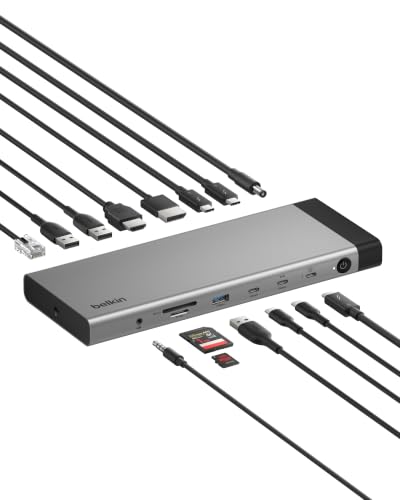
Belkin 140W Thunderbolt 5 Dock
Best for: Triple 4K@144Hz setups with 140W charging
- Display Support
- Triple
- Max Resolution
- 8K@60Hz, 4K@144Hz
- Host Interface
- Thunderbolt 5
- Power Delivery
- 140W
- Data Transfer Speed
- 80Gbps
- Total Ports
- 14
The Belkin 140W Thunderbolt 5 Dock connects up to three 4K monitors at 144Hz or one 8K display at 60Hz. It delivers 140W of power to your laptop while providing 80Gbps data speeds. The dock includes a 2.5Gb Ethernet port and supports daisy-chaining up to six Thunderbolt devices. This setup suits users who need a clean, high-performance workstation with reliable wired networking and extensive connectivity options.
- Supports triple 4K@144Hz or single 8K@60Hz displays
- Provides 140W power delivery for host laptops
- Offers 80Gbps data transfer speeds
- Includes 2.5Gb Ethernet for fast networking
- Enables daisy-chaining of up to six devices
- Limited to 4K UHD resolution output
- Weighs more than standard USB-C hubs due to robust build
- Requires Thunderbolt 5 compatible host device for full speeds
- You need to drive three 4K monitors simultaneously
- You require 140W power delivery for high-performance laptops
- You want a single cable solution for data, video, and power
- You only need a single 1080p display
- Your laptop does not support Thunderbolt 5
- You prefer a compact, lightweight travel dock
Verdict: The Belkin 140W Thunderbolt 5 Dock fits professionals who need triple 4K@144Hz displays and 140W charging in one station. It suits users who value 80Gbps data speeds and 2.5Gb Ethernet for stable, high-bandwidth workflows.
Specifications side by side
| Spec | Belkin 140W Thunderbolt 5 Dock |
|---|---|
| Display Support | Triple |
| Max Resolution | 8K@60Hz, 4K@144Hz |
| Host Interface | Thunderbolt 5 |
| Power Delivery | 140W |
| Data Transfer Speed | 80Gbps |
| Total Ports | 14 |
| Ethernet Speed | 2.5Gb |
| Resolution | 4K UHD |
| Refresh Rate | 144Hz |
| Ports | USB-C, Ethernet, Thunderbolt 4 |
| Color | Gray |
| Model | INC031ttSGY |
Frequently asked questions
Does the Belkin 140W Thunderbolt 5 Dock support three monitors?
Yes, it supports triple displays. The dock is rated for triple 4K UHD output. You can run three monitors at 144Hz refresh rates simultaneously. This setup is ideal for professionals who need extensive screen real estate for multitasking or creative work without lag.
What is the maximum data transfer speed of this dock?
The dock offers speeds up to 80Gbps. This is a Thunderbolt 5 specification. You benefit from significantly faster file transfers compared to older USB standards. Large video files or backups move quickly, reducing wait times during high-bandwidth workflows.
Can this dock charge a laptop while in use?
Yes, it provides 140W of power delivery. This high wattage allows you to charge compatible laptops while connected. You can link it to devices like a MacBook Pro. The single cable handles video, data, and power delivery simultaneously for a clean setup.
Does the Belkin dock include an Ethernet port?
Yes, it features a 2.5Gb Ethernet port. This ensures stable, high-bandwidth connections for your network. You get reliable wired internet for professional tasks. The dock also includes USB-C and Thunderbolt 4 ports for additional peripheral connectivity.
Is this dock compatible with iPhone or iPad?
The listing mentions compatibility with iPhone 17 and iPad. You can connect these devices for video and data transfer. It also supports Chromebooks and MacBook Pro. Verify that your host device supports Thunderbolt 5 or Thunderbolt 4 for full functionality.
What color is the Belkin 140W Thunderbolt 5 Dock?
The dock arrives in a gray finish. Its model number is INC031ttSGY. The design is a 14-in-1 expansion hub. This compact form factor packs many ports into a single unit, keeping your workspace organized and reducing cable clutter.
Who is this dock best suited for?
It fits professionals needing triple 4K@144Hz displays and 140W charging. Users who value 80Gbps data speeds will find it useful. It suits those requiring stable 2.5Gb Ethernet for high-bandwidth workflows. This station consolidates multiple needs into one connection.
See also