Acer 27-Inch Monitor Showdown: Which Model Fits Your Workflow?
As Amazon Associates, we earn from qualifying purchases. This means we may receive a small commission at no extra cost to you if you click through and make a purchase.
Selecting an acer 27 monitor requires balancing everyday workspace ergonomics with the graphic performance required for modern software. The 27-inch form factor is the industry sweet spot for desktop computing, offering enough physical screen area to split two full documents side by side without demanding the excessive desk depth of an ultrawide setup. The defining operational choice comes down to resolution versus refresh speed: whether your daily computing demands the absolute text sharpness and visual real estate of a 1440p panel, or whether a high-framerate 1080p Full HD display provides the seamless motion and comfortable viewing you require without overtaxing your graphics hardware.
This comprehensive comparison examines three specific displays manufactured by Acer to determine which display profile aligns with your professional workload and leisure gaming. The lineup contrasts two Full HD offerings—a streamlined 120Hz workstation display and an upgraded 144Hz model featuring AMD FreeSync—against a performance-oriented 1440p Quad HD display boasting a rapid 180Hz refresh rate and wide professional color space coverage. By comparing panel structures, color reproduction capabilities, and synchronization standards, this evaluation clarifies where each model excels and helps you decide exactly which acer 27 monitor to buy for your desk setup.
Which Acer 27-Inch Monitor Should You Buy
- Everyday Office Productivity and Casual Motion: Choose the Acer 27in FHD 1920×1080 IPS 120Hz for standard corporate documents, web administration, and basic video streaming with integrated eye comfort features.
- Design Precision and High-Performance Gaming: Choose the Acer Nitro 27in QHD 2560×1440 IPS if your workflow demands razor-sharp text clarity, expanded workspace canvas, 95% DCI-P3 color accuracy, and up to 180Hz motion clarity.
- Fluid Multitasking and Balanced Visuals: Choose the Acer 27in FHD 1920×1080 IPS 144Hz if you prioritize high frame rates, AMD FreeSync compatibility, and low blue light filtering on a clean ZeroFrame borderless display.
Acer 27in FHD 1920×1080 IPS 120Hz

Acer
9.2/10 Our score
- Color
- Black
- Size
- 27-inch
- Dimensions
- 8.27 x 24.07 x 17.44 inches
Listed by the seller on the product page.
Best for: High-framerate office work and smooth gaming
Pros
- Fast 144Hz refresh rate
- Official AMD FreeSync support
- ZeroFrame borderless layout
- Low Blue Light filter
Cons
- Full HD density on larger screen

Best for: General office productivity and casual media playback
Pros
- Smooth 120Hz refresh rate
- Adaptive-Sync tear prevention
- Integrated eye protect technology
Cons
- Coarser 1080p pixel pitch
- Modest 250 nits brightness
The Acer 27in FHD 1920×1080 IPS 120Hz (model KB272 G0bi) serves as an entry point for users seeking a large visual footprint paired with fluid motion. Built around an In-Plane Switching LCD panel, this display delivers consistent color accuracy and wide viewing angles, making it a functional upgrade for anyone transitioning from a smaller workstation like a conventional acer 24 inch monitor. With an upgraded 120Hz refresh rate—double that of traditional 60Hz corporate displays—the panel minimizes cursor stuttering, window ghosting, and eye fatigue during long administrative shifts.
This acer ips 27 monitor features a 16:9 widescreen profile with a 0.311mm pixel pitch and a matte anti-glare screen coating that deflects harsh overhead office lighting. It incorporates Adaptive-Sync support that works in harmony with modern graphics cards to eliminate screen tearing during video editing playback and light gaming sessions. Acer packages the display with built-in eye protect technology to reduce ocular strain, while dynamic contrast management yields a rated ratio of 100,000,000:1 alongside a standard 250 nits brightness output, maintaining uniform visibility across daylit workspaces.
While this display excels at handling spreadsheets, web dashboards, and corporate communications, the 1080p resolution across a 27-inch diagonal means text density is lower than on smaller or higher-resolution displays. For users who perform detailed photographic correction, fine architectural drafting, or competitive esports, the KB272 G0bi gives way to faster, higher-resolution panels in the Acer catalog that offer smaller pixel spacing and wider color spaces.
- Native 1920 x 1080 Full HD resolution with fluid 120Hz refresh speed
- Adaptive-Sync support delivering smooth, tear-free motion rendering
- 1ms Visual Response Boost (VRB) minimizing motion smearing
- Matte screen finish paired with dedicated eye protect technology
Acer Nitro 27in QHD 2560×1440 IPS
Acer
8.4/10 Our score
- Color
- Black
- Size
- 27-inch
- Dimensions
- 8.28 x 24.2 x 18.14 inches
Listed by the seller on the product page.
Best for: Creative editing and fast competitive gaming
Pros
- Sharp 2560×1440 QHD resolution
- Fluid 180Hz refresh rate
- Wide 95% DCI-P3 color gamut
- Rapid 0.5ms GTG response
Cons
- Standard 1000:1 contrast ratio
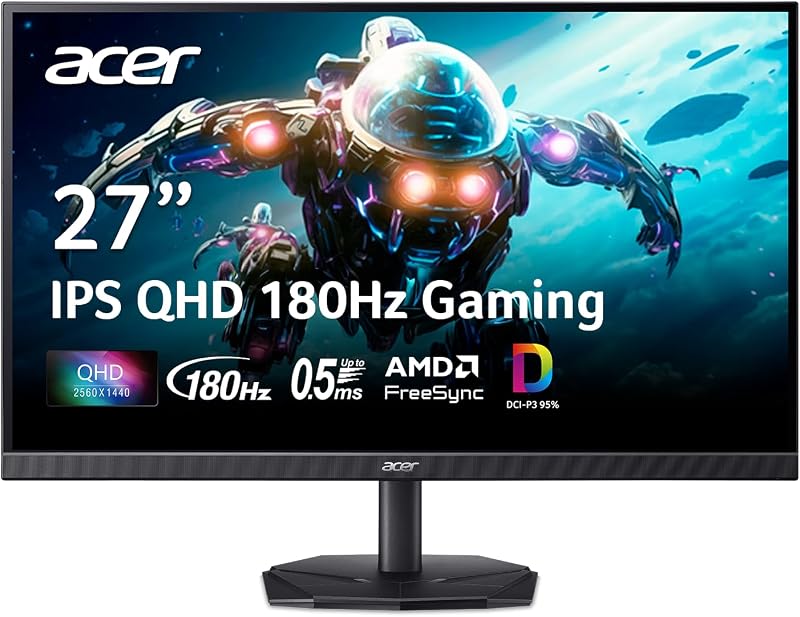
Stepping up from Full HD, the Acer Nitro 27in QHD 2560×1440 IPS (model KG271U N3bmiipx) represents a major advancement in both visual density and rendering performance. Designed for creative professionals and dedicated gamers, this acer 1440p 27 monitor packs 2560×1440 pixels onto an expansive IPS panel. The result is roughly 77 percent more screen real estate than 1080p displays, allowing you to view detailed timelines, open complex code environments side by side, or inspect fine graphical details without interface scaling issues. It firmly establishes its place within the renowned acer nitro monitor 27 hardware lineage.
Color performance is a standout feature of this model, as the listing specifies 95% DCI-P3 color gamut coverage along with HDR 10 support. These visual parameters make the KG271U an asset for graphic artists, digital photographers, and film editors who need reliable color consistency across projects. Motion clarity is equally high, courtesy of a rapid 180Hz refresh rate and an ultra-fast gray-to-gray (GTG) response time rated down to 0.5ms. Supported by official AMD FreeSync technology, the monitor matches its rendering cycles directly to your graphics output, eliminating jitter and tearing across high-intensity workflows.
Physical construction is tailored for multi-screen arrangements through Acer’s ZeroFrame enclosure, which reduces peripheral borders to open up contiguous viewing fields. The display incorporates Acer ComfyView, low-dimming features, and flicker-less technology to safeguard comfort over prolonged work blocks. With an overall product weight of 5.5 kg and a stable desk stand, this unit serves as the benchmark selection for anyone who refuses to compromise between color-critical creative work and ultra-smooth frame pacing.
- Sharp 2560 x 1440 Quad HD resolution delivering superior text clarity
- High-speed 180Hz refresh rate paired with up to 0.5ms GTG response
- Extensive 95% DCI-P3 color gamut coverage with HDR 10 decoding
- AMD FreeSync technology eliminating stuttering across intensive frame rates
Acer 27in FHD 1920×1080 IPS 144Hz

Acer
9.2/10 Our score
- Color
- Black
- Size
- 27-inch
- Dimensions
- 8.26 x 27.36 x 18.29 inches
- Weight
- 8.38 pounds
Listed by the seller on the product page.
The Acer 27in FHD 1920×1080 IPS 144Hz (model KB272 P6bi) combines the easy accessibility of 1080p Full HD resolution with high-framerate motion processing. Positioned squarely for professionals who demand fast screen response for fast-moving data streams, video verification, and competitive games, this acer 27 inch 144hz monitor delivers rapid frame delivery without demanding an elite graphics processing unit. For users seeking an expansive flat surface rather than large ultrawide form factors like an acer nitro 32 inch curved monitor, this unit maintains clean spatial balance on typical office desks.
The IPS panel structure guarantees wide 178-degree horizontal and vertical viewing angles, preventing the color fading and contrast distortion typical of older display technologies. A 1ms response time works alongside the 144Hz refresh rate to produce fluid 2D transitions, ensuring animated presentations, live screen shares, and gaming sequences remain sharp without distracting ghosting artifacts. Acer has integrated certified AMD FreeSync technology, ensuring that graphical frame rates remain cleanly synchronized during intensive full-screen rendering tasks.
Ergonomics and user safety are prioritized through a Low Blue Light filter, which mitigates harsh spectrum emissions during late-night projects. The physical enclosure utilizes Acer’s ZeroFrame architectural approach, allowing near-seamless multi-monitor installations where two or three displays sit flush side by side. For users whose primary duties center on web production, customer management software, and high-framerate media, this model represents a practical middle ground in our acer 27 monitor comparison, conceding ultimate pixel density only to its Quad HD Nitro sibling.
- Vibrant Full HD 1920 x 1080 resolution across a wide 27-inch IPS panel
- Up to 144Hz refresh rate for fluid screen transitions and responsive navigation
- Integrated AMD FreeSync technology preventing frame tears and stutter
- ZeroFrame design with 178-degree viewing angles and Low Blue Light filtering
What Sets These Models Apart
Comparing these three displays reveals how Acer tunes its 27-inch platform for different functional needs. While all three leverage In-Plane Switching (IPS) technology for superior viewing angles and natural color rendering, they diverge substantially in resolution, pixel pitch, maximum refresh rate, and color space precision. The table below outlines the core technical attributes extracted directly from each product specification sheet to help guide your purchasing choice.
| Feature | Acer 27in FHD 120Hz (KB272 G0bi) | Acer Nitro 27in QHD (KG271U) | Acer 27in FHD 144Hz (KB272 P6bi) |
|---|---|---|---|
| Native Resolution | 1920 x 1080 (Full HD) | 2560 x 1440 (Quad HD) | 1920 x 1080 (Full HD) |
| Maximum Refresh Rate | 120Hz | 180Hz | 144Hz |
| Response Time Rating | 1ms VRB | Up to 0.5ms GTG | 1ms |
| Color Space / Quality Spec | Color Gamut 99, Eye Protect | 95% DCI-P3, HDR 10 Support | Color Gamut 99, Low Blue Light |
| Synchronization Tech | Adaptive-Sync (FreeSync Compatible) | AMD FreeSync | AMD FreeSync |
| Pixel Pitch | 0.311 mm | The listing does not specify | The listing does not specify |
Buying Tips for Acer 27-Inch Monitors
When selecting the best acer 27 inch monitor, your first consideration should be the relationship between screen size and native resolution. On a 27-inch diagonal surface, a 1920×1080 Full HD image results in a relatively large pixel pitch of roughly 0.31mm. This makes text characters large and effortless to read from a standard sitting distance of two to three feet, which can alleviate eye fatigue for clerical workers and general administrative staff. However, if your work involves complex spreadsheets with hundreds of visible rows, side-by-side window multitasking, or fine graphic manipulation, stepping up to a 2560×1440 Quad HD panel provides dramatically crisper character rendering and nearly double the usable workspace.
Refresh rates and frame synchronization represent another primary performance divide. Standard displays operate at 60Hz, whereas these three Acer models span 120Hz, 144Hz, and 180Hz. Higher refresh rates do more than elevate competitive gaming; they noticeably enhance everyday office navigation by smoothing window dragging, cursor movement, and rapid document scrolling. If you plan to engage in high-speed visual processing or fast gaming, pay attention to the response time metric: gray-to-gray (GTG) ratings down to 0.5ms—such as that found on the Nitro QHD—provide snappier pixel color changes than Visual Response Boost (VRB) strobing methods, eliminating trails behind fast-moving imagery.
Finally, evaluate the physical dimensions and workspace footprint of your prospective monitor. All three models feature slim enclosures with thin outer bezels, making them well-suited for dual-monitor setups on standard commercial desks. Verify that your desk depth accommodates their stands, which occupy roughly 8.26 to 8.28 inches of base depth across the board. Furthermore, consider ambient room lighting: all three models feature matte anti-glare screen finishes and 250-nit brightness ratings, ensuring steady visibility without mirror reflections, though color-critical designers should leverage the wide 95% DCI-P3 gamut of the Nitro model for color-accurate print and video delivery.
FAQ
Is a 1080p resolution sufficient on an acer 27 monitor for office productivity?
Yes, 1080p Full HD resolution is well-suited for general office work, web browsing, data entry, and everyday clerical tasks. Because the pixels are spread over a 27-inch diagonal, system interface elements and standard text characters appear naturally larger without requiring operating system display scaling. However, users who require extreme typographic sharpness or who routinely tile multiple application windows side by side will benefit from upgrading to a 1440p QHD model.
How does the 1440p resolution on the Acer Nitro 27in QHD compare to 1080p models?
The Acer Nitro 27in QHD 2560×1440 panel delivers approximately 77 percent more individual pixels than standard 1080p displays. This creates a much denser pixel grid, which sharpens small system fonts, eliminates jagged vector lines in design applications, and provides a broader desktop canvas to place multiple working windows on a single display without overlapping.
What is the difference between Adaptive-Sync and AMD FreeSync on these displays?
Both technologies are engineered to eliminate display tearing and stuttering by dynamically synchronizing the monitor’s refresh cycles with the rendering output of your graphics hardware. The Acer 27in FHD 120Hz utilizes Adaptive-Sync with FreeSync compatibility, whereas the Acer Nitro QHD 180Hz and the Acer 27in FHD 144Hz feature dedicated AMD FreeSync hardware-level communication. Both implementations guarantee smooth visual flow across fast-paced video and gaming workflows.
Do these Acer 27-inch monitors include integrated audio speakers?
The provided manufacturer specifications for these listings do not specify integrated desktop speakers. Users requiring system audio should connect dedicated external desktop speakers or a headset directly to their computer sound outputs or audio interfaces.
Which Acer 27-inch monitor is best for creative editing workflows?
The Acer Nitro 27in QHD 2560×1440 IPS is clearly the superior choice for creative work. It combines the heightened clarity of Quad HD resolution with an expanded 95% DCI-P3 color gamut and HDR 10 signal support, providing the detailed color fidelity and granular canvas space necessary for digital photography, visual design, and video production.