4K UHD or 6K Docking Stations? Compared by Specs
As Amazon Associates, we earn from qualifying purchases. This means we may receive a small commission at no extra cost to you if you click through and make a purchase.
As an Amazon Associate we earn from qualifying purchases. Links on this page are affiliate links.
Choosing between a 4K UHD vs 6K docking station depends on your display needs and computer type. Both units offer extensive connectivity and power delivery for modern laptops. The Anker Prime supports dual 4K displays on Windows and macOS systems. The iVANKY dock provides higher resolution options for Apple Silicon Macs. You must select the dock that matches your hardware and monitor count requirements.
Resolution
4K UHD
6K
Host Interface
USB-C, USB4, Thunderbolt
Thunderbolt 5
Display Support
Dual Display
Triple Display
Use
Windows, macOS, ChromeOS
macOS
Refresh Rate
not listed
60Hz
Choose the first if
- You use Windows or ChromeOS laptops
- You need two monitors at 4K resolution
- You want broad operating system compatibility
Choose the second if
- You use an M-series Mac
- You need three high-resolution displays
- You require Thunderbolt 5 data speeds
Verdict
Choose the Anker Prime if you need a versatile dock for Windows or mixed environments. Select the iVANKY dock only if you have an M-series Mac and require triple 6K displays. Each product serves a distinct hardware ecosystem.
Resolution and Display Specs Compared
Resolution
Edge: iVANKY FusionDock Max 2 Thunderbolt 5 Dock
The iVANKY FusionDock Max 2 supports 6K resolution, offering significantly higher pixel density for sharp text and detailed graphics. The Anker Prime Docking Station is limited to 4K UHD output. This makes the iVANKY better for high-resolution monitors. You get more screen real estate and clarity with the 6K model. The 4K option is sufficient for standard 4K displays but lacks the extra detail headroom. If your monitor supports 6K, the iVANKY is the clear choice. Otherwise, the Anker covers standard 4K needs effectively.
Refresh Rate
Edge: iVANKY FusionDock Max 2 Thunderbolt 5 Dock
The iVANKY dock explicitly lists a 60Hz refresh rate for its 6K output. The Anker Prime specifications do not state a refresh rate for its 4K UHD support, though it mentions 2K@60Hz for dual displays with DP 1.4 laptops. Both likely support 60Hz for standard use, but the iVANKY provides confirmed data for its higher resolution output. The Anker may offer similar smoothness, but the lack of explicit data makes it harder to verify. The iVANKY wins by providing clear refresh rate information for its primary high-res mode.
Compatibility
Edge: Anker Prime 14-in-1 Dual Display Dock
The Anker Prime Docking Station supports Windows 10 and 11, ChromeOS, and macOS. It works with USB-C, USB4, and Thunderbolt connections. The iVANKY FusionDock Max 2 is compatible with M-series Apple Silicon Macs only. It does not work with Intel Macs, Windows PCs, or Chromebooks. This is a major difference. If you use a Windows PC, the Anker is your only option. The iVANKY is exclusive to newer Macs. Choose based on your computer type first. Cross-platform support favors the Anker significantly.
Display Support
Edge: iVANKY FusionDock Max 2 Thunderbolt 5 Dock
The Anker Prime supports dual displays via two HDMI ports. It can output 4K on one and 1080p on another with DP 1.2 laptops, or 2K@60Hz on both with DP 1.4. The iVANKY supports up to three displays depending on the Mac chip. M5 Pro models can drive three 6K@60Hz displays via Thunderbolt ports. M1–M4 base models support fewer. The iVANKY offers more simultaneous display options for compatible Macs. The Anker is simpler but limited to two screens. For multi-monitor setups on Mac, the iVANKY has the edge.
Connectivity
Edge: iVANKY FusionDock Max 2 Thunderbolt 5 Dock
The Anker Prime offers 14 ports, including three USB-C ports with up to 100W charging each and one USB-A port. It supports data speeds up to 10Gbps. The iVANKy has 23 ports, including ten USB ports and three Thunderbolt 5 ports. It supports data transfer up to 120Gbps via Thunderbolt 5. The iVANKY provides faster data speeds and more total ports. The Anker is more portable with fewer ports but still robust. For high-speed data and extensive connectivity, the iVANKY is superior.
Power Delivery
Edge: Anker Prime 14-in-1 Dual Display Dock
The Anker Prime Docking Station delivers up to 160W of total output. It can charge up to four devices simultaneously. The iVANKy FusionDock Max 2 provides 140W Power Delivery. Both offer substantial power for laptops. The Anker provides 20W more total output. This extra power may help with high-performance laptops or charging multiple devices more effectively. The iVANKY still offers ample power for most MacBooks. The Anker has a slight advantage in raw power delivery capacity.
Which docking station fits your setup
Mac users needing triple 6K screens
Our pick: iVANKY FusionDock Max 2 Thunderbolt 5 Dock
The iVANKY dock supports up to three 6K displays at 60Hz on M5 Pro and M5 Max chips. It uses Thunderbolt 5 for 120Gbps data transfer and includes a 2.5Gbps Ethernet port. This makes it ideal for Mac users who require high-resolution triple-monitor setups with fast connectivity.
Windows users wanting dual 4K output
Our pick: Anker Prime 14-in-1 Dual Display Dock
The Anker Prime supports dual 4K displays at 60Hz on laptops with DP 1.4. It offers 160W total power delivery and 10Gbps data speeds. It works with Windows 10 and 11, making it a practical choice for users who need reliable dual-monitor support on non-Mac systems.
Users prioritizing silent operation
Our pick: iVANKY FusionDock Max 2 Thunderbolt 5 Dock
The iVANKY dock uses a full-aluminum chassis for passive cooling, meaning there is no internal fan and no noise. It stays cool under load, with surface temperatures staying below safety limits. This quiet design is best for users who work in silent environments and dislike fan noise.
Users needing broad OS compatibility
Our pick: Anker Prime 14-in-1 Dual Display Dock
The Anker Prime supports USB-C, USB4, and Thunderbolt connections on Windows 10, Windows 11, and ChromeOS. The iVANKY dock is restricted to Apple Silicon Macs only. If you use a Windows or Chromebook, the Anker is the only viable option for your current computer setup.
| # | Product | Best for | Price |
|---|---|---|---|
| 1 | Anker Prime 14-in-1 Dual Display Dock | Dual 4K UHD display setups with high power needs | |
| 2 | iVANKY FusionDock Max 2 Thunderbolt 5 Dock | M5 Pro/Max Macs needing triple 6K displays |

Anker Prime 14-in-1 Dual Display Dock
Best for: Dual 4K UHD display setups with high power needs
- Resolution
- 4K UHD
- Display Support
- Dual
- Max Resolution
- 4K
- Host Interface
- USB-C
- Power Delivery
- 100W
- Data Transfer Speed
- 10Gbps
This Anker docking station supports dual 4K UHD displays via HDMI, making it a solid choice for productivity setups. It delivers up to 160W of total power output to charge your laptop and other devices simultaneously. The unit features 10Gbps data transfer speeds and includes an Ethernet port. It connects via USB-C, USB4, or Thunderbolt. This model is ideal for Windows and ChromeOS users who need reliable dual-screen support and fast charging capabilities.
- Dual HDMI ports for 4K UHD display support
- 160W max power output for fast charging
- 10Gbps data transfer speeds on select ports
- Supports USB-C, USB4, and Thunderbolt connections
- Includes Ethernet port for wired networking
- Dual display resolution caps at 2K@60Hz with DP 1.4 laptops
- Heavier build at 2.82 pounds compared to lighter alternatives
- Does not support 5120×1430 monitor resolution
- You need dual 4K UHD displays for work
- You require 160W charging for high-power laptops
- You use Windows 10, 11, or ChromeOS
- You need 6K display support
- You require Linux compatibility
- You want identical mirrored displays on macOS
Verdict: Anker Prime 14-in-1 Laptop Docking Station fits users who prioritize dual 4K UHD output and high wattage charging over higher resolution options. It is a practical hub for Windows and ChromeOS setups needing reliable connectivity.
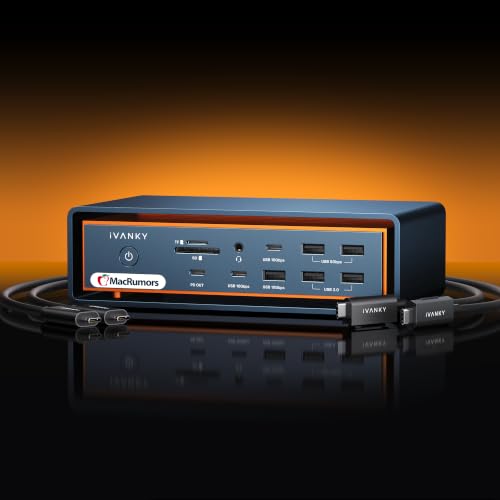
iVANKY FusionDock Max 2 Thunderbolt 5 Dock
Best for: M5 Pro/Max Macs needing triple 6K displays
- Resolution
- 6K
- Display Support
- Triple
- Max Resolution
- 6K@60Hz
- Host Interface
- Thunderbolt 5
- Power Delivery
- 140W
- Data Transfer Speed
- 120Gbps
This iVANKY dock targets M-series Macs with a 140W power delivery rating and Thunderbolt 5 connectivity. It supports up to triple 6K@60Hz displays on M5 Pro chips, or three 6K outputs via Thunderbolt ports on M5 Max models. The aluminum chassis uses passive cooling to eliminate fan noise. You get 2.5Gbps Ethernet and 10 USB ports. It is designed strictly for macOS users seeking high-resolution multi-monitor setups.
- 140W Power Delivery for fast charging
- Thunderbolt 5 interface for 120Gbps data transfer
- Supports up to three 6K@60Hz displays on compatible M-series chips
- Passive cooling design eliminates fan noise
- Only supports M-series Macs, excluding Intel Macs and Windows PCs
- Limited to 2.5Gbps Ethernet speed instead of 10Gbps
- Maximum display count drops to two 6K monitors on M1–M4 Pro and base chips
- You use an M5 Pro or M5 Max Mac and need three 6K displays
- You want silent operation without internal cooling fans
- You require 140W power delivery for your laptop
- You use an Intel Mac, Windows PC, or Chromebook
- You need to switch between multiple computers
- You require 10Gbps Ethernet connectivity
Verdict: The iVANKY FusionDock Max 2 6K Thunderbolt 5 Dock fits M-series Mac users who need high-resolution displays and silent operation. It delivers 140W charging and robust video output for compatible M5 chips, though it excludes non-Apple systems entirely.
Specifications side by side

| Spec | Anker Prime 14-in-1 Dual Display Dock | iVANKY FusionDock Max 2 Thunderbolt 5 Dock |
|---|---|---|
| Display Support | Dual | Triple |
| Max Resolution | 4K | 6K@60Hz |
| Host Interface | USB-C | Thunderbolt 5 |
| Power Delivery | 100W | 140W |
| Data Transfer Speed | 10Gbps | 120Gbps |
| Video Ports | HDMI | Thunderbolt 5, HDMI |
| Total Ports | 14 | 23 |
| Ethernet Speed | – | 2.5GbE |
| Resolution | 4K UHD | 6K |
| Refresh Rate | – | 60Hz |
| Ports | HDMI, Ethernet | Ethernet, Thunderbolt 4 |
| Features | Audio Support | Power Delivery |
| Use | – | Mac |
| Operating System | – | macOS |
| Dimensions | 5.51 × 3.82 × 1.85 inches | – |
| Weight | 2.82 pounds | 6.08 pounds |
| Color | Grey | Midnight Blue |
| Model | A83B6 | – |
Frequently asked questions
Can a 6K docking station work with Windows?
The iVANKY FusionDock Max 2 is designed exclusively for macOS and M-series Mac chips. It does not support Windows or ChromeOS systems. If you use a Windows laptop, this dock will not function. You should choose a dock that explicitly lists Windows compatibility in its specifications.
What is the maximum charging power for these docks?
The iVANKY FusionDock Max 2 provides 140W of Power Delivery. This amount supports high-power laptops and M-series Macs. The Anker Prime dock also offers high wattage charging suitable for demanding setups. Check your laptop's power requirements to ensure the dock meets or exceeds them.
How many displays can each dock support?
The iVANKY dock supports up to three 6K displays at 60Hz. The Anker Prime dock supports dual 4K UHD displays. Your choice depends on whether you need triple high-resolution screens or dual standard 4K monitors. Verify your monitor count before purchasing.
Does the iVANKY dock use Thunderbolt 5?
Yes, the iVANKY FusionDock Max 2 uses a Thunderbolt 5 host interface. This provides 120Gbps data transfer speeds. The connection ensures high bandwidth for multiple 6K displays. Ensure your computer has a Thunderbolt 5 port for full functionality.
Is Ethernet included on both docking stations?
Both docks include Ethernet ports for wired internet connections. The iVANKY dock features a 2.5Gbps Ethernet port. The Anker dock lists Ethernet as a standard port. Wired connections offer more stable latency for professional work compared to Wi-Fi.
What audio features do these docks provide?
The Anker Prime dock explicitly lists Audio Support in its features. This allows you to connect external speakers or headphones directly to the dock. The iVANKY dock specifications do not mention audio output capabilities. Check the manual for specific audio jack details if needed.
Which dock is better for M5 Pro Macs?
The iVANKY FusionDock Max 2 is built for M5 Pro and M5 Max chips. It delivers 140W charging and supports triple 6K displays. The Anker dock is better for Windows or ChromeOS users. Choose the iVANKY if you require high-resolution output on Apple Silicon.
Do these docks support silent operation?
The iVANKY dock is noted for silent operation, which suits quiet office environments. The Anker dock specifications do not mention noise levels. Both units are compact, with the Anker model measuring 5.51 inches in length. Consider your workspace noise sensitivity when choosing.
See also