16GB RAM or 8GB RAM Mini PCs? Compared by Specs
As Amazon Associates, we earn from qualifying purchases. This means we may receive a small commission at no extra cost to you if you click through and make a purchase.
As an Amazon Associate we earn from qualifying purchases. Links on this page are affiliate links.
You are deciding between a 16GB RAM vs 8GB RAM mini PC for your workspace. Both options offer compact designs suitable for desks with limited space. The Apple Mac mini M6 and the Dell OptiPlex 3070 Micro share a focus on small footprints. The main difference lies in their memory capacity and processing architecture. One provides 16GB of unified memory with an Apple M6 chip, while the other offers 8GB of DDR4 RAM with an Intel Core i5 processor.
Memory
16GB Unified Memory
8GB DDR4 RAM
Processor
Apple M6 chip
Intel Core i5-9500
Operating System
macOS
Windows 11 Pro
Storage
512GB SSD
250GB SSD
Connectivity
Wi-Fi 7, Bluetooth 6, 2.5Gb Ethernet
5G WiFi, Bluetooth
Choose the first if
- You need higher memory for demanding AI workflows or multitasking.
- You prefer the macOS operating system and Apple ecosystem.
- You want faster connectivity with Wi-Fi 7 and 2.5Gb Ethernet.
Choose the second if
- You require Windows 11 Pro for specific business software.
- You have a lower memory requirement for basic office tasks.
- You are looking for a system with an Intel processor.
Verdict
Choose the Apple Mac mini if you need more memory and modern connectivity for creative or AI tasks. Select the Dell OptiPlex Micro if you specifically need Windows 11 Pro and sufficient power for standard office productivity.
16GB vs 8GB RAM Mini PC Specs

Memory Capacity
Edge: Apple Mac mini M6 Desktop
The Apple Mac mini M6 comes with 16GB of unified memory. This configuration provides higher bandwidth and faster data access for demanding tasks. The Dell OptiPlex 3070 Micro includes 8GB of DDR4 RAM. This amount is sufficient for basic web browsing and standard office applications. If you plan to run multiple heavy programs or edit large files, the extra memory in the Mac mini helps prevent slowdowns. The Dell model may require you to close other apps to maintain performance.
Storage Space
Edge: Apple Mac mini M6 Desktop
Storage capacity affects how many files and programs you can keep on your computer. The Apple Mac mini M6 includes a 512GB SSD. This allows you to store more photos, videos, and documents. The Dell OptiPlex 3070 Micro has a 250GB SSD. This smaller drive fills up faster if you save large files locally. You might need external storage for the Dell model to keep up with your data needs. The Mac mini offers double the internal space for your files.
Processor Speed
Edge: Apple Mac mini M6 Desktop
The processor determines how quickly your computer handles tasks. The Apple Mac mini M6 uses the M6 chip with a 12-core CPU. This chip is designed for next-level performance and AI workflows. The Dell OptiPlex 3070 Micro uses an Intel Core i5-9500 processor. This is a 9th Gen hexa-core chip suitable for everyday multitasking. The Mac mini’s newer architecture generally offers better speed for complex jobs. The Dell processor is reliable but older technology.
Connectivity Options
Edge: Apple Mac mini M6 Desktop
Ports and wireless features impact how you connect your devices. The Apple Mac mini M6 features three Thunderbolt 4 ports, two USB-C ports, HDMI, and 2.5Gb Ethernet. It also supports Wi-Fi 7 and Bluetooth 6. The Dell OptiPlex 3070 Micro includes WiFi and Bluetooth adapters. It does not list specific high-speed port counts in the provided data. The Mac mini offers more modern and versatile connection options for peripherals and displays.
Operating System
Edge: Tie
Your preferred software ecosystem influences your choice. The Apple Mac mini M6 runs macOS. This system is known for stability and integration with other Apple devices. The Dell OptiPlex 3070 Micro comes with Windows 11 Pro. This version of Windows offers advanced security features and broader compatibility with business software. If you rely on specific Windows-only applications, the Dell is the better choice. If you prefer macOS, the Mac mini is the only option.
Which Mini PC Fits Your Needs
Users needing high performance for AI
Our pick: Apple Mac mini M6 Desktop
The Apple Mac mini M6 offers 16GB of unified memory with 170GB/s bandwidth. This setup accelerates AI workflows and large language model tasks directly on the device. The M6 chip includes a Dual 16-core Neural Engine for faster processing. You get responsive performance for demanding creative and technical workloads without external dependencies.
Office workers using standard business apps
Our pick: Dell OptiPlex Micro Intel i5 PC
The Dell OptiPlex 3070 Micro runs Windows 11 Pro, ideal for business environments. It features an Intel Core i5-9500 processor and 8GB of DDR4 RAM. This combination handles everyday multitasking, web browsing, and productivity software smoothly. The compact design saves desk space while providing reliable, quiet operation for daily office tasks.
Budget-conscious buyers wanting Windows
Our pick: Dell OptiPlex Micro Intel i5 PC
If you prefer the Windows ecosystem, the Dell OptiPlex 3070 Micro includes Windows 11 Pro pre-installed. It provides 250GB of SSD storage for files and applications. The 8GB RAM configuration is sufficient for light computing needs. This option delivers dependable performance for home or office use in a small, energy-efficient form factor.
| # | Product | Best for | Price |
|---|---|---|---|
| 1 | Apple Mac mini M6 Desktop | Compact desktops needing strong local AI processing | |
| 2 | Dell OptiPlex Micro Intel i5 PC | compact home or office workstations |

Apple Mac mini M6 Desktop
Best for: Compact desktops needing strong local AI processing
- Memory
- 16GB RAM
- Processor
- Apple M6
- Memory Capacity
- 16GB
- Storage Capacity
- 512GB
- Graphics
- 12-core GPU
- Video Ports
- Thunderbolt 4, HDMI, USB-C
The Apple Mac mini M6 packs a 16GB unified memory configuration into a 5-by-5-inch chassis. This setup pairs with a 512GB SSD and an M6 chip featuring a 12-core CPU. You get fast storage access and dedicated AI acceleration. It connects via Thunderbolt 4 and 2.5Gb Ethernet. This compact desktop suits users who need strong local processing power in a small footprint.
- 16GB unified memory for handling large media files
- M6 chip with 12-core CPU for responsive performance
- 512GB SSD storage for quick data access
- Compact 5-by-5-inch design fits under monitors
- 16GB memory is the base tier compared to 24GB or 32GB options
- 1.48-pound weight is slightly heavier than typical micro PCs
- Limited to one HDMI port for external displays
- You need strong local AI processing capabilities
- You prefer a compact desktop form factor
- You require fast SSD storage speeds
- You need more than 16GB of unified memory
- You require Windows 11 Pro operating system
- You need multiple HDMI ports for displays
Verdict: Apple Mac mini M6 16GB RAM delivers efficient performance for users who prioritize compact size and local AI tasks. It fits those who value fast SSD speeds and do not need the higher memory capacities of other configurations.
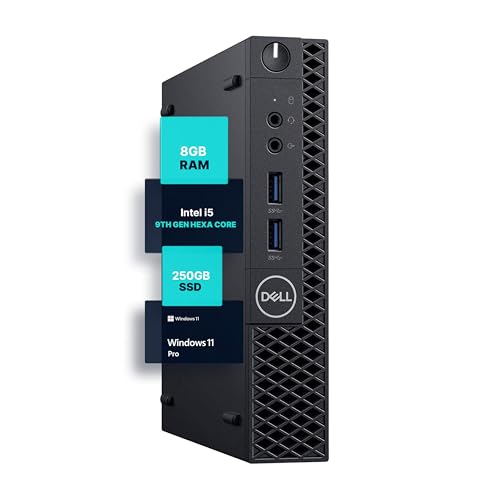
Dell OptiPlex Micro Intel i5 PC
Best for: compact home or office workstations
- Memory
- 8GB RAM
- Processor
- Intel Core i5-9500
- Memory Capacity
- 8GB DDR4
- Storage Capacity
- 250GB SSD
- Operating System
- Windows 11 Pro
- Dimensions
- 12.1 × 13.3 × 4 inches
This Dell Optiplex 3070 Micro is a compact desktop running Windows 11 Pro. It features an Intel Core i5-9500 processor and 8GB of DDR4 RAM paired with a 250GB SSD. The unit measures 13.3 by 12.1 by 4 inches, offering a small footprint for tight spaces. It includes 5G WiFi and Bluetooth connectivity. This model suits users who need reliable performance for office tasks without requiring large memory capacity.
- Intel Core i5-9500 hexa-core processor
- 8GB DDR4 RAM for multitasking
- 250GB SSD for fast load times
- Windows 11 Pro pre-installed
- Compact 4-inch height design
- 8GB RAM is less than the 16GB option available on this list
- 250GB SSD storage is smaller than higher-tier configurations
- 9th generation Intel processor is older than newer chip generations
- You need a small form factor for a desk with limited space
- You require Windows 11 Pro for business or home use
- You only need 8GB of RAM for basic productivity tasks
- You need more than 8GB of RAM for heavy multitasking
- You require a larger storage capacity than 250GB
- You prefer the latest generation processors for maximum speed
Verdict: Dell Optiplex 3070 Micro 8GB RAM fits users who prioritize a compact size and Windows 11 Pro over higher memory capacity. It is a practical choice for light office work where 8GB RAM suffices.
Specifications side by side

| Spec | Apple Mac mini M6 Desktop | Dell OptiPlex Micro Intel i5 PC |
|---|---|---|
| Processor | Apple M6 | Intel Core i5-9500 |
| Memory Capacity | 16GB | 8GB DDR4 |
| Storage Capacity | 512GB | 250GB SSD |
| Graphics | 12-core GPU | – |
| Video Ports | Thunderbolt 4, HDMI, USB-C | – |
| Operating System | macOS | Windows 11 Pro |
| Memory | 16GB RAM | 8GB RAM |
| Storage | 512GB SSD | – |
| Dimensions | 5 × 5 × 1.97 inches | 12.1 × 13.3 × 4 inches |
| Weight | 1.48 pounds | – |
| Size | 16GB Unified Memory | 512GB SSD Storage | 621.62 cubic inches |
| Color | Silver | Black |
| Model | MHQL4LL/A | 3070 5070 7070 |
Frequently asked questions
Can 8GB RAM handle multiple browser tabs?
Yes, 8GB RAM can manage standard web browsing and office tasks. The Dell OptiPlex Micro uses this capacity for light office work. It runs Windows 11 Pro efficiently for everyday duties. You should close unused tabs to maintain speed. This setup suits users who do not need heavy multitasking capabilities.
Is 16GB RAM better for AI tasks?
Yes, 16GB RAM is superior for local AI processing. The Apple Mac mini M6 features 16GB of unified memory. This configuration accelerates large language model tasks directly on the device. It provides the necessary bandwidth for efficient AI workflows. You get faster results when running these demanding applications locally.
Which mini PC is smaller in size?
The Apple Mac mini M6 is more compact. It measures 5 inches in width and 1.97 inches in height. The Dell OptiPlex Micro is larger, measuring 13.3 inches wide. Both fit on desks, but the Mac mini saves more space. You choose the Mac mini for the smallest physical footprint.
Does the 8GB model include an operating system?
Yes, the Dell OptiPlex Micro includes Windows 11 Pro. This operating system is pre-installed for immediate use. It supports standard office applications and web browsing. You do not need to install software separately. This makes it a practical choice for quick setup and light work.
What storage comes with the 16GB model?
The Apple Mac mini M6 includes 512GB of SSD storage. This solid-state drive offers fast data access speeds. It pairs with the 16GB unified memory for efficient performance. You get ample space for files and applications. The speed ensures quick loading times for your documents and media.
Is the 8GB mini PC good for home use?
Yes, it is suitable for compact home workstations. The Dell OptiPlex Micro is designed for this environment. It handles light office work and basic tasks well. You get a reliable Windows 11 Pro experience. It fits well in home offices where space is limited and high memory is not required.
See also