120Hz vs 144Hz Kvm Switches: Which Should You Buy?
As Amazon Associates, we earn from qualifying purchases. This means we may receive a small commission at no extra cost to you if you click through and make a purchase.
As an Amazon Associate we earn from qualifying purchases. Links on this page are affiliate links.
This 120Hz vs 144Hz kvm switch comparison helps you decide between two Thunderbolt 4 hubs. Both devices let you control two computers with one keyboard and mouse. They share high-speed data and power delivery features. The main difference is the maximum refresh rate. One unit tops out at 120Hz. The other supports up to 144Hz. This affects how smooth your display looks. You need to check which speed matches your monitor.
Refresh Rate
120Hz
144Hz
Resolution
6K
8K UHD
Ports
Thunderbolt 4, Ethernet
Thunderbolt 4, USB-C, USB-A
Display Modes
Dual monitor side-by-side or single
Up to 4K@60Hz on two screens
Choose the first if
- You need a wired Ethernet connection for both computers
- You plan to use an Apple Studio Display
- You prefer switching via an included IR remote
Choose the second if
- You want higher resolution output up to 8K
- You need standard USB-A ports for peripherals
- You require a 144Hz refresh rate for smoother visuals
Verdict
Choose the TESmart if you need Ethernet ports and specific Apple display compatibility. Pick the Sabrent if you prioritize higher resolution and a 144Hz refresh rate. Both units deliver solid Thunderbolt 4 performance for dual computer setups.
120Hz vs 144Hz KVM Switches

refresh rate
Edge: Sabrent Thunderbolt 4 KVM Switch
The Sabrent Thunderbolt 4 KVM Switch lists a refresh rate of 144Hz in its attributes. This suggests it can support higher frame rates for compatible displays. The TESmart 2×2 Thunderbolt 4 KVM Switch specifies a maximum refresh rate of 120Hz. It supports up to 5K at 120Hz. If you use high-refresh-rate monitors for gaming or smooth scrolling, the 144Hz capability of the Sabrent unit may offer a slight advantage. The TESmart unit is limited to 120Hz. Both are well above standard 60Hz, but the higher number on the Sabrent gives it the edge for fast motion.
resolution
Edge: Sabrent Thunderbolt 4 KVM Switch
Resolution capabilities differ between the two switches. The Sabrent unit supports up to 8K resolution at 60Hz. It also handles 5K at 60Hz. The TESmart switch supports up to 6K resolution. It achieves 5K at 120Hz. If you plan to use an 8K display, the Sabrent is the only option here. For 5K displays, both work, but the TESmart allows that resolution at its higher 120Hz refresh rate. The Sabrent drops to 60Hz at 5K. The 8K support gives the Sabrent a clear advantage in maximum pixel count.
ports
Edge: Sabrent Thunderbolt 4 KVM Switch
Port selection varies by model. The Sabrent switch includes three Thunderbolt 4 ports with 40Gbps speeds. It also has four USB Type-A ports for peripherals. These USB ports support up to 10Gbps transfer speeds. The TESmart switch focuses on Thunderbolt 4 connectivity. It includes a built-in 1000Mbps Ethernet port. It has front USB 3.2 Gen 2 ports supporting 10 Gbps data. The Sabrent offers more USB-A convenience for mice and keyboards. The TESmart adds wired network sharing. The Sabrent has more total data ports.
power delivery
Edge: Tie
Both switches support power delivery for connected laptops. The Sabrent unit includes a 24V/5A power adapter. It supports PD 3.0 charging at up to 60W. The TESmart switch also provides up to 60W power delivery through its Thunderbolt host inputs. Both deliver the same wattage for charging. The TESmart front USB ports add 7.5W for smaller devices. The Sabrent USB ports charge up to 5V at 2.4A. For primary laptop charging, they are tied at 60W. Neither offers a significant advantage in main power delivery.
compatibility
Edge: TESmart 2×2 Thunderbolt 4 KVM Switch
Compatibility differs in specific device support. The TESmart switch is explicitly compatible with the Apple Studio Display. It is designed for select MacBook and Mac Studio setups. The Sabrent switch is designed for Windows and macOS computers. It may work with other compliant devices. The TESmart has a stronger focus on the Apple ecosystem, especially with the Studio Display. The Sabrent is broader for general PC and Mac use. If you use an Apple Studio Display, the TESmart is the safer choice. Otherwise, the Sabrent offers wider general compatibility.
Which KVM Switch Fits Your Needs
Users needing dual monitor flexibility
Our pick: TESmart 2×2 Thunderbolt 4 KVM Switch
The TESmart model supports Display Mode 2, allowing each monitor to show a different connected computer. This setup is ideal for side-by-side work across two screens. You get 5K@120Hz output and flexible switching via front buttons, IR remote, or keyboard hotkeys for efficient multitasking.
Those wanting compact hardware
Our pick: Sabrent Thunderbolt 4 KVM Switch
The Sabrent unit is significantly smaller at 2.76 inches wide and 0.71 inches high. It weighs just one pound and includes an integrated 70cm cable. This compact form factor saves desk space while still providing Thunderbolt 4 connectivity and 60W power delivery for your devices.
Users prioritizing high refresh rates
Our pick: Sabrent Thunderbolt 4 KVM Switch
The Sabrent switch lists a 144Hz refresh rate in its attributes, which is higher than the TESmart's 120Hz specification. If your display and host support it, this provides smoother motion. It also handles 8K@60Hz output, offering greater resolution flexibility for compatible monitors.
| # | Product | Best for | Price |
|---|---|---|---|
| 1 | TESmart 2×2 Thunderbolt 4 KVM Switch | Dual monitor setups requiring 60W charging | |
| 2 | Sabrent Thunderbolt 4 KVM Switch | high-refresh-rate dual-computer setups |

TESmart 2×2 Thunderbolt 4 KVM Switch
Best for: Dual monitor setups requiring 60W charging
- Refresh Rate
- 120Hz
- Computers Supported
- 2
- Monitors Supported
- 2
- Maximum Resolution
- 6K@60Hz
- Video Interface
- Thunderbolt 4
- Power Delivery
- 60W
This TESmart 2×2 KVM switch lets you control two computers and two displays with one keyboard and mouse. It supports up to 5K resolution at 120Hz or 6K at 60Hz. The device includes 60W power delivery and a 1000Mbps Ethernet port. It offers flexible switching via buttons, IR remote, or hotkeys. This setup suits users who need side-by-side monitor management for dual Mac or Thunderbolt systems.
- Supports 5K@120Hz or 6K@60Hz output
- Provides 60W power delivery for host devices
- Includes 1000Mbps Ethernet for network sharing
- Allows independent display modes for each monitor
- Refresh rate is 120Hz, which is lower than the 144Hz option available in this guide
- Maximum resolution is 6K, while other listed models support 8K
- You need to manage two computers and two displays simultaneously
- You require 60W power delivery for your connected hosts
- You want to share a wired network connection between devices
- You require a 144Hz refresh rate for high-speed gaming
- You need 8K resolution support for your displays
- You only have one computer to connect
Verdict: TESmart 2×2 Thunderbolt 4 KVM Switch is a solid choice for users prioritizing 60W charging and 120Hz refresh rates over 8K resolution. It fits those who need reliable dual-monitor control for two Thunderbolt hosts.
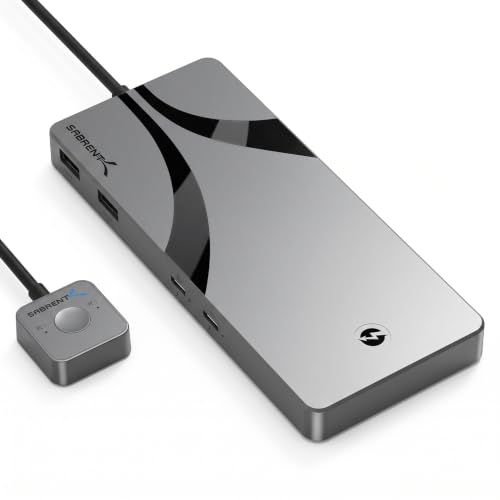
Sabrent Thunderbolt 4 KVM Switch
Best for: high-refresh-rate dual-computer setups
- Refresh Rate
- 144Hz
- Computers Supported
- 2
- Monitors Supported
- 2
- Maximum Resolution
- 8K@60Hz, 4K@144Hz
- Video Interface
- Thunderbolt 4, USB-C, DisplayPort
- Power Delivery
- 60W
This SABRENT Thunderbolt 4 KVM switch supports 144Hz refresh rates at 4K resolution, making it suitable for high-frame-rate workflows. It connects two hosts via three 40Gbps ports and includes USB-A connectivity. The aluminum build dissipates heat effectively. It provides 60W power delivery for connected devices. This unit is designed for macOS and Windows systems, offering a compact footprint for dual-computer setups.
- Supports 144Hz refresh rates at 4K resolution
- Three Thunderbolt 4 ports with 40Gbps transfer speeds
- Aluminum chassis for improved heat dissipation
- Includes 60W Power Delivery charging capability
- Heavier at 1 pound compared to lighter alternatives
- Larger dimensions at 6.3 inches in length
- Requires a separate 24V/5A power adapter
- You need 144Hz display output for gaming or video work
- You require three Thunderbolt 4 connections for peripherals
- You want a durable aluminum build for your desk
- You only need 120Hz refresh rates and want a smaller device
- You prefer a lighter unit under 1 pound
- You need a model with an integrated cable for portability
Verdict: SABRENT 144Hz Thunderbolt 4 KVM suits users who prioritize high refresh rates and robust Thunderbolt connectivity. It is ideal for those who need to switch between two hosts while maintaining 4K@144Hz performance.
Specifications side by side

| Spec | TESmart 2×2 Thunderbolt 4 KVM Switch | Sabrent Thunderbolt 4 KVM Switch |
|---|---|---|
| Computers Supported | 2 | 2 |
| Monitors Supported | 2 | 2 |
| Maximum Resolution | 6K@60Hz | 8K@60Hz, 4K@144Hz |
| Video Interface | Thunderbolt 4 | Thunderbolt 4, USB-C, DisplayPort |
| Power Delivery | 60W | 60W |
| USB Hub Standard | USB 3.2 Gen 2 (10Gbps) | USB 3.2 Gen 2×1 (10Gbps) |
| Ethernet Speed | 1000Mbps | – |
| Resolution | 6K | 8K UHD |
| Refresh Rate | 120Hz | 144Hz |
| Ports | Ethernet, Thunderbolt 4 | USB-C, Thunderbolt 4, USB-A |
| Features | Power Delivery | Power Delivery |
| Use | – | Mac |
| Operating System | – | macOS |
| Number of Computers | 2 Computers | – |
| Dimensions | 9.06 × 5.12 × 1.97 inches | 6.3 × 2.76 × 0.71 inches |
| Weight | – | 1 pounds |
| Model | TKS202-X4-USBK | SB-TB4K |
| Size | – | Thunderbolt 4 KVM |
| Color | – | Black |
Frequently asked questions
Can a 144Hz KVM switch support 8K resolution?
Yes, the Sabrent Thunderbolt 4 KVM Switch supports 8K UHD resolution. This allows you to connect high-density displays while switching between two computers. The device maintains this resolution via its Thunderbolt 4 connectivity. It is designed for users who need maximum pixel density alongside high refresh rates.
Do these switches support Power Delivery for laptops?
Both the TESmart and Sabrent models include Power Delivery features. This allows you to charge connected devices while using the switch. The TESmart unit specifically supports 60W charging for your hosts. You can simplify your desk setup by reducing the number of power adapters needed for your laptops.
Is 120Hz enough for professional video editing?
The TESmart 2×2 Thunderbolt 4 KVM Switch offers a 120Hz refresh rate with 6K resolution. This provides smooth motion handling for video editing timelines. The dual monitor setup allows you to view your timeline and preview window simultaneously. It is a solid choice for creators prioritizing stable dual-screen control over extreme frame rates.
Which KVM is better for macOS users?
The Sabrent Thunderbolt 4 KVM Switch is explicitly listed for use with macOS. It supports high-refresh-rate performance on Mac systems. The device connects via Thunderbolt 4 and USB-C ports. This makes it a suitable option for users who need reliable switching between two Mac hosts without compatibility issues.
How many computers can these switches control?
Both listed models are designed to control two computers. You can switch between two hosts using a single keyboard and mouse setup. This dual-computer capability helps you manage multiple workstations from one desk. The switching mechanism allows you to toggle control between your primary and secondary machines instantly.
What is the difference between 6K and 8K resolution on these devices?
The TESmart switch supports up to 6K resolution, while the Sabrent model supports 8K UHD. Higher resolution means more pixels and sharper images on compatible displays. The Sabrent unit offers greater pixel density for professional monitors. The TESmart unit provides a slightly lower maximum resolution but maintains a high 120Hz refresh rate.
Do these switches include Ethernet ports?
The TESmart 2×2 Thunderbolt 4 KVM Switch includes an Ethernet port. This allows you to connect a wired network connection through the switch. The Sabrent model lists USB-C, Thunderbolt 4, and USB-A ports but does not specify an Ethernet port in its attributes. You should check the specific port layout if wired networking is essential for your setup.
See also